Welcome to the Inedo Forums! Check out the Forums Guide for help getting started.
If you are experiencing any issues with the forum software, please visit the Contact Form on our website and let us know!
Permissions only work when set for specific user, not a group (LDAP)
-
Hello,
I logged an issue here: https://forums.inedo.com/topic/3271/cannot-push-nuget-package-to-ldap-secured-feed?_=1646689732560 about not being able to upload packages to an LDAP secured feed. It was indicated there that the NuGet client queries the feed first which does not use any API key, so we had to enable Anonymous permissions to View/Download on all feeds. Why is that the case?
Also, I think this is related to that, we tried to set permissions to View/Download feeds at an LDAP security group level, but users are getting a 403 unauthorized. If I scope the permissions directly to the user it all seems to work as intended. Am I configuring the LDAP group permissions incorrectly?
-
Hi @kichikawa_2913 ,
The NuGet client's behavior is based on NuGet.org, where no authentication is ever required to view/download packages. As such, it doesn't pass the API key when doing those queries; instead, you can use a username of
apiand the password of your api key.Based on the issue though, it sounds like ProGet is unable resolve the groups; I would use the "test privileges" function on the Tasks page to verify this. Thatw ill show you if the username can download packages or not.
The most common reason that groups aren't resolving is that the member is not directly in the group (i.e. they're in a group which is a member of the group), and you don't have recursive groups enabled; do note that this is really slow on some domains.
Cheers,
Steve -
Thank you for the response.
- Using the username of
apiand the api key as the password, is that setup in the Task/Permissions section or in a NuGet.config file? - I used the "test privileges" function and it shows that the group has View/Download permissions.
- My user is directly in the group, not indirectly by some other group.
- Using the username of
-
Hi @kichikawa_2913,
I believe Steve is suggesting for each user to create a personal API key and then use that to authenticate their NuGet feed. That would allow you to use
apias the username and api key as the password. As for where this would be setup, you would create the personal API key in ProGet and use that in the NuGet config.Just a couple of other questions.
- Are users downloading packages using Visual Studio or the NuGet cli?
- Visual Studio will actually use the Credential Manager and you would have to change the credentials in there.
- The NuGet.config is typically better used for the NuGet CLI
- Can the user log in to ProGet's UI and view/download the packages in the feed from the UI?
- This would indicate that the permissions are configured correctly in ProGet.
Thanks,
Dan - Are users downloading packages using Visual Studio or the NuGet cli?
-
@Dan_Woolf thank you for the clarification!
- Users are downloading packages using Visual Studio and I did see it prompt for credentials that are stored in the Windows Credential Manager.
- The users can log into the ProGet UI but are not able to view or download any packages from any feeds despite having the permissions setup with an LDAP group. They are only able to accomplish this when I scope permissions/tasks directly to a user.
We do have "Search recursively" enabled in our LDAP setup.
-
Hi @kichikawa_2913,
Thanks for checking that for me. Based on the fact that you cannot view/download the packages via the UI, this sounds like a permissions configuration issue. Is it possible to share a screen shot of your permissions configuration? You can send it to support@inedo.com with the subject of
[QA-785] Permissions Configurationif you do not feel comfortable posting on the forums. This will give us a better idea of things to check for (we would also not post any AD group names directly in the forums either).One last thing, can you confirm the version of ProGet you are using and the version of the InedoCore extension you have installed?
Thanks,
DAn -
@Dan_Woolf said in Permissions only work when set for specific user, not a group (LDAP):
[QA-785] Permissions Configuration
Sending an email with screenshots.
We are running 6.0.8 Build 5 and InedoCore 1.13.0 with and update available to 1.13.1.
-
Hi @kichikawa_2913,
Thanks for sending that over. Could you also screenshot the "Domains / User Directories" tab and send that over? Your permissions look correct, I'm wondering if there is another setting that might be conflicting.
Thanks,
Dan -
@Dan_Woolf Sent
-
Hi @kichikawa_2913,
I think I see what is happening. You currently have both the Built-in and the LDAD user directory enabled. I'm guessing you have users added to the Built-In directory with the same username and it is favoring them. Since those are not in the LDAP group, it is not accepting the permissions. Since you are currently only using the LDAP user directory, I would suggest disabling the Built-In directory.
The other options would be to remove those users from the built-in directory or add groups to the Built-In with the same name as the LDAP groups and give those groups permissions.
Thanks,
Dan -
@Dan_Woolf we only have one "emergency admin" account created with the built-in method. The only reason that is enabled is because the UI recommended it be enabled in case of an emergency or when switching between methods. We have absolutely no users from AD setup on the built-in method.
-
Hi @kichikawa_2913,
Could you try two things for me?
- Temporarily disable the Built-In directory and see if it works?
- Re-enable Built-In and login with the user name in the format of "user@domail.local"?
Thanks,
Dan -
@Dan_Woolf 1 did not work and 2 lets me log in but results in 403 unauthorized still.
-
@kichikawa_2913 I'm wondering if this might be a regression with the preview feature, but I can't imagine how. I have one other idea, too...
I used the "test privileges" function and it shows that the group has View/Download permissions.
Can you clarify this? The "test privileges" should only work with a username, not a group name. Could share what happens when you:
- Have a specific user navigate to a package in a NuGet feed, and then try to download it from UI? Is there a specific message body you see? (outside of 403)
- Enter that same username in the "test privileges" with that particular feed? What are all the permissions you see?
After doing those, the last thing I would try is to revert to the 6.0 behavior, and see if the problem still occurs. AT least that will tell us where to look....
-
- User logs in, clicks on "Feeds", and only sees the 403 message on the page with nothing else available.
- I sent an email with screenshots of the test privileges for the group and specific user in that group.
What do you mean by "revert to the 6.0 behavior"? We are on 6.0.8, should we revert back to the initial release of 6.0.0?
-
Hi @kichikawa_2913,
When you are on the "Domains / User Directories" tab, you should see a link at the top that says "revert to single-directory mode". Steve is requesting that you click that link and see if the problems with the groups still exists.
Thanks,
Dan -
Also, I just reviewed the email you sent about the view effective privilege's and it looks like something is not linking up correctly for your users group. Would you be able to run the our AD Test tool 1.13.1 from a windows computer and see if your users show up when searching for members in that group? You will see a tab in that tool called "Get Group's Users". It will allow you to verify we are pulling those users back in that group.
Thanks,
Dan -
@Dan_Woolf from a Visual Studio perspective it seems to be working better, meaning we can see all versions for a package but unable to download certain versions of packages. The only example I have so far is Selenium ChromeDriver NuGet.
Error Package 'Selenium.WebDriver.ChromeDriver 99.0.4844.5100' is not found in the following primary source(s): 'https://repo.dev.summit.network/nuget/approved-nuget/v3/index.json'. Please verify all your online package sources are available (OR) package id, version are specified correctly.Despite the package version there and downloadable:
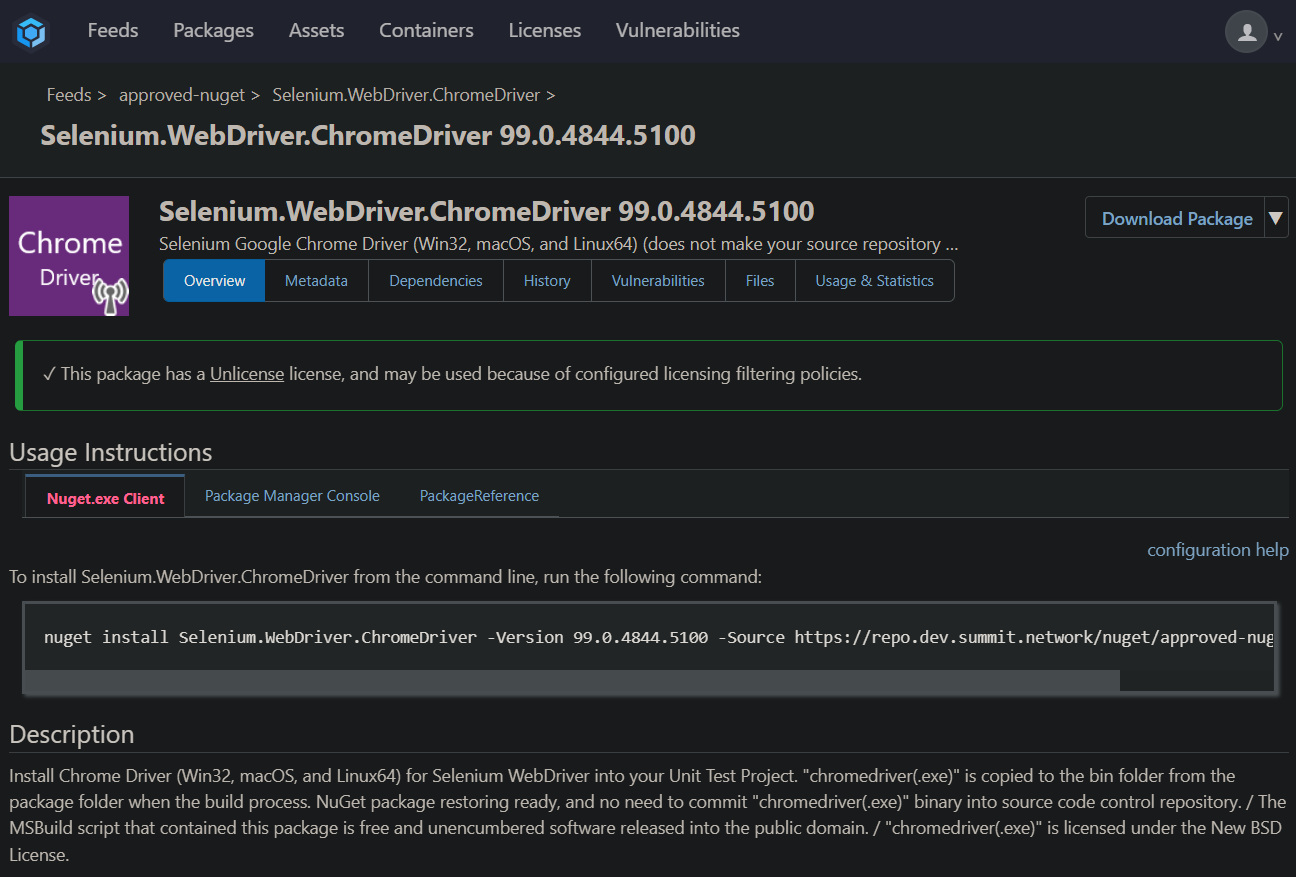
If I log into the UI with a user from that group I still get 403.
-
@Dan_Woolf I'm not getting any users back, I emailed you the debug log.
-
@Dan_Woolf sent a second email showing all the settings used in the tool.


Hello! It looks like you're interested in this conversation, but you don't have an account yet.
Getting fed up of having to scroll through the same posts each visit? When you register for an account, you'll always come back to exactly where you were before, and choose to be notified of new replies (either via email, or push notification). You'll also be able to save bookmarks and upvote posts to show your appreciation to other community members.
With your input, this post could be even better 💗
Register Login