Welcome to the Inedo Forums! Check out the Forums Guide for help getting started.
If you are experiencing any issues with the forum software, please visit the Contact Form on our website and let us know!
Whitelist npm packages licenses
-
I'm currently evaluating ProGet Basic (we're using the free version for some years now), and especially the license filtering, but I'm having issues with packages which don't specify the license correctly.
We own a commercial license for Kendo-React from Telerik, that consists of a lot of npm packages. For example:- https://www.npmjs.com/package/@progress/kendo-react-buttons
- https://www.npmjs.com/package/@progress/kendo-react-popup
- https://www.npmjs.com/package/@progress/kendo-react-grid
They all have a license of "SEE LICENSE IN LICENSE.md" and ProGet seems to only be able to create a licensing rule (I deny everything, and whitelist specific licenses) with that exact SPDX. But that has a big side effect: any package with that license, will be allowed. Which makes the license checking unreliable, since we're losing control over which licenses we really want to allow.
So my question: is there a feature planned for whitelisting specific packages (preferably with a specific version as well, since licenses can change between versions)?
While writing I think that a possible workaround would be to create a scoped registry specific for the @progress packages, but that would probably not work well with global license filters. Any other suggestions?
-
Well, that's an interesting way to specify an embedded license file. I don't know if that's a convention or specification, but that seems to be a new way of handling it. It's kind of documented now, which is good: https://docs.npmjs.com/cli/v8/configuring-npm/package-json#license
Anyways, we already handle this for NuGet packages using a URL convention like this:
- No license -
packageid://Aspose.Words/21.9.0 - File license -
package://Aspose.Words/21.9.0/License\Aspose_End-User-License-Agreement.txt
Those will be defaulted in the fields if the package specifies no license or a file license.
Not sure if it works now for npm packages, but it'd be relatively easy to adoption that convention, and then suggest it when the "license" field starts with "SEE LICENSE IN"...
Anyways we'll investigate this and update in a day or two.
Cheers,
Alana - No license -
-
Hi @p-boeren_9744 ,
I added support to have npm packages treat
SEE LICENSE INas a embedded file licenses via PG-2085.It now looks like this, and blocks/allows package:
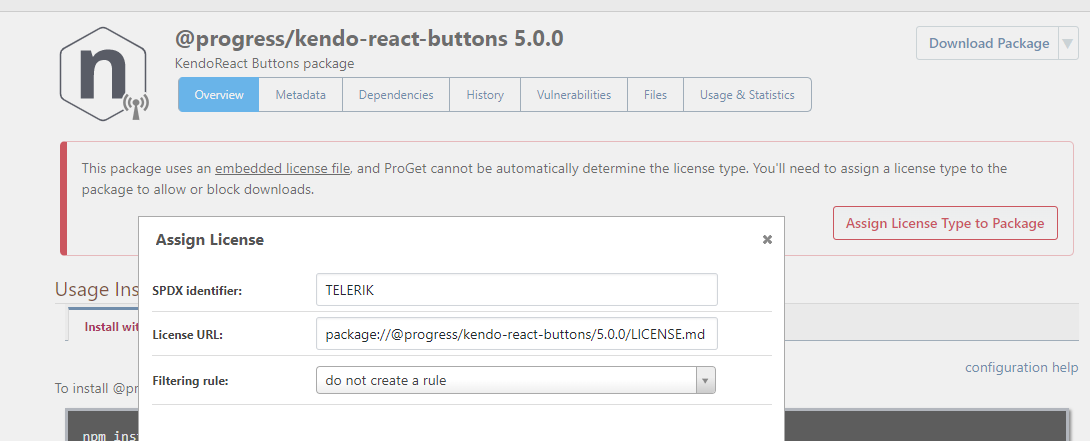
This will be released in this week's upcoming maintenance release.
Cheers,
Alana -
That's great! Thanks!
-
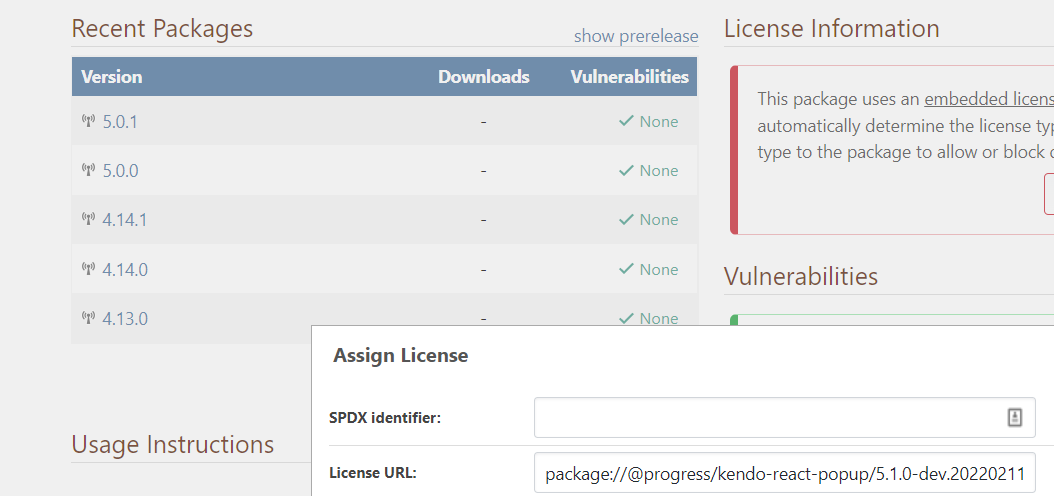
Would it be possible to take the "show/hide prerelease" option into account when assigning a license? Now it always takes the latest package (which quite often is a pre-release version) which is a bit confusing. For example (License URL is for a 5.1.0 dev version):
-
@p-boeren_9744 sure thing!
Never noticed it before, but I just fixed as PG-2100 - and it'll go in 6.0.9 (
 Feb 25)
 -
When trying to add a license via the API for a certain feed, the license is allowed at all feeds (thus created at global level).
When I create a license via the api (api/management/licenses/create) with this body:
{
  "licenseId": "package://@progress/kendo-react-grid/5.0.1/",
  "title": "package://@progress/kendo-react-grid/5.0.1/",
  "urls": [
    "package://@progress/kendo-react-grid/5.0.1/package/LICENSE.md"
  ],
  "allowed": true,
  "allowedFeeds": ["NpmLicenseTest"],
  "blockedFeeds": []
}
The license is properly created according to the api (api/management/licenses/list):
 {
        "licenseId": "package://@progress/kendo-react-grid/5.0.1/",
        "title": "package://@progress/kendo-react-grid/5.0.1/",
        "urls": [
            "package://@progress/kendo-react-grid/5.0.1/package/LICENSE.md"
        ],
        "allowed": true,
        "allowedFeeds": [
            "NpmLicenseTest"
        ],
        "blockedFeeds": []
    },
    {
        "licenseId": "package://@progress/kendo-react-popup/5.0.1/",
        "title": "package://@progress/kendo-react-popup/5.0.1/",
        "urls": [
            "package://@progress/kendo-react-popup/5.0.1/package/LICENSE.md"
        ],
        "allowed": true,
        "allowedFeeds": [
            "NpmLicenseTest"
        ],
        "blockedFeeds": []
    },
(the popup, license was added via the UI), but the license is actually created at global level (and thus visible in all other feeds):

Do I call the API incorrectly, or is this a bug?
-
Hi @p-boeren_9744 ,
The documentation isn't very clear

I had to look this up myself in the code. If you set the
allowedproperty, then a global rule is also created. Therefore, the following should work instead:{ "licenseId": "package://@progress/kendo-react-grid/5.0.1/", "title": "package://@progress/kendo-react-grid/5.0.1/", "urls": [ "package://@progress/kendo-react-grid/5.0.1/package/LICENSE.md" ], "allowedFeeds": ["NpmLicenseTest"] }Cheers,
Alana


Hello! It looks like you're interested in this conversation, but you don't have an account yet.
Getting fed up of having to scroll through the same posts each visit? When you register for an account, you'll always come back to exactly where you were before, and choose to be notified of new replies (either via email, or push notification). You'll also be able to save bookmarks and upvote posts to show your appreciation to other community members.
With your input, this post could be even better 💗
Register Login