Inedo Community Forums Forums
    • Recent
    • Tags
    • Popular
    • Login

    Welcome to the Inedo Forums! Check out the Forums Guide for help getting started.

    If you are experiencing any issues with the forum software, please visit the Contact Form on our website and let us know!

    kubernetes scanner not showing results

    Scheduled Pinned Locked Moved Support
    28 Posts 5 Posters 70 Views 1 Watching
    Loading More Posts
    • Oldest to Newest
    • Newest to Oldest
    • Most Votes
    Reply
    • Reply as topic
    Log in to reply
    This topic has been deleted. Only users with topic management privileges can see it.
    • C Offline
      cronventis
      last edited by

      I'm on the latest ProGet (Version 6.0.5 (Build 9)) and I'm using the latest Kubernetes extension (1.10.1).

      It seems to work because of the logs:

      Scanning Kubernetes API at https://xxx.xx
      Beginning package/container scan using Kubernetes API at https://xxx.xx...
      Package/Container Scanner completed.
      Scan using Kubernetes API at https://xxx.xx complete; recording data...
      
      1 Reply Last reply Reply Quote 0
      • Dan_WoolfD Offline
        Dan_Woolf inedo-engineer
        last edited by

        Hi @cronventis,

        Do you see any records in the ContainerUsage database table in the ProGet database. When the scanner runs, it will dump records into that table and then the UI will display the records from there.

        Thanks,
        Dan

        1 Reply Last reply Reply Quote 0
        • C Offline
          cronventis
          last edited by

          Yes, there are 495 entries in that table...

          1 Reply Last reply Reply Quote 0
          • rhessingerR Offline
            rhessinger inedo-engineer
            last edited by

            Hi @cronventis,

            Thanks for checking that for us. That does mean the Container Scanner is working. Did you happen to configure the container usage on your Docker Registry in ProGet? You can check this by navigating to Docker Registry -> Manage Feed -> Detection & Blocking and then you should see your container scanner under Container Usage Scanning.

            If you have configured your feed to use that, the next step would be to look at what the Kubernetes scanner identified for your images and how ProGet has these images stored. If you look at your ContainerUsage table, you will need to look at two columns; Container_Name and Image_Id. The Container_Name is your repository's name and the Image_Id is the Digest for your image. Can you confirm that you see the container names you are expecting in that table?

            Thanks,
            Rich

            Products Engineer, Inedo

            C 1 Reply Last reply Reply Quote 0
            • C Offline
              cronventis @rhessinger
              last edited by

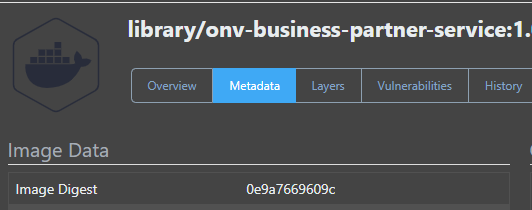
              @rhessinger I think so. One example:

              2bed9004-7368-47cc-917b-dfd915230d7f-image.png

              1a1d49f1-4fe6-4b77-b6c0-5044588fcf52-image.png

              maybe its related to the library/ part?

              1 Reply Last reply Reply Quote 0
              • rhessingerR Offline
                rhessinger inedo-engineer
                last edited by

                Hi @cronventis,

                Thank you for checking that for me. I dug into this further and it looks like we only actually use the Image_Id to find the image within a feed. We expect Kubernetes to return the Config Digest and that is what is stored in the Image_Id column. I'm going to work on creating this scenario and verify what is being pulled from Kubernetes. With the holidays coming up, I will not be able to look into this until next week. You should hear back from us by Tuesday or Wednesday of next week.

                Thanks,
                Rich

                Products Engineer, Inedo

                1 Reply Last reply Reply Quote 1
                • rhessingerR Offline
                  rhessinger inedo-engineer
                  last edited by

                  Hi @cronventis,

                  I set up an example in our test environment here and everything is working as expected. I did verify that the Image_Id that is in the database should match the Image Digest in the Image Data table as well.

                  Is this image a local image or a cached image? Currently, usage will only show for a local image.

                  If it is a local image, I think the next steps will be to run a few different SQL queries to identify why the usage is not matching to the image.

                  Thanks,
                  Rich

                  Products Engineer, Inedo

                  1 Reply Last reply Reply Quote 0
                  • C Offline
                    cronventis
                    last edited by

                    Its a local image.. build and pushed to ProGet by our pipeline..
                    Let me know how I can support you with the queries.

                    dean-houstonD 1 Reply Last reply Reply Quote 0
                    • dean-houstonD Offline
                      dean-houston inedo-engineer @cronventis
                      last edited by

                      @cronventis would you be able to get us the following?

                      1. a backup of your database
                      2. a list of your namespaces (/api/v1/pods)

                      If so, we can provide a secure link to let you upload them to us. Note the namespace list might be multi-paged, which means you may need to use the continue argument; https://kubernetes.io/docs/reference/generated/kubernetes-api/v1.19/#list-all-namespaces-pod-v1-core

                      This would be the easiest for us to sift through, and you wouldn't have to run queries, etc.

                      If not, we'll think of something else :)

                      C 1 Reply Last reply Reply Quote 0
                      • C Offline
                        cronventis @dean-houston
                        last edited by

                        @dean-houston If possible I would prefer not to do that... There might be some sensible data that should not be shared... I know it makes your task a little harder, but I could offer a remote session or something similar...

                        1 Reply Last reply Reply Quote 0
                        • rhessingerR Offline
                          rhessinger inedo-engineer
                          last edited by

                          Hi @cronventis,

                          Would you be able to send over your Docker tables from your ProGet database to us? They won't contain any of the actual layers of the images, just the digests and names so we can see where the disconnect is happening.

                          The easiest way to do this would be to :

                          1. Create a new database called pgexport
                          2. Running the following SQL to dump the docker tables into that database:
                            SELECT * INTO [pgexport].[DockerBlobs] FROM [DockerBlobs]
                            SELECT * INTO [pgexport].[DockerImageLayers] FROM [DockerImageLayers]
                            SELECT * INTO [pgexport].[DockerImages] FROM [DockerImages]
                            SELECT * INTO [pgexport].[DockerRepositoryTags] FROM [DockerRepositoryTags]
                            SELECT * INTO [pgexport].[ContainerUsage] FROM [ContainerUsage]
                          
                          1. then backup pgexport and send it to us

                          If the backup is pretty small, you can just email it to support@inedo.com with the subject of [QA-729] Database Export or I can create a one drive share link you can upload to.

                          Would you be able to do that?

                          Thanks,
                          Rich

                          Products Engineer, Inedo

                          C 1 Reply Last reply Reply Quote 0
                          • C Offline
                            cronventis @rhessinger
                            last edited by

                            @rhessinger E-Mail is on the way.. :)

                            1 Reply Last reply Reply Quote 0
                            • rhessingerR Offline
                              rhessinger inedo-engineer
                              last edited by

                              Hi @cronventis,

                              Thanks for sending this over to us! I can confirm we have received it and we are currently looking into this. I'll let you know when we have more information.

                              Thanks,
                              Rich

                              Products Engineer, Inedo

                              1 Reply Last reply Reply Quote 1
                              • rhessingerR Offline
                                rhessinger inedo-engineer
                                last edited by

                                Hi @cronventis,

                                I took a look through your tables and there is definitely something a bit odd going on with your Kubernetes output. Could you tell me what version of Kubernetes you are running?

                                Would it be possible to see the output from your Kubernetes API? Again, this is something you can send us via suppor@inedo.com with the subject of [QA-729] Kubernetes API. To get the image list, you can simply run this PowerShell against your Kubernetes API:

                                $uri = [System.Uri]'http://localhost:8080/api/v1/pods?limit=999'
                                $response = Invoke-RestMethod -Method GET -Uri $uri.ToString()
                                $response | ConvertTo-JSON | Out-File "C:\temp\response.json"
                                

                                Just change HTTP://localhost:8080 to your Kubernetes API host and port.

                                Thanks,
                                Rich

                                Products Engineer, Inedo

                                1 Reply Last reply Reply Quote 1
                                • C Offline
                                  cronventis
                                  last edited by cronventis

                                  @rhessinger said in kubernetes scanner not showing results:

                                  [QA-729] Kubernetes API

                                  E-Mail is on its way again.. :)

                                  *it probably should be suppor(t)@ ✌

                                  1 Reply Last reply Reply Quote 0
                                  • rhessingerR Offline
                                    rhessinger inedo-engineer
                                    last edited by

                                    Hi @cronventis,

                                    Thanks! I got the email and I'm taking a look now.

                                    Thanks,
                                    Rich

                                    Products Engineer, Inedo

                                    1 Reply Last reply Reply Quote 0
                                    • rhessingerR Offline
                                      rhessinger inedo-engineer
                                      last edited by

                                      Hi @cronventis,

                                      I just wanted to let you know that I'm still researching this. Is it possible to tell me what version of Kubernetes and Rancher is installed?

                                      Thanks,
                                      Rich

                                      Products Engineer, Inedo

                                      C 1 Reply Last reply Reply Quote 0
                                      • C Offline
                                        cronventis @rhessinger
                                        last edited by

                                        @rhessinger
                                        Rancher: v2.6.2
                                        Kubernetes: v1.19.9

                                        1 Reply Last reply Reply Quote 0
                                        • Dan_WoolfD Offline
                                          Dan_Woolf inedo-engineer
                                          last edited by

                                          Hi @cronventis,

                                          Just an update: We are still looking into the issue. We are currently having trouble recreating the same API output as yours. In our tests, the imageId returned for the container status contains a different digest. We are digging further into the Rancher documentation, specifically around their Kubernetes configuration.

                                          If you have any tips on some specific Rancher/Kubernetes configurations we should look for, please let us know.

                                          Thanks,
                                          Dan

                                          C 1 Reply Last reply Reply Quote 0
                                          • C Offline
                                            cronventis @Dan_Woolf
                                            last edited by

                                            @Dan_Woolf Sorry to say that, but I really dont know how to help you further. I sent you another json (could be identical, or only have small changes) but was created in a different way.. Maybe this is more useful?


                                            atrippA 1 Reply Last reply Reply Quote 0

                                            Hello! It looks like you're interested in this conversation, but you don't have an account yet.

                                            Getting fed up of having to scroll through the same posts each visit? When you register for an account, you'll always come back to exactly where you were before, and choose to be notified of new replies (either via email, or push notification). You'll also be able to save bookmarks and upvote posts to show your appreciation to other community members.

                                            With your input, this post could be even better 💗

                                            Register Login
                                            • 1
                                            • 2
                                            • 2 / 2
                                            • First post
                                              Last post
                                            Inedo Website Home • Support Home • Code of Conduct • Forums Guide • Documentation