Welcome to the Inedo Forums! Check out the Forums Guide for help getting started.
If you are experiencing any issues with the forum software, please visit the Contact Form on our website and let us know!
Powershell aggregate feed mangles version numbers
-
Re: ProGet Handling of PowerShell Gallery Versions
I am seeing similar to what's reported in the earlier thread.
I have an aggregate feed set up to aggregate our internal packages and PSGallery. Machines on our network cannot connect to PSGallery direct due to the firewall and are only allowed to retrieve via this one feed.
For example package AWSPowershell, in PSGallery it shows versions 4.1.15.0. In the proget web interface it shows 4.1.15.
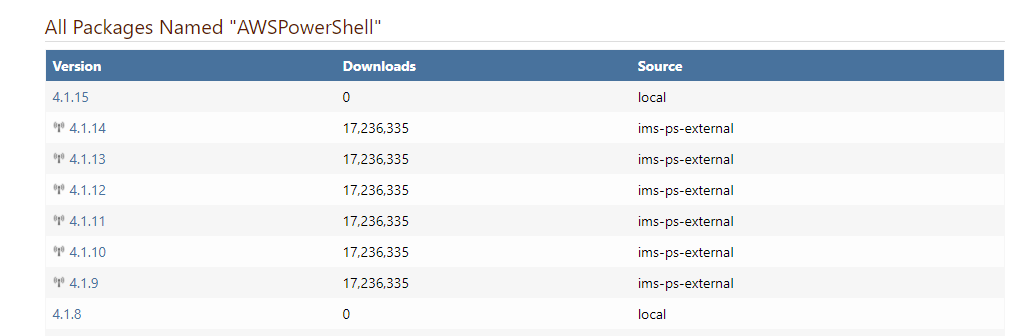
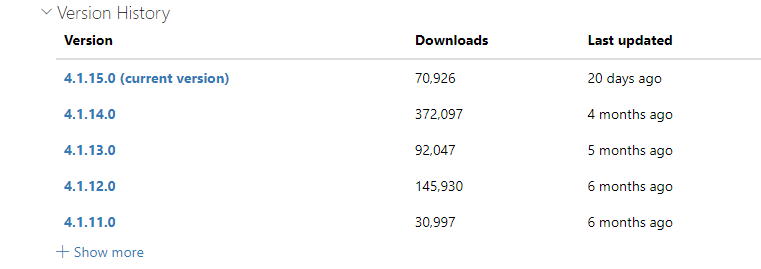
This confuses Install-Module - how do I fix it?
-
Hello,
This is unfortunately due to bugs in the PowerShellGet & PowerShell Gallery API that aren't feasible to workaround. Basically, the API is reporting different versions than the package file, which makes working with local/cached packages and remote packages painful like this. However, it seems like it's going to be addressed by Microsoft, finally, in PowerShellget v3.
In any case, given your architecture (i.e. "Machines on our network cannot connect to PSGallery direct due to the firewall and are only allowed to retrieve via this one feed."), we recommend using a Package Approval Workflow instead.
- create an 'unapproved-powershell' and
approved-powershellfeed - create a connector on 'unapproved-powershell' to PSGallery.org
- Promote packages from
unapproved-powershelltoapproved-powershell
This will totally eliminate the "bad API" problem as well.
Cheers,
Alana - create an 'unapproved-powershell' and

Hello! It looks like you're interested in this conversation, but you don't have an account yet.
Getting fed up of having to scroll through the same posts each visit? When you register for an account, you'll always come back to exactly where you were before, and choose to be notified of new replies (either via email, or push notification). You'll also be able to save bookmarks and upvote posts to show your appreciation to other community members.
With your input, this post could be even better 💗
Register Login