Welcome to the Inedo Forums! Check out the Forums Guide for help getting started.
If you are experiencing any issues with the forum software, please visit the Contact Form on our website and let us know!
chocolatey connector healthy but shows no packages
-
what do i need to do here?
-
@mcascone unfortunately this is where it can get complex; there's nothing you can change in ProGet, so it's going to be either a server or proxy change
The most likely case is that the server doesn't trust the certificate presented by
chocolatey.org; it's also very possible that your proxy server is stripping/replacing the certificate, and your server doesn't trust the proxy server's certificate.It could also be a cipher issue. One user reported a very strange custom Windows setting caused this error; "a cipher not present on the server, due to a custom cipher list policy declared in the registry key (
HKEY_LOCAL_MACHINE\SOFTWARE\Wow6432Node\Policies\Microsoft\Cryptography\Configuration\SSL\00010002).Since this is happening in the service, you should be able to log-in to server using the Service Account that ProGet is running under, and use the web browser to visit that URL. That will make it easier for your IT team to fix the certificate issues, in theory.
-
I think that's right, that we use a self-signed internal cert that the ZScaler replaces, and it mucks things up a lot. I thought infosec had pushed a thing to update all VMs, but they might have missed this one. I'll look into it, thanks!
-
We continue to have this issue - the chocolatey connector is still broken, and I was trying to activate container scanning today, and our install can't reach the extension gallery. TLS error.
The Inedo Hub also doesn't work completely.We have Inedo.com whitelisted, and I know I've updated the cert in the Windows host VM that ProGet is running on. That should take care of it, but it doesn't seem to be the complete answer. What/where else do i need to look? Is there another runtime that ProGet is using somewhere with its own cert chain? I don't think you're using a jvm/jre anywhere?
I'd really like to get this resolved so we can use all of the great features available, especially in our paid version.
thanks
max -
Hi @mcascone,
Our products our built with .NET 4.5.2, which uses the Windows certificate chain.
I suspect that ZScaler is replacing the certificate, and that's causing a trust problem. Maybe you can try installing ZScaler certificate directly in the store, and there are some registry tweaks / hacks that might make it work. Unfortunately I don't have any specifics on what you can try.
You should see same errors if you log-in as service account user, and try to visit the site in IE or Edge. PowerShell would also exhibit the same errors.
In any case, I would search for like "ZSCaler Certificate TLS error Windws" and what not, and hopefully find some specific things to try...
Best,
Alana -
Hi, thanks as always for the quick reply. I thought i had installed the zscaler root ca cert fairly recently, but i did it again, and it helped a little. The "latest news from inedo" pane shows info now, and the Extensions page shows a big green bar and that "updates are available", which we weren't seeing before. I didn't even have to restart the app to see the change.
Unfortunately we're just peeling the onion... on any use of the extensions page, either "update all extensions" or trying to install one of the available ones, we keep getting the same error (below). Strangely, the window displaying the error message closes automatically after about ten seconds, and the page reloads.
Side note: We noticed that the ProGet Service is running as Network Service, is that correct?Thanks in advance.
Logged: 12/17/2021 12:09:17 PM
 Level: Error
 Category: Extension Updater
 Message: Unhandled exception: System.Net.WebException: The remote server returned an error: (403) Forbidden.
at System.Net.HttpWebRequest.EndGetResponse(IAsyncResult asyncResult)
at System.Threading.Tasks.TaskFactory`1.FromAsyncCoreLogic(IAsyncResult iar, Func`2 endFunction, Action`1 endAction, Task`1 promise, Boolean requiresSynchronization) --- End of stack trace from previous location where exception was thrown ---
at System.Runtime.ExceptionServices.ExceptionDispatchInfo.Throw() at System.Runtime.CompilerServices.TaskAwaiter.HandleNonSuccessAndDebuggerNotification(Task task)
at Inedo.ProGet.Den.InedoDenClient.<DownloadFileAsync>d__13.MoveNext() --- End of stack trace from previous location where exception was thrown ---
at System.Runtime.ExceptionServices.ExceptionDispatchInfo.Throw() at Inedo.ProGet.WebApplication.Pages.Administration.Extensions.ExtensionUpdater.<UpdateAsync>d__19.MoveNext()

 Details: none
We also tried the Indeo Hub Updater app, which hits an error and crashes. (this is not new behavior). These are the logs from that:
Error 12/17/2021 12:11:56 PM .NET Runtime 1026 None
Log Name: Application Source: .NET Runtime Date: 12/17/2021 12:11:56 PM Event ID: 1026 Task Category: None Level: Error Keywords: Classic User: N/A Computer: MTPVPAPGET01.consilio.com Description: Application: InedoHubBootstrapper.exe Framework Version: v4.0.30319 Description: The process was terminated due to an unhandled exception. Exception Info: System.Net.WebException at System.Net.HttpWebRequest.EndGetResponse(System.IAsyncResult) at System.Threading.Tasks.TaskFactory`1[[System.__Canon, mscorlib, Version=4.0.0.0, Culture=neutral, PublicKeyToken=b77a5c561934e089]].FromAsyncCoreLogic(System.IAsyncResult, System.Func`2<System.IAsyncResult,System.__Canon>, System.Action`1<System.IAsyncResult>, System.Threading.Tasks.Task`1<System.__Canon>, Boolean) at System.Runtime.ExceptionServices.ExceptionDispatchInfo.Throw() at System.Runtime.CompilerServices.TaskAwaiter.HandleNonSuccessAndDebuggerNotification(System.Threading.Tasks.Task) at Inedo.UPack.Extensions+<GetResponseAsync>d__0.MoveNext() at System.Runtime.ExceptionServices.ExceptionDispatchInfo.Throw() at System.Runtime.CompilerServices.TaskAwaiter.HandleNonSuccessAndDebuggerNotification(System.Threading.Tasks.Task) at Inedo.UPack.Net.DefaultApiTransport+<GetResponseAsync>d__5.MoveNext() at System.Runtime.ExceptionServices.ExceptionDispatchInfo.Throw() at System.Runtime.CompilerServices.TaskAwaiter.HandleNonSuccessAndDebuggerNotification(System.Threading.Tasks.Task) at Inedo.UPack.Net.UniversalFeedClient+<GetPackageStreamAsync>d__20.MoveNext() at System.Runtime.ExceptionServices.ExceptionDispatchInfo.Throw() at System.Runtime.CompilerServices.TaskAwaiter.HandleNonSuccessAndDebuggerNotification(System.Threading.Tasks.Task) at Inedo.Hub.Bootstrapper.MainWindow+<InstallHubAsync>d__9.MoveNext() at System.Runtime.ExceptionServices.ExceptionDispatchInfo.Throw() at System.Runtime.CompilerServices.TaskAwaiter.HandleNonSuccessAndDebuggerNotification(System.Threading.Tasks.Task) at Inedo.Hub.Bootstrapper.MainWindow+<OnInitialized>d__7.MoveNext() at System.Runtime.ExceptionServices.ExceptionDispatchInfo.Throw() at System.Windows.Threading.ExceptionWrapper.InternalRealCall(System.Delegate, System.Object, Int32) at System.Windows.Threading.ExceptionWrapper.TryCatchWhen(System.Object, System.Delegate, System.Object, Int32, System.Delegate) at System.Windows.Threading.DispatcherOperation.InvokeImpl() at System.Threading.ExecutionContext.RunInternal(System.Threading.ExecutionContext, System.Threading.ContextCallback, System.Object, Boolean) at System.Threading.ExecutionContext.Run(System.Threading.ExecutionContext, System.Threading.ContextCallback, System.Object, Boolean) at System.Threading.ExecutionContext.Run(System.Threading.ExecutionContext, System.Threading.ContextCallback, System.Object) at MS.Internal.CulturePreservingExecutionContext.Run(MS.Internal.CulturePreservingExecutionContext, System.Threading.ContextCallback, System.Object) at System.Windows.Threading.DispatcherOperation.Invoke() at System.Windows.Threading.Dispatcher.ProcessQueue() at System.Windows.Threading.Dispatcher.WndProcHook(IntPtr, Int32, IntPtr, IntPtr, Boolean ByRef) at MS.Win32.HwndWrapper.WndProc(IntPtr, Int32, IntPtr, IntPtr, Boolean ByRef) at MS.Win32.HwndSubclass.DispatcherCallbackOperation(System.Object) at System.Windows.Threading.ExceptionWrapper.InternalRealCall(System.Delegate, System.Object, Int32) at System.Windows.Threading.ExceptionWrapper.TryCatchWhen(System.Object, System.Delegate, System.Object, Int32, System.Delegate) at System.Windows.Threading.Dispatcher.LegacyInvokeImpl(System.Windows.Threading.DispatcherPriority, System.TimeSpan, System.Delegate, System.Object, Int32) at MS.Win32.HwndSubclass.SubclassWndProc(IntPtr, Int32, IntPtr, IntPtr) at MS.Win32.UnsafeNativeMethods.DispatchMessage(System.Windows.Interop.MSG ByRef) at System.Windows.Threading.Dispatcher.PushFrameImpl(System.Windows.Threading.DispatcherFrame) at System.Windows.Application.RunDispatcher(System.Object) at System.Windows.Application.RunInternal(System.Windows.Window) at Inedo.Hub.Bootstrapper.App.Main() Event Xml: <Event xmlns="http://schemas.microsoft.com/win/2004/08/events/event"> <System> <Provider Name=".NET Runtime" /> <EventID Qualifiers="0">1026</EventID> <Level>2</Level> <Task>0</Task> <Keywords>0x80000000000000</Keywords> <TimeCreated SystemTime="2021-12-17T18:11:56.000000000Z" /> <EventRecordID>538191</EventRecordID> <Channel>Application</Channel> <Computer>MTPVPAPGET01.consilio.com</Computer> <Security /> </System> <EventData> <Data>Application: InedoHubBootstrapper.exe Framework Version: v4.0.30319 Description: The process was terminated due to an unhandled exception. Exception Info: System.Net.WebException at System.Net.HttpWebRequest.EndGetResponse(System.IAsyncResult) at System.Threading.Tasks.TaskFactory`1[[System.__Canon, mscorlib, Version=4.0.0.0, Culture=neutral, PublicKeyToken=b77a5c561934e089]].FromAsyncCoreLogic(System.IAsyncResult, System.Func`2<System.IAsyncResult,System.__Canon>, System.Action`1<System.IAsyncResult>, System.Threading.Tasks.Task`1<System.__Canon>, Boolean) at System.Runtime.ExceptionServices.ExceptionDispatchInfo.Throw() at System.Runtime.CompilerServices.TaskAwaiter.HandleNonSuccessAndDebuggerNotification(System.Threading.Tasks.Task) at Inedo.UPack.Extensions+<GetResponseAsync>d__0.MoveNext() at System.Runtime.ExceptionServices.ExceptionDispatchInfo.Throw() at System.Runtime.CompilerServices.TaskAwaiter.HandleNonSuccessAndDebuggerNotification(System.Threading.Tasks.Task) at Inedo.UPack.Net.DefaultApiTransport+<GetResponseAsync>d__5.MoveNext() at System.Runtime.ExceptionServices.ExceptionDispatchInfo.Throw() at System.Runtime.CompilerServices.TaskAwaiter.HandleNonSuccessAndDebuggerNotification(System.Threading.Tasks.Task) at Inedo.UPack.Net.UniversalFeedClient+<GetPackageStreamAsync>d__20.MoveNext() at System.Runtime.ExceptionServices.ExceptionDispatchInfo.Throw() at System.Runtime.CompilerServices.TaskAwaiter.HandleNonSuccessAndDebuggerNotification(System.Threading.Tasks.Task) at Inedo.Hub.Bootstrapper.MainWindow+<InstallHubAsync>d__9.MoveNext() at System.Runtime.ExceptionServices.ExceptionDispatchInfo.Throw() at System.Runtime.CompilerServices.TaskAwaiter.HandleNonSuccessAndDebuggerNotification(System.Threading.Tasks.Task) at Inedo.Hub.Bootstrapper.MainWindow+<OnInitialized>d__7.MoveNext() at System.Runtime.ExceptionServices.ExceptionDispatchInfo.Throw() at System.Windows.Threading.ExceptionWrapper.InternalRealCall(System.Delegate, System.Object, Int32) at System.Windows.Threading.ExceptionWrapper.TryCatchWhen(System.Object, System.Delegate, System.Object, Int32, System.Delegate) at System.Windows.Threading.DispatcherOperation.InvokeImpl() at System.Threading.ExecutionContext.RunInternal(System.Threading.ExecutionContext, System.Threading.ContextCallback, System.Object, Boolean) at System.Threading.ExecutionContext.Run(System.Threading.ExecutionContext, System.Threading.ContextCallback, System.Object, Boolean) at System.Threading.ExecutionContext.Run(System.Threading.ExecutionContext, System.Threading.ContextCallback, System.Object) at MS.Internal.CulturePreservingExecutionContext.Run(MS.Internal.CulturePreservingExecutionContext, System.Threading.ContextCallback, System.Object) at System.Windows.Threading.DispatcherOperation.Invoke() at System.Windows.Threading.Dispatcher.ProcessQueue() at System.Windows.Threading.Dispatcher.WndProcHook(IntPtr, Int32, IntPtr, IntPtr, Boolean ByRef) at MS.Win32.HwndWrapper.WndProc(IntPtr, Int32, IntPtr, IntPtr, Boolean ByRef) at MS.Win32.HwndSubclass.DispatcherCallbackOperation(System.Object) at System.Windows.Threading.ExceptionWrapper.InternalRealCall(System.Delegate, System.Object, Int32) at System.Windows.Threading.ExceptionWrapper.TryCatchWhen(System.Object, System.Delegate, System.Object, Int32, System.Delegate) at System.Windows.Threading.Dispatcher.LegacyInvokeImpl(System.Windows.Threading.DispatcherPriority, System.TimeSpan, System.Delegate, System.Object, Int32) at MS.Win32.HwndSubclass.SubclassWndProc(IntPtr, Int32, IntPtr, IntPtr) at MS.Win32.UnsafeNativeMethods.DispatchMessage(System.Windows.Interop.MSG ByRef) at System.Windows.Threading.Dispatcher.PushFrameImpl(System.Windows.Threading.DispatcherFrame) at System.Windows.Application.RunDispatcher(System.Object) at System.Windows.Application.RunInternal(System.Windows.Window) at Inedo.Hub.Bootstrapper.App.Main() </Data> </EventData> </Event>Error 12/17/2021 12:11:56 PM Application Error 1000 (100)Log Name: Application Source: Application Error Date: 12/17/2021 12:11:56 PM Event ID: 1000 Task Category: (100) Level: Error Keywords: Classic User: N/A Computer: MTPVPAPGET01.consilio.com Description: Faulting application name: InedoHubBootstrapper.exe, version: 1.2.3.2, time stamp: 0x5fb48b63 Faulting module name: KERNELBASE.dll, version: 6.3.9600.20040, time stamp: 0x60adc0a6 Exception code: 0xe0434352 Fault offset: 0x0000000000007afc Faulting process id: 0x595c Faulting application start time: 0x01d7f3718f0439f3 Faulting application path: C:\Users\mcascone1\AppData\Local\Temp\2\InedoHubBootstrapper\InedoHubBootstrapper.exe Faulting module path: C:\Windows\system32\KERNELBASE.dll Report Id: d1297f18-5f64-11ec-812a-005056a1231c Faulting package full name: Faulting package-relative application ID: Event Xml: <Event xmlns="http://schemas.microsoft.com/win/2004/08/events/event"> <System> <Provider Name="Application Error" /> <EventID Qualifiers="0">1000</EventID> <Level>2</Level> <Task>100</Task> <Keywords>0x80000000000000</Keywords> <TimeCreated SystemTime="2021-12-17T18:11:56.000000000Z" /> <EventRecordID>538192</EventRecordID> <Channel>Application</Channel> <Computer>MTPVPAPGET01.consilio.com</Computer> <Security /> </System> <EventData> <Data>InedoHubBootstrapper.exe</Data> <Data>1.2.3.2</Data> <Data>5fb48b63</Data> <Data>KERNELBASE.dll</Data> <Data>6.3.9600.20040</Data> <Data>60adc0a6</Data> <Data>e0434352</Data> <Data>0000000000007afc</Data> <Data>595c</Data> <Data>01d7f3718f0439f3</Data> <Data>C:\Users\mcascone1\AppData\Local\Temp\2\InedoHubBootstrapper\InedoHubBootstrapper.exe</Data> <Data>C:\Windows\system32\KERNELBASE.dll</Data> <Data>d1297f18-5f64-11ec-812a-005056a1231c</Data> <Data> </Data> <Data> </Data> </EventData> </Event>Information 12/17/2021 12:11:58 PM Windows Error Reporting 1001 None
Log Name: Application Source: Windows Error Reporting Date: 12/17/2021 12:11:58 PM Event ID: 1001 Task Category: None Level: Information Keywords: Classic User: N/A Computer: MTPVPAPGET01.consilio.com Description: Fault bucket , type 0 Event Name: APPCRASH Response: Not available Cab Id: 0 Problem signature: P1: InedoHubBootstrapper.exe P2: 1.2.3.2 P3: 5fb48b63 P4: KERNELBASE.dll P5: 6.3.9600.20040 P6: 60adc0a6 P7: e0434352 P8: 0000000000007afc P9: P10: Attached files: These files may be available here: Analysis symbol: Rechecking for solution: 0 Report Id: d1297f18-5f64-11ec-812a-005056a1231c Report Status: 0 Hashed bucket: Event Xml: <Event xmlns="http://schemas.microsoft.com/win/2004/08/events/event"> <System> <Provider Name="Windows Error Reporting" /> <EventID Qualifiers="0">1001</EventID> <Level>4</Level> <Task>0</Task> <Keywords>0x80000000000000</Keywords> <TimeCreated SystemTime="2021-12-17T18:11:58.000000000Z" /> <EventRecordID>538193</EventRecordID> <Channel>Application</Channel> <Computer>MTPVPAPGET01.consilio.com</Computer> <Security /> </System> <EventData> <Data> </Data> <Data>0</Data> <Data>APPCRASH</Data> <Data>Not available</Data> <Data>0</Data> <Data>InedoHubBootstrapper.exe</Data> <Data>1.2.3.2</Data> <Data>5fb48b63</Data> <Data>KERNELBASE.dll</Data> <Data>6.3.9600.20040</Data> <Data>60adc0a6</Data> <Data>e0434352</Data> <Data>0000000000007afc</Data> <Data> </Data> <Data> </Data> <Data> </Data> <Data> </Data> <Data> </Data> <Data>0</Data> <Data>d1297f18-5f64-11ec-812a-005056a1231c</Data> <Data>0</Data> <Data> </Data> </EventData> </Event> -
without any other changes that i'm aware of, a few hours later, i was able to install the extension updates to Inedo.Core, and i was able to install the Clair extension. But i still get the same error when trying to install Sonatype.
What's going on?update: the inedo hub updater works now too.
update 2: The hub was able to update itself, but it still can't do the install.Unhandled exception: System.Net.WebException: The remote server returned an error: (403) Forbidden. at System.Net.HttpWebRequest.EndGetResponse(IAsyncResult asyncResult) at System.Threading.Tasks.TaskFactory`1.FromAsyncCoreLogic(IAsyncResult iar, Func`2 endFunction, Action`1 endAction, Task`1 promise, Boolean requiresSynchronization) --- End of stack trace from previous location where exception was thrown --- at System.Runtime.ExceptionServices.ExceptionDispatchInfo.Throw() at System.Runtime.CompilerServices.TaskAwaiter.HandleNonSuccessAndDebuggerNotification(Task task) at Inedo.UPack.Extensions.<GetResponseAsync>d__0.MoveNext() --- End of stack trace from previous location where exception was thrown --- at System.Runtime.ExceptionServices.ExceptionDispatchInfo.Throw() at System.Runtime.CompilerServices.TaskAwaiter.HandleNonSuccessAndDebuggerNotification(Task task) at Inedo.UPack.Net.DefaultApiTransport.<GetResponseAsync>d__5.MoveNext() --- End of stack trace from previous location where exception was thrown --- at System.Runtime.ExceptionServices.ExceptionDispatchInfo.Throw() at System.Runtime.CompilerServices.TaskAwaiter.HandleNonSuccessAndDebuggerNotification(Task task) at Inedo.UPack.Net.UniversalFeedClient.<GetPackageStreamAsync>d__20.MoveNext() --- End of stack trace from previous location where exception was thrown --- at System.Runtime.ExceptionServices.ExceptionDispatchInfo.Throw() at System.Runtime.CompilerServices.TaskAwaiter.HandleNonSuccessAndDebuggerNotification(Task task) at Inedo.Hub.Installer.ProductInstaller.<DownloadPackageAsync>d__18.MoveNext() --- End of stack trace from previous location where exception was thrown --- at System.Runtime.ExceptionServices.ExceptionDispatchInfo.Throw() at System.Runtime.CompilerServices.TaskAwaiter.HandleNonSuccessAndDebuggerNotification(Task task) at Inedo.Hub.Installer.ProductInstaller.<InstallAsync>d__13.MoveNext() -
we get a similar error when trying to create an offline installer:
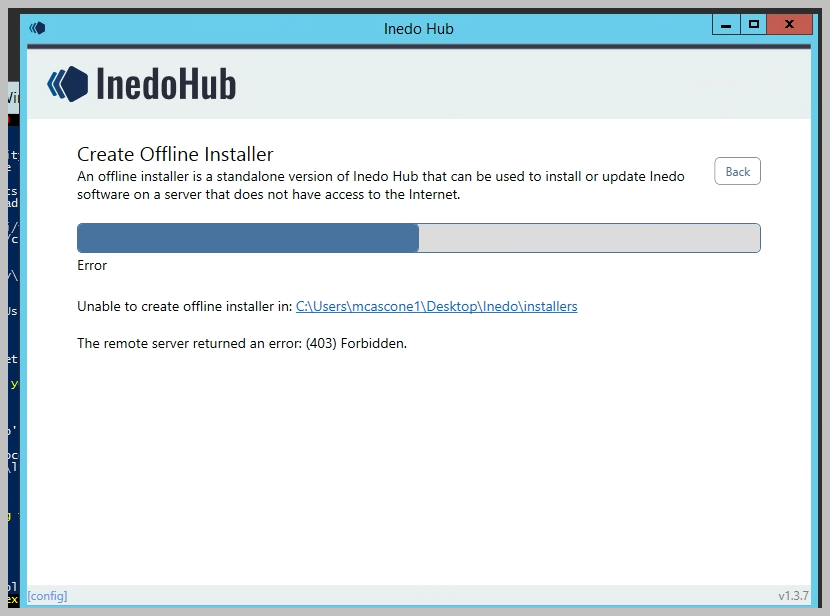
i suppose the idea is to do this on a machine that doesn't have the issue. So this is just another data point.
-
These
403errors are all coming from your proxy server (firewall); unfortunately we/you have no visibility on that.But it's clear that some requests are allowed, and others aren't. Maybe it doesn't like requests that are downloading a file called
.upack. maybe it doesn't like the agent header. Maybe it tries to scan/verify contents with a virus check? It's a total guess
From here, best bet is to check with IT to see if they can inspect the firewall/proxy logs.
-
Thanks, i've started a thread with our infosec folks. I'm putting some more info here for posterity and future review.
I get a different error now in the inedo hub when trying to create a standalone installer on my local machine, off the vpn (but i think we still have a zscaler somethingorother on our laptops too) : "existing connection forcibly closed":
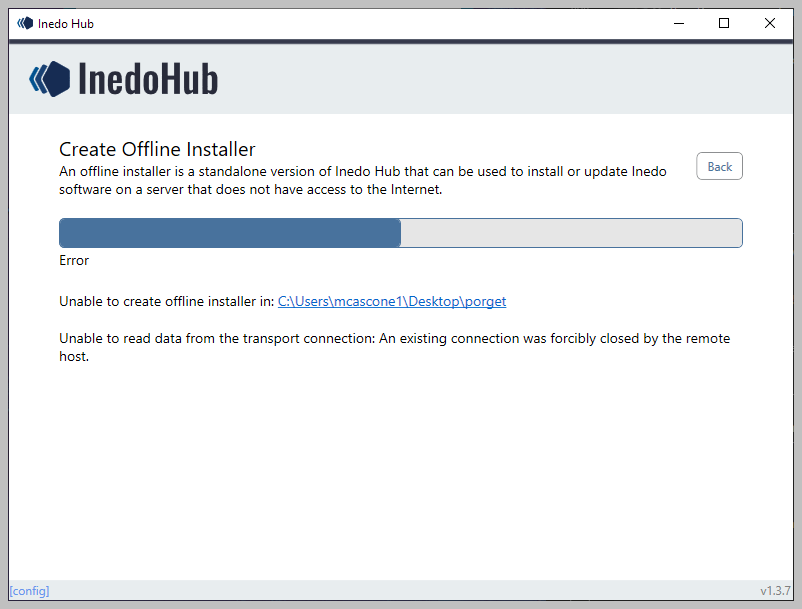
In the "porget" folder on my desktop (spelling mistake known but left in place), I see:
- porget
- DesktopHub.config
- Packages
- ProGet-5.3.43.upack
Is the upack file usable on a remote machine as a standalone installer?
- porget
-
@mcascone
existing connection forcibly closed
I'm afraid this is more of the same; there's some sort of network policy that's blocking this connection. It could be the way your laptop is configured, but maybe it's also happening on the HTTPS/SSL level? Anyways, the remote server (not proget.inedo.com, but some intermediate) is disconnecting at some point.
The
ProGet-5.3.43.upackwould really only be useful for manual installation; but it also might be bad/corrupt/incomplete. You could try unzipping it to see.Oh.... I probably should have said it before, but we have premade, single-exe offline installers for specific versions of ProGet: https://my.inedo.com/downloads/installers
Here is some more information about them; https://docs.inedo.com/docs/desktophub-offline
-
InfoSec is looking into this as best they can.
I was able to use the pre-built offline installer package from your site to upgrade to the latest v5.
FWIW, i had to disable Safe Browsing in Chrome - it was blocking the download via one of its Security settings.
-
After futzing with the certs on the proget host vm, it looks like we've got full connectivity to the chocolatey.org feed as well as nuget.org.
Can someone remind me/point me to docs around the difference between connector caching of packages vs. the "pull to proget" function?
thanks!


Hello! It looks like you're interested in this conversation, but you don't have an account yet.
Getting fed up of having to scroll through the same posts each visit? When you register for an account, you'll always come back to exactly where you were before, and choose to be notified of new replies (either via email, or push notification). You'll also be able to save bookmarks and upvote posts to show your appreciation to other community members.
With your input, this post could be even better 💗
Register Login