Welcome to the Inedo Forums! Check out the Forums Guide for help getting started.
If you are experiencing any issues with the forum software, please visit the Contact Form on our website and let us know!
ProGet shows seemingly random versions as "latest" when using a NuGet connector
-
Hi Inedo devs, thanks for developing ProGet!
We are using ProGet 5.3.36 (Build 4) Free. We have a connector to our legacy intranet NuGet v2 feed with package caching enabled.
I've noticed the following problem: For packages which are not yet cached, ProGet shows a wrong "latest" version number in the search results:
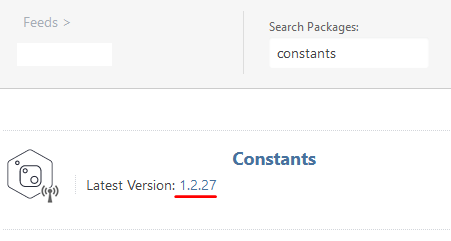
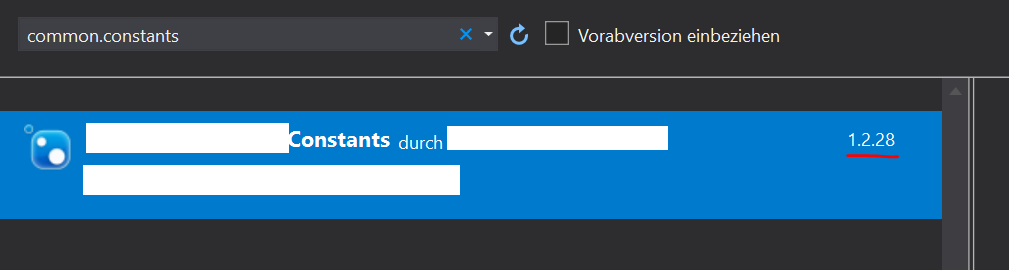
A different version is shown in the VS NuGet package explorer when searching for the package. It can also only install that exact version (we cannot select any newer versions in the drop down).
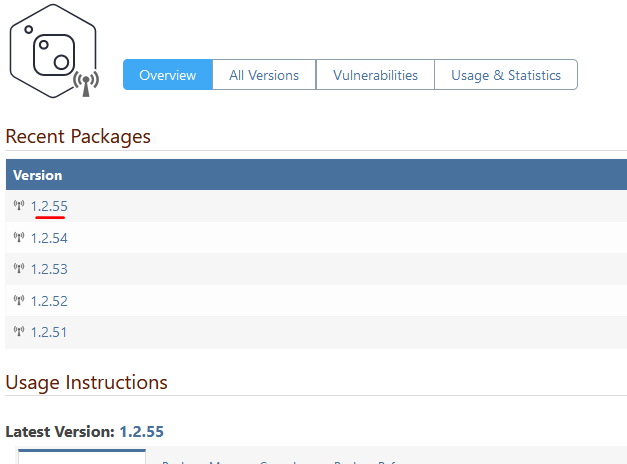
On the package details page, the correct latest version is shown:
Also, if there is a version of a package already cached, ProGet seems to always show that as the "latest" version, regardless if there are newer versions available in the connected feed.
Is there something I am doing wrong here? The documentation leads me to believe that ProGet should always query the connected feed for the latest version (if metadata caching isn't enabled, which is isn't). Thanks in advance for your reply!
Kind regards
Nico -
Hi Nico,
You're doing nothing wrong as far as I can tell.
I can't reproduce the issue where the wrong latest version is shown for an uncached package. Does it only happen for that one package? How many versions of it are on the external feed?
Regarding the other issue - that cached packages in the browse list may show the incorrect latest version - there is not much we can do about that. The browse list both in ProGet web interface and in the VS NuGet dialog sort by popularity and so frequently return totally different packages. The only way we could guarantee an accurate "latest version" display for cached packages on there would be to individually query those packages from the connector, which would drastically slow down the results. That said, I agree this isn't great. I'll chat with the rest of the team and see if we can come up with a better way to handle this.
-Greg
-
Hi Greg, thanks for your reply!
I didn't find any way to reproduce the random versions with another feed, so I'm fairly sure this is either an issue with v2 feeds in general or the specific feed we are using, which is quite an old build of the NuGet Gallery.
The issue doesn't seem to occur in all packages. It seems to be most prominent in the packages with a lot of versions (like, 100 and up). I don't know how the v2 API works, maybe there's some kind of paging or limiting involved?
Another thing that might be relevant: While using the ProGet endpoint
nuget/<feed>/v3/registrations-gz/<package>/index.jsonfor one of the package with random versions, I've noticed some weird empty dependencies showing up:"catalogEntry": { "@id": "https://nuget01/nuget/Feed/v3/catalog/package/1.2.55.json", "@type": "PackageDetails", "authors": "Company", "dependencyGroups": [ { "dependencies": [ { "id": "", "range": "" } ], "targetFramework": "net45" },This prevents NuGet.exe from installing the package:
Attempting to gather dependency information for package 'package.1.2.55' with respect to project 'C:\Users\nkr\source\repos\Test', targeting 'Any,Version=v0.0'
Missing C:\Users\nkr\.nuget\packages\package\1.2.55\package.1.2.55.nupkg
  CACHE https://nuget01/nuget/Feed/v3/registrations-gz/package/index.json
An error occurred while retrieving package metadata for 'package.1.2.55' from source 'https://nuget01/nuget/Feed/v3/index.json'.
  id
System.InvalidOperationException: An error occurred while retrieving package metadata for 'package.1.2.55' from source 'https://nuget01/nuget/Feed/v3/index.json'. ---> NuGet.Protocol.Core.Types.Fat
alProtocolException: An error occurred while retrieving package metadata for 'package.1.2.55' from source 'https://nuget01/nuget/Feed/v3/index.json'. ---> System.ArgumentException: id
   at NuGet.Packaging.Core.PackageDependency..ctor(String id, VersionRange versionRange, IReadOnlyList`1 include, IReadOnlyList`1 exclude)
   at NuGet.Protocol.ResolverMetadataClient.ProcessPackageVersion(JObject packageObj, NuGetVersion version)
   at NuGet.Protocol.ResolverMetadataClient.<GetDependencies>d__0.MoveNext()
Now, after manually downloading the package in order to load it into the cache, the dependencies are fixed and the package is installable:
"catalogEntry": {
    "@id": "https://nuget01/nuget/Feed/v3/catalog/package/1.2.55.json",
    "@type": "PackageDetails",
    "authors": "Company",
    "dependencyGroups": [
        {
            "dependencies": [],
            "targetFramework": ".NETFramework4.5"
        },
-Nico
-
@nkr said in ProGet shows seemingly random versions as "latest" when using a NuGet connector:
quite an old build of the NuGet Gallery.
Oooh that might cause a lot of headaches/problems

Older versions of the NuGet Gallery have some notoriously strange/quirky behaviors -- so much so that we had a special feed type just handle them ("Quirks Feeds"). We finally removed that feed type last year (ProGet 5.3) after the bugs were mostly fixed.
The "missing dependency info" sounds very familiar, and the same thing happened with packages from nuget.org. It was such a long time ago, and the nuget team fixed it with new code and a data update.
Anyway.. I would recommend just migrating your packages using a bulk import.
-
Ah, that makes sense, the weirdness of the NuGet Gallery is why we're migrating to ProGet in the first place

Anyway, thanks for the great support. Will definitely recommend ProGet in the future!


Hello! It looks like you're interested in this conversation, but you don't have an account yet.
Getting fed up of having to scroll through the same posts each visit? When you register for an account, you'll always come back to exactly where you were before, and choose to be notified of new replies (either via email, or push notification). You'll also be able to save bookmarks and upvote posts to show your appreciation to other community members.
With your input, this post could be even better 💗
Register Login