Inedo Community Forums Forums
    • Recent
    • Tags
    • Popular
    • Login

    Welcome to the Inedo Forums! Check out the Forums Guide for help getting started.

    If you are experiencing any issues with the forum software, please visit the Contact Form on our website and let us know!

    BuildMaster Text Template Operation

    Scheduled Pinned Locked Moved Support
    7 Posts 3 Posters 18 Views
    Loading More Posts
    • Oldest to Newest
    • Newest to Oldest
    • Most Votes
    Reply
    • Reply as topic
    Log in to reply
    This topic has been deleted. Only users with topic management privileges can see it.
    • P Offline
      paul_6112
      last edited by

      Hi Support,
      This may be similar to https://forums.inedo.com/topic/3266/pscall-does-not-work-for-script-created-at-application-level/8

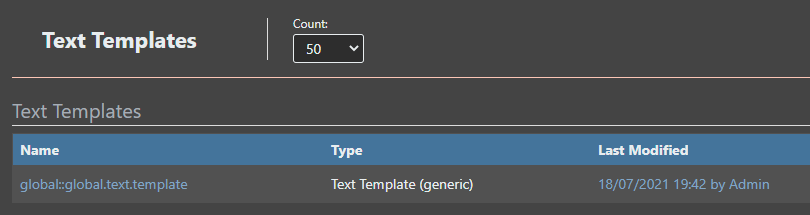
      If I have a Global Text Template:
      a054df78-4160-48d3-bab4-84f03d816dbf-image.png

      And a Local Application Text Template:
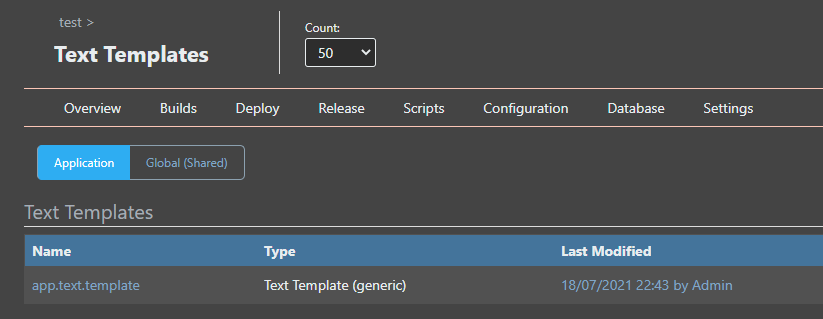
      e4ee806d-fc8b-472b-ab39-1535a65cb236-image.png

      The Apply Template Operation in the Asset drop down box only lists the Global Text Templates.
      (I can however manually type the name of the Local Application Text Template and it works..)
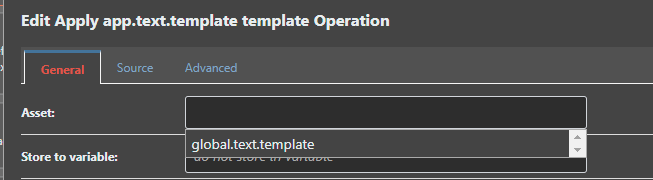
      91f827a7-3476-4b58-917e-eb9da3564cf4-image.png

      Thanks,
      Paul

      1 Reply Last reply Reply Quote 0
      • atrippA Offline
        atripp inedo-engineer
        last edited by

        Hello;

        This will be fixed via BM-3722; it indeed was quite similar to that PowerShell

        Alana

        1 Reply Last reply Reply Quote 0
        • P Offline
          paul_6112
          last edited by

          Hi @atripp ,
          I've tested v7.0.6 and I'm sorry to report this isn't quite right still..

          Whilst the Apply Template Operation now finds and allows you to select the Local Application text template
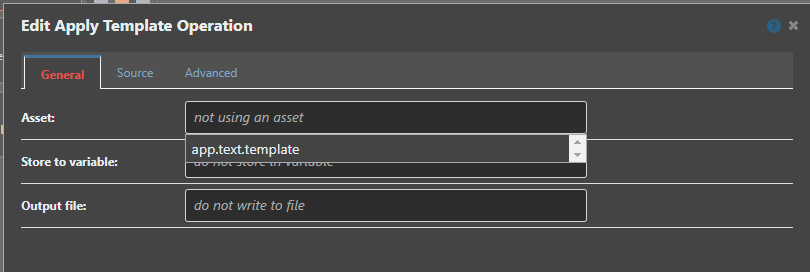
          9f888d4b-101f-41ae-8c93-597430c81677-image.png

          It now no longer finds the global template(s) and I'm assuming the expected behaviour should be both the local application and global templates are listed in the Asset drop down ?

          Thanks,
          Paul

          1 Reply Last reply Reply Quote 0
          • rhessingerR Offline
            rhessinger inedo-engineer
            last edited by

            Hi @paul-reeves_6112,

            Thanks for following up. We will take a look at this and see what is happening. Hang tight!

            Thanks,
            Rich

            Products Engineer, Inedo

            1 Reply Last reply Reply Quote 0
            • rhessingerR Offline
              rhessinger inedo-engineer
              last edited by

              Hi @paul-reeves_6112,

              I think I have found the issue. I have created a pre-release extension, InedoCore 1.12.3-RC.1, that includes the fix. Could you please try to install this version and see if it fixes the issue for you?

              You can follow our manual extension installation guide to either manually install the extension or to change BuildMaster to use our pre-release extension feed.

              Thanks,
              Rich

              Products Engineer, Inedo

              1 Reply Last reply Reply Quote 0
              • P Offline
                paul_6112
                last edited by

                Hi @rhessinger ,
                Sorry I didn't get to the pre-release; but I have test 1.12.3 and this is now working as expected, thank you.
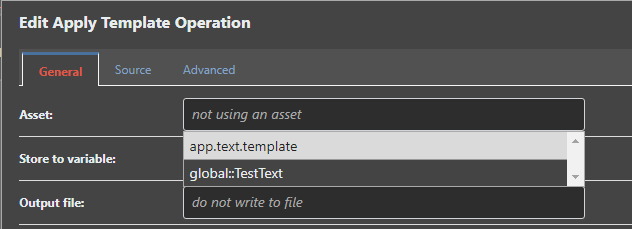
                1c50493f-5d7f-4d2d-9e28-a882b021c9a1-image.png

                Regards,
                Paul

                1 Reply Last reply Reply Quote 0
                • rhessingerR Offline
                  rhessinger inedo-engineer
                  last edited by

                  Hi @paul-reeves_6112,

                  That's ok. It went through our internal testing and everything looked good so we pushed it to production with the last release. Thanks for verifying this for us!

                  Thanks,
                  Rich

                  Products Engineer, Inedo

                  1 Reply Last reply Reply Quote 0

                  Hello! It looks like you're interested in this conversation, but you don't have an account yet.

                  Getting fed up of having to scroll through the same posts each visit? When you register for an account, you'll always come back to exactly where you were before, and choose to be notified of new replies (either via email, or push notification). You'll also be able to save bookmarks and upvote posts to show your appreciation to other community members.

                  With your input, this post could be even better 💗

                  Register Login
                  • 1 / 1
                  • First post
                    Last post
                  Inedo Website Home • Support Home • Code of Conduct • Forums Guide • Documentation