Welcome to the Inedo Forums! Check out the Forums Guide for help getting started.
If you are experiencing any issues with the forum software, please visit the Contact Form on our website and let us know!
BuildMaster Set File Attributes Operation
-
Hi Support,
Could someone help with the 'Set File Attributes' Operation please?I'm configuring the operation like this :
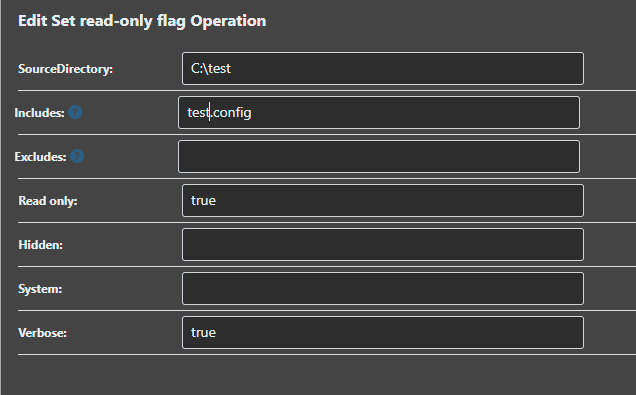
And the log shows that no file attributes have been specified ?

The read only flag isn't being set.. so am I missing something, or could you take a look please?
Thanks,
Paul -
Hi @paul-reeves_6112 ,
This was a strange bug that came from a v7 compiler change and missed test case; if you do ReadOnly=false (the typical usage), it works fine.
Fortunately it was a very simple fix, and if you download InedoCore 1.12.2-CI.1, it'll be included in that. We will ship 1.12.2 with the next maintenance release as well.
You can set your extensions feed url (Admin > Advanced Settings) to be
https://proget.inedo.com/feeds/PrereleaseExtensions, which will download prerelease versions from the extensions pageThanks,
Alana -
Hi @atripp ,
Super, thank you.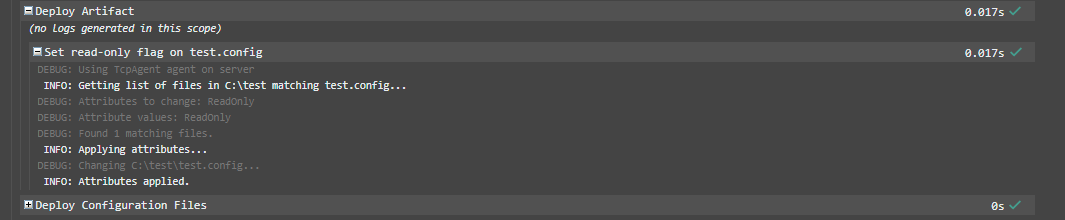
Maybe I'm abusing this function at the moment, but my for use case I've been looking at setting files to be ReadOnly before using a Deploy Artifact Operation which has 'Overwrite read-only files' set as false.
If the Artifact has a default configuration file; but I'm upgrading a system where this configuration file already exists what is the best approach to keep the current file ?
Is there a better method you can suggest ?
Thanks,
Paul -
Hi @paul-reeves_6112 ,
Of course, it should totally work in the usecase you described, I just wanted to explain how it got missed during testing :)
In general, we recommend not including configuration files that contain environment-specific configuration in artifacts to begin with, or at least using include/exclude filters on the Deploy Artifact operation. Then, deploying using the configuration files feature. But that's just general advice of course.
However, your use case sounds a little different, in that you want the configuration file deployed, but only the first time? I don't have a great solution to that, but the main downside I see is that engineers who manage/edit the configuration file (add values, etc), may be surprised when it's "not deploying" like they expect it to.
Config files can be tricky to balance as you probably already know :)
Cheers,
Alana

Hello! It looks like you're interested in this conversation, but you don't have an account yet.
Getting fed up of having to scroll through the same posts each visit? When you register for an account, you'll always come back to exactly where you were before, and choose to be notified of new replies (either via email, or push notification). You'll also be able to save bookmarks and upvote posts to show your appreciation to other community members.
With your input, this post could be even better 💗
Register Login