Welcome to the Inedo Forums! Check out the Forums Guide for help getting started.
If you are experiencing any issues with the forum software, please visit the Contact Form on our website and let us know!
Nuget packages not found during reindex
-
Is there a chance that Proget is caching files and then searching for files in the wrong directory due to case sensitivity?
Check out the screenshots below where the package name does not reflect properly in storage path.
ALSO i have set the connector to NOT cache. But it still caches..
Using proget 5.3.7 - docker
For example, i reindex the nuget feed, its looking a package in Syncfusion.Grid.Wpf (however it appears to have stored in Syncfusion.Grid.WPF directory


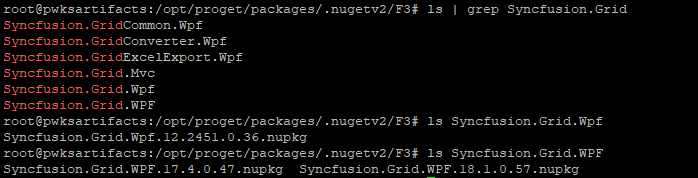
Let me know if I can provide more logs or something.
-
It's definitely possible; we've seen some situations in Cloud Storage where a package's casing changes between versions, and this is the result. But it only impacted replication to our knowledge.
The cloud storage package stores were modified to fix that, but I suppose it could happen on Linux-based as well, but this is the first report to my knowledge.
Can you confirm this is happening? It's a very risky change (unlike the cloud storage, which is easy to rollback becuase it's in an extension) that fixes a very small edge case, so we need to be extremely careful in fixing it. It's not clear what's being impacted here, aside from the package verification job...
-
I am hitting an issue when trying to install nuget from proget, it reports the package cannot be found despite reporting having it. If i recall correctly the message may be similar to this
multiple attempts to download the nupkg have failed. The feed is either invalid or required packages were removed while the current operation was in progress -
this is definitely breaking builds:
C:\Program Files (x86)\Microsoft Visual Studio\2017\BuildTools\Common7\IDE\CommonExtensions\Microsoft\NuGet\NuGet.targets(114, 5): The feed 'https://xxx/nuget/ks-nuget/v3/index.json [https://xxx/nuget/ks-nuget/v3/index.json]' lists package 'Syncfusion.Grid.WPF.17.4.0.47' but multiple attempts to download the nupkg have failed. The feed is either invalid or required packages were removed while the current operation was in progress. Verify the package exists on the feed and try again.
  Unable to find package 'Syncfusion.Grid.WPF.17.4.0.47'.
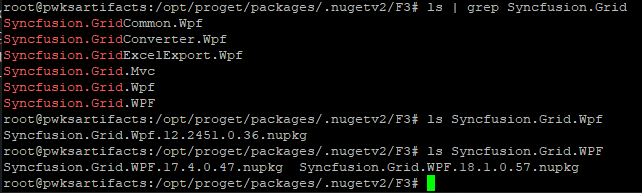
Package is clearly there at least on the server, probably searching in the wrong directory
-
I see; it seems the problem is the casing change from v12 to v17 of the package.
I assume you are't using both at the moment? As a work-around, can you try deleting v12 of the package, then renaming folder to WPF instead of Wpf?
Will that work?
-
we are actually using both versions, some of our legacy applications appear to be pointing to the 12.x version. I copied the package into Wpf folder and had to modify the names of the actual package for it to work. The casing of the package had to match as well for it to work.

Please work on a fix for this. I think this type of mucking around in the packages directory may pollute the contents.
-
Thanks; so just so I understand, if you made a properly-cased version of the v12 package file, it worked, for both versions?
It's not ideal, I know. But this is situation must be extremely rare (first report in many years), and fixing it is costly/risky, so we need to weigh cost/benefit (especially when there are a lot more valuable things we can could improve in the software) against a workaround.
-
So it looks like Proget is not even searching Syncfusion.Grid.WPF directory despite most of the new packages going into that.
I deleted Syncfusion.Grid.Wpf directory and it couldn't find the package despite being a copy inside Syncfusion.Grid.WPF directory.
C:\Program Files (x86)\Microsoft Visual Studio\2017\BuildTools\Common7\IDE\CommonExtensions\Microsoft\NuGet\NuGet.targets(114, 5): The feed 'https://xxx/nuget/ks-nuget/v3/index.json [https://xxx/nuget/ks-nuget/v3/index.json]' lists package 'Syncfusion.Grid.WPF.17.4.0.47' but multiple attempts to download the nupkg have failed. The feed is either invalid or required packages were removed while the current operation was in progress. Verify the package exists on the feed and try again.
  Unable to find package 'Syncfusion.Grid.WPF.17.4.0.47'.
What made this work was copy/move and rename 'Syncfusion.Grid.WPF\Syncfusion.Grid.WPF.17.4.0.47.nupkg' to 'Syncfusion.Grid.Wpf\Syncfusion.Grid.Wpf.17.4.0.47.nupkg'
If no cache is set for the connector, none of this should technically matter, correct?
-
Thanks, got it. An annoying work-around for sure, but it somewhat makes sense, because the package name must be decided based on the first package in the list? I don't know... but the right-answer is to store everything as lower case and have a fallback for mixed-case (which is what we did in the cloud storage).
If no cache is set for the connector, none of this should technically matter, correct?
The problem is occurring when the package is being loaded some disk, so it would impact Cached and Local packages, but not Remote packages.
-
What are the chances of storing everything in lowercase getting added? Can the same fix be applied to the cloud storage bit apply to the Linux setup?
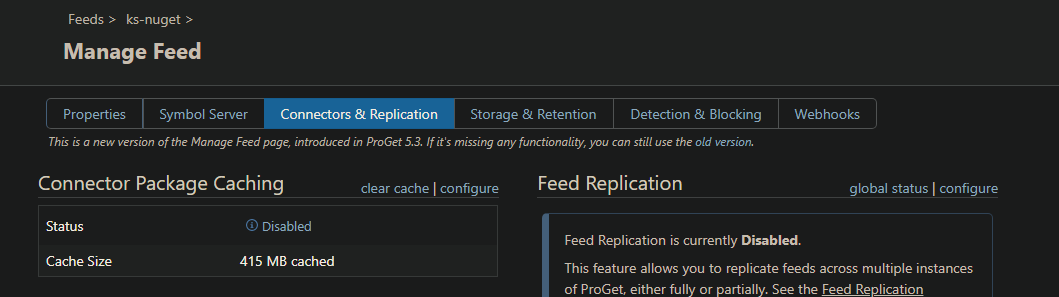
Has anyone reported that disabling cache connector still caches the packages locally for nuget? If this was working I guess I wouldnt be affecting me cause I have cache off.
Despite cache off, the cache size has been increasing, such as the Syncfusion.Grid.WPF being downloaded locally..
-
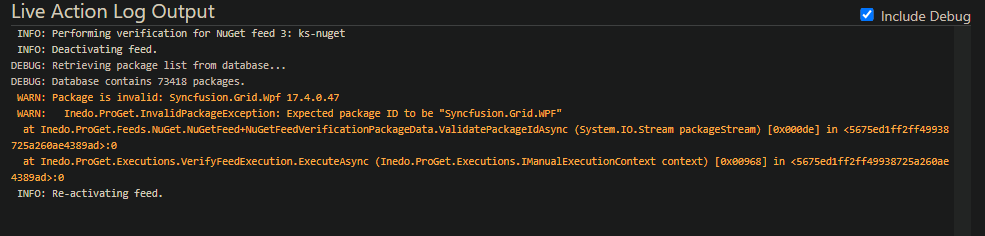
I want to add that after the manual change, when I did a reindex it seems like Proget detected it as an invalid package and removed it (i checked the delete option)
-
I see; that makes sense, the re-indexing would delete it.
Hmm, okay, I just thought about another work-around instead. Please download v12 package, edit the .nuspec file, rename it to be cased like the others, and then upload it? This ought to solve it, as well.
It's definitely a bug we can look to fix, but thus far it's impacted just a single user on a single package in several years so far. It's a high-risk change, and we have a lot of things on the backlog that add more impact/value to the users.
-
Did a quick look in our packages directory, looks like Syncfusion Inc has done this to other packages as well with the case rename, got 10+ packages that have different cases :(
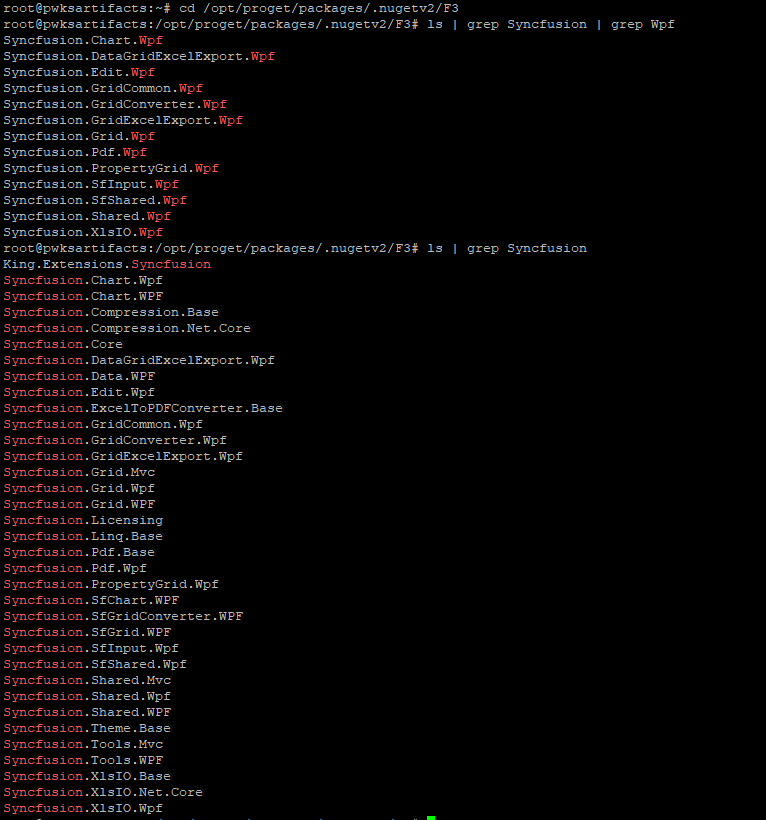
-
are there any other ideas to fix this?
new packages are going into the wrong folder and i have to copy it to the .Wpf one from .WPF
new package:C:\Program Files (x86)\Microsoft Visual Studio\2017\BuildTools\Common7\IDE\CommonExtensions\Microsoft\NuGet\NuGet.targets(114, 5): The feed 'https://xxx/nuget/ks-nuget/v3/index.json [https://xxx/nuget/ks-nuget/v3/index.json]' lists package 'Syncfusion.Grid.WPF.18.2.0.54' but multiple attempts to download the nupkg have failed. The feed is either invalid or required packages were removed while the current operation was in progress. Verify the package exists on the feed and try again. Unable to find package 'Syncfusion.Grid.WPF.18.2.0.54'.
Running this command every time it breaks something cause a new package is not feasible.
Technically the package shouldnt be caching, so will PG-1804 fix this? -
Hello; good news, we can now fix this as part of SDK-64, which will ship in
ProGetCore, a new container that will contain the .NET5 version of ProGet that's designed to replace the mono stack.We're planning to ship a public technology preview by the end of next week (as part of 5.3.11), and the
ProGetCorecontainer will eventually replaceProGetcontainer (which will becomeProGetMono). This will happen well before November, but we don't know when.PG-1804 will fix the caching problem you identified, however.
-
this is excellent news, i am looking forward to this fix.
thank you.
-
still looking forward to this in 5.3.11, but wanted to let you know release 5.3.10 had a fixed a bug that was caching unintentionally. Since these packages I do not intend to cache, the case sensitivity issue is not affecting me for now.
-
@jyip_5228 FYI, as part of ProGet 5.3.10 release, we shipped the
ProGetCorecontainer image as well.You can follow the normal steps in the Linux and Docker Installation Guide to install/upgrade, but just use
progetcorefor the container instead ofproget.Aside from support for the Lucene-based Maven feed indexing (in progress), it seems to be feature complete. And of course, if there are problems, you can switch back to
proget:5.3.10or downgrade as needed (no database schema changes).For example,
docker pull proget.inedo.com/productimages/inedo/progetcore:5.3.10

Hello! It looks like you're interested in this conversation, but you don't have an account yet.
Getting fed up of having to scroll through the same posts each visit? When you register for an account, you'll always come back to exactly where you were before, and choose to be notified of new replies (either via email, or push notification). You'll also be able to save bookmarks and upvote posts to show your appreciation to other community members.
With your input, this post could be even better 💗
Register Login