Welcome to the Inedo Forums! Check out the Forums Guide for help getting started.
If you are experiencing any issues with the forum software, please visit the Contact Form on our website and let us know!
`dotnet nuget push --skip-duplicate` does not work as expected
-
We have a new major release coming up, 5.3. So perhaps, we'll just change the response there.
And if it actually makes a problem, and others have a trouble updating their own scripts, then we can consider adding a flag.
-
The use case is quite simply for re-trying a build after a partial (possibly transient) failure, where multiple artifacts are "uploaded", not just NuGet artifacts.
The point is you still cannot (and must not) overwrite any NuGet artifacts with a given version, but you can skip them, which makes the build much more flexible.
-
@atripp
--skip-duplicateis still not working with ProGet 5.3.2. To be clear, the behavior I'm expecting is "publish this package only if this version doesn't exist yet, otherwise do nothing." It appears that even with--skip-duplicate, package versions are overwritten which is not ideal. -
In this case, you'll need to remove the
Feeds_OverwritePackageprivilege from the API Key or User that's doing the push. The behavior you want/expect is not possible otherwise.nuget.exedoes not send any information to ProGet about whether packages should or shouldn't be overwritten; the--skip-duplicationoption merely treats certain server errors (i.e. a 409 error) as a warning instead of a failure. -
@atripp Thank you for the quick response. It's not obvious to me how to change this permission to API Keys, the checkboxes in the web UI are labelled:
- Grant access to Native API
- Grant access to Package Promotion API
- Grant access to Webhooks API
- Grant access to Repackaging API
- Grant access to Feed Management API
- Grant access to Connector Health API
- Grant access to Feed API
I'm guessing there's another place I need to go to remove the
Feeds_OverwritePackagefrom the API key, but it's not obvious how to do this in the web UI. -
Ah, I can see that.
So, in this case, you'd want to:
- Grant access to Feed API
- Specify a Username to impersonate with the appropriate access to feeds/tasks
-
I am having problems configuring a user with the appropriate access. Specifically, I am having problems creating a Task that has the Add Package and View Feed permissions but that does not have the Overwrite Package permission.
We are running ProGet Free Edition version 5.3.2 (Build 14). When creating / editing a task, if I check any of the feeds permissions and save the task, the task saves with all of permissions instead of only the ones I checked.
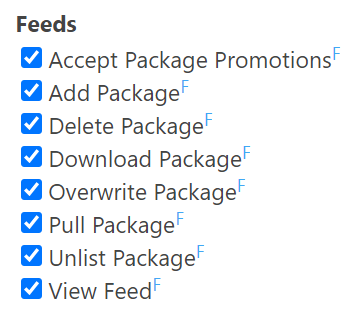
-
I experimented with the "Administration" and "Credentials" categories, along with the "Feeds" category, in the Edit Task UI.
All 3 categories exhibit the bug. If you check any box in the category and save the task, all of the permissions in that category are enabled.
It looks like within a category on the Edit Task UI, all of the input check boxes have the same name. e.g. All 8 check boxes in the Feeds category have the name "ah0~ah4~ah2~ah9".
-
@atripp I am having the same problem as @prnei_4140 in that I cannot add only one of the permissions; they all get added automatically. Is this a known issue?
-
Hello; this issue is known now, I've logged an issue and we'll get it fixed in the next release; PG-1727
Release is scheduled for Friday, but we may ship it sooner.

Hello! It looks like you're interested in this conversation, but you don't have an account yet.
Getting fed up of having to scroll through the same posts each visit? When you register for an account, you'll always come back to exactly where you were before, and choose to be notified of new replies (either via email, or push notification). You'll also be able to save bookmarks and upvote posts to show your appreciation to other community members.
With your input, this post could be even better 💗
Register Login