Welcome to the Inedo Forums! Check out the Forums Guide for help getting started.
If you are experiencing any issues with the forum software, please visit the Contact Form on our website and let us know!
Can't upgrade from Proget 5.1.21 for over a year now
-
Nothing works. It always fails. I've tried upgrading to latest, I've tried upgrading to 5.1.22 -- doesn't matter. It fails SO BAD that even the HUB crashes when attempting to save the ERROR REPORT.
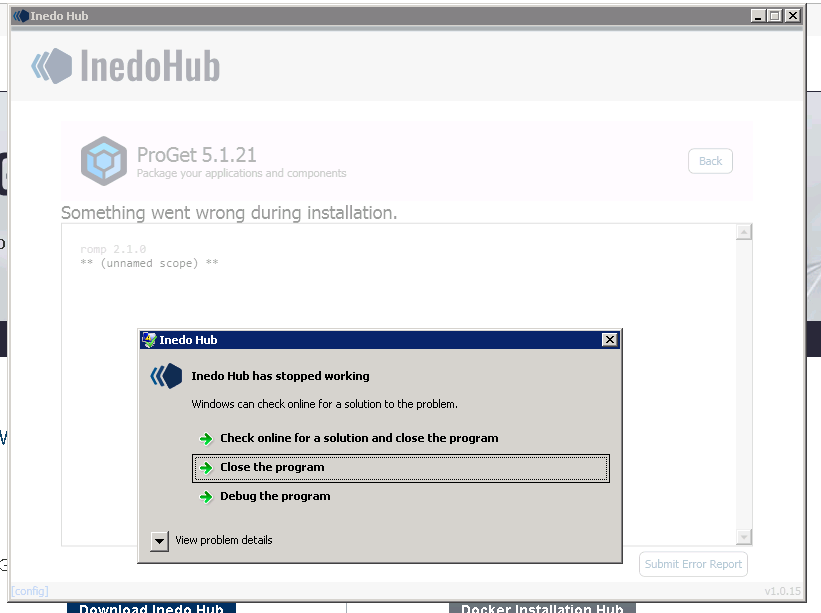
Not sure what to do.
-
Hi; I'm sorry for the frustration.
If you click on the "View problem details" or go to Windows Event Log, you can see the error that's causing the Hub (i.e. the installer) to crash; with that information we can likely spot the underlying problem.
Can you try running the following in an elevated PowerShell prompt to see the underlying logs?
PS C:\Program Files\Inedo Hub> .\hub.exe romp jobs logs
But perhaps the easiest thing might be to just restart from scratch (while keeping data)...
-
Ensure ProGet is backed up as per backup instructions, just to be safe
-
Try to Uninstall ProGet (using Inedo Hub); this will not delete the database nor the packages
-
Uninstall Inedo Hub (via system Uninstall Programs menu)
-
Stop all ProGet services (if they still exist)
-
Delete all data from C:\ProgramData\upack
-
Delete ProGet from %ProgramFiles% if it exists
-
Redownload hub and install ProGet; this will use your existing database (which references your package store)
That should bring things back to normal.
-
-
Thanks for getting back to me.
Event Logs for the HUB:
Application: InedoHub.exe
Framework Version: v4.0.30319
Description: The process was terminated due to an unhandled exception.
Exception Info: System.NullReferenceException
   at Inedo.Hub.Data.ErrorReport.WriteInstallSettings(System.IO.TextWriter)
   at Inedo.Hub.Data.ErrorReport.<WriteToZip>g__writeEntry2|4_0(System.String, System.Action`1<System.IO.TextWriter>, <>c__DisplayClass4_0 ByRef)
   at Inedo.Hub.Data.ErrorReport.WriteToZip(System.IO.Stream)
   at Inedo.Hub.Pages.ErrorPage.SaveLog_Click(System.Object, System.Windows.RoutedEventArgs)
   at System.Windows.EventRoute.InvokeHandlersImpl(System.Object, System.Windows.RoutedEventArgs, Boolean)
   at System.Windows.UIElement.RaiseEventImpl(System.Windows.DependencyObject, System.Windows.RoutedEventArgs)
   at System.Windows.Controls.Primitives.ButtonBase.OnClick()
   at System.Windows.Controls.Button.OnClick()
   at System.Windows.Controls.Primitives.ButtonBase.OnMouseLeftButtonUp(System.Windows.Input.MouseButtonEventArgs)
   at System.Windows.RoutedEventArgs.InvokeHandler(System.Delegate, System.Object)
   at System.Windows.RoutedEventHandlerInfo.InvokeHandler(System.Object, System.Windows.RoutedEventArgs)
   at System.Windows.EventRoute.InvokeHandlersImpl(System.Object, System.Windows.RoutedEventArgs, Boolean)
   at System.Windows.UIElement.ReRaiseEventAs(System.Windows.DependencyObject, System.Windows.RoutedEventArgs, System.Windows.RoutedEvent)
   at System.Windows.UIElement.OnMouseUpThunk(System.Object, System.Windows.Input.MouseButtonEventArgs)
   at System.Windows.RoutedEventArgs.InvokeHandler(System.Delegate, System.Object)
   at System.Windows.RoutedEventHandlerInfo.InvokeHandler(System.Object, System.Windows.RoutedEventArgs)
   at System.Windows.EventRoute.InvokeHandlersImpl(System.Object, System.Windows.RoutedEventArgs, Boolean)
   at System.Windows.UIElement.RaiseEventImpl(System.Windows.DependencyObject, System.Windows.RoutedEventArgs)
   at System.Windows.UIElement.RaiseTrustedEvent(System.Windows.RoutedEventArgs)
   at System.Windows.Input.InputManager.ProcessStagingArea()
   at System.Windows.Input.InputManager.ProcessInput(System.Windows.Input.InputEventArgs)
   at System.Windows.Input.InputProviderSite.ReportInput(System.Windows.Input.InputReport)
   at System.Windows.Interop.HwndMouseInputProvider.ReportInput(IntPtr, System.Windows.Input.InputMode, Int32, System.Windows.Input.RawMouseActions, Int32, Int32, Int32)
   at System.Windows.Interop.HwndMouseInputProvider.FilterMessage(IntPtr, MS.Internal.Interop.WindowMessage, IntPtr, IntPtr, Boolean ByRef)
   at System.Windows.Interop.HwndSource.InputFilterMessage(IntPtr, Int32, IntPtr, IntPtr, Boolean ByRef)
   at MS.Win32.HwndWrapper.WndProc(IntPtr, Int32, IntPtr, IntPtr, Boolean ByRef)
   at MS.Win32.HwndSubclass.DispatcherCallbackOperation(System.Object)
   at System.Windows.Threading.ExceptionWrapper.InternalRealCall(System.Delegate, System.Object, Int32)
   at System.Windows.Threading.ExceptionWrapper.TryCatchWhen(System.Object, System.Delegate, System.Object, Int32, System.Delegate)
   at System.Windows.Threading.Dispatcher.LegacyInvokeImpl(System.Windows.Threading.DispatcherPriority, System.TimeSpan, System.Delegate, System.Object, Int32)
   at MS.Win32.HwndSubclass.SubclassWndProc(IntPtr, Int32, IntPtr, IntPtr)
   at MS.Win32.UnsafeNativeMethods.DispatchMessage(System.Windows.Interop.MSG ByRef)
   at System.Windows.Threading.Dispatcher.PushFrameImpl(System.Windows.Threading.DispatcherFrame)
   at System.Windows.Application.RunDispatcher(System.Object)
   at System.Windows.Application.RunInternal(System.Windows.Window)
   at Inedo.Hub.App.Main()
Running the hub directly just produces this:

I will try and do a full uninstall/install later tonight (offline) -- to avoid development hours.
-
Thanks for the stack trace; I was able to identify the underlying bug that is crashing the installer; https://inedo.myjetbrains.com/youtrack/issue/DH-20
It's essentially an error in error reporting, so fixing it likely won't fix underlying problem. But I think the approach I talked about above should at least let you upgrade and get your Hub installation working again.
-
k, we're good. Upgraded successfully!


Hello! It looks like you're interested in this conversation, but you don't have an account yet.
Getting fed up of having to scroll through the same posts each visit? When you register for an account, you'll always come back to exactly where you were before, and choose to be notified of new replies (either via email, or push notification). You'll also be able to save bookmarks and upvote posts to show your appreciation to other community members.
With your input, this post could be even better 💗
Register Login