Welcome to the Inedo Forums! Check out the Forums Guide for help getting started.
If you are experiencing any issues with the forum software, please visit the Contact Form on our website and let us know!
Unzip not working
-
I am trying to Unzip a file on a remote machine which has a server type "Powershell Agentless" I am able to check if the file is present or not using "Ensure File" it also gives the output on the log that file is present. After that when the unzip block runs there are no output and no extracted data in the folder.
If anyone knows what is wrong here kindly provide their feedback
-
hi; please share your OtterScript and we might be able to get a better idea :)
-
I am using the in-built function from otter's visual config editor.
Extract-ZipFile ( Name: C:\Temp\test.zip, Directory: C:\Temp, ClearTarget: false, Overwrite: false ); -
Thanks!
So to be clear, is this in a "configuration plan" or an "orchestration plan"? Can you give some more context as to how you're trying to use this (i.e. why do you want to unzip)? Can you share the full plan?
-
Below you can find the image which will provide you all the details you want
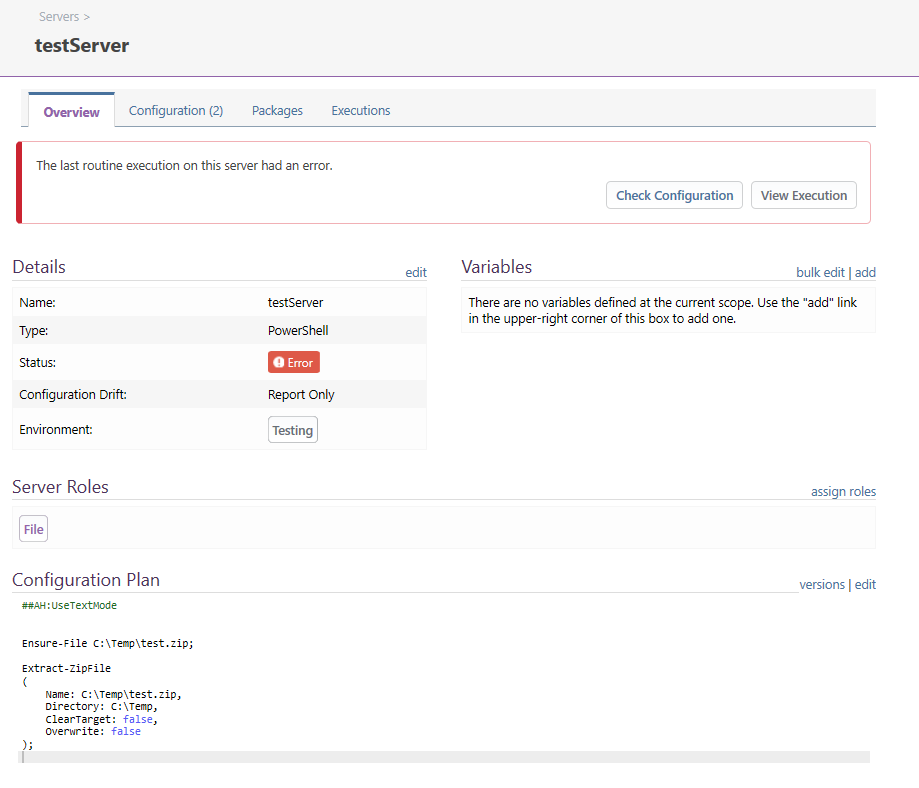
-
Hello;
What are you trying to do?
This definitely won't work for several reasons.
-
Ensure-Fileis an "Ensure" operation and will detect configuration drift and can optionally create the file if it doesn't exist; but in this case, it would be a 0-byte file named test.zip, which isn't a valid zip -
Extract-ZipFileis a "Execute-only" operation, which means it will run only within a block (e.g.{ ... }) if drift was detected (i.e. the file didn't exist in the operation before); but if that was the case, it would fail because it's not a valid zip file
You probably want to use an Orchestration plan for this.
Please read through this eBook to get feeling for how configuration and Orchestration Plans: https://inedo.com/support/resources/ebooks/windows-first-iac-cca
-

Hello! It looks like you're interested in this conversation, but you don't have an account yet.
Getting fed up of having to scroll through the same posts each visit? When you register for an account, you'll always come back to exactly where you were before, and choose to be notified of new replies (either via email, or push notification). You'll also be able to save bookmarks and upvote posts to show your appreciation to other community members.
With your input, this post could be even better 💗
Register Login