Welcome to the Inedo Forums! Check out the Forums Guide for help getting started.
If you are experiencing any issues with the forum software, please visit the Contact Form on our website and let us know!
Not able to connect to YouTrack
-
When I try to connect my buildmaster to YouTrack I just get "Error: Value cannot be null, credentialName". Anyone solved this issue before ?
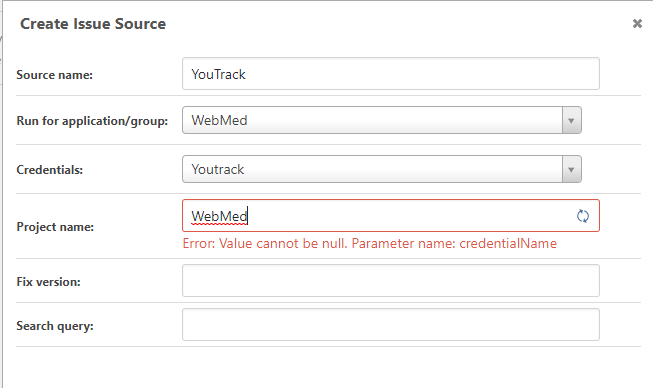
-
What version of BuildMaster is this... 6.2.5? I believe it's just a UI problem with the editor...
Is it v1.0.1 of the YouTrack extension? This one still needs to be updated to use BuildMaster 6.2's Secure Resource + Secure Credentials.
-
@atripp Yes, this is 6.2.5 and plugin version 1.0.1. Can I edit this in the config files instead, we are just starting to use BuildMaster.
-
We'll investigate this and get it working soon -- I think it's a UI-related bug with the new 6.2 changes to resource/credentials.
There's no configuration file to save -- but hopefully it will let you save, despite that error message? We use this version, and this extension internally as well.
-
I managed to get it working by modifying the DB, but it still does not work in the UI. Seems to be same issue for other issue sources.
-
I've identified this and we'll get this fixed in the next maintenance release (shipping end of week, at the latest) as BM-3552

Hello! It looks like you're interested in this conversation, but you don't have an account yet.
Getting fed up of having to scroll through the same posts each visit? When you register for an account, you'll always come back to exactly where you were before, and choose to be notified of new replies (either via email, or push notification). You'll also be able to save bookmarks and upvote posts to show your appreciation to other community members.
With your input, this post could be even better 💗
Register Login