Welcome to the Inedo Forums! Check out the Forums Guide for help getting started.
If you are experiencing any issues with the forum software, please visit the Contact Form on our website and let us know!
5.1.1 plan execution issues
-
Hello,
I've just upgraded to 5.1.1 and my plans will not work.
I've tried 2. The one fails at zipping files. Of two main folders, it adds one folder and then fails. the folders zip fine on the windows server.
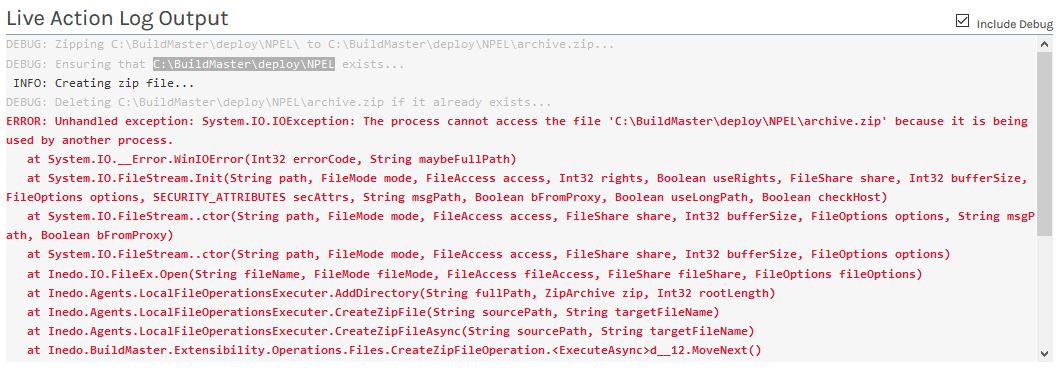
Here's the error log:Creating zip file...Deleting C:\BuildMaster\deploy\NPEL\archive.zip if it already exists...Unhandled exception: System.IO.IOException: The process cannot access the file 'C:\BuildMaster\deploy\NPEL\archive.zip' because it is being used by another process. at System.IO.__Error.WinIOError(Int32 errorCode, String maybeFullPath) at System.IO.FileStream.Init(String path, FileMode mode, FileAccess access, Int32 rights, Boolean useRights, FileShare share, Int32 bufferSize, FileOptions options, SECURITY_ATTRIBUTES secAttrs, String msgPath, Boolean bFromProxy, Boolean useLongPath, Boolean checkHost)Also deleting files from a server:
This is the script and error:
# Delete file from Upload
for server Router
{
    Delete-Files *
    (
        Directory: /root/upload
    );
}

Deleting files from /root/upload...
Unhandled exception: System.ArgumentOutOfRangeException: startIndex cannot be larger than length of string.

Parameter name: startIndex

   at System.String.Substring(Int32 startIndex, Int32 length)

   at Inedo.BuildMaster.Extensibility.Agents.Ssh.SshFileOperationsExecuter.<GetFileSystemInfosAsync>d__24.MoveNext()

--- End of stack trace from previous location where exception was thrown ---

   at System.Runtime.ExceptionServices.ExceptionDispatchInfo.Throw()
Thanks,
David
Product: BuildMaster
Version: 5.1.1 -
For the Delete-Files issue, we have identified a bug with directory enumeration via SSH/SFTP that is causing this issue and will include this fix in BuildMaster 5.1.2, which we plan to release today.
Regarding the Create Zip issue... is that an OtterScript plan or a legacy plan? We have not been able to reproduce this, unless there actually is another process that has the zip file open when trying to delete it.
-
Hi Dean,
It's an OtterScript plan. I'll try the update and report back :-)
Thanks,
David
-
Hello,
Yes, the delete files works now, but I still get an error zipping files.
I've tried without specifying a directory and using the default working folders and it still fails.I have 1 text file in this directory: C:\BuildMaster\deploy\NPEL
This is all that is in my script:
##AH:UseTextMode
for server BUILDMASTER3
{
    # zip source
    Create-ZipFile
    (
        Name: C:\BuildMaster\deploy\NPEL\archive.zip,
        Directory: C:\BuildMaster\deploy\NPEL\,
        Overwrite: True
    );
}
This is the error I get:
-
We still can't reproduce this- I don't think it's possible to get that exception unless some other process is actually keeping a handle to the zip file open. Could you try restarting the Agent/BuildMaster service to see if that clears it up?
If not, you may need to run Process Monitor on the server to see what's keeping that file open.
-
Hi,
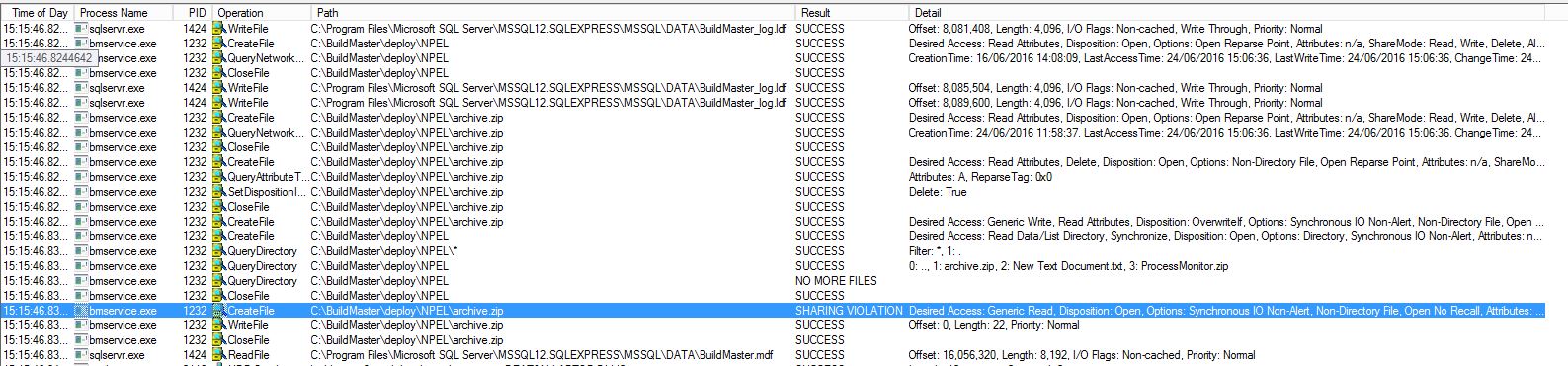
After a server reboot, I still get the same thing. I can't see anything else that has the file open, other than BuildMaster.
Here's a screenshot of process monitor. Does it Help?
If not, I'll build another server, take it back to version 5.10 and then upgrade it and see if it fails in the same way.
-
Ah, sorry. I guess I was thinking of Process Explorer actually to discover all of the processes that have the file handle open. See this answer on serverfault: http://serverfault.com/a/1980
-
Hi,
I installed the process explorer, but couldn't see archive.zip anywhere in open processes.
However, what I have done is found which version this problem started happening with.I had checkpointed my server build, so I could go back to a server that only had SQL Express installed. It's a Windows 2012 R2 server, in a Domain, with nothing else installed. It's a volume licensed build and I haven't installed Windows updates.
I installed BuildMaster 5.0.6. Created one application that does the same as the script above and when I create and deploy the package, it does what I expect, creates a zip file with the contents of the directory. In this case, a small text file that I created.
So I then installed BuildMaster 5.0.10 & then 5.0.11 and the plan still deploys fine.
As soon as I install version 5.1.0 I get the error message.So if the file is in use with another process, it doesn't happen until 5.1.0.
Could I be missing something on the server that 5.1.0 requires?
Thanks,
David
-
Hi David,
We're really struggling trying to figure out what could be causing this... we have very similar test systems as well.
Of note, in v5.1, we introduced the new agent model, but the old (legacy) agents should still be working fine, and handle all of those things using the old code.
Can you try using a new Inedo Agent, and see if the problem continues?
Also can you send us the entire plan that your using, so we can see if it might have something to do with async usage, or something?
Best,
Alana -
Hi,
The script is super simple and only runs on the BuildMaster server, so I'm assuming there are no agents, or if there are, the update would update them.
Here is the script:
##AH:UseTextMode
# This is a sample deployment plan; you can create a different deployment plan for each environment,
# or attempt to generalize the plan in combination with templates and variables (e.g. $EnvironmentName).
for server BUILDMASTER3
{
    Log-Information "This plan was auto-generated on 27/06/2016 14:50:07; you may visit the Plans page to modify it.";

    Create-ZipFile
    (
        Name: c:\buildmaster\deploy\npel\archive.zip,
        Directory: c:\buildmaster\deploy\npel\,
        Overwrite: true
    );

}
Thanks again,
David
-
Ah, I see the problem. Maybe it could be a better error message...
Basically, you're creating the zip file in the directory you're trying to create a zip file of.
Create-ZipFile ( Name: archive.zip, # <-- this will put it in $WorkingDirectory instead Directory: c:\buildmaster\deploy\npel\, Overwrite: true ); Create-ZipFile ( Name: c:\buildmaster\deploy\npel.archive.zip, # <-- also will work Directory: c:\buildmaster\deploy\npel\, Overwrite: true ); -
Hi,
DOH! Yes, thanks, that's it.
I'm blaming the person that wrote the original script I copied :-)
Thanks again for your help.
David
Hello! It looks like you're interested in this conversation, but you don't have an account yet.
Getting fed up of having to scroll through the same posts each visit? When you register for an account, you'll always come back to exactly where you were before, and choose to be notified of new replies (either via email, or push notification). You'll also be able to save bookmarks and upvote posts to show your appreciation to other community members.
With your input, this post could be even better 💗
Register Login