Welcome to the Inedo Forums! Check out the Forums Guide for help getting started.
If you are experiencing any issues with the forum software, please visit the Contact Form on our website and let us know!
Image-based Services (Containerized Builds) failing on "Build .NET Project"
-
I enabled Image-based Services and had it install the default images. BuildMaster is installed on a windows server that is also running DockerDesktop so the docker.exe version command shows 29.4.1. Now I found an article on your site that didn't mention DockerDesktop but did talk about other options and said that depending what you were using depended on whether it supported Linux or not. I know my Docker does support Linux as that is what I'm using on the images running on it but when I try to kick of the build it gives me an error as if it thinks it is running on Linux but is actually on Windows. Below is the log from the build.
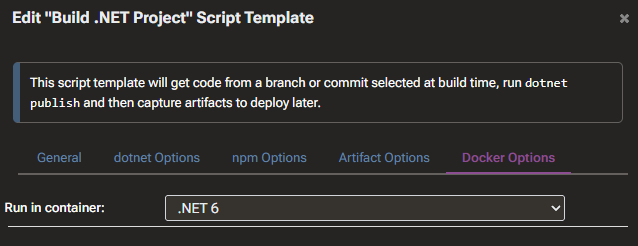
Screenshot showing it is set to run in a container:
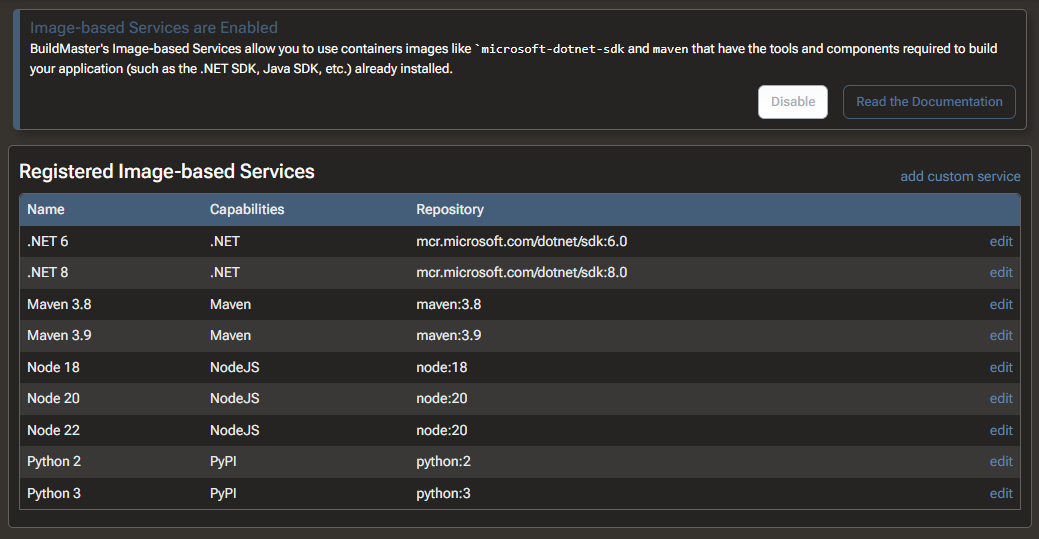
Screenshot showing Image-based Services are enabled and the registered services:
Log from Build:
Using LocalAgent agent on localhost Updating local repository for http://bitbucket1.sscs.ad:7990/scm/cdb/transaction.api.git... Git backend: libgit2sharp Repository path is C:\ProgramData\BuildMaster\Temp\Service\.gitrepos\bitbucket1.sscs.ad$7990$scm$cdb$transaction.api.git Fetching from origin (http://bitbucket1.sscs.ad:7990/scm/cdb/transaction.api.git)... Fetch completed in 00:00:00.1317612. Exporting files to C:\ProgramData\BuildMaster\Temp\Service\_E327\... Checking out code from de476603d1d6185ddac1708c5de9cda5a3fd8c68 to C:\ProgramData\BuildMaster\Temp\Service\_E327\... Lookup succeeded; found commit de476603d1d6185ddac1708c5de9cda5a3fd8c68. Looking for submodules... No submodules in repository. Using LocalAgent agent on localhost Searching for files matching **.csproj in C:\ProgramData\BuildMaster\Temp\Service\_E327... Found 11 matching files. Reading C:\ProgramData\BuildMaster\Temp\Service\_E327\SSCS.Mapping.Generator\SSCS.Mapping.Generator.csproj... C:\ProgramData\BuildMaster\Temp\Service\_E327\SSCS.Mapping.Generator\SSCS.Mapping.Generator.csproj loaded. Setting Version in C:\ProgramData\BuildMaster\Temp\Service\_E327\SSCS.Mapping.Generator\SSCS.Mapping.Generator.csproj to 1.3.1... Writing C:\ProgramData\BuildMaster\Temp\Service\_E327\SSCS.Mapping.Generator\SSCS.Mapping.Generator.csproj... C:\ProgramData\BuildMaster\Temp\Service\_E327\SSCS.Mapping.Generator\SSCS.Mapping.Generator.csproj saved. Reading C:\ProgramData\BuildMaster\Temp\Service\_E327\Transaction.API\Transaction.API.csproj... C:\ProgramData\BuildMaster\Temp\Service\_E327\Transaction.API\Transaction.API.csproj loaded. Setting Version in C:\ProgramData\BuildMaster\Temp\Service\_E327\Transaction.API\Transaction.API.csproj to 1.3.1... Writing C:\ProgramData\BuildMaster\Temp\Service\_E327\Transaction.API\Transaction.API.csproj... C:\ProgramData\BuildMaster\Temp\Service\_E327\Transaction.API\Transaction.API.csproj saved. Reading C:\ProgramData\BuildMaster\Temp\Service\_E327\Transaction.Application\Transaction.Application.csproj... C:\ProgramData\BuildMaster\Temp\Service\_E327\Transaction.Application\Transaction.Application.csproj loaded. Setting Version in C:\ProgramData\BuildMaster\Temp\Service\_E327\Transaction.Application\Transaction.Application.csproj to 1.3.1... Writing C:\ProgramData\BuildMaster\Temp\Service\_E327\Transaction.Application\Transaction.Application.csproj... C:\ProgramData\BuildMaster\Temp\Service\_E327\Transaction.Application\Transaction.Application.csproj saved. Reading C:\ProgramData\BuildMaster\Temp\Service\_E327\Transaction.Application.DTO\Transaction.Application.DTO.csproj... C:\ProgramData\BuildMaster\Temp\Service\_E327\Transaction.Application.DTO\Transaction.Application.DTO.csproj loaded. Setting Version in C:\ProgramData\BuildMaster\Temp\Service\_E327\Transaction.Application.DTO\Transaction.Application.DTO.csproj to 1.3.1... Writing C:\ProgramData\BuildMaster\Temp\Service\_E327\Transaction.Application.DTO\Transaction.Application.DTO.csproj... C:\ProgramData\BuildMaster\Temp\Service\_E327\Transaction.Application.DTO\Transaction.Application.DTO.csproj saved. Reading C:\ProgramData\BuildMaster\Temp\Service\_E327\Transaction.CdbWin.Client\Transaction.CdbWin.Client.csproj... C:\ProgramData\BuildMaster\Temp\Service\_E327\Transaction.CdbWin.Client\Transaction.CdbWin.Client.csproj loaded. Setting Version in C:\ProgramData\BuildMaster\Temp\Service\_E327\Transaction.CdbWin.Client\Transaction.CdbWin.Client.csproj to 1.3.1... Writing C:\ProgramData\BuildMaster\Temp\Service\_E327\Transaction.CdbWin.Client\Transaction.CdbWin.Client.csproj... C:\ProgramData\BuildMaster\Temp\Service\_E327\Transaction.CdbWin.Client\Transaction.CdbWin.Client.csproj saved. Reading C:\ProgramData\BuildMaster\Temp\Service\_E327\Transaction.Client.Shared\Transaction.Client.Shared.csproj... C:\ProgramData\BuildMaster\Temp\Service\_E327\Transaction.Client.Shared\Transaction.Client.Shared.csproj loaded. Setting Version in C:\ProgramData\BuildMaster\Temp\Service\_E327\Transaction.Client.Shared\Transaction.Client.Shared.csproj to 1.3.1... Writing C:\ProgramData\BuildMaster\Temp\Service\_E327\Transaction.Client.Shared\Transaction.Client.Shared.csproj... C:\ProgramData\BuildMaster\Temp\Service\_E327\Transaction.Client.Shared\Transaction.Client.Shared.csproj saved. Reading C:\ProgramData\BuildMaster\Temp\Service\_E327\Transaction.Domain\Transaction.Domain.csproj... C:\ProgramData\BuildMaster\Temp\Service\_E327\Transaction.Domain\Transaction.Domain.csproj loaded. Setting Version in C:\ProgramData\BuildMaster\Temp\Service\_E327\Transaction.Domain\Transaction.Domain.csproj to 1.3.1... Writing C:\ProgramData\BuildMaster\Temp\Service\_E327\Transaction.Domain\Transaction.Domain.csproj... C:\ProgramData\BuildMaster\Temp\Service\_E327\Transaction.Domain\Transaction.Domain.csproj saved. Reading C:\ProgramData\BuildMaster\Temp\Service\_E327\Transaction.Persistence\Transaction.Persistence.csproj... C:\ProgramData\BuildMaster\Temp\Service\_E327\Transaction.Persistence\Transaction.Persistence.csproj loaded. Setting Version in C:\ProgramData\BuildMaster\Temp\Service\_E327\Transaction.Persistence\Transaction.Persistence.csproj to 1.3.1... Writing C:\ProgramData\BuildMaster\Temp\Service\_E327\Transaction.Persistence\Transaction.Persistence.csproj... C:\ProgramData\BuildMaster\Temp\Service\_E327\Transaction.Persistence\Transaction.Persistence.csproj saved. Reading C:\ProgramData\BuildMaster\Temp\Service\_E327\Transaction.Tests.Common\Transaction.Tests.Common.csproj... C:\ProgramData\BuildMaster\Temp\Service\_E327\Transaction.Tests.Common\Transaction.Tests.Common.csproj loaded. Setting Version in C:\ProgramData\BuildMaster\Temp\Service\_E327\Transaction.Tests.Common\Transaction.Tests.Common.csproj to 1.3.1... Writing C:\ProgramData\BuildMaster\Temp\Service\_E327\Transaction.Tests.Common\Transaction.Tests.Common.csproj... C:\ProgramData\BuildMaster\Temp\Service\_E327\Transaction.Tests.Common\Transaction.Tests.Common.csproj saved. Reading C:\ProgramData\BuildMaster\Temp\Service\_E327\Transaction.Tests.Integration\Transaction.Tests.Integration.csproj... C:\ProgramData\BuildMaster\Temp\Service\_E327\Transaction.Tests.Integration\Transaction.Tests.Integration.csproj loaded. Setting Version in C:\ProgramData\BuildMaster\Temp\Service\_E327\Transaction.Tests.Integration\Transaction.Tests.Integration.csproj to 1.3.1... Writing C:\ProgramData\BuildMaster\Temp\Service\_E327\Transaction.Tests.Integration\Transaction.Tests.Integration.csproj... C:\ProgramData\BuildMaster\Temp\Service\_E327\Transaction.Tests.Integration\Transaction.Tests.Integration.csproj saved. Reading C:\ProgramData\BuildMaster\Temp\Service\_E327\Transaction.Tests.Unit\Transaction.Tests.Unit.csproj... C:\ProgramData\BuildMaster\Temp\Service\_E327\Transaction.Tests.Unit\Transaction.Tests.Unit.csproj loaded. Setting Version in C:\ProgramData\BuildMaster\Temp\Service\_E327\Transaction.Tests.Unit\Transaction.Tests.Unit.csproj to 1.3.1... Writing C:\ProgramData\BuildMaster\Temp\Service\_E327\Transaction.Tests.Unit\Transaction.Tests.Unit.csproj... C:\ProgramData\BuildMaster\Temp\Service\_E327\Transaction.Tests.Unit\Transaction.Tests.Unit.csproj saved. Performing containerized build using ".NET 6" image based service. Using LocalAgent agent on localhost Ensuring working directory C:\ProgramData\BuildMaster\Temp\Service\_E327 exists... Executing dotnet publish "/var/buildmaster-ibs/Transaction.API/Transaction.API.csproj" --configuration "Release" --output "/var/buildmaster-ibs/publish" "-p:ContinuousIntegrationBuild=true" "--no-self-contained" ... Unhandled exception: System.ComponentModel.Win32Exception (2): An error occurred trying to start process 'id' with working directory 'C:\Windows\system32'. The system cannot find the file specified. at System.Diagnostics.Process.StartWithCreateProcess(ProcessStartInfo startInfo) at System.Diagnostics.Process.Start() at Inedo.Agents.LocalProcess.Start() at Inedo.Agents.LocalProcess.Inedo.Agents.IRemoteProcess.StartAsync(CancellationToken cancellationToken) at Inedo.BuildMaster.Windows.ServiceApplication.Executions.PlanExecuter.AgentDockerHost.GetCurrentUserIdAsync(IRemoteProcessExecuter exec, ActiveNamedScope log, CancellationToken cancellationToken) at Inedo.BuildMaster.Windows.ServiceApplication.Executions.PlanExecuter.AgentDockerHost.ExecuteInContainerAsync(ContainerStartInfo containerStartInfo, CancellationToken cancellationToken) at Inedo.Extensions.DotNet.Operations.DotNet.DotNetBuildOrPublishOperation.<>c__DisplayClass63_0.<<ExecuteAsync>g__execAsync|2>d.MoveNext() in C:\Users\builds\AppData\Local\Temp\InedoAgent\BuildMaster\192.168.44.60\Temp\_E613379\Src\DotNet\InedoExtension\Operations\DotNet\DotNetBuildOrPublishOperation.cs:line 420 --- End of stack trace from previous location --- at Inedo.Extensions.DotNet.Operations.DotNet.DotNetBuildOrPublishOperation.ExecuteAsync(IOperationExecutionContext context) in C:\Users\builds\AppData\Local\Temp\InedoAgent\BuildMaster\192.168.44.60\Temp\_E613379\Src\DotNet\InedoExtension\Operations\DotNet\DotNetBuildOrPublishOperation.cs:line 332 at Inedo.BuildMaster.Windows.ServiceApplication.Executions.PlanExecuter.OtterScriptExecuter.Inedo.ExecutionEngine.Executer.IExecutionHostEnvironment.ExecuteActionAsync(ActionStatement actionStatement, IExecuterContext context) Cleaning up... Deleting C:\ProgramData\BuildMaster\Temp\Service\_E327 on localhost... C:\ProgramData\BuildMaster\Temp\Service\_E327 on localhost deleted. Cleanup complete. -
Based on the error message, it looks like you've got Docker Desktop configured to use Windows-based containers, not Linux. I'm not sure if this can work on Docker Desktop; it's just a not a stack anyone considers/supports for use cases like this.
The underlying error appears to becoming from the
dotnettooling. Though it's hard to say without troubleshooting further. Basically, something in the stack is calling the Linux toolid, which isn't going to work on a Windows container.If you're evaluating/testing, I would just use a virtual machine and pretend it's a remote server or something to that effect.
Thanks,
Steve -
Hi @stevedennis,
Actually my Docker.Desktop is set up to communicate with a Linux Docker engine. That makes me wonder what type of image it is trying to run from buildmaster though. Somewhere I think the wires are getting crossed as to what OS it is using vs what it thinks it is using.Thank you,
Brandon -
The image that's being used is
mcr.microsoft.com/dotnet/sdk:6.0, which is technically a "fat manifest" that points to a number of platform-specific images. But that's all handled by the Docker engine.So if you're getting a Windows-based image, then it means the Docker engine is not using Windows. I haven't used DockerDesktop in years, since WSL2 is much more reliable and a similar-to-production experience.
I mentioned this in my other reply, but I would suggest to "play around" with the commands using
docker run ...to see if you can get this working using that container.Once you can get it working from the CLI, then it won't be problem for Buildmaster to do the same thing.
Thanks,
Steve -
The reason I'm using Docker.Desktop is not to run Linux on Windows but to run Docker. The goal was to mimic our dev and prod deployment which involves using helm files to update what version of a given image is deployed in a given environment. This part I have working. I just figured I'd try taking advantage of having docker installed to try out this feature of BuildMaster. I didn't expect it to be this troublesome though.
When I was working on it this morning I tried updating the tag to pull a specific version of the image to ensure it was Linux but that didn't work either. In fact it didn't change anything. I'll look at it again on Monday. Maybe someone will have some insight before then and help me out. Let me know if there is anything I add to the post to help. If I see a response over the weekend I'll definitely update the post with any requested information.
-
I would like to try and "reopen" this topic. I didn't get back to this right away but I did some more work on this today and I'm curious if someone at Inedo might be able to supply some more details if I provide more details on what I've learned since the last posting.
I used cursor to try and understand more of what was going on since I wasn't really following everything being said above. What it basically told me was that it has nothing to do with interacting with docker. Apparently when ImageBasedService is used it expects you are using an agent on a Linux machine as your code is explicitly calling the Id method. For the record cursor analyzed your DLLs to try and figure this out. I'm not sure how accurate it is but I'm wondering if it will at least trigger someone on your side to figure out the best way to help me or at least explain to me what is going on and what my options are.
Here is the code it looked at
string HostPath = ((!(await exec.GetEnvironmentVariableValueAsync("USER") != "root")) ? null : (await GetCurrentUserIdAsync(exec, context.CurrentLogScope, cancellationToken)));private static async Task<string?> GetCurrentUserIdAsync(IRemoteProcessExecuter exec, ActiveNamedScope log, CancellationToken cancellationToken)
{
using IRemoteProcess p = exec.CreateProcess(new RemoteProcessStartInfo
{
FileName = "id",
Arguments = "-u"
});
// ... read stdout, then StartAsync
}code_textThank you,
Brandon -
I was finally able to get it to work. I'm not sure how you "expect" it to work so I am curious what you'll say about my solution. After some research I found out that if you install git for windows there is a directory with some utilities which includes an id command for windows as a part of that. I added that directory to my path and the Image based service finally worked. Is there a better way to get this to work? Perhaps this was an oversite in the coding as maybe this is standard on your computers so the the third-party dependency wasn't mentioned? I'll be curious to hear your explanation.
Thank you,
Brandon -
As I mentioned earlier, this is an issue with the
dotnetcontainer for Windows, not BuildMaster:,The underlying error appears to becoming from the
dotnettooling. Though it's hard to say without troubleshooting further. Basically, something in the stack is calling the Linux toolid, which isn't going to work on a Windows container.When you installed Git (which is basically a Linux tool), it must have included a Windows-version of
id. That allowed thedontnetcontainer to then work. You're probably the first person whose tried to use thedotnetcontainer without installing Git as well ;)As for a better way, just run on a small Linux VM instead on your Windows desktop (Hyper V). You're going to run into a lot of headaches if you try to use Docker Desktop.
Thanks,
Steve -
Hi @stevedennis,
I appreciate the reply but I will be honest and say it doesn't really make any sense. To my knowledge I'm not using docker desktop for this feature. I installed WSL on my machine and I'm assuming it is using that. One of the things I learned in this process is that docker desktop doesn't allow the same command line usage that WSL does. I still have Docker Desktop as well, but I'm using that for running the results of what BuildMaster is building, not anything BuildMaster itself is doing.As far as the Id command and git, I've always had git installed. Apparently the directory with that utility is not part of the normal path. There is another directory in the install of git that is part of the path but it doesn't include the Id command. I just added the other directory to the path manually.
Either way, the question I was trying to get answered was regardless of my set up, what is the requirements for someone trying to use this feature as expected. From my digging the Inedo code is trying to run a Linux command (Id) on the box hosting the agent (not a docker container). The code is trying to get a user to apparently use in running the docker command. This is where I was hoping you or someone at Inedo could fill in the gaps.
I just want to be able to tell my company that if they want to use that feature should the have an agent running an Linux box (VM or a real one). Good news is I at least proved it "can" run on a windows box.
Thank you,
Brandon -
You may be right here; we'll just need to dig in and research a bit more. "Everyone" tests with and assumes a Linux Stack when working with Docker containers/agents, so it's likely this is just an edge case that we need to review further.
We'll add this to our roadmap to do down the line.
Thanks,
Steve -
@stevedennis Thank you, I look forward to hearing back.

Hello! It looks like you're interested in this conversation, but you don't have an account yet.
Getting fed up of having to scroll through the same posts each visit? When you register for an account, you'll always come back to exactly where you were before, and choose to be notified of new replies (either via email, or push notification). You'll also be able to save bookmarks and upvote posts to show your appreciation to other community members.
With your input, this post could be even better 💗
Register Login