Welcome to the Inedo Forums! Check out the Forums Guide for help getting started.
If you are experiencing any issues with the forum software, please visit the Contact Form on our website and let us know!
Proget: Move data to another folder
-
Hello
So first I'd like to say that I'm not very experienced with Docker. But getting Proget up and running using docker was a breeze. Proget is very useful for us, and our use is expanding. And that's kind of my issue. When I installed Proget, I just followed the installation instructions which resulted in the Proget-database/packages/backup folders being placed in the root user home folder on the root volume. So my root partition is now filling up.
I've added a second volume and mounted it to /var/proget. But how do I migrate the contents of my database/packages and backup folder to the new folders? I've tried just to rsync the files to the new destination and then run installation with
docker run -d --name=proget --restart=unless-stopped \
  -v /var/proget/proget-packages:/var/proget/packages \
  -v /var/proget/proget-database:/var/proget/database  \
  -v /var/proget/proget-backups:/var/proget/backups \
  -p 8624:80  \
  proget.inedo.com/productimages/inedo/proget:25.0.18
but I get a database error. So I tried to find a way to backup and restore, but honestly the documentations seem somewhat wanting for how to backup and restore using docker? Same goes for migrating to another server, I cannot find a guide for this?
I had a snapshot of the installation from before i tried to move the data, so I just reverted to that to get it up and running again. But I still need a way to move data to the other volume.
-
@Sigve-opedal_6476
Here is a solution
Create a network.
With that proget can reach inedo as they will be into the same network.
docker network create inedo-netInedo
docker run -d --name inedodb
--network inedo-net
-v ./inedo-data:/var/lib/postgresql/data
proget.inedo.com/productimages/inedo/inedodb:17.6sudo chown 1000:1000 proget-database
Proget
docker run -d --name proget
--network inedo-net
-p 8624:80
-v ./proget-packages:/var/proget/packages
-v ./proget-backups:/var/proget/backups
-v ./proget-database:/var/proget/database
-e INEDO_DB_TYPE=inedodb
-e INEDO_DB_HOST=inedodb
-e INEDO_DB_USER=proget \
proget.inedo.com/productimages/inedo/proget:latestI got also lot's of issue because the database directory must be empty.
I hope it will help you. -
Thanks @certificatemanager_4002 -- that will definitely work if you're using
inedodb(i.e. settting up a cluster), though for using a single-server instance,inedodbisn't recommended.@Sigve-opedal_6476 I'm not super-experienced at Linux myself.... but if the container is stopped, then you should be able to just move/copy the files. The container must be able to read the files -- I do know there's some kind of permissions/user error when things aren't set right.
I'd share the database error when you restart.
-
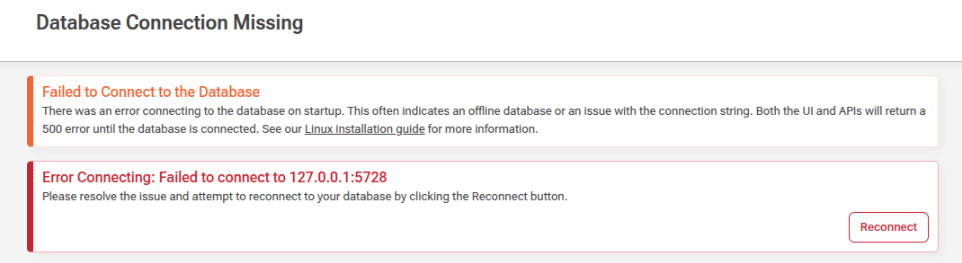
The error I got was this. I tried my best to set correct permissions and SELinux label, but I guess there could be something there. Bu my suspicion is that the database is referenced somewhere pointing the old location? But I can try again with selinux disabled
-
So I succeeded this time, I changed the montpoint to /data and created the subdirectories:
mkdir -p /data/proget/proget-backups
mkdir -p /data/proget/proget-database
mkdir -p /data/proget/proget-packages
Set correct permissions on the folders (same permissions as on the./proget-* folders)
chmod 700 /data/proget/proget-database/
chmod 755 /data/proget/proget-backups/
chmod 755 /data/proget/proget-packages/
Set ownership
chown 101:root /data/proget/proget-database/
chown root:root /data/proget/proget-backups/
chown root:root /data/proget/proget-packages/
Set correct SELinux context
semanage fcontext -a -t svirt_sandbox_file_t "/data/proget(/.*)?"
restorecon -Rv /data/proget
Stop- and remove proget (I had a sapshot of the server as backup)
docker stop proget
docker rm proget
rsync data to new directory
rsync -avh ./proget-packages/ /data/proget/proget-packages/
rsync -avh ./proget-database/ /data/proget/proget-database/
rsync -avh ./proget-backups/ /data/proget/proget-backups/
Then install with (:z added for SELInux)
docker run -d --name=proget --restart=unless-stopped \
  -v /data/proget/proget-packages:/var/proget/packages:z \
  -v /data/proget/proget-database:/var/proget/database:z \
  -v /data/proget/proget-backups:/var/proget/backups:z \
  -p 8624:80 \
  proget.inedo.com/productimages/inedo/proget:25.0.18
last, remove the old directories in root home folder after ensuring everything is OK.
cd ~
rm -rf ./proget-packages ./proget-database ./proget-backups
Now it works as expected. i don't know what I did wrong last time, but now proget isn't filling up the root directory anymore. probably obvious for everyone used to docker, but wasn't for me :)

Hello! It looks like you're interested in this conversation, but you don't have an account yet.
Getting fed up of having to scroll through the same posts each visit? When you register for an account, you'll always come back to exactly where you were before, and choose to be notified of new replies (either via email, or push notification). You'll also be able to save bookmarks and upvote posts to show your appreciation to other community members.
With your input, this post could be even better 💗
Register Login