Welcome to the Inedo Forums! Check out the Forums Guide for help getting started.
If you are experiencing any issues with the forum software, please visit the Contact Form on our website and let us know!
Docker Migration from Nexus – Feature Not Working
-
Hi ProGet team,
I’m trying to use the Docker migration feature in ProGet to import images from a Sonatype Nexus repository, but it doesn’t seem to be working as expected with the following error.
ERROR: Unhandled exception: System.Net.Http.HttpRequestException: Response status code does not indicate success: 404 (Not Found).The Nexus docker repository can be found in the selection of the import dialog.
Before I proceed further, I’d like to confirm whether there are any specific requirements or limitations for this migration feature.
In our setup:
- The Nexus Docker repository is configured using a port connector.
- We have a proxy server that maps this port to a different external URL.
Would this configuration affect or break the migration process?
If so, is there a recommended way to handle such setups?Any clarification or documentation on the expected configuration for Docker migration from Nexus would be greatly appreciated.
Thanks.
-
Hi @koksime-yap_5909,
ProGet uses a combination of the Nexus REST API and the Docker API to pull images from Nexus. Just like packages, only local images will be pulled (as in only hosted Nexus Docker registries are supported). The basic process is:
- Get a list of images using the Nexus components API.
- Get the Docker API endpoint using the Nexus registries API (this is what you would use in the Docker client)
- Pull the image (manifest, layers, etc...) using the Nexus Docker API
I'm guessing the error is occurring building the URL to Docker API endpoint. When you say that you are using an external proxy, did you configure the subdomain and port in Nexus to be the subdomain and port of your proxy? Would you also be able to send us the JSON that is returned for the following GET request in the Nexus API?
https://«NEXUS_HOST_AND_PORT»/service/rest/v1/repositories/docker/hosted/«NEXUS_DOCKER_REGISTRY_NAME»If you can send me the value for the
urlproperty and the object fordockerproperty, I can tell you what URL ProGet using to connect to the Docker API. Feel free to obfuscate the host name, subdomain (if configured), and registry name. The JSON will look something like this:{ "name": "internal", "format": "docker", "type": "hosted", "url": "http://localhost:8081/repository/docker-example", ... "docker": { "v1Enabled": false, "forceBasicAuth": true, "httpPort": 8082, "httpsPort": 8083, "subdomain": "docker-a", "pathEnabled": true } }Thanks,
Rich -
Hi @rhessinger,
Our Nexus docker repository is configured to use specific port (e.g. port 8080), but this port is not exposed externally. Here's an example response returned by the Nexus endpoint:
{
  "name" : "example",
  "url" : "https://nexus-example/repository/example",
  "online" : true,
...
  "docker" : {
    "v1Enabled" : false,
    "forceBasicAuth" : true,
    "httpPort" : 8080,
    "httpsPort" : null,
    "subdomain" : null
  },
...
  "format" : "docker",
  "type" : "hosted"
}
Instead, we have a proxy server that maps a custom URL (e.g.,
https://nexus-docker/) to the internal Nexus port.All Docker operations (push/pull) work correctly through this custom URL.
Could this proxy-based URL mapping affect the Docker migration feature, or is there a way to specify the external (proxy) URL for migration?
Thanks.
-
Hi @koksime-yap_5909,
The separate proxy server port is what is causing the import issue with this. After looking at this further, the main issue is that specified
httpPortis overriding the port, even when anhttps://URL is being used. I created a ticket, PG-3155, to fix that and add the ability to override the URL used for the Docker API. This fix will be released in ProGet 2025.15. If you are interested, I can get you a pre-release build with the fix in it either later today or tomorrow. Just let me know!Thanks,
Rich -
Hi ProGet team,
Thanks for adding support to override the Docker API URL. However, during my testing, it doesn’t seem to work as expected.
For Docker images with long paths, based on the logs, it appears that the requested URL path is truncated. I’m not sure if this is just a visual effect in the logs or if the actual request is being truncated. For example, the URL should be:
https://nexus-registry.example/v2/my-example/subgroup/container/project/subname/image/manifests/stablebut the log shows:
https://nexus-registry.example/v2/group/container/project/subname/image/manifests/stableand it returns a 404, even though I can access the original URL directly in the browser.
Furthermore, with shorter image paths, e.g.:
https://nexus-registry.example/v2/python/manifests/3.11.2-bullseyeI don’t see the request in the log, and it fails with the following error message:
Error: Unhandled exception: System.ArgumentOutOfRangeException: startIndex cannot be larger than length of string. (Parameter 'startIndex')
   at System.String.ThrowSubstringArgumentOutOfRange(Int32 startIndex, Int32 length)
   at System.String.Substring(Int32 startIndex, Int32 length)
I would appreciate any guidance on this matter.
Thank you for your support!
-
Hi @koksime-yap_5909,
Thanks for following up! Is it possible to share the contents of the JSON your API generates? You can do that by logging into Nexus and entering the following URL in your browser:
https://«NEXUS_HOST_AND_PORT»/service/rest/v1/components?repository=«REPOSITORY_NAME»Please not the Repository Name is your Docker Registry name.
The code does some stuff to strip off the registry name so only the namespace and image name are left. I'm guessing that something is being returned slightly differently. Can you also tell us what version of Nexus you are running? It might help so I can do more testing with that version.
Thanks,
Rich -
Hi @rhessinger,
Thanks for the reply. I am running Nexus 3.76.1.
Here's the response from the API:
{
  "items" : [ {
    "id" : "<obfuscated>",
    "repository" : "docker",
    "format" : "docker",
    "group" : "",
    "name" : "pseudo-group/subgrouping/groups/individual/project/image",
    "version" : "stable",
    "assets" : [ {
      "downloadUrl" : "https://my-nexus-server.foo.bar.com/repository/docker/v2/pseudo-group/subgrouping/groups/individual/project/image/manifests/stable",
      "path" : "/v2/pseudo-group/subgrouping/groups/individual/project/image/manifests/stable",
      "id" : "<obfuscated>",
      "repository" : "docker",
      "format" : "docker",
      "checksum" : {
        "sha256" : "<obfuscated>",
        "sha1" : "<obfuscated>"
      },
      "contentType" : "application/vnd.docker.distribution.manifest.v2+json",
      "lastModified" : "2025-12-02T12:15:33.452+00:00",
      "lastDownloaded" : null,
      "uploader" : "<obfuscated>",
      "uploaderIp" : "<obfuscated>",
      "fileSize" : <obfuscated>,
      "blobCreated" : "2025-12-02T12:15:33.454+00:00",
      "blobStoreName" : null,
      "docker" : { }
    } ]
  } ],
  "continuationToken" : null
}
The Docker API Override URL is set to
https://nexus-registry.foo.bar.baz.com/v2/which is the URL returned by the docker client.Here's the outputs when running the migration:
info: System.Net.Http.HttpClient.Default.LogicalHandler[100]
      Start processing HTTP request GET https://nexus-registry.foo.bar.baz.com/v2/ouping/groups/individual/project/image/manifests/stable
info: System.Net.Http.HttpClient.Default.ClientHandler[100]
      Sending HTTP request GET https://nexus-registry.foo.bar.baz.com/v2/ouping/groups/individual/project/image/manifests/stable
Hope the info above is helpful. Thanks!
-
Hi @koksime-yap_5909,
Thanks for sending this over! It will take me a but to dig through this. Just a couple of quick follow up questions:
- What is psuedo-group? Is that a repository/registry name?
- What is subgrouping/groups? It may be helpful to see a screenshot of this example inside of Nexus.
Thanks,
Rich -
Hi @rhessinger ,
The
pseudo-group/subgrouping/groupsare just arbitrary name for possible parent groups.This is a screenshot of the layout when the image are published to Nexus.
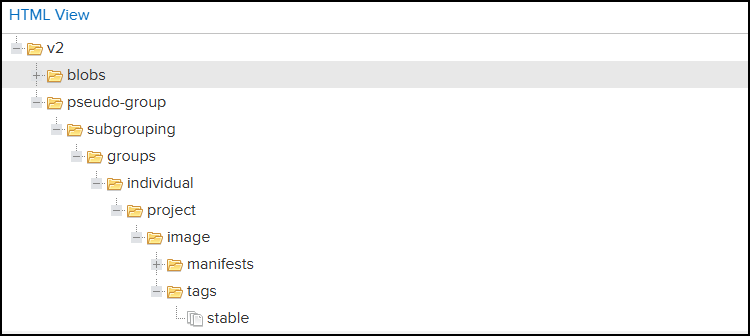
Thanks.
-
Hi @koksime-yap_5909,
Thanks for clarifying that for me. In my testing, the name property always started with
repository/<<REPOSITTORY_NAME>>/.... I'm going to dig into this further and should have an update for you tomorrow. One last question, do you have any rules in your reverse-proxy that would be stripping that out of components API?Thanks,
Rich -
Hi @rhessinger,
I don’t think the reverse proxy strips the component API. In the configuration of the reverse proxy, we map a URL to a port, so when a client accesses the server using a specific URL, the request is routed to the corresponding listening port.
Thanks.
-
Hi @koksime-yap_5909,
Thank you very much for all the information. I was able to recreate your issue and I'm working on a fix right now. I have created a ticket, PG-3178, to track the fix and should have it resolved shortly. The next release is Friday of next week, but I can provide you with a pre-release to try as soon as the fix is ready if you would like. Please let me know.
Thanks,
Rich -
Hi @rhessinger ,
Thanks for your help! I’m fine waiting until the release next Friday.
-
Hi @koksime-yap_5909,
Sounds good. The fix will be released on Friday December 19th.
Thanks,
rich -
Hi @rhessinger ,
Thanks for the support. I am now able to import container images from Nexus.
However, I notice that images with OCI media type are not imported. Is that expected?
Output of execution:
INFO: Importing example:0.0.1...
WARN Docker image "example:0.0.1" not found.
The
example:0.0.1has the following value returned from thehttps://«NEXUS_HOST_AND_PORT»/service/rest/v1/components?repository=«REPOSITORY_NAME»API:"contentType" : "application/vnd.oci.image.manifest.v1+json", -
Hi @koksime-yap_5909,
There are certain types of OCI images that are not supported in ProGet (covered in this forums post), but the
application/vnd.oci.image.manifest.v1+jsonimage type manifest is supported. I'm guessing this is a quirk with Artifactory. What I have learned through implementing this importer is that Artifactory is very dependent on the order of accept headers. It is possible that the order is not quite right. Our order for the importers are:private static HttpRequestMessage CreateDockerHttpRequest(HttpMethod method, string url) { var request = new HttpRequestMessage(method, url); // Order matters here, especially with Artifactory request.Headers.Accept.Add(new("application/vnd.docker.distribution.manifest.v2+json")); request.Headers.Accept.Add(new("application/vnd.docker.distribution.manifest.list.v2+json")); request.Headers.Accept.Add(new("application/vnd.docker.distribution.manifest.v1+prettyjws")); request.Headers.Accept.Add(new("application/json")); request.Headers.Accept.Add(new("application/vnd.oci.image.manifest.v1+json")); request.Headers.Accept.Add(new("application/vnd.oci.image.index.v1+json")); return request; }Is it possible to share an example Docker file that we could build an image that has this import image? That way I can verify it mixed with standard Docker images.
Thanks,
Rich -
Hi @rhessinger ,
Unfortunately I do not have an example of Dockerfile to build the image.
However, after further investigation, I noticed that this only happens when the top-level
mediaTypeis missing in the image when I used thedocker manifest inspect <image>to check the manifest.After I updated the manifest with top-level
mediaTypemanually, the ProGet is able to identify the image and migrate it from the Nexus. -
Hi @koksime-yap_5909,
Ah ok. It make sense that we would not be able to pull those based on the accept headers. How many images do you have without a media type? Are these mostly old images or are there new ones missing this as well? Do you know how to recreate an image in Nexus without a media type?
Thanks,
Rich -
Hi @rhessinger,
I currently do not have an overview on how many images without top-level
mediaType.To have an image in Nexus without top-level
mediaType, you can use theorasCLI tool to manipulate the manifest.For my testing, I used
skopeoto copy an OCI image (e.g. alpine/git:v2.52.0) to Nexus.skopeo copy --dest-creds <user>:<password> --dest-tls-verify=false docker://alpine/git:v2.52.0 docker://registry.nexus.example/docker/alpine/git:v2.52.0Then I used the
orasto:-
fetch the manifest
oras manifest fetch --insecure registry.nexus.example/docker/alpine/git:v2.52.0 > manifest.json -
Edit the
manifest.json, and remove the top-levelmediaType -
Push the manifest back to the registry
oras manifest push --insecure --media-type application/vnd.oci.image.manifest.v1+json registry.nexus.example/docker/alpine/git:v2.52.0 manifest.json
After that, when inspecting the manifest with
docker manifest inspect, the top-levelmediaTypeshould be missing from the image. And when trying to do migration in ProGet, it will show that the image is not found.I hope the information shared above is useful. Thank you.
-
-
Hi @koksime-yap_5909,
Thanks for sharing the steps. I'm going to attempt to reproduce this and I'll let you know what i find!
Thanks,
Rich

Hello! It looks like you're interested in this conversation, but you don't have an account yet.
Getting fed up of having to scroll through the same posts each visit? When you register for an account, you'll always come back to exactly where you were before, and choose to be notified of new replies (either via email, or push notification). You'll also be able to save bookmarks and upvote posts to show your appreciation to other community members.
With your input, this post could be even better 💗
Register Login