Welcome to the Inedo Forums! Check out the Forums Guide for help getting started.
If you are experiencing any issues with the forum software, please visit the Contact Form on our website and let us know!
Error 500 when trying to restore NuGet packages
-
Today I noticed that I receive errors like this, when trying to restore packages:
Error downloading 'NuGet.CommandLine.6.14.0' from 'https://proget.mydomain.com/nuget/Default/v3/flatcontainer/NuGet.CommandLine/6.14.0/NuGet.CommandLine.6.14.0.nupkg'.
Response status code does not indicate success: 500 (Internal Server Error).

Error: NuGet.Protocol.Core.Types.FatalProtocolException: Error downloading 'NuGet.CommandLine.6.14.0' from 'https://proget.mydomain.com/nuget/Default/v3/flatcontainer/NuGet.CommandLine/6.14.0/NuGet.CommandLine.6.14.0.nupkg'.
 ---> System.Net.Http.HttpRequestException: Response status code does not indicate success: 500 (Internal Server Error).
   at System.Net.Http.HttpResponseMessage.EnsureSuccessStatusCode()
   at NuGet.Protocol.HttpSource.<>c__DisplayClass18_0`1.<<ProcessStreamAsync>b__0>d.MoveNext()
--- End of stack trace from previous location ---
   at NuGet.Protocol.HttpSource.ProcessResponseAsync[T](HttpSourceRequest request, Func`2 processAsync, SourceCacheContext cacheContext, ILogger log, CancellationToken token)
   at NuGet.Protocol.HttpSource.ProcessStreamAsync[T](HttpSourceRequest request, Func`2 processAsync, SourceCacheContext cacheContext, ILogger log, CancellationToken token)
   at NuGet.Protocol.GetDownloadResultUtility.GetDownloadResultAsync(HttpSource client, PackageIdentity identity, Uri uri, PackageDownloadContext downloadContext, String globalPackagesFolder, ILogger logger, CancellationToken token)
   --- End of inner exception stack trace ---
...
If i call the above mentioned URL directly in a browser, it only displays this message:
Violation of UNIQUE KEY constraint 'UQ__PackageNameIds'. Cannot insert duplicate key in object 'dbo.PackageNameIds'. The duplicate key value is (nuget, <NULL>, NuGet.CommandLine).
The statement has been terminated.
I tried a reindex because it was suggested by the web interface upon login, but the error still occurs.
What can I do about it?
Version 2025.8 (Build 17)
MSSQL Database BackendThanks,
Philipp -
Hi @power_pille ,
I haven't seen that error before, but I suspect it could occur during a race condition while simultaneously trying to access newly-accessed packages. During an intense package restore, the window for the race condition would widen.
It should go away however. If you can look at the error messages logged in ProGet, it'll help give an idea:
Violation of UNIQUE KEY constraint 'UQ__PackageNameIds'. Cannot insert duplicate key in object 'dbo.PackageNameIds'. The duplicate key value is (nuget, <NULL>, NuGet.CommandLine).In this case, the package is
NuGet.CommandLine-- so hopefully you wouldn't see that again. Let us know if that's not the case, and if you repeadly see the same package.-- Dean
-
Hi @dean-houston,
thank you for your reply.
Unfortunately it is not going away by itself. I can reproduce the error with one of my build pipelines that tries to restore that package. It does not seem to be specific to that package however. A colleague called me yesterday and described the same problem on his local dev machine for another package (in his case it was Microsoft.IdentityModel.JsonWebTokens).
Edit: I just found a log entry in ProGet with a Stack trace attached. Maybe this helps diagnosing:
An error occurred processing a GET request to https://proget.mydomain.com/nuget/Default/v3/flatcontainer/Microsoft.IdentityModel.JsonWebTokens/7.7.1/Microsoft.IdentityModel.JsonWebTokens.7.7.1.nupkg: Violation of UNIQUE KEY constraint 'UQ__PackageNameIds'. Cannot insert duplicate key in object 'dbo.PackageNameIds'. The duplicate key value is (nuget, <NULL>, Microsoft.IdentityModel.JsonWebTokens).
The statement has been terminated.

Microsoft.Data.SqlClient.SqlException (0x80131904): Violation of UNIQUE KEY constraint 'UQ__PackageNameIds'. Cannot insert duplicate key in object 'dbo.PackageNameIds'. The duplicate key value is (nuget, <NULL>, Microsoft.IdentityModel.JsonWebTokens).
The statement has been terminated.
   at Microsoft.Data.SqlClient.SqlConnection.OnError(SqlException exception, Boolean breakConnection, Action`1 wrapCloseInAction)
   at Microsoft.Data.SqlClient.TdsParser.ThrowExceptionAndWarning(TdsParserStateObject stateObj, Boolean callerHasConnectionLock, Boolean asyncClose)
   at Microsoft.Data.SqlClient.TdsParser.TryRun(RunBehavior runBehavior, SqlCommand cmdHandler, SqlDataReader dataStream, BulkCopySimpleResultSet bulkCopyHandler, TdsParserStateObject stateObj, Boolean& dataReady)
   at Microsoft.Data.SqlClient.SqlDataReader.TryConsumeMetaData()
   at Microsoft.Data.SqlClient.SqlCommand.FinishExecuteReader(SqlDataReader ds, RunBehavior runBehavior, String resetOptionsString, Boolean isInternal, Boolean forDescribeParameterEncryption, Boolean shouldCacheForAlwaysEncrypted)
   at Microsoft.Data.SqlClient.SqlCommand.RunExecuteReaderTds(CommandBehavior cmdBehavior, RunBehavior runBehavior, Boolean returnStream, Boolean isAsync, Int32 timeout, Task& task, Boolean asyncWrite, Boolean inRetry, SqlDataReader ds, Boolean describeParameterEncryptionRequest)
   at Microsoft.Data.SqlClient.SqlCommand.RunExecuteReader(CommandBehavior cmdBehavior, RunBehavior runBehavior, Boolean returnStream, TaskCompletionSource`1 completion, Int32 timeout, Task& task, Boolean& usedCache, Boolean asyncWrite, Boolean inRetry, String method)
   at Microsoft.Data.SqlClient.SqlCommand.ExecuteReader(CommandBehavior behavior)
   at Inedo.Data.DatabaseContext.ExecuteInternal(String storedProcName, GenericDbParameter[] parameters, DatabaseCommandReturnType returnType)
   at Inedo.Data.DatabaseContext.ExecuteNonQuery(String storedProcName, GenericDbParameter[] parameters)
   at Inedo.ProGet.Feeds.PackageFeed`5.CreateOrUpdatePackage(PUrl purl, Context db, Nullable`1 publishDate, String publishedBy, Nullable`1 packageSize, Nullable`1 cached, Nullable`1 listed, Nullable`1 allow, Byte[] manifest, Byte[] md5, Byte[] sha1, Byte[] sha256, Byte[] sha512, String fileName, String originUrl)
   at Inedo.ProGet.Feeds.PackageFeed`5.AddPackageAsync(Stream stream, InstallPackageOptions options, PackageInstallContext context, Nullable`1 publishDate, Boolean listed, CancellationToken cancellationToken)
   at Inedo.ProGet.Feeds.PackageFeed`5.AddPackageAsync(Stream stream, InstallPackageOptions options, PackageInstallContext context, Nullable`1 publishDate, Boolean listed, CancellationToken cancellationToken)
   at Inedo.ProGet.Feeds.PackageFeed`5.DownloadPackageAsync(TPackage package, IPackageDownloadContext context, OpenPackageOptions options, PackageInstallContext installContext, CancellationToken cancellationToken)
   at Inedo.ProGet.WebApplication.FeedEndpoints.NuGet.NuGetApi.GetHandler.TransmitPackageAsync(AhHttpContext context, WebApiContext apiContext, ICanonicalNuGetPackage package, String packageFileName, Boolean includeSymbols, Boolean includeSource, Boolean includeSignature, NuGetFeed feed)
   at Inedo.ProGet.WebApplication.FeedEndpoints.NuGet.NuGetApi.GetHandler.ProcessGetRequestAsync(AhHttpContext context, WebApiContext apiContext, RequestData urlData, NuGetFeed feed)
   at Inedo.ProGet.WebApplication.FeedEndpoints.NuGet.V3.PackageBaseAddressHandler.ProcessRequestAsync(NuGetFeed feed, AhHttpContext context, WebApiContext apiContext, String relativeUrl)
   at Inedo.ProGet.WebApplication.FeedEndpoints.NuGet.NuGetFeedHandler.ProcessRequestAsync(AhHttpContext context, WebApiContext apiContext, NuGetFeed feed, String relativeUrl)
   at Inedo.ProGet.WebApplication.FeedEndpoints.FeedEndpointHandler.FeedRequestHandler.ProcessRequestAsync(AhHttpContext context)
ClientConnectionId:35c73520-7c8f-4a32-ac72-3bcb50fe0251
Error Number:2627,State:1,Class:14

::Web Error on 22.08.2025 08:02:31::
Edit2: I found other log messages with the same problem. Strange is that the ones I looked at, seem all to be microsoft releated packages e.g.:
microsoft.identitymodel.jsonwebtokens
system.security.cryptography.pkcs
system.text.encodings.web
NuGet.CommandLine
System.Text.Json
Best regards,
Philipp -
I found out that the Stored Procedure
dbo.PackageNameIds_GetOrCreatePackageNameIdmight be the problem. If I call it manually on the database I receive the above mentioned error:BEGIN TRAN EXEC dbo.PackageNameIds_GetOrCreatePackageNameId 'nuget', NULL, 'NuGet.CommandLine', 'Y' ROLLBACKBUT if I call it like this, it is successful:
BEGIN TRAN
EXEC dbo.PackageNameIds_GetOrCreatePackageNameId 'nuget', NULL, 'Nuget.CommandLine', 'Y'
ROLLBACK
Note the small
ginNugetin the second statement.The database already contains a record for
NuGet.CommandLine:
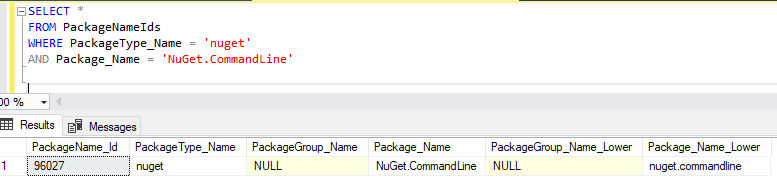
-
Hi @power_pille ,
That's strange; I'm wondering if there's some kind of collation problem on your database.
Can you run this?
SELECT CONVERT (varchar, SERVERPROPERTY('collation')) AS 'Server', collation_name as 'Database' FROM sys.databases WHERE name = 'ProGet';What are the collation you're seeing?
ProGet must be
SQL_Latin1_General_CP1_CI_AS-- Dean
-
Hi @dean-houston ,
Seems ok:

The stored procedure does comparisons by providing the collation explicitly.
-
I'm having the same problem, and I can see in the database the duplicated entries.
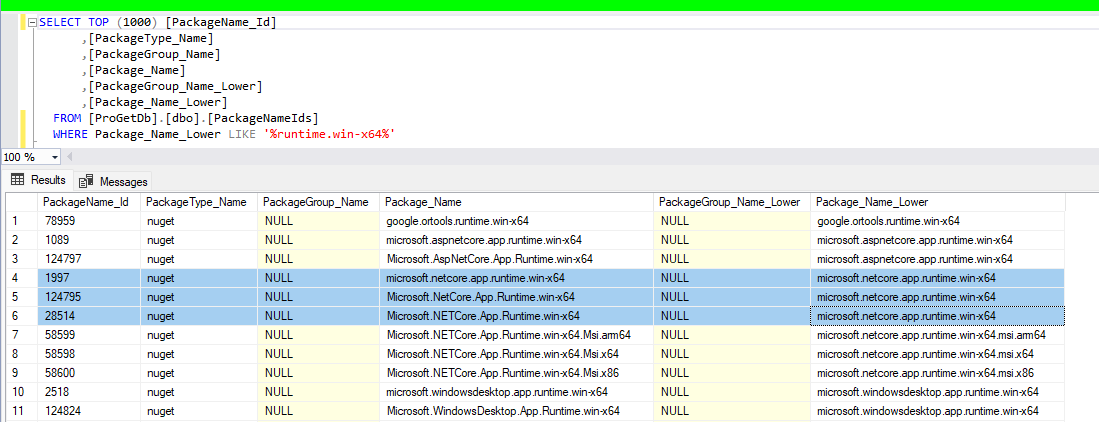
-
Hi @dean-houston,
thanks to the post of @pmsensi I also had another look at the records in the database. I always only found one record for e.g. Nuget.CommandLine. But then I noticed that the Column "PackageNameIds.Package_Name" uses a case sensitive collation:
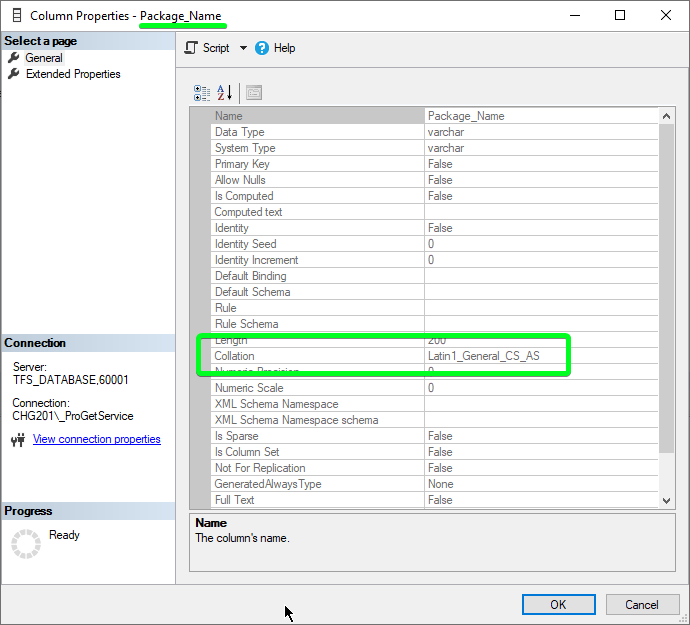
So if I query the column with case insensitive collation I also receive 2 records. This was unexpected as the collation of the server and database were both case insensitive. This may have to do with the problem I guess, but I'm not sure why.
SELECT * FROM PackageNameIds WHERE PackageType_Name = 'nuget' AND Package_Name LIKE 'NuGet.CommandLine' COLLATE Latin1_General_CI_AS -
I created a copy of the Stored Procedure
[dbo].[PackageNameIds_GetOrCreatePackageNameId]and replaced the statement that tries to find the correctly cased record with this:-- prefer an exact case match if there are multiple entries WITH AvailablePackageOrderedByCasing AS ( SELECT TOP 1 * FROM [PackageNameIds] WHERE [PackageType_Name] = @PackageType_Name AND (([PackageGroup_Name_Lower] IS NULL AND @PackageGroup_Name IS NULL) OR ([PackageGroup_Name_Lower] = LOWER(@PackageGroup_Name))) AND [Package_Name_Lower] = LOWER(@Package_Name) ORDER BY CASE WHEN [Package_Name] = @Package_Name COLLATE Latin1_General_CS_AS AND ISNULL([PackageGroup_Name],'') = ISNULL(@PackageGroup_Name,'') THEN 0 ELSE 1 END, [PackageName_Id] DESC ) SELECT @PackageName_Id = [PackageName_Id], @Actual_PackageGroup_Name = [PackageGroup_Name], @Actual_Package_Name = [Package_Name] FROM AvailablePackageOrderedByCasingWhen I call the modified stored procedure I get the Id of the correctly cased record without an error.
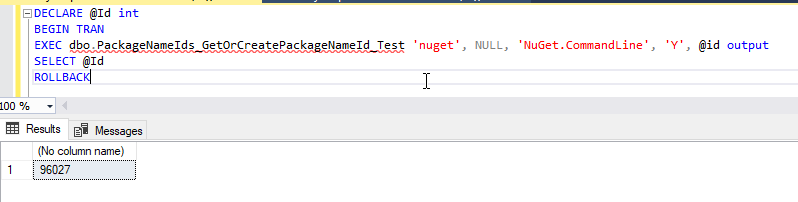
So I think the issue might be the part that tries to find the correctly cased existing record.
-
@power_pille @pmsensi thanks for helping to investigate this
What I can say is this is most definitely a regression in ProGet 2025.8 caused by PG-3047 -- I'm not sure if we want to revert that change or fix it. But rolling back to ProGet 2024.7 will definitely address the issue.
As for casing, it's all really strange to honest - some package ecosystems (rpm) are case sensitive, and different packages that differ by casing. Most are not insane like that.
However, due to a bug from a while back, "bad data" snuck into the
PackageNameIdstable from a vulnerability database update -- and that's why NuGet has those duplicates. Clearing them "blindly" from databases in the field isn't easy, but the feed reindex was a step in that direction.Anyway we're going to continue researching how to address this
-
hi @power_pille @pmsensi ,
Just as an update, we will revert the change via PG-3097 in the next maintenance release.
We will solve duplicate package names another day -- but we'll do it the "hard way", which is to update all the related tables when it occurs.
Thanks,
Alana -
Hi @atripp,
ok, in the meantime I applied the above mentioned fix to the stored procedure so our builds will run again.
-
Hi @atripp ,
thank you for the update. I reverted to 2025.07 and I will wait for the next maintenance release.
@power_pille thank you too, for your findings and suggestions.


Hello! It looks like you're interested in this conversation, but you don't have an account yet.
Getting fed up of having to scroll through the same posts each visit? When you register for an account, you'll always come back to exactly where you were before, and choose to be notified of new replies (either via email, or push notification). You'll also be able to save bookmarks and upvote posts to show your appreciation to other community members.
With your input, this post could be even better 💗
Register Login