Welcome to the Inedo Forums! Check out the Forums Guide for help getting started.
If you are experiencing any issues with the forum software, please visit the Contact Form on our website and let us know!
ProGet Entra Hybrid Authentication
-
Hey, I have a bit of an odd corporate setup. I don't know the specifics, but we have some Entra hybrid sync thing going on that synchronises Entra cloud groups into local Active Directory. I'm pretty sure this is a standard offering from Microsoft.
I am trying to utilise this along with Entra Access Packages so that people can request access to groups and have them approved without needing go through an Active Directory admin.
For login we use SAML SSO via Entra, not Windows Authentication. This is documented as ignoring group claims and going straight to AD.
The generated AD groups have very odd names. They look something like
$JQA200-TQZJ4H3I77X8@domaineven though they have a long name ofCN=cg_actual_name_plusrandomizedprefix,OU=Cloud,DC=domain.Using the "Test User Directories" feature of ProGet, I can see the members of the group whether I look up
$JQA200-TQZJ4H3I77X8or look upcg_actual_name_plusrandomizedsuffix, I can correctly see the members.If I look up a user and group together, ProGet can see that a user is a member of
cg_actual_name_plusrandomizedsuffix, but it cannot see that the user is a member of$JQA200-TQZJ4H3I77X8.I believe this is the source of the actual issue I am seeing - when I assign Task permissions to
$JQA200-TQZJ4H3I77X8(e.g. Administer), users who are members of that group do not actually get those permissions.Group search:
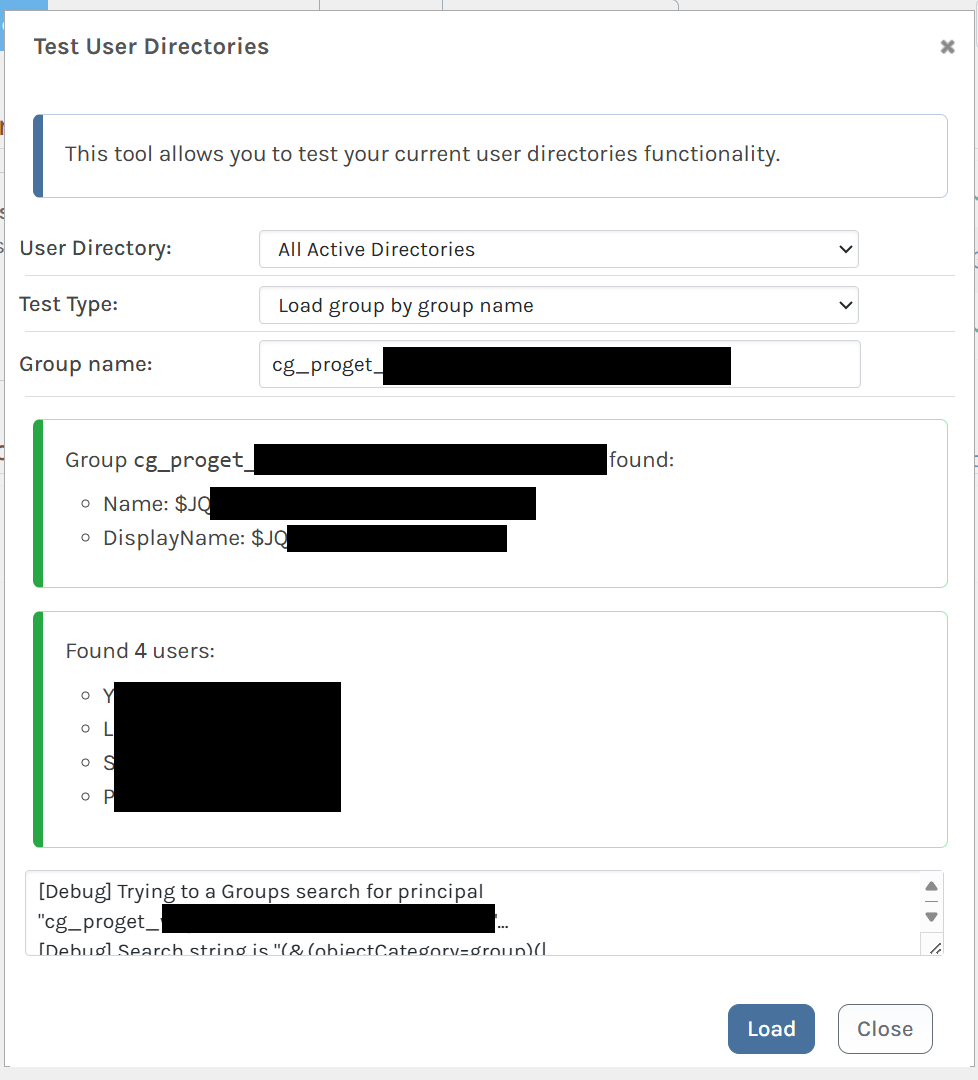
Check membership by SAMAccountName
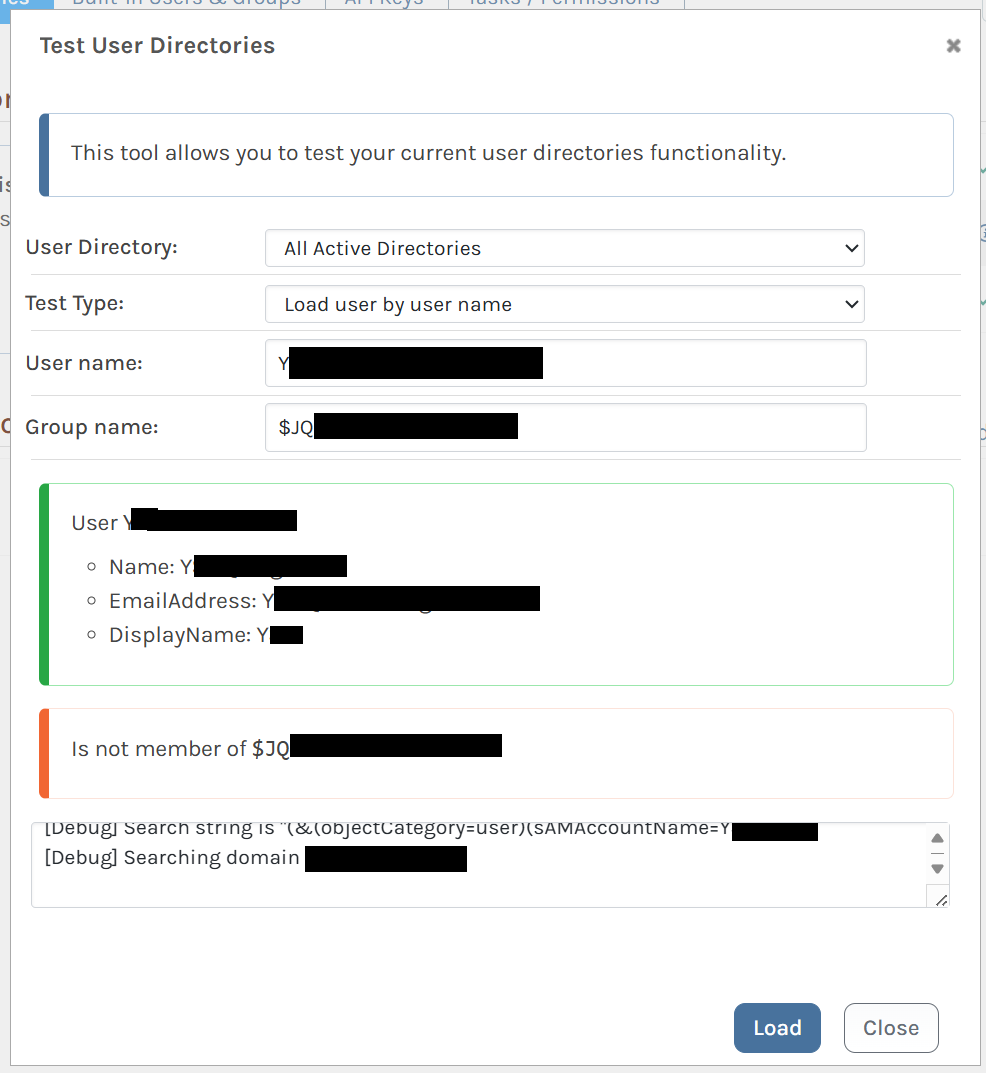
Check membership by Entra name (plus suffix)
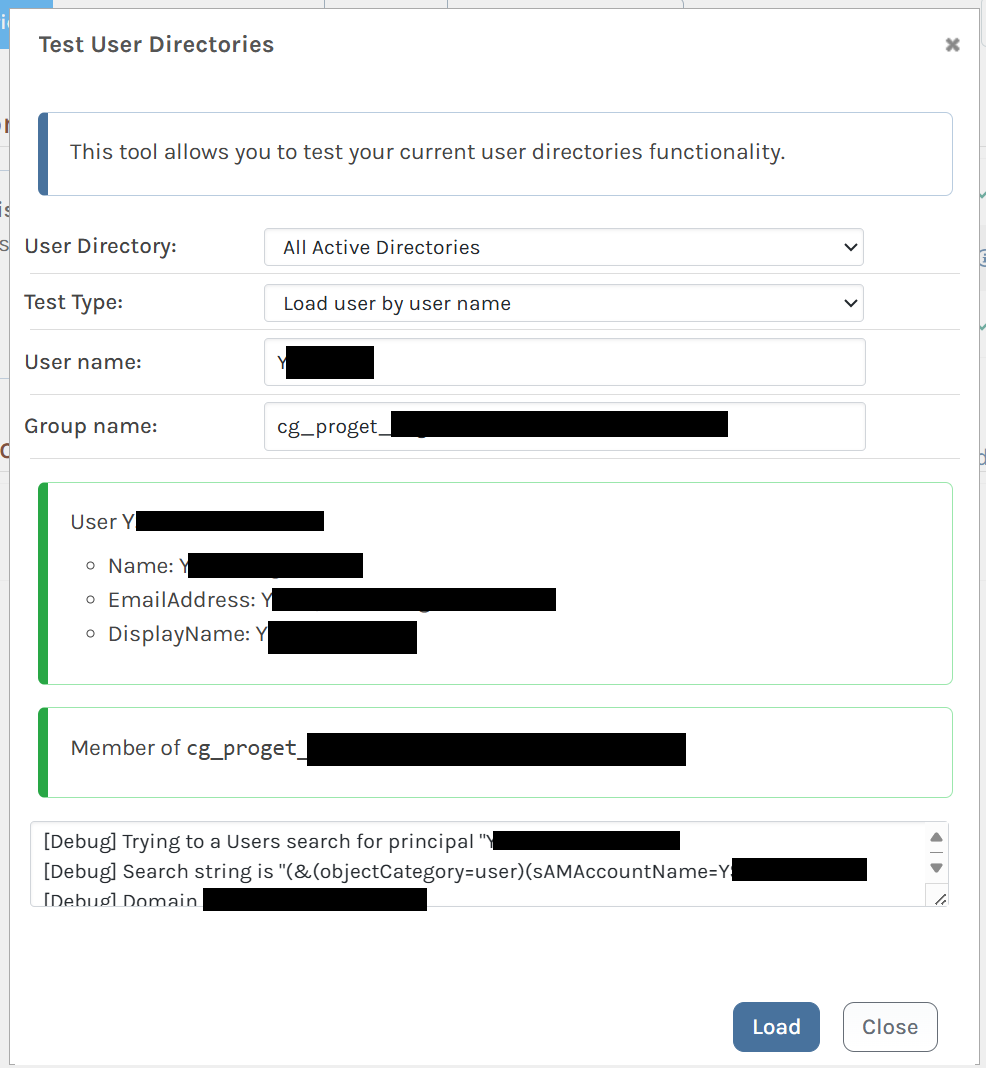
-
Hi @yaakov-smith_7984 ,
I'm afraid I'm not really sure what's happening; it's clear that they're doing something "pretty weird" behind the scenes, and the integration is designed to use Active Directory, not this system.
You can see the queries that ProGet is making -- and if those queries don't return those "weird" groups like $JQA200-TQZJ4H3I77X8, then it's not going to work.
Hopefully the system will work with LDAP queries. If you use the OpenLDAP/Generic directory, you can customize the property names and queries to hopefully get it working: https://docs.inedo.com/docs/installation/security-ldap-active-directory/various-ldap-openldap
Let us know what you find out,
Thanks,
Steve -
I've run the same query that the Test User Directories pane spit out in its little debug log there and it returned exactly what I expected. The user is in that group.
I have spun up a completely separate test system to reproduce this, running Windows Server 2025 with the default Azure image.
- Install Active Directory Domain Services and IIS. Make sure to install Windows Authentication for IIS.
- Create a new forest. I used the domain name
proget.test. - Create an AD user for ProGet to run as. I made
app_proget@proget.test. Give it a password, disable password expiry. - Download and install Inedo Hub for Windows.
- Install ProGet 2025.7 with Embedded database running as the above user account.
- In Windows Services, set the user password under ProGet Service > Properties > Log On
- Activate ProGet. I used an Enterprise trial key, but I think a Basic trial will work too.
- Enable Active Directory v4 (new).
- Use Test User Directories to make sure that AD integration is working.
Then, to reproduce this scenario:
-
In Active Directory Users and Computers, create a new group. Set the group name to
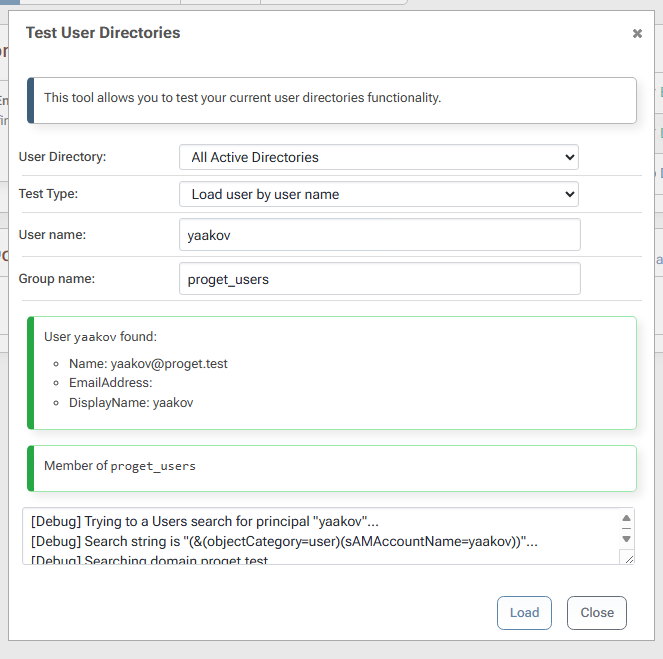
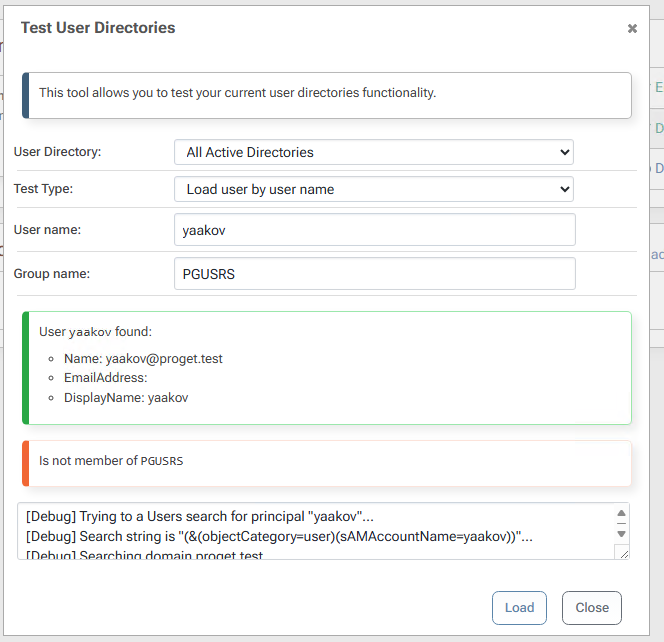
proget_usersand the group name (pre-windows 2000) to PGUSRS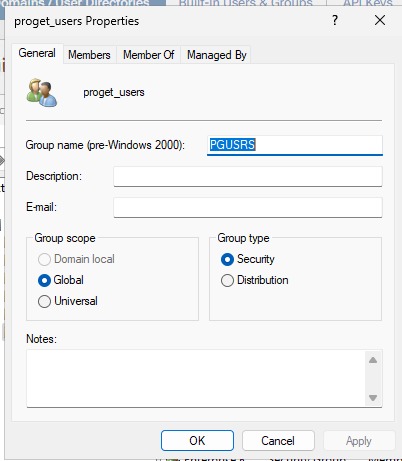
-
Add yourself as a member of this group
-
Look yourself up as a group member in ProGet:
To reproduce the exact problem, rather than the general circumstance:
-
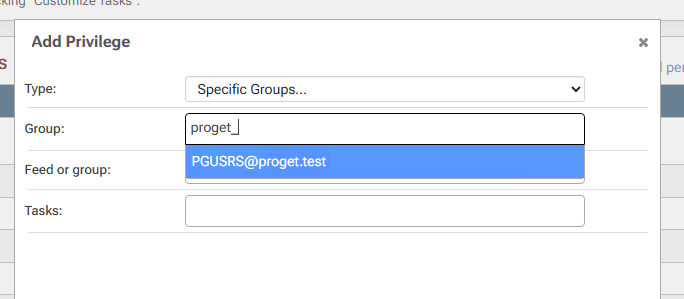
Assign permissions (tasks) to this group. For example, Administer. Note that when looking up the group, ProGet displays its "pre-windows 2000" name and persists it as so:

-
Create a new AD user and add them to this group.
-
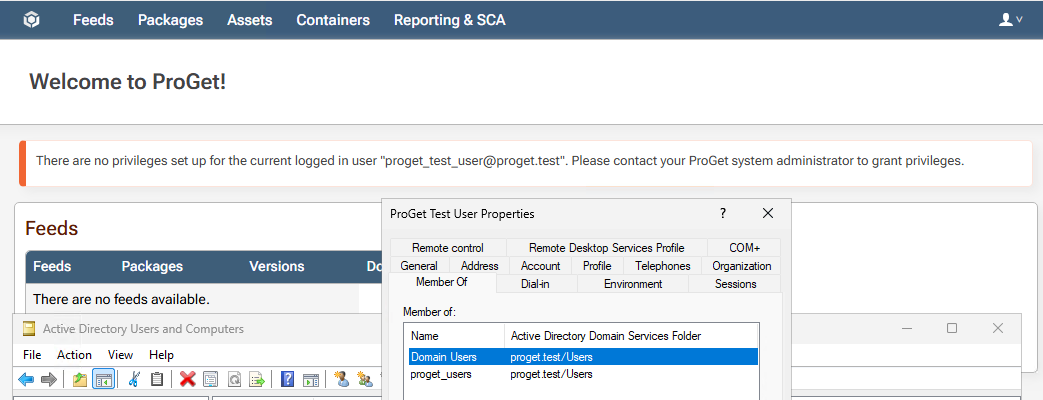
Log in to ProGet as the new AD user
-
Note that you have no privileges in ProGet, despite being a member of a group that grants full administrative rights.
-
Hi @yaakov-smith_7984 ,
Thanks for the additional details; so it sounds like the issue is that ProGet's Active Directory Integration does not support Active Directory group lookup using a "pre-Windows 2000" Group Name?
I'm not sure if this is something we'll want to support in the Active Directory integration. That integration is sensitive and performance-critical, so trying to add-in support for group names on domain configurations from the 1990's doesn't make a lot of sense.
For reference, here is our Active Directory Integration code:
https://github.com/Inedo/inedox-inedocore/tree/master/InedoCore/InedoExtension/UserDirectories/ActiveDirectoryWhy Entra is using those ancient fields is beyond me, especially since all AD objects already have a unique ID. I suspect those are simply not intended to be queried or used by third-party tools. Maybe they're unstable and subject to change. I would try to get ahold of someone at Microsoft to get some answers on how to handle this.
That said, did you try the OpenLDAP/Generic directory? That will allow you to define your own LDAP queries. I think that's what you'll need to do.
Thanks,
Steve -
I don't think the issue is that ProGet's Active Directory Integration does not support Active Directory group lookup using a "pre-Windows 2000" Group Name as much as ProGet's Active Directory Integration does not support any group where the "pre-Windows 2000" Group Name differs from the Group Name, which I believe is where
nameandsAMAccountNamediffer.When looking up what groups a user is a member of, that system relies upon group name.
When assigning permissions to a group, that system relies upon the pre-2K name.Those two systems aren't talking to eachother unless the values happen to match (which to be fair is going to be the 99% case).
Having the link to the code now, I think the bug is here:
This hardcodes
sAMAccountName(i.e."PGUSRS") as the primary source of group name, and only falls back tonameif it is not present.But then, when checking the
memberOfproperty of the user, that is done here against the group's full X.500-style name ("CN=proget_test_user,DC=proget,DC=test")Even though the "group name property name" is overridable (https://github.com/Inedo/inedox-inedocore/blob/master/InedoCore/InedoExtension/UserDirectories/ActiveDirectory/ADUserDirectoryV4.cs#L113-L118) neither of these code paths use it, so changing that doesn't help.
I haven't tried OpenLDAP/Generic yet, I may give that a try this afternoon.
-
I can kind of get it working under OpenLDAP/Generic directory with the "Test User Directories" tool by setting the queries to match AD and then setting LDAP Object > Group Name Property Value to
distinguishedName. However, if I then try and assign any privileges to that group, it doesn't save it and there are no errors logged. -
Hi @yaakov-smith_7984 , sounds like progress.... can you try to do a "group lookup" using the AD testing tool (page)? That's what the permissions page will do prior to saving.
That might give you a clue to the queries that are happening.
-
@stevedennis
It can't find the group on its own:
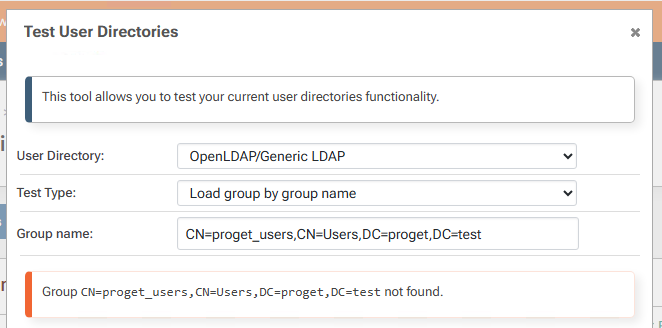
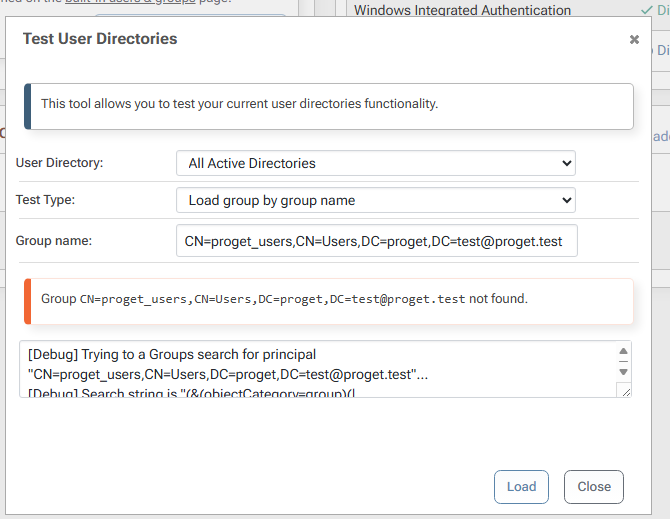
But it does find it as part of all groups:
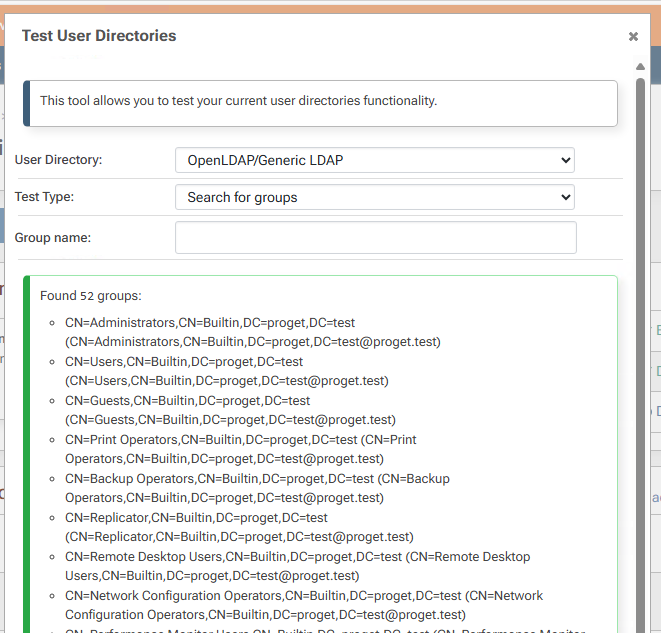
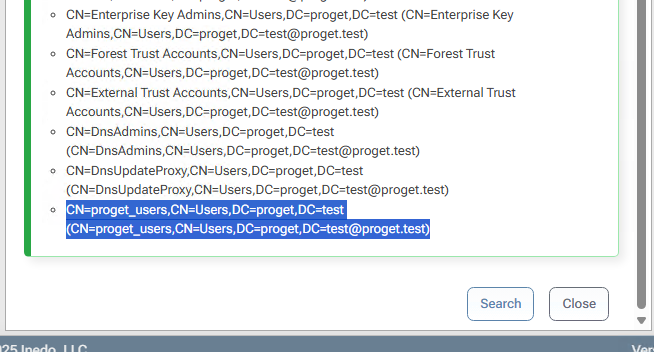
This whole approach seems a lot more finnicky. The AD solution seems to be clearer and more reliable, it just has that bug with the mismatching object properties.
-
@yaakov-smith_7984 good news -- we're working on a new version of the Active Directory integration that may address this problem -- want to give it a shot?
It's in our pre-release feed:
https://docs.inedo.com/docs/proget/administration/extensions#pre-releasesThe extension is InedoCore 3.0.5-CI.2:
https://proget.inedo.com/feeds/PrereleaseExtensions/inedox/InedoCore/3.0.5-CI.2We have been running it in our environment for a while.
This would be an ideal place to fix the issue, or at least add some kind of option to make it work better.
-
a-ha!
v5 seems to work.
It has the same problems with the Test User Directories dialog, it says that my user is a member of proget_users (correct) but does not say that my user is a member of PGUSERS (incorrect).
However, that fades into irrelevancy - when I go assign a task/permission to the group, it saves it as
proget_users@proget.testand not asPGUSERS@proget.test, so then when I log in it can follow the entire chain fromproget_test_user->memberof proget_users->has Administer right.How far along is v5? Is that prerelease build stable enough that I could give it a spin in our current production environment, or should I wait until its released as stable?
-
@yaakov-smith_7984 great news!
We are planning to include it as is in the next maintenance release, later today. So it's "stable enough" we figure :)
-
Is the v5 provider available on Linux, or only on Windows?
We have a new setup we're building using the container image, and AD v5 doesn't show up in Version 2025.8 (Build 17).
-
Hi @yaakov-smith_7984 ,
It looks like we forgot to ship the updated extension in 2025.8, so it's not "included" when you install ProGet. You should be able to update under Admin > Extensions, but unless you make the extensions directory (under Admin > Advacned Configuration) mapped to the docker host it will not "survive" a container reboot.
We could get you a prerelease container version if you'd like to try it as included, just let us know
Thanks,
Alana


Hello! It looks like you're interested in this conversation, but you don't have an account yet.
Getting fed up of having to scroll through the same posts each visit? When you register for an account, you'll always come back to exactly where you were before, and choose to be notified of new replies (either via email, or push notification). You'll also be able to save bookmarks and upvote posts to show your appreciation to other community members.
With your input, this post could be even better 💗
Register Login