Welcome to the Inedo Forums! Check out the Forums Guide for help getting started.
If you are experiencing any issues with the forum software, please visit the Contact Form on our website and let us know!
Trying to push nuget packages, getting 500 Internal Server Error
-
Hi,
I configured a nuget feed for my internal Proget server (docker) and I keep getting a 500 Internal Server Error message. I tried to use an API Access key and user method, the end result is the same. Here is the log extract :
An error occurred processing a PUT request to http://myserverurl:11080/nuget/Test/: Unexpected end of Stream, the content may have already been read by another component.
System.IO.IOException: Unexpected end of Stream, the content may have already been read by another component.
at Microsoft.AspNetCore.WebUtilities.MultipartReaderStream.ReadAsync(Memory1 buffer, CancellationToken cancellationToken) at Microsoft.AspNetCore.WebUtilities.FileBufferingReadStream.ReadAsync(Memory1 buffer, CancellationToken cancellationToken)
at Microsoft.AspNetCore.WebUtilities.StreamHelperExtensions.DrainAsync(Stream stream, ArrayPool1 bytePool, Nullable1 limit, CancellationToken cancellationToken)
at Microsoft.AspNetCore.Http.Features.FormFeature.InnerReadFormAsync(CancellationToken cancellationToken)
at Microsoft.AspNetCore.Http.Features.FormFeature.ReadForm()
at Inedo.Web.AhHttpFileCollection.get_Count()
at Inedo.ProGet.WebApplication.FeedEndpoints.NuGet.NuGetApi.PutHandler.ProcessPutRequestAsync(AhHttpContext context, WebApiContext apiContext, RequestData urlData, NuGetFeed feed) in C:\Users\builds\AppData\Local\Temp\InedoAgent\BuildMaster\192.168.44.60\Temp_E576295\Src\src\ProGet\WebApplication\FeedEndpoints\NuGet\NuGetApi.PutHandler.cs:line 40
at Inedo.ProGet.WebApplication.FeedEndpoints.NuGet.NuGetApi.ProcessRequestAsync(AhHttpContext context, WebApiContext apiContext, NuGetFeed feed, String relativeUrl) in C:\Users\builds\AppData\Local\Temp\InedoAgent\BuildMaster\192.168.44.60\Temp_E576295\Src\src\ProGet\WebApplication\FeedEndpoints\NuGet\NuGetApi.cs:line 27
at Inedo.ProGet.WebApplication.FeedEndpoints.NuGet.NuGetFeedHandler.ProcessRequestAsync(AhHttpContext context, WebApiContext apiContext, NuGetFeed feed, String relativeUrl) in C:\Users\builds\AppData\Local\Temp\InedoAgent\BuildMaster\192.168.44.60\Temp_E576295\Src\src\ProGet\WebApplication\FeedEndpoints\NuGet\NuGetFeedHandler.cs:line 38
at Inedo.ProGet.WebApplication.FeedEndpoints.FeedEndpointHandler.FeedRequestHandler.ProcessRequestAsync(AhHttpContext context) in C:\Users\builds\AppData\Local\Temp\InedoAgent\BuildMaster\192.168.44.60\Temp_E576295\Src\src\ProGet\WebApplication\FeedEndpoints\FeedEndpointHandler.cs:line 194::Web Error on 07/24/2025 12:55:31::
Here is my configuration :
#PROGET
  proget:
    deploy:
      placement:
        constraints:
          - node.hostname==PTR1-APPNODE-1
      restart_policy:
        condition: any
        max_attempts: 20
        delay: 240s
    image: proget.inedo.com/productimages/inedo/proget:latest
    environment:
      - PUID=${PUID:-500}
      - PGID=${PGID:-500}
      - USER_UID=${PUID:-500}
      - USER_GID=${PGID:-500}
      - TZ=${TIMEZONE:-America/Toronto}
    volumes:
      - /mnt/PTR1-NAS-1/MAIN/proget:/var/proget/packages
      - proget-database:/var/proget/database
      - proget-backups:/var/proget/backups
    ports:
      - 11080:80
    networks:
      - dev-net
I have checked if it was perhaps a permission issue writing to the NAS by logging in the container and creating a file from there and all was fine.
Any ideas what I'm missing and how to fix this?
Thanks
-
Hi @patrick-tessier_4584,
The underlying error is network-related; perhaps the traffic is being interfered with, the client is prematurely disconnecting, etc. There are no settings in ProGet nor issues with your ProGet configuration.
Unfortunately that's a bit challenging to troubleshoot, but I suggest you start with a tool like Fiddler Classic or ProxyMan, and see what reuqests are being sent to ProGet.
Then try to reproduce using only curl (not the client tool). Then bypass network equipment / proxies / etc., running the request entirely on the PRoGet server/container if you have to.
Hope that points in the right direction; please share what you find.
Thanks,
STeve -
Hi, @stevedennis .I'm trying to understand what makes you say the client is closing the connection prematurely? The server is still returning a 500 which means something has not been handled correctly. Otherwise if the client would timeout or close it would be a different code like a 408 or something else depending on the issue.
Could it be a server setting that is causing this issue? I've checked everything but I don't see anything that could cause this. I have many other services running on this server all pretty much the same way so it isn't a network issue otherwise I would have issues with many other services I'm running.
-
Hi @stevedennis ,
As I suspected it wasn't a network issue and the error did in fact come from the Proget server. I was on Linux and install nuget which seemed very old from whatever repo it took it from, 2.8.3 I think. I was issued the following command :
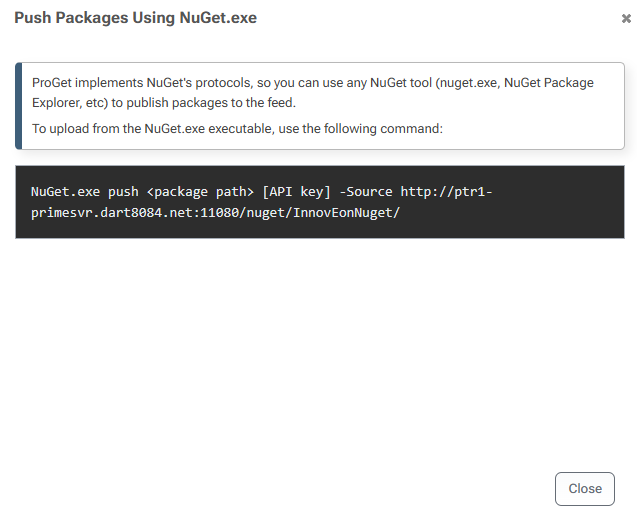
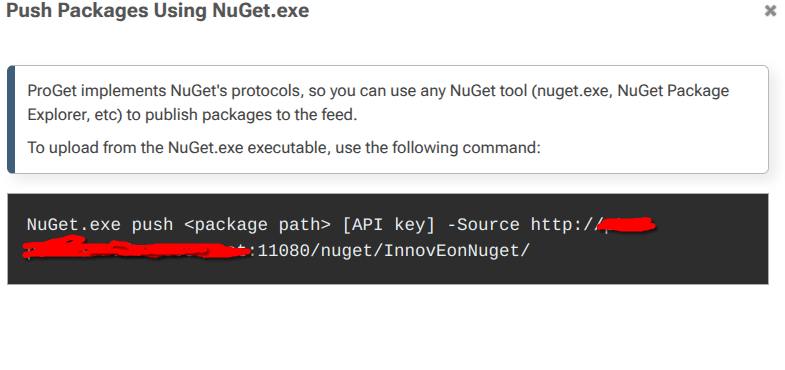
NuGet.exe push -ApiKey [API key] -Source http://myurl:11080/nuget/InnovEonNuget/ <package.nupkg>The command above was actually generated by Proget minus the "-ApiKey" which was missing. This kept giving me a 500 from the server.
I also tried with dotnet nuget with the following
dotnet nuget push -k [API key] -s http://myurl:11080/nuget/InnovEonNuget/ <package.nupkg>Which told me that I couldn't do that since I'm using http unless I add "allowInsecureConnections=True" to my nuget.config.
That is when I decided to add an entry to my proget server in nuget.config which looks like this :
<?xml version="1.0" encoding="utf-8"?>
<configuration>
  <packageSources>
    <add key="nuget.org" value="https://api.nuget.org/v3/index.json" protocolVersion="3" />
    <add key="ANugetServer" value="http://myurl:11080/nuget/InnovEonNuget/v3/index.json" allowInsecureConnections="True" />
  </packageSources>
</configuration>
and then executed
dotnet nuget push -k [API key] -s ANugetServer <package.nupkg>If you notice the last command I'm passing it the "key" defined in the nuget.config and with this Proget was perfectly happy and accepted my package.
So I'm not sure why the nuget.exe didn't work, I didn't try to pass the source and give it just the key to see if that would work but with "dotnet nuget" it works. I wish I had more information returned to me in the logs as to why Proget was unable to digest whatever nuget.exe sent it initially but at least "dotnet nuget" works.
I would recommend looking into this further on your side and perhaps adding a section on how to configure "dotnet nuget" from this screen :
Cheers
-
@patrick-tessier_4584 thanks for letting us know!
NuGet 2.8.3 was released October 17, 2014, which I believe predates ProGet. It probably uploads things in quirky way that we haven't tested in very many years.
In any case, it sounds like it's working now and the issue was the ancient version of nuget.exe
-
@stevedennis True it is old and "dotnet nuget" should probably be used. Which I guess it is weird the Proget is giving a NuGet.exe example. Perhaps that should be updated to use dotnet nuget instead
Here is where I got that string
-
Select Add Package from the Set up Visual Studio menu :

-
Select Push Via Nuget Utility
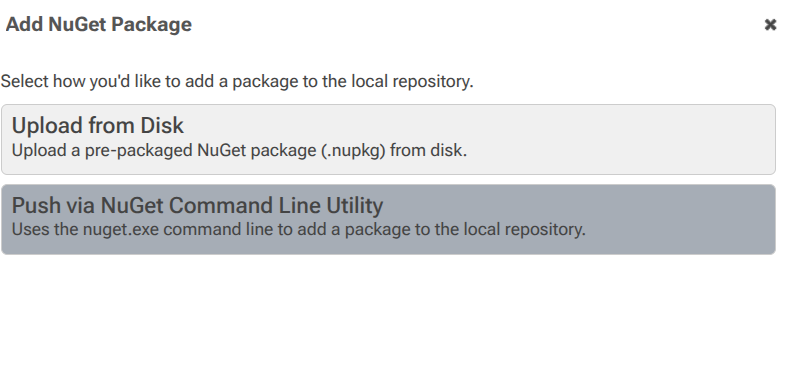
- Then we get the nuget utility command line
Cheers
-
-
Hi @patrick-tessier_4584 FYI,
dotnet nugetandnuget.exeare effectively the same thing - they both invoke the NuGet CL.. Thenuget.exeis a standalone version of the CLI anddotnet nugetis part of the .NET SDK.The issue is that your copy of
nuget.exewas ancient and didn't work.Cheers,
Steve

Hello! It looks like you're interested in this conversation, but you don't have an account yet.
Getting fed up of having to scroll through the same posts each visit? When you register for an account, you'll always come back to exactly where you were before, and choose to be notified of new replies (either via email, or push notification). You'll also be able to save bookmarks and upvote posts to show your appreciation to other community members.
With your input, this post could be even better 💗
Register Login