Welcome to the Inedo Forums! Check out the Forums Guide for help getting started.
If you are experiencing any issues with the forum software, please visit the Contact Form on our website and let us know!
BuildMaster 2024.6 - Build .NET Project script template bug
-
While trying to modify a "Build .NET Project" script template, I'm consistently encountering an "Unexpected Error (500) Server Error" in the dialog window.
This is in a new Application for a DotNet platform, WindowsServer target.
I created a new local "Build .NET Project" script and where I seem to always run into issues is when I attempt to enter a value for "Build output directory" on the "dotnet Options" tab.
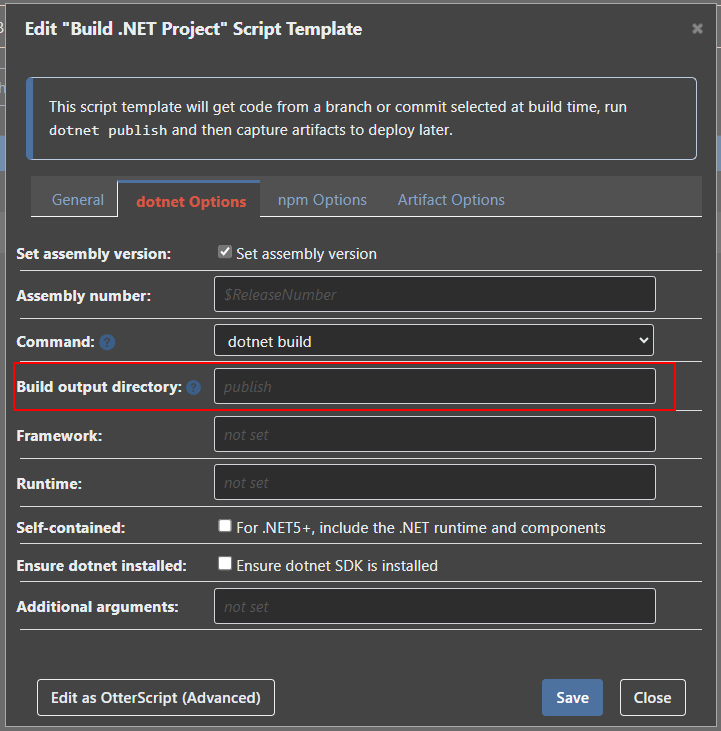
Every time I enter a value, like "bin/Release" and try to save the dialog window displays:
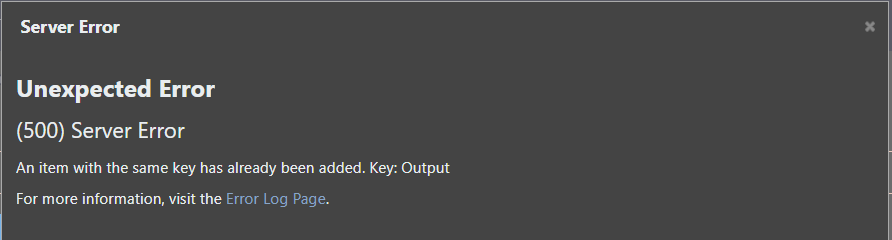
The logged error:
An error occurred in the web application: An item with the same key has already been added. Key: Output URL: https://hidden/scripts/edit-template?applicationId=26&raftItemId=Default%3A%3AScada Data Importer%3A%3ADeploymentScript%3A%3ABuild Referrer: https://hidden/scripts/edit-template?applicationId=26&raftItemId=Default%3A%3AScada Data Importer%3A%3ADeploymentScript%3A%3ABuild User: hidden User Agent: Mozilla/5.0 (Windows NT 10.0; Win64; x64) AppleWebKit/537.36 (KHTML, like Gecko) Chrome/137.0.0.0 Safari/537.36 Edg/137.0.0.0 Stack trace: at System.Collections.Generic.Dictionary`2.TryInsert(TKey key, TValue value, InsertionBehavior behavior) at System.Collections.Generic.Dictionary`2.Add(TKey key, TValue value) at System.Linq.Enumerable.ToDictionary[TSource,TKey,TElement](IEnumerable`1 source, Func`2 keySelector, Func`2 elementSelector, IEqualityComparer`1 comparer) at Inedo.BuildMaster.Web.WebApplication.Pages.Scripts.ScriptTemplates.ScriptTemplateEditor.Action(String name, ValueTuple`2[] args) at Inedo.BuildMaster.Web.WebApplication.Pages.Scripts.ScriptTemplates.CreateDotNetBuildEditor.GetStatements()+MoveNext() at System.Collections.Generic.LargeArrayBuilder`1.AddRange(IEnumerable`1 items) at System.Collections.Generic.EnumerableHelpers.ToArray[T](IEnumerable`1 source) at System.Collections.Immutable.ImmutableArray.CreateRange[T](IEnumerable`1 items) at Inedo.ExecutionEngine.ScopedStatementBlock..ctor(IEnumerable`1 statements, IEnumerable`1 templates) at Inedo.ExecutionEngine.ScopedStatementBlock..ctor(IEnumerable`1 statements) at Inedo.BuildMaster.Web.WebApplication.Pages.Scripts.ScriptTemplates.ScriptTemplateEditor.CreateScript() at Inedo.BuildMaster.Web.WebApplication.Pages.Scripts.EditScriptTemplatePage.<>c__DisplayClass14_0.<CreateChildControlsAsync>g__save|0() at Inedo.BuildMaster.Web.WebApplication.Pages.Scripts.EditScriptTemplatePage.<>c__DisplayClass14_0.<CreateChildControlsAsync>b__1() at Inedo.Web.Controls.ButtonLinks.PostBackButtonLink.Inedo.Web.Controls.ISimpleEventProcessor.ProcessEventAsync(String eventName, String eventArgument) at Inedo.Web.PageFree.SimplePageBase.ExecutePageLifeCycleAsync() at Inedo.Web.PageFree.SimplePageBase.ProcessRequestAsync(AhHttpContext context) at Inedo.Web.AhWebMiddleware.InvokeAsync(HttpContext context) ::HTTP Error on 6/23/2025 2:00:43 PM:: -
Hi @mwatt_5816,
Thanks for all of the detail. I have fixed the code, BM-3982, for this template and it will be released in the next maintenance of BuildMaster 2024.0.7 on Friday.
Thanks,
Rich

Hello! It looks like you're interested in this conversation, but you don't have an account yet.
Getting fed up of having to scroll through the same posts each visit? When you register for an account, you'll always come back to exactly where you were before, and choose to be notified of new replies (either via email, or push notification). You'll also be able to save bookmarks and upvote posts to show your appreciation to other community members.
With your input, this post could be even better 💗
Register Login