Welcome to the Inedo Forums! Check out the Forums Guide for help getting started.
If you are experiencing any issues with the forum software, please visit the Contact Form on our website and let us know!
ProGet: Docker image not showing all layers
-
Hi,
Our images have quite a few layers. Up to about 36, but about 10 of them are just LABEL and ARG lines. When viewing the image in ProGet it only shows up to 24 layers. Is that intentional?
Best regards,
Daniel -
Hi @daniel-lundqvist_1790 ,
Are you sure there are 36 layers in your image? You can see this in the manifest file.
I don't believe that commands like
LABELandARGlines will change the filesystem, and thus a new layer would not be created.The container configuration file, if it exists, may contain these extra commands. You can see the details of these files on the metadata of your image.
Thanks,
Alana -
Hi,
Yes, according to this (first line is a header):
% docker image history <image> | wc -l
37
Last layer shown in ProGet is the 24:th item according to above command. Perhaps layer is not the correct terminology but Layers in ProGet does not show all that
docker image historyshows.Best regards,
Daniel -
Hi @daniel-lundqvist_1790,
Thanks for clarifying. These are different things...
The
docker image historydisplays all lines in thehistorysection of the container configuration file (CCF), which includes both layer-creating and nonlayer-creating commands. A CCF is optional, I suspect that command wouldn't work without the CCF, but I don't know.The "Layers" tab in ProGet displayed the actual layers (i.e.
.tar.gzfiles on disk) that the image. If available, the CCF is used to augment the layer with command information.As an example, you can see the Docker image for ProGet itself:
- https://proget.inedo.com/containers/tags/ProductImages/inedo/proget/24.0.20/metadata
- https://proget.inedo.com/containers/tags/ProductImages/inedo/proget/24.0.20/layers
You can see the CCF lists the history:
"history": [
  {
    "created": "2024-07-02T01:25:02.331012304Z",
    "created_by": "/bin/sh -c #(nop) ADD file:b24689567a7c604de93e4ef1dc87c372514f692556744da43925c575b4f80df6 in / "
  },
  {
    "created": "2024-07-02T01:25:02.745660567Z",
    "created_by": "/bin/sh -c #(nop)  CMD [\"bash\"]",
    "empty_layer": true
  },
  {
    "created": "2024-07-09T14:47:21.224481352Z",
    "created_by": "ENV APP_UID=1654 ASPNETCORE_HTTP_PORTS=8080 DOTNET_RUNNING_IN_CONTAINER=true",
    "comment": "buildkit.dockerfile.v0",
    "empty_layer": true
  },
  {
    "created": "2024-07-09T14:47:21.224481352Z",
    "created_by": "RUN /bin/sh -c apt-get update     \u0026\u0026 apt-get install -y --no-install-recommends         ca-certificates                 libc6         libgcc-s1         libicu72         libssl3         libstdc++6         tzdata         zlib1g     \u0026\u0026 rm -rf /var/lib/apt/lists/* # buildkit",
    "comment": "buildkit.dockerfile.v0"
  },
But only two of those generated FS changes and became layers. So that's what is displayed on the "Layers" page.
Thanks,
Alana -
Hi,
Thanks for clarifying the differences.
But still, ProGet does not show the all information that
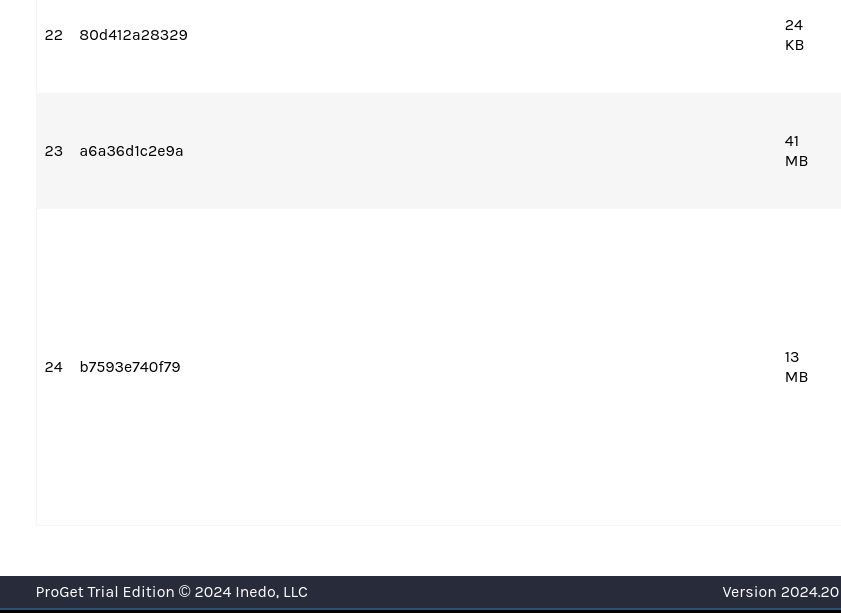
docker image historyshows, it's cut off two-thirds in. As you saw from above, there are 36 lines to the CLI output, but ProGet only shows the 24 first of those:
Best regards,
Daniel -
Hi @daniel-lundqvist_1790 ,
The Image Layers and Image History are two different things.
I'm not sure how to better explain this... but ProGet is not designed to show you the "Image History" -- if you want that, then use the
docker image historycommand.Instead, ProGet's "Layers" page shows the Image Layers.
It's confusing because these things are similar, but they are in fact different.
Thanks,
Alana -
Hi,
I understand that. But again, there are layers after what ProGet shows. Regardless if ProGet only shows layers or not, it's missing the latter layers from the image. There are about 7 or 8 after the last one from the screenshot.
Thank you for your patience,
Daniel -
Hi @daniel-lundqvist_1790,
Can you paste in the manifest file here? It's JSON and it's going to be on the "Metadata" page in a textbox
Thanks,
Alana -
Manifest:
{
   "schemaVersion": 2,
   "mediaType": "application/vnd.docker.distribution.manifest.v2+json",
   "config": {
      "mediaType": "application/vnd.docker.container.image.v1+json",
      "size": 14147,
      "digest": "sha256:ab4eca7160c7cbb7ca656fc567ff13eed767066b4ea662ceea31b9ce8e44f2ad"
   },
   "layers": [
      {
         "mediaType": "application/vnd.docker.image.rootfs.diff.tar.gzip",
         "size": 79078981,
         "digest": "sha256:e60c9fe2676d1fc11442d4ccd62ed958bdeb07c2a637cbdc10e2eef235b66814"
      },
      {
         "mediaType": "application/vnd.docker.image.rootfs.diff.tar.gzip",
         "size": 22354231,
         "digest": "sha256:c061909f4a7a21b0ffe2c5fcc606ce8d0106b461ec7b1c2f414cdb50e061e2d3"
      },
      {
         "mediaType": "application/vnd.docker.image.rootfs.diff.tar.gzip",
         "size": 3817,
         "digest": "sha256:8de8dab7a9d012b3e23f5afa40b62627f2c263be798552b855b3a3630950cc3f"
      },
      {
         "mediaType": "application/vnd.docker.image.rootfs.diff.tar.gzip",
         "size": 32,
         "digest": "sha256:4f4fb700ef54461cfa02571ae0db9a0dc1e0cdb5577484a6d75e68dc38e8acc1"
      },
      {
         "mediaType": "application/vnd.docker.image.rootfs.diff.tar.gzip",
         "size": 4430,
         "digest": "sha256:aa3ef9e322efe6117e81bc3d5e90858570d330d12bbb4d83f8bf494b97282634"
      },
      {
         "mediaType": "application/vnd.docker.image.rootfs.diff.tar.gzip",
         "size": 21657612,
         "digest": "sha256:ceeb0cf101bb99324b382ffa5bcf6c9d8b457f1c139e1ba29996366722a5711f"
      },
      {
         "mediaType": "application/vnd.docker.image.rootfs.diff.tar.gzip",
         "size": 1379,
         "digest": "sha256:bff29e0a6e38370cd786eb41e5b804651fc004d6981526e0ba2eb2ced51cff37"
      },
      {
         "mediaType": "application/vnd.docker.image.rootfs.diff.tar.gzip",
         "size": 945288,
         "digest": "sha256:5549a014dacbbe1fb9703b00faed6ce3e39b7c83bafaee5e13f56b24e38899e5"
      },
      {
         "mediaType": "application/vnd.docker.image.rootfs.diff.tar.gzip",
         "size": 325129588,
         "digest": "sha256:e594dc179bfc37e9c8c746b7c303651c5472dd6702f9aac03e4babdff540531e"
      },
      {
         "mediaType": "application/vnd.docker.image.rootfs.diff.tar.gzip",
         "size": 32,
         "digest": "sha256:4f4fb700ef54461cfa02571ae0db9a0dc1e0cdb5577484a6d75e68dc38e8acc1"
      },
      {
         "mediaType": "application/vnd.docker.image.rootfs.diff.tar.gzip",
         "size": 32,
         "digest": "sha256:4f4fb700ef54461cfa02571ae0db9a0dc1e0cdb5577484a6d75e68dc38e8acc1"
      },
      {
         "mediaType": "application/vnd.docker.image.rootfs.diff.tar.gzip",
         "size": 1238929,
         "digest": "sha256:6897a98c90464f6521787c0a5410533790d266c63c732afa860b2d5fab2720b2"
      },
      {
         "mediaType": "application/vnd.docker.image.rootfs.diff.tar.gzip",
         "size": 16767228,
         "digest": "sha256:d69ae6da49ed40a5c9cf51194ea5f4f7d18de50e85a0b9d4da276785cadd0626"
      },
      {
         "mediaType": "application/vnd.docker.image.rootfs.diff.tar.gzip",
         "size": 8906037,
         "digest": "sha256:982da0f0876345605ae557d61a92ee45399553bd0a5806b8c3e62548df32e002"
      },
      {
         "mediaType": "application/vnd.docker.image.rootfs.diff.tar.gzip",
         "size": 130,
         "digest": "sha256:d7a1da484429e49793b180eeef361b16534a7f7bbe4b00067fa0397bc1f92fad"
      },
      {
         "mediaType": "application/vnd.docker.image.rootfs.diff.tar.gzip",
         "size": 4940215,
         "digest": "sha256:4ee7dcf865d60d11363aa61338a4aa22116540d3b87ea087730419922c22e68e"
      },
      {
         "mediaType": "application/vnd.docker.image.rootfs.diff.tar.gzip",
         "size": 16399337,
         "digest": "sha256:4529bcd3ea1bf888fce1d9d7887243ce879e69408e65ce764a99860eef9ae68f"
      },
      {
         "mediaType": "application/vnd.docker.image.rootfs.diff.tar.gzip",
         "size": 92,
         "digest": "sha256:b33640e583ab6f826c3dcb7956be9a4cad8f9b1eb8c83594518b8fb67e6c5281"
      },
      {
         "mediaType": "application/vnd.docker.image.rootfs.diff.tar.gzip",
         "size": 1842985,
         "digest": "sha256:95c6edbc8b63924db8268f4b698fa82daa10af2d6d81020fc29c3a2ad7418222"
      },
      {
         "mediaType": "application/vnd.docker.image.rootfs.diff.tar.gzip",
         "size": 11610611,
         "digest": "sha256:f4340cf7e51f815647974cc1771b2dffa77e0f5eba4a57721bc05e9af6c6ad57"
      },
      {
         "mediaType": "application/vnd.docker.image.rootfs.diff.tar.gzip",
         "size": 32,
         "digest": "sha256:4f4fb700ef54461cfa02571ae0db9a0dc1e0cdb5577484a6d75e68dc38e8acc1"
      },
      {
         "mediaType": "application/vnd.docker.image.rootfs.diff.tar.gzip",
         "size": 25434,
         "digest": "sha256:80d412a28329389087d676a767297becd692057d56043d1019af006c430fac7e"
      },
      {
         "mediaType": "application/vnd.docker.image.rootfs.diff.tar.gzip",
         "size": 43891830,
         "digest": "sha256:a6a36d1c2e9abece59b383c3f93c39d060a48ae4a9d3047408bc05aa09c9c5b1"
      },
      {
         "mediaType": "application/vnd.docker.image.rootfs.diff.tar.gzip",
         "size": 13829131,
         "digest": "sha256:b7593e740f79fdea31249ff3717f4fe50dc1925ca728bb423e56e12e2e1b4b6e"
      }
   ]
}
I could also provide the configuration JSON, but rather send that outside of forum.
// Daniel
-
Hi @daniel-lundqvist_1790 ,
Thanks for sharing this; as you can see from the manifest file you shared, there are 24 layers in your image. These are the 24 layers that ProGet is showing on the Layers tab.
We can clearly see that there are no additional layers; the 24th layer that ProGet is showing is indeed the last (24th) entry in the manifest file:
      {
         "mediaType": "application/vnd.docker.image.rootfs.diff.tar.gzip",
         "size": 13829131,
         "digest": "sha256:b7593e740f79fdea31249ff3717f4fe50dc1925ca728bb423e56e12e2e1b4b6e"
      }
The
docker image historycommand does not show layers. It shows image history, which is orthogonal to layers. ProGet is not designed to show the image history, only the layers.If you were to look at your Container Configuration File, under the "history" property, you will see the exact number of items that
docker image historyshows`. The command is simply giving a user-friendly printout of that file.Hope that helps clarify,
Alana -
Hi,
I understand that
docker image historydoes not show layers per se, but layers are show in a way. It's correct that there are 24 layers and ProGet does show 24 rows. But the commands shown for some/most layers are wrong, it's as if it does not skip non-layer generating commands. There are several commands in our Dockerfile that sets environment variables for following RUN commands.Here's part of command from Dockerfile that generates layer 24:
RUN /bin/sh -c : && tar -C /tmp -xf /tmp/...And here's what ProGet show for layer 24:
RUN |2 proxy_host= proxy_port=8888 /bin/sh -c...The command that ProGet show is used to generate a layer earlier in the Dockerfile.
Best regards,
Daniel -
Hi @daniel-lundqvist_1790 ,
Thanks, now I understand what the issue is: basically the command history isn't lining up to the layers. This is a minor UI/display thing.
I can fix that fairly easy by grouping history entries marked with
empty_layerinto the following command. Here is what it looks like when grouped (ignore red warnings, it's dev environment):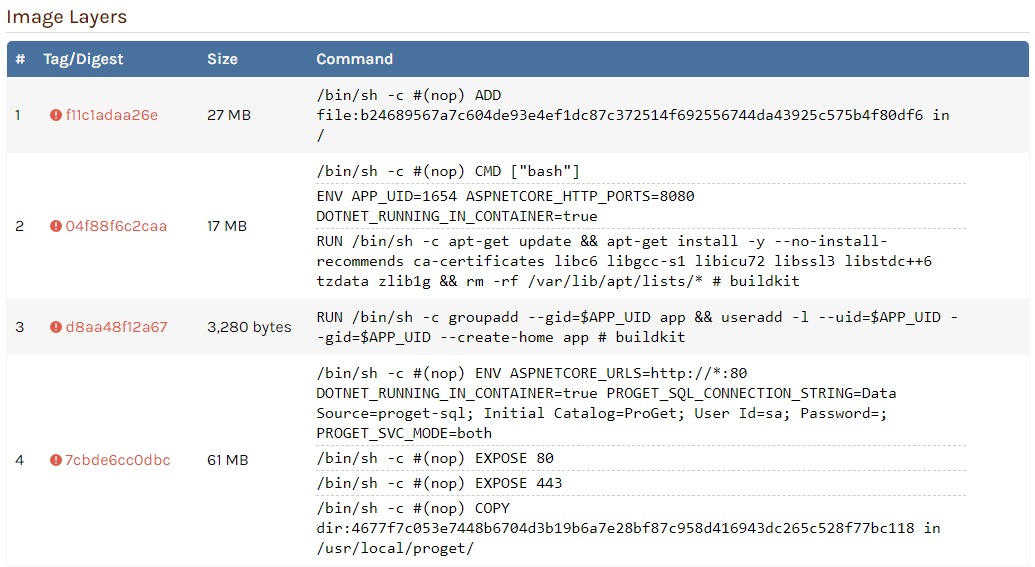
Assuming the history entries are accurate, the bottom-most entry should be the one that generated the layer.
This will be in the next maintenance release (friday) via PG-2848.
Thanks,
Alana -
Hi,
Great, thanks! Apologies for not able to describe the problem better.
Best regards,
Daniel -
@daniel-lundqvist_1790 no problem.. docker is really confusing/silly... , glad we got it solved :)

Hello! It looks like you're interested in this conversation, but you don't have an account yet.
Getting fed up of having to scroll through the same posts each visit? When you register for an account, you'll always come back to exactly where you were before, and choose to be notified of new replies (either via email, or push notification). You'll also be able to save bookmarks and upvote posts to show your appreciation to other community members.
With your input, this post could be even better 💗
Register Login