Welcome to the Inedo Forums! Check out the Forums Guide for help getting started.
If you are experiencing any issues with the forum software, please visit the Contact Form on our website and let us know!
Unable to use the API
-
We are using a self-hosted instance of ProGet 22.0.26. We are trying to download all the packages from all feeds, and therefore need to use the API.
We have tried using the pgutil CLI, the Native API, HTTP Methods, and the .NET Inedo.ProGet nuget package, but none of them work.
If I try to browse "https://#####/api/management/feeds/list" on my browser, I get "Persisted object is not a FeedConfig."
If I try to use the nuget package, set up as follows:
var creds = new ProGetApiKeyAuthentication("#####");
var proGetClient = new ProGetClient("https://#####", creds);
var createFeedResponse = await proGetClient.CreateFeedAsync("test-feed-from-dotnet", "nuget", CancellationToken.None);
I get
Unhandled exception. Inedo.ProGet.ProGetClientException: Server responded with BadRequest (400): Expected content-type application/json.
   at Inedo.ProGet.ProGetClient.CheckResponseAsync(HttpResponseMessage response, CancellationToken cancellationToken)
   at Inedo.ProGet.ProGetClient.CreateFeedAsync(String feedName, String feedType, CancellationToken cancellationToken)
   at NugetSync.ConsoleApp.Clients.TrakaProgetClient.ListPackagesAsync(String feed) in C:\Users\frcamp\RiderProjects\nuget-sync\src\NugetSync.ConsoleApp\Clients\TrakaProgetClient.cs:line 13
   at Program.<Main>$(String[] args) in C:\Users\frcamp\RiderProjects\nuget-sync\src\NugetSync.ConsoleApp\Program.cs:line 15
   at Program.<Main>(String[] args)
If I try to list the feeds:
        var feedsResponse = proGetClient.ListFeedsAsync();
        var feeds = new List<ProGetFeed>();
        await foreach (var feed in feedsResponse)
        {
            feeds.Add(feed);
        }
I get:
Unhandled exception. System.Net.Http.HttpRequestException: Response status code does not indicate success: 500 (Internal Server Error).
   at System.Net.Http.HttpResponseMessage.EnsureSuccessStatusCode()
   at System.Net.Http.Json.HttpClientJsonExtensions.<FromJsonStreamAsyncCore>g__Core|7_0[TValue](HttpClient client, Uri requestUri, JsonTypeInfo`1 jsonTypeInfo, CancellationToken cancellationToken)+MoveNext()
   at NugetSync.ConsoleApp.Clients.TrakaProgetClient.ListPackagesAsync(String feedName) in C:\Users\frcamp\RiderProjects\nuget-sync\src\NugetSync.ConsoleApp\Clients\TrakaProgetClient.cs:line 16
   at NugetSync.ConsoleApp.Clients.TrakaProgetClient.ListPackagesAsync(String feedName) in C:\Users\frcamp\RiderProjects\nuget-sync\src\NugetSync.ConsoleApp\Clients\TrakaProgetClient.cs:line 16
   at Program.<Main>$(String[] args) in C:\Users\frcamp\RiderProjects\nuget-sync\src\NugetSync.ConsoleApp\Program.cs:line 15
   at Program.<Main>(String[] args)
When I try to make requests from postman, I always get a 401, no matter if I put the API Key in the headers or query.
I have also tried one of the example PowerShell scripts on the docs:
$feedName = "#####"
$apiUrl = "https://#####/api/packages/$feedName/latest"
$apiKey = "######"

$queryParams = @{
    stableOnly = "true"
}

$headers = @{
    "X-API-Key" = $apiKey
}

$response = Invoke-RestMethod -Uri $apiUrl -Headers $headers -Method Get -Body $queryParams

foreach ($package in $response) {
    Write-Host "Package Name: $($package.name)"
    Write-Host "Latest Version: $($package.version)"
    Write-Host "--------------------"
}
But always get a 401.
I have also tried to use a pseudo key (username:password) but I get the same exact results with all methods (pgutil, nuget package, HTTP methods).
How can we call the API for ProGet?
-
Hi @francesco-campanella_3733 ,
Based on the error message, I'm thinking that one of the feeds has some kind of legacy/odd configuration, and that's causing an error in the API (which is why the library and pgutil aren't working either).
Without looking at your database, I think the easiest way to fix it is to go the Manage Feed page, and then edit/save Feed Features or NuGet settings.
If we saw the results of
SELECT * FROM [Feeds], but in particular theFeedConfiguration_Xmlcolumn, we could be for sureThanks,
Alana -
@atripp Thanks for replying. I am going to try to run the commands against different feeds and see if that helps. I will also get in touch with the person that manages that instance and see if we can run that SQL command.
-
We have run the SQL query, here is the FeedConfiguration_Xml column:
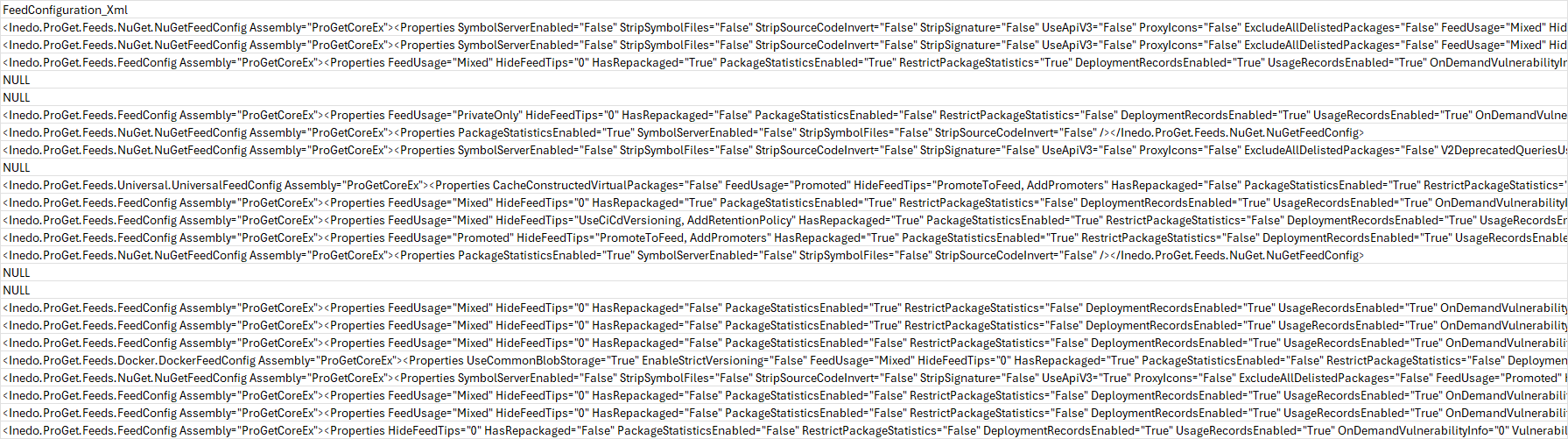
<Inedo.ProGet.Feeds.NuGet.NuGetFeedConfig Assembly="ProGetCoreEx"><Properties SymbolServerEnabled="False" StripSymbolFiles="False" StripSourceCodeInvert="False" StripSignature="False" UseApiV3="False" ProxyIcons="False" ExcludeAllDelistedPackages="False" FeedUsage="Mixed" HideFeedTips="AddRetentionPolicy" HasRepackaged="False" PackageStatisticsEnabled="True" RestrictPackageStatistics="False" DeploymentRecordsEnabled="True" UsageRecordsEnabled="True" OnDemandVulnerabilityInfo="0" /></Inedo.ProGet.Feeds.NuGet.NuGetFeedConfig>

<Inedo.ProGet.Feeds.NuGet.NuGetFeedConfig Assembly="ProGetCoreEx"><Properties SymbolServerEnabled="False" StripSymbolFiles="False" StripSourceCodeInvert="False" StripSignature="False" UseApiV3="False" ProxyIcons="False" ExcludeAllDelistedPackages="False" FeedUsage="Mixed" HideFeedTips="AddRetentionPolicy" HasRepackaged="False" PackageStatisticsEnabled="False" RestrictPackageStatistics="False" DeploymentRecordsEnabled="False" UsageRecordsEnabled="True" OnDemandVulnerabilityInfo="0" /></Inedo.ProGet.Feeds.NuGet.NuGetFeedConfig>

<Inedo.ProGet.Feeds.FeedConfig Assembly="ProGetCoreEx"><Properties FeedUsage="Mixed" HideFeedTips="0" HasRepackaged="True" PackageStatisticsEnabled="True" RestrictPackageStatistics="True" DeploymentRecordsEnabled="True" UsageRecordsEnabled="True" OnDemandVulnerabilityInfo="0" /></Inedo.ProGet.Feeds.FeedConfig>

NULL

NULL

<Inedo.ProGet.Feeds.FeedConfig Assembly="ProGetCoreEx"><Properties FeedUsage="PrivateOnly" HideFeedTips="0" HasRepackaged="False" PackageStatisticsEnabled="False" RestrictPackageStatistics="False" DeploymentRecordsEnabled="True" UsageRecordsEnabled="True" OnDemandVulnerabilityInfo="0" /></Inedo.ProGet.Feeds.FeedConfig>

<Inedo.ProGet.Feeds.NuGet.NuGetFeedConfig Assembly="ProGetCoreEx"><Properties PackageStatisticsEnabled="True" SymbolServerEnabled="False" StripSymbolFiles="False" StripSourceCodeInvert="False" /></Inedo.ProGet.Feeds.NuGet.NuGetFeedConfig>

<Inedo.ProGet.Feeds.NuGet.NuGetFeedConfig Assembly="ProGetCoreEx"><Properties SymbolServerEnabled="False" StripSymbolFiles="False" StripSourceCodeInvert="False" StripSignature="False" UseApiV3="False" ProxyIcons="False" ExcludeAllDelistedPackages="False" V2DeprecatedQueriesUsed="False" HideV2DeprecatedQueriesUsedMessage="False" IgnoreInvalidApiKeys="False" FeedUsage="Mixed" HideFeedTips="AddRetentionPolicy" HasRepackaged="False" PackageStatisticsEnabled="True" RestrictPackageStatistics="False" DeploymentRecordsEnabled="True" UsageRecordsEnabled="True" OnDemandVulnerabilityInfo="0" /></Inedo.ProGet.Feeds.NuGet.NuGetFeedConfig>

NULL

<Inedo.ProGet.Feeds.Universal.UniversalFeedConfig Assembly="ProGetCoreEx"><Properties CacheConstructedVirtualPackages="False" FeedUsage="Promoted" HideFeedTips="PromoteToFeed, AddPromoters" HasRepackaged="False" PackageStatisticsEnabled="True" RestrictPackageStatistics="False" DeploymentRecordsEnabled="True" UsageRecordsEnabled="True" OnDemandVulnerabilityInfo="0" VulnerabilitiesEnabled="False" LicensesEnabled="False" UseWithProjects="True" /></Inedo.ProGet.Feeds.Universal.UniversalFeedConfig>

<Inedo.ProGet.Feeds.FeedConfig Assembly="ProGetCoreEx"><Properties FeedUsage="Mixed" HideFeedTips="0" HasRepackaged="True" PackageStatisticsEnabled="True" RestrictPackageStatistics="False" DeploymentRecordsEnabled="True" UsageRecordsEnabled="True" OnDemandVulnerabilityInfo="0" /></Inedo.ProGet.Feeds.FeedConfig>

<Inedo.ProGet.Feeds.FeedConfig Assembly="ProGetCoreEx"><Properties FeedUsage="Mixed" HideFeedTips="UseCiCdVersioning, AddRetentionPolicy" HasRepackaged="True" PackageStatisticsEnabled="True" RestrictPackageStatistics="False" DeploymentRecordsEnabled="True" UsageRecordsEnabled="True" OnDemandVulnerabilityInfo="0" /></Inedo.ProGet.Feeds.FeedConfig>

<Inedo.ProGet.Feeds.FeedConfig Assembly="ProGetCoreEx"><Properties FeedUsage="Promoted" HideFeedTips="PromoteToFeed, AddPromoters" HasRepackaged="True" PackageStatisticsEnabled="True" RestrictPackageStatistics="False" DeploymentRecordsEnabled="True" UsageRecordsEnabled="True" OnDemandVulnerabilityInfo="0" /></Inedo.ProGet.Feeds.FeedConfig>

<Inedo.ProGet.Feeds.NuGet.NuGetFeedConfig Assembly="ProGetCoreEx"><Properties PackageStatisticsEnabled="True" SymbolServerEnabled="False" StripSymbolFiles="False" StripSourceCodeInvert="False" /></Inedo.ProGet.Feeds.NuGet.NuGetFeedConfig>

NULL

NULL

<Inedo.ProGet.Feeds.FeedConfig Assembly="ProGetCoreEx"><Properties FeedUsage="Mixed" HideFeedTips="0" HasRepackaged="False" PackageStatisticsEnabled="True" RestrictPackageStatistics="False" DeploymentRecordsEnabled="True" UsageRecordsEnabled="True" OnDemandVulnerabilityInfo="0" /></Inedo.ProGet.Feeds.FeedConfig>

<Inedo.ProGet.Feeds.FeedConfig Assembly="ProGetCoreEx"><Properties FeedUsage="Mixed" HideFeedTips="0" HasRepackaged="False" PackageStatisticsEnabled="True" RestrictPackageStatistics="False" DeploymentRecordsEnabled="True" UsageRecordsEnabled="True" OnDemandVulnerabilityInfo="0" /></Inedo.ProGet.Feeds.FeedConfig>

<Inedo.ProGet.Feeds.FeedConfig Assembly="ProGetCoreEx"><Properties FeedUsage="Mixed" HideFeedTips="0" HasRepackaged="False" PackageStatisticsEnabled="False" RestrictPackageStatistics="False" DeploymentRecordsEnabled="True" UsageRecordsEnabled="True" OnDemandVulnerabilityInfo="0" /></Inedo.ProGet.Feeds.FeedConfig>

<Inedo.ProGet.Feeds.Docker.DockerFeedConfig Assembly="ProGetCoreEx"><Properties UseCommonBlobStorage="True" EnableStrictVersioning="False" FeedUsage="Mixed" HideFeedTips="0" HasRepackaged="True" PackageStatisticsEnabled="False" RestrictPackageStatistics="False" DeploymentRecordsEnabled="True" UsageRecordsEnabled="True" OnDemandVulnerabilityInfo="0" /></Inedo.ProGet.Feeds.Docker.DockerFeedConfig>

<Inedo.ProGet.Feeds.NuGet.NuGetFeedConfig Assembly="ProGetCoreEx"><Properties SymbolServerEnabled="False" StripSymbolFiles="False" StripSourceCodeInvert="False" StripSignature="False" UseApiV3="True" ProxyIcons="False" ExcludeAllDelistedPackages="False" FeedUsage="Promoted" HideFeedTips="0" HasRepackaged="False" PackageStatisticsEnabled="False" RestrictPackageStatistics="False" DeploymentRecordsEnabled="True" UsageRecordsEnabled="True" OnDemandVulnerabilityInfo="0" /></Inedo.ProGet.Feeds.NuGet.NuGetFeedConfig>

<Inedo.ProGet.Feeds.FeedConfig Assembly="ProGetCoreEx"><Properties FeedUsage="Mixed" HideFeedTips="0" HasRepackaged="False" PackageStatisticsEnabled="False" RestrictPackageStatistics="False" DeploymentRecordsEnabled="True" UsageRecordsEnabled="True" OnDemandVulnerabilityInfo="0" /></Inedo.ProGet.Feeds.FeedConfig>

<Inedo.ProGet.Feeds.FeedConfig Assembly="ProGetCoreEx"><Properties FeedUsage="Mixed" HideFeedTips="0" HasRepackaged="False" PackageStatisticsEnabled="False" RestrictPackageStatistics="False" DeploymentRecordsEnabled="True" UsageRecordsEnabled="True" OnDemandVulnerabilityInfo="0" VulnerabilitiesEnabled="True" LicensesEnabled="True" UseWithProjects="True" /></Inedo.ProGet.Feeds.FeedConfig>

<Inedo.ProGet.Feeds.FeedConfig Assembly="ProGetCoreEx"><Properties HideFeedTips="0" HasRepackaged="False" PackageStatisticsEnabled="False" RestrictPackageStatistics="False" DeploymentRecordsEnabled="True" UsageRecordsEnabled="True" OnDemandVulnerabilityInfo="0" VulnerabilitiesEnabled="False" LicensesEnabled="False" UseWithProjects="True" /></Inedo.ProGet.Feeds.FeedConfig>
Are the
NULLs allowed? Or is it something else perhaps? -
@francesco-campanella_3733 sorry not seeing the issue yet....one more column

Can you run this?
SELETE Feed_Id, FeedType_Name, FeedConfiguration_Xml FROM FeedsScreenshot is okay, we can figure the XML from the post above if needed.
You can use Feed_Name instead of Feed_Id, it's up to you -- i want some kind of reference in case I want to ask you to try something in UI
-
Here is the output from that query:
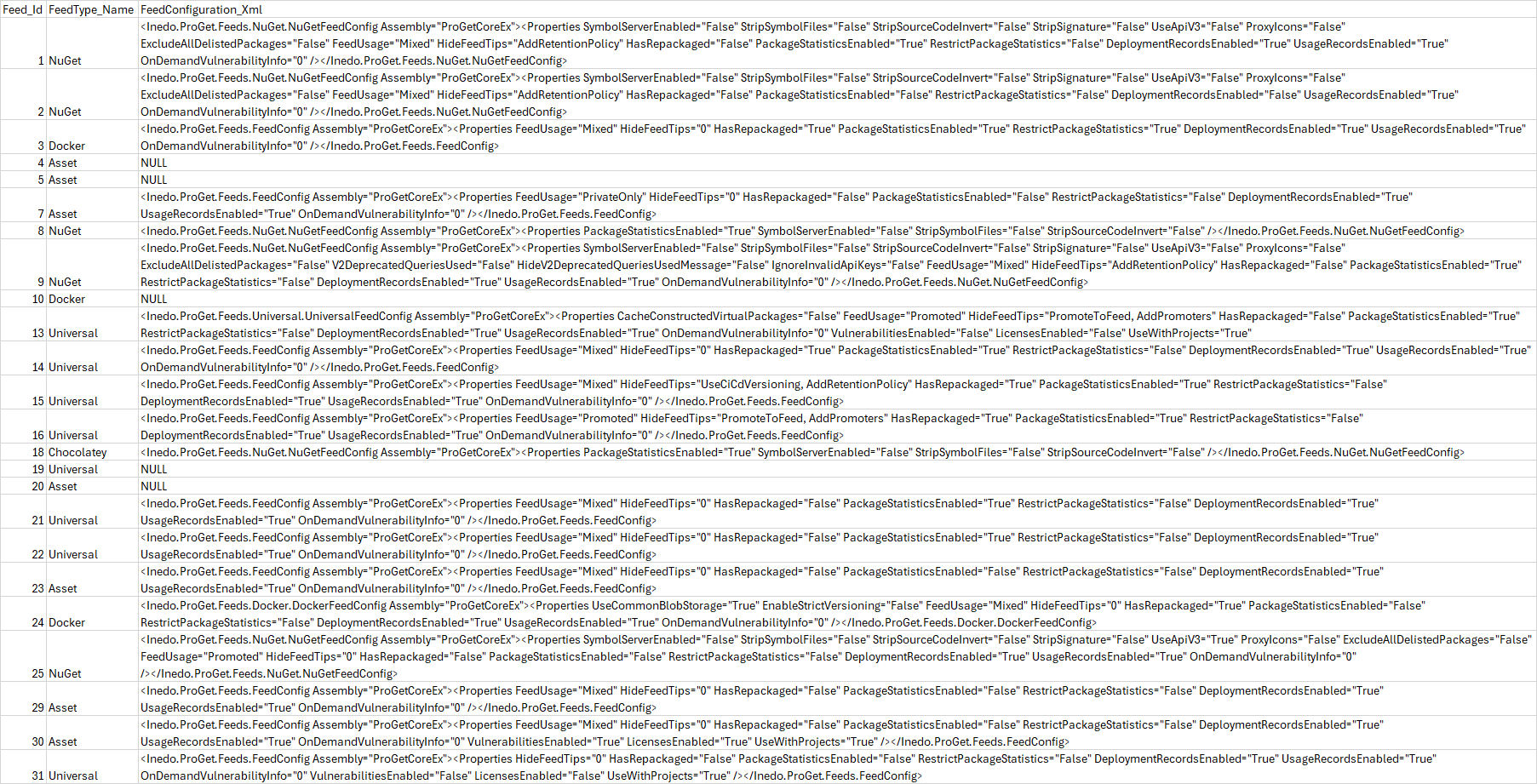
Let me know if the screenshot is not legible.
-
I found what feeds are causing the problem:
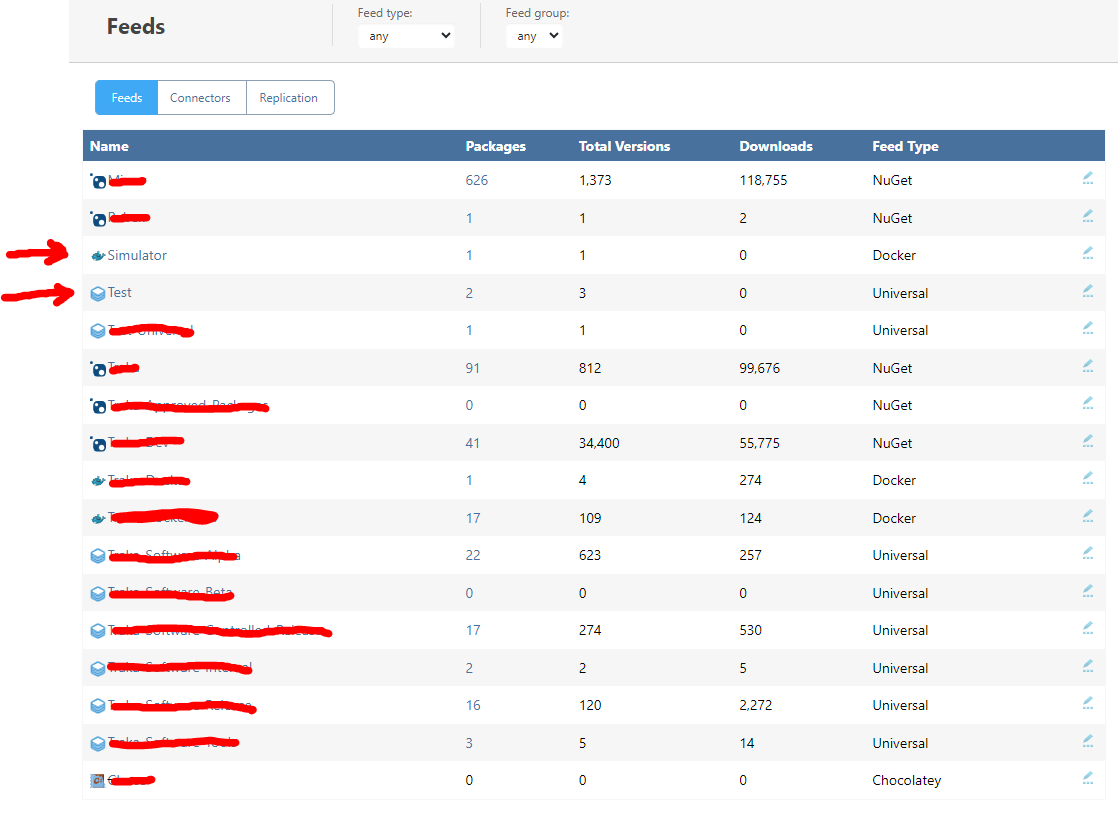
When I run https://traka-proget.ad.global:8625/api/management/feeds/get/<FEED_NAME> against them, I get "Persisted object is not a FeedConfig.". All the others work fine.
For the nuget feeds, I ended up using a NuGet client to discover and download them all. For the docker feeds, I will use the Docker CLI. For the Universal feeds, I'll use the ProGet API (either http methods, SDK, or pgutils).
I am going to try this tomorrow and let you know if I have any issues like the ones I mentioned in the original post.
-
@francesco-campanella_3733 thanks for continuing to research this - we just haven't had a chance to look further. Did you try editing the feed settings (especially the Feed Features, which would save a new Feed Config), and then re-saving again? We will fix the bug, I would just like to be able to reproduce it so we know for sure what's causing it :)

Hello! It looks like you're interested in this conversation, but you don't have an account yet.
Getting fed up of having to scroll through the same posts each visit? When you register for an account, you'll always come back to exactly where you were before, and choose to be notified of new replies (either via email, or push notification). You'll also be able to save bookmarks and upvote posts to show your appreciation to other community members.
With your input, this post could be even better 💗
Register Login