Welcome to the Inedo Forums! Check out the Forums Guide for help getting started.
If you are experiencing any issues with the forum software, please visit the Contact Form on our website and let us know!
NPM Package name case sensitivity
-
we recently had users having issues if their NPM project depended on the
jsonpathpackage. Our NPM feed uses a connector to the public NPM registry, and we had pulled version 1.1.1 to our local proget. Apparently when this was done, the package was saved to ProGet asJSONPath.This resulted in the packument data pull in
npm auditto fail since the metadata JSON (at https://progetserver/npm/feedname/jsonpath) had the nameJSONPathbut the package name is all lower case.Removing the package and all versions from ProGet and clearing it from disk does appear to work, but once we pull it back into ProGet, it will fail.
NPM is very clear in their documentation that package names should always be all lowercase because of case sensitivity differences between OSes.
How can we fix ProGet so that we can pull the jsonpath package locally but keep the proper naming convention?
-
Hi @dan-brown_0128,
I understand that npm is currently case insensitive, but there was a brief period that it wasn't. This led to several duplicate packages being published:
I don't believe this is possible anymore? Either way, ProGet is case insensitive for npm packages, which means that
JSONPathandjsonpathare considered the same package.IfIn either case, the package name should be returned in results asJSONPathcame first, then that's what the package name is I guess?jsonpathIt doesn't seem to cause any issues, except with
npm audit?This is a rare case, so I would just not worry about it. We don't recommend
npm auditand you should usepgutil auditanyway. More comprehensive, covers licenses, all that.. -
Part of the issue here is that the results from ProGet do not match that of the public registry. Yes, it is an edgecase where there are 2 packages with the same name but different capitalization, but its also a fairly common package.
npm audit is a step that is run by default as part of
npm installand other standard functions. This is to advise of package updates, end of support, and vulnerabilities by priority. Simply replacing NPM with pgutil is not a small feat, especially with standard common tooling already in use across the field.The fact that our builds fail because of the mismatch is problematic, and shows that two unique packages are being mixed by ProGet. The audit caught it, and prevented the two from being crossed
-
hi @dan-brown_0128,
ProGet simply does not support case-sensitive npm package names. This is a 10+ year old design decision (back from ProGet v3), which we made because npm package were always supposed to be lower-cased: https://docs.npmjs.com/creating-a-package-json-file#required-name-and-version-fields
JSONPathis an invalid package that entered the public registry due to an npmjs.org bug. It's an old package -- latest version version 0.1.2, is 8+ years old -- and according to the package page says that it's "moved tojsonpath-plusto avoid npm problems in dealing with upper-case packages."ProGet permits these packages, but there are just going to be quirks if you have them in your feed. For example, if you have both
jsonpath-1.1.1andJSONPath-0.1.2in your feed, then they will generally show up asjsonpath, but in some API queries you may seeJSONPath.We understand this is different than how the npmjs.org registry behaves, but as I mentioned, this was a "day 1" choice that we can't change today. No one's mentioned this as an issue until now.
If npm audit is crashing because sometimes
JSONPathis returned in results, that sounds like a bug in npm audit to me? We obviously can't add support for case-sensitive npm packages nor change how ProGet returns data in npm API calls just to work-around an npm audit bug like this.The easiest solution is to stop using
JSONPathand remove from your feed, which it sounds like you already have. It's a really old package, and there are only a handful like this on the public registry.Best,
Steve -
Thanks for the details. We did delete
jsonpathandJSONPathfrom our local feed, but once ProGet caches thejsonpathpackage locally, it starts to display asJSONPathon the ProGet site. Is there a way to force the site to recognize it asjsonpathinstead since v1.1.1 is the only one locally?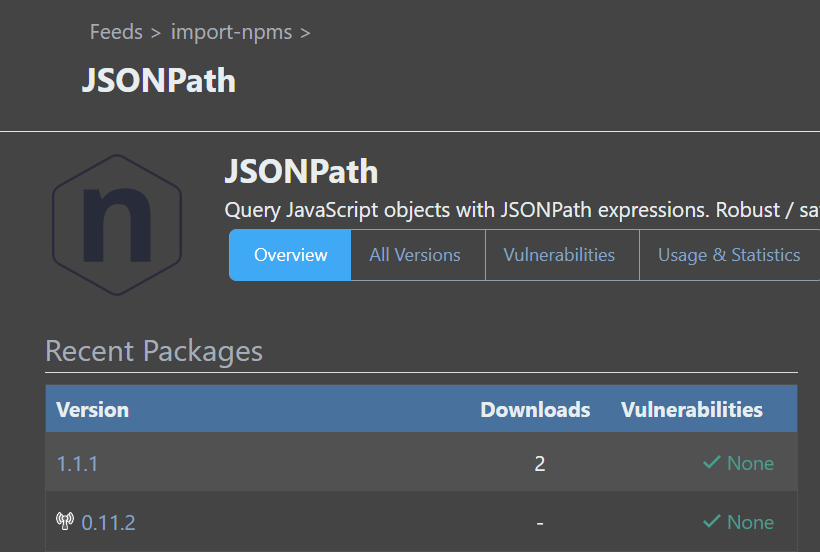
-
Hi @dan-brown_0128 ,
Oh that's really weird --- I must have mis understood from the get-go. I'm not sure how that's scenario is possible. At least in ProGet 2023, 2024, I wasn't able to reproduce this under any circumstances

Perhaps it was a bug in an import from a long-while ago. But re-reading your first post, it sounds like you've worked around it?
Otherwise I think it would take a kind of data-cleanup script to handle.
Thanks,
Steve -
I wonder if its an issue if the old
JSONPathwas pulled locally first, thenjsonpathwas pulled. Right now, we just have a workaround by disablingnpm auditsupport in ProGet, which allows our builds to run, but that disables a legitimate feature because of this one edge case.My guess is that some DB cleanup would need to happen to purge
JSONPathandjsonpathfrom all memory? -
Hi @dan-brown_0128 ,
Sorry that we your reply. It must have been closed by mistake on our dashboard or something.
You're correct - this does require a database cleanup. As it so happens, we do have a "duplicates clean-up" script available, but it's intended for ProGet 2024. It's extraordinarily complicated, as you can see:
https://gist.github.com/apxltd/351d328023c1c32852c30c335952fabb
If you're able to send us a copy of your database (we can share a secure link for you in EDO-10419, just let us know), then we can review and think of the best plan to fix it. That will be either running the script in ProGet 2023 or upgrading then running the script.
Let us know your thoughts
Thank you,
Steve -
Hi @stevedennis
I have the same problem. I have a large number of packages in my feed, and I also encountered the case sensitivity issue. Could you advise on how I can delete a package from the database by its name? Which specific rows from which tables need to be removed? -
Hi @pbspec2_5732 ,
The script in the linked gist should fix the problem for you; it's not feasible/possible to try editing in the database directly due to the complexity of the model.
https://gist.github.com/apxltd/351d328023c1c32852c30c335952fabb
Thanks,
Steve

Hello! It looks like you're interested in this conversation, but you don't have an account yet.
Getting fed up of having to scroll through the same posts each visit? When you register for an account, you'll always come back to exactly where you were before, and choose to be notified of new replies (either via email, or push notification). You'll also be able to save bookmarks and upvote posts to show your appreciation to other community members.
With your input, this post could be even better 💗
Register Login