Welcome to the Inedo Forums! Check out the Forums Guide for help getting started.
If you are experiencing any issues with the forum software, please visit the Contact Form on our website and let us know!
[OT] Modifying a server configuration triggers a full "Server Check"
-
Hello,
When a modification is made on a server configuration, a full Server Check is triggered.
This results in a app pool server crash and a restart .
.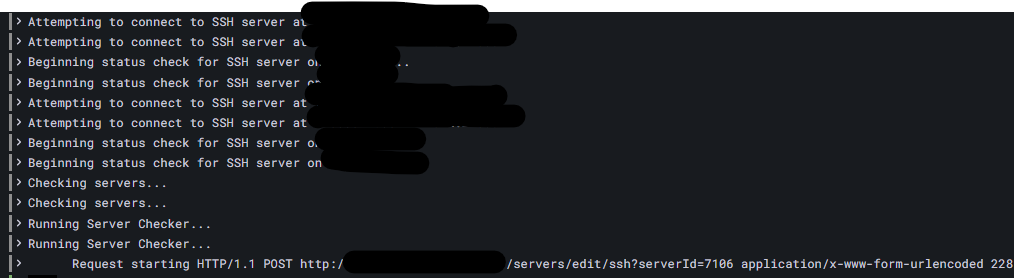
log order: bottom - topOtter docker last version.
Best regards
PhilippeC. -
Hi @philippe-camelio_3885 ,
A Full Server Check will occur once per hour by default - does that also crash? You can also trigger by going to Admin > Service.
Also, can you give more detail about what you mean by crashing? There is no "app pool" on Linux/Docker (doesn't use IIS), and the web application isn't responsible for running the server check (that's the Service application). So unclear what the crash would be.
Thank you,
Steve -
@stevedennis said in [OT] Modifying a server configuration triggers a full "Server Check":
Also, can you give more detail about what you mean by crashing? There is no "app pool" on Linux/Docker (doesn't use IIS), and the web application isn't responsible for running the server check (that's the Service application). So unclear what the crash would be.
Hi Steve
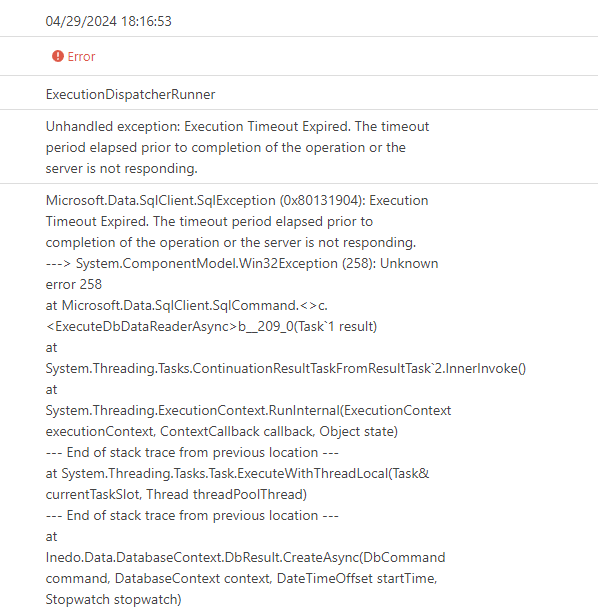
Yes, every time a Full Server check is running, Otter hangs and restart (docker swarm stack).
Following the error msg I got.
Error msg
-
@philippe-camelio_3885 this is related to SQL Server timeouts/performance issues
Unfortunately we don't have any other information available from the information provided, and about the only suggest I would have is to attempt to increase hardware/CPU on the SQL Server, perform database maintenance (see advanced maintenance) , and finally use SQL Server performance monitoring tools to find where there are problems
There may be some queries that can be optimized or missing indexes. If you can find any of those, please let us know and we can explore to add those optimizations in the product
-
@stevedennis
Few weeks ago,I migrated the docker stack Otter from a small linux vm (2 vCpu / 8 go Ram) to a physical serveur (2 x 16 core / 256 Go Ram).
There was still the pb .
.I will try to make the database maintenance as you suggest and let you know what is going on.
Cheers
PhilippeC. -
I have done some db maintenance (mainly for defrag index), but as I am not a dba guy and I don't have too much for debugging so it is difficult for me to found some missing index.
-
Hello @stevedennis
Just a question, if we put the database problem aside, why a full ServerCheck is started every time a creation / modification is made for a server ? Is it the expected behavior ?Version
Otter docker 2023.4
SQL : docker express:2019-latest -
Hi @philippe-camelio_3885,
Troubleshooting the database can be a pain, but there are a lot of tools that can help. Here is a nice guide from Microsoft, which includes a script that shows you how to use the
sys.dm_exec_query_statsandsys.Dm_exec_sql_textviews:
https://learn.microsoft.com/en-us/troubleshoot/sql/database-engine/performance/troubleshoot-slow-running-queriesJust make sure to remove
WHERE t.text like '<Your Query>%'from the sample, if you want to see all queries. Some red flags on that query will a disproportionaltotal_elapsed_time, etc.That said, there are two different jobs:
- "Server Checker" attempts to connect to each server and make sure the agent is up to date; when this fails, a server will go into an Agent Error state
- "Routine Configuration" attempts to check desired configuration against each server using OtterScript; this is what puts a server in Failed or Drift state
A "Server Checker" is run frequently and should be very fast. There is very little database activity (just
Servers_GetServersto get all servers, thenServers_UpdateServerStatusper server).A "Routine Configuration" is obviously more complicated, and may involve a lot more database activity.
-- Dean
-
Hi Dean
Thank you
This is helpfull.
I will dig a little bit and let you know if I found something.
Best regards
PhilippeC.


Hello! It looks like you're interested in this conversation, but you don't have an account yet.
Getting fed up of having to scroll through the same posts each visit? When you register for an account, you'll always come back to exactly where you were before, and choose to be notified of new replies (either via email, or push notification). You'll also be able to save bookmarks and upvote posts to show your appreciation to other community members.
With your input, this post could be even better 💗
Register Login