Welcome to the Inedo Forums! Check out the Forums Guide for help getting started.
If you are experiencing any issues with the forum software, please visit the Contact Form on our website and let us know!
Ability to bulk delete SBOMs
-
Hi,
I'm running into some timeout issues during release analysis so I wanted to reduces the number of imported SBOMs but you can only delete one at a time. A bulk delete action would be nice or a feature in pgscan to replace an SBOM instead of adding more and more each build.
Version 2023.32 (Build 3)
-
@v-makkenze_6348 we'd definitely be curious to learn more about the use case. We only expect like 1-2 sboms per build (or "release" as it's called in ProGet 2023) -- the idea is that it's one SBOM for the nuget packages, one for npm, etc. Maybe a big monolith will have more, but not more than a handful.
-
For most of our products we work with four releases a year and have many builds so the SBOM's add up.
We also have a cloud product where we deliver continously and used the buildnumer as Proget 'release' but then the number of releases got unwieldy. We fixed release number to 1.0 but then SBOM's add up again.
What i'm really looking for is a way to refresh the SBOM's for a release.
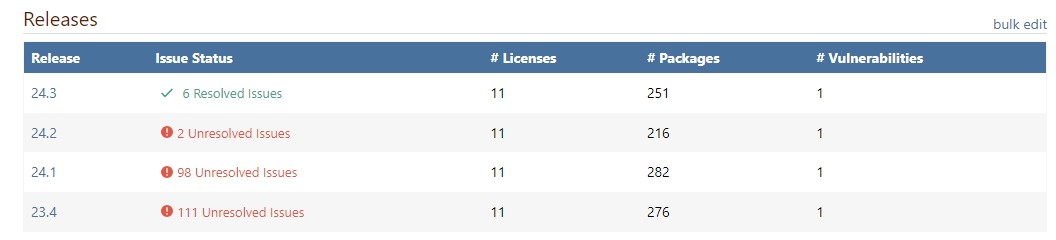
I like to keep the old releases (as we call them) so we see progress
-
@v-makkenze_6348 thanks for clarifying - that's not how we intended to use the feature, but hopefully the ProGet 2024 model will work better.
In ProGet 2024, they are called Builds, and Builds have a Release Number. They are also auto-archived, and have a kind of Build Stage.
Sorry but I don't yet have screenshots, but there is some documentation:
https://docs.inedo.com/docs/proget-sca-builds


Hello! It looks like you're interested in this conversation, but you don't have an account yet.
Getting fed up of having to scroll through the same posts each visit? When you register for an account, you'll always come back to exactly where you were before, and choose to be notified of new replies (either via email, or push notification). You'll also be able to save bookmarks and upvote posts to show your appreciation to other community members.
With your input, this post could be even better 💗
Register Login