Welcome to the Inedo Forums! Check out the Forums Guide for help getting started.
If you are experiencing any issues with the forum software, please visit the Contact Form on our website and let us know!
ProGet Max Pool size was reached
-
Hi Everyone,
We are running ProGet Version 2022.30 (Build 5) we have multiple feeds on our server mostly NPM and NuGet public connector feeds. We are getting exceptions on our ProGet server in the event log with the following:
System.InvalidOperationException: Timeout expired. The timeout period elapsed prior to obtaining a connection from the pool. This may have occurred because all pooled connections were in use and max pool size was reached.
at Microsoft.Data.ProviderBase.DbConnectionFactory.TryGetConnection(DbConnection owningConnection, TaskCompletionSource`1 retry, DbConnectionOptions userOptions, DbConnectionInternal oldConnection, DbConnectionInternal& connection)On the diagnostic centre we are also getting errors with the following:
An error occurred processing a GET request to https://XXX/nuget/WTG-Internal/v3/index.json: Timeout expired. The timeout period elapsed prior to obtaining a connection from the pool. This may have occurred because all pooled connections were in use and max pool size was reached.
Request URL: https://www.nuget.org/api/v2/FindPackagesById()?id='microsoft.net.sdk.macos.manifest-6.0.400.msi.x64'&semVerLevel=2.0.0
System.Net.WebException: The operation has timed out.The SQL Server we are running on is SQL 2016 Enterprise Server with 2TB of RAM. The database has allow snapshot isolation and read committed snapshot enabled. What is happening is the server starts to return 503 service unavailable when the above starts happening. We have attempted to set the Max Pool's in the connection string which has not helped and the Web.NuGetRequestLimit. It appears that maybe the NPM feed could be causing this issue as well.
Regards Scott
-
The NuGet FindPackagesById Query is taking a long time. I would expect this to be every quick?
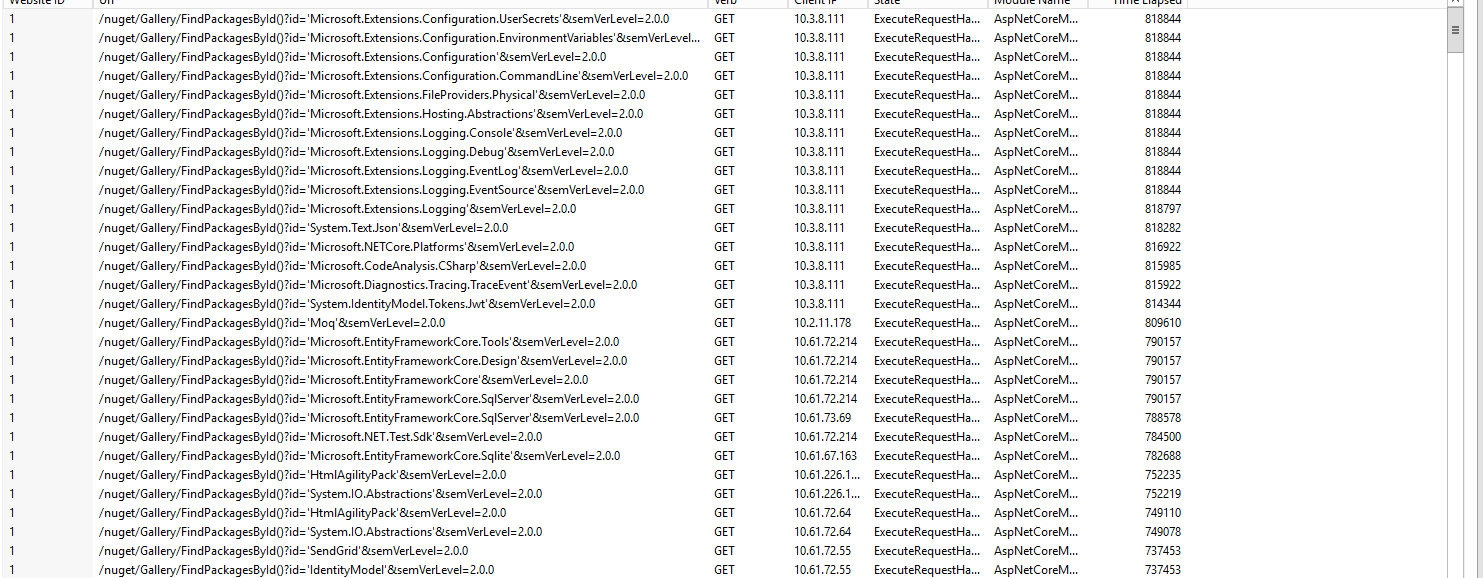
It is like there is a blocking query as they all clear in one go.
-
Hi @scott-wright_8356 ,
This is a common symptom of "server overload", and based on the usage pattern this is not surprising. It's not a question of hardware, but the fact that the NuGet client is effectively doing a "Denial of Service" on your ProGet server by issuing hundreds of simultaneous requests.
Keep in mind that every one of these requests must be forwarded to nuget.org (and perhaps other connectors?), so the traffic/waits multiply very quickly - and the symptom are timeouts like this on unrelated resources (like SQL Server). The
FindPackagesById()query is notoriously slow on nuget.org, so there is a lot of waiting.Setting up a ProGet Server Cluster that uses load balancing will be the best solution to handle these huge spikes in traffic There are a few other ways to squeeze more performance out of an instance.
- Enable Metadata Caching on the connector, so that the queries don't need to be forwarded every time
- Switch to NuGet v3 API endpoint; you are using the v2 endpoint, which is resource intensive already and doesn't use queries like
FindPAckagesById() - Throttle requests; ProGet 2023 has a built in request limiter (advanced settings > Web.ConcurrentRequestLimit), and ProGet 2022 has a similar function only for NuGet feeds
See How to Prevent Server Overload in ProGet to learn more.
Hope that helps,
Alana -
Thank you atripp, confirmation of everything we thought was the problem and working on it now.

Hello! It looks like you're interested in this conversation, but you don't have an account yet.
Getting fed up of having to scroll through the same posts each visit? When you register for an account, you'll always come back to exactly where you were before, and choose to be notified of new replies (either via email, or push notification). You'll also be able to save bookmarks and upvote posts to show your appreciation to other community members.
With your input, this post could be even better 💗
Register Login