Welcome to the Inedo Forums! Check out the Forums Guide for help getting started.
If you are experiencing any issues with the forum software, please visit the Contact Form on our website and let us know!
[PROGET] PowershellGallery Feed on v2023.27 cannot find some modules, v5.3.38 yes
-
Hi,
I have a Feed called "public-psm" for PowerShell Gallery.
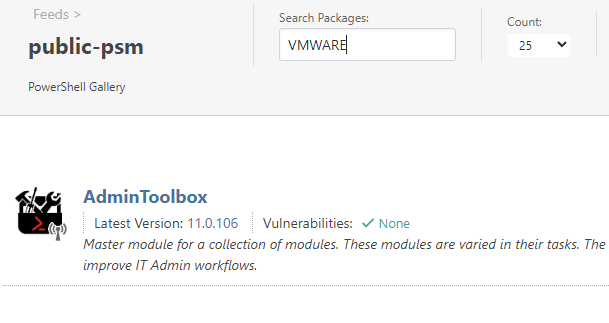
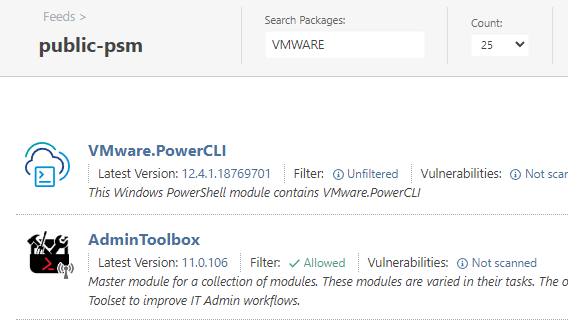
The v2023.27 is broken (previous version was too). Some modules are not visible - exemple with VMWARE.PowerCLI
This was working fine on v5.3.38Exemple :
v2023.27
v5.3.38
the feeds were created as simple as possible
v2023.27 have no filters.Any advice is welcome
Best Regards
PhilippeC. -
Hi @philippe-camelio_3885,
We're aware of this issue, and it's related to some bugs/quirks with the search results from the PowerShell Gallery API (v2). It's not really feasible to work-around, and unfortunately Microsoft will not fix the issue because it should be fixed in PowerShell Gallery API (v3).... which is due any year now. Its ~3 years late.
The results are suboptimal in both ProGet 5.3 and ProGet 2023, but ProGet 2023 is worse. This has to due with some performance optimizations we made with not paging as many results.
Fortunately this only impacts the search api, which is mostly limited to the ProGet UI. As long as you know the exact package name, you can naviage and install it fine.
Cheers,
Alana -
Hi @atripp
Thanks for your reply.
Therefore even if I write the complete name of the module - VMware.PowerCLI - , it can't be found.
I am using docker version of Proget, is it possible the cause of the issue ?
Is there anyone else using the Docker version ?
-
I made a small test with Proget (Frre) on Windows - last version.
Same result
-
Hi @philippe-camelio_3885 ,
I just tried this, and noticed that the connector is timing out. This is the query that ProGet makes when you type that in, and it takes 13-15 seconds when I click the link:
https://www.powershellgallery.com/api/v2/Search()?$top=25&$skip=0&searchTerm='VMWARE.PowerCLI'&targetFramework=''&includePrerelease=true&semVerLevel=2.0.0That's longer than the default (10s) time out, so I guess this result is expected. If you increase the timeot to 20 seconds, i guess it should work.
Cheers,
Alana -
Hello @atripp
You save my day.
Increasing the timeout resolve the pb.Thank you

Hello! It looks like you're interested in this conversation, but you don't have an account yet.
Getting fed up of having to scroll through the same posts each visit? When you register for an account, you'll always come back to exactly where you were before, and choose to be notified of new replies (either via email, or push notification). You'll also be able to save bookmarks and upvote posts to show your appreciation to other community members.
With your input, this post could be even better 💗
Register Login