Welcome to the Inedo Forums! Check out the Forums Guide for help getting started.
If you are experiencing any issues with the forum software, please visit the Contact Form on our website and let us know!
BuildMaster 2023.4 Proxy Support for Extension Updates
-
Hi Support,
We have been working away on v7, but overdue time for an upgrade !With a Proxy configured and allowing;
my.indeo.com
proget.indeo.comI've noticed that the Administration Extensions Page does not appear to actually connect to be able to see the latest Extension Versions, nor does the Available Extensions list populate.
Here is the Scripting Extension;

Which on a Internet connected version shows a warning for v2.0.3 as v2.4.0 is listed in the missing column.Likewise the Available Extensions is empty;

When running the 'Update Checker' from the service status a warning is shown, leading me to believe this may not be attempting the connection via the proxy;
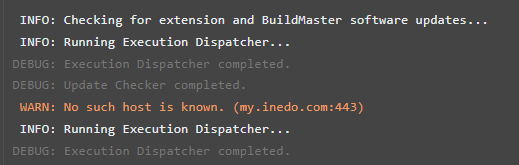
Thanks,
Paul -
Hi @paul_6112,
It definitely looks like the proxy settings need to be configured/changed. You can configure and test the Proxy settings under Admin > Proxy. That page also has a "Test" button that you can try different URLs.
With a Proxy configured and allowing;
my.indeo.com
proget.indeo.comNow this is probably a typo on the forums, but just in case not...
inedo.comnotindeo.comHope that helps,
Alana -
Hi @atripp ,
Opps, how embarrassing, yes that is a typo error in my post..I can confirm the Proxy Settings are correct, and the test does report success;


And just to prove a failure for a different URI;

The BuildMaster Update page does report the current version..so if this is connected via the Proxy then this is working;

Thanks,
Paul -
Hi @paul_6112
In that case, you may want to try restarting the service? It's possible the proxy change didn't get reflected...
Thanks,
Alana -
Hi Alana,
I've restarted both the BuildMaster Web Service and BuildMaster Service and the error is still present on running the update task, and the Extensions Page has not updated.Thanks,
Paul -
Hi @paul_6112,
Thanks for verifying this for us. We were able to find an issue in our code. This has been fixed in BM-3909 and will be released this Friday in BuildMaster 2023.5.
Thanks,
Rich -
Hi Rich,
Excellent, thank you very much for the fix and update.Regards,
Paul -
Hi Rich,
Tested this on 2023.5;
The extension page does now load and can see the extensions, and appears to work okay to update an extension.
However, the Icon list appears to be broken as these are not proxied via BuildMaster, but its direct Browser access.
You did fix this on a previous ticket on BM 7 ; so don't know if the same fix can be applied to BM 2023 please?
Thanks,
Paul -
Hi @paul_6112 ,
Thanks for letting us know that this is still an issue. I created a ticket, BM-3914, to track this fix.
Thanks,
Rich


Hello! It looks like you're interested in this conversation, but you don't have an account yet.
Getting fed up of having to scroll through the same posts each visit? When you register for an account, you'll always come back to exactly where you were before, and choose to be notified of new replies (either via email, or push notification). You'll also be able to save bookmarks and upvote posts to show your appreciation to other community members.
With your input, this post could be even better 💗
Register Login