Welcome to the Inedo Forums! Check out the Forums Guide for help getting started.
If you are experiencing any issues with the forum software, please visit the Contact Form on our website and let us know!
Intermittent 504s when retrieving packages
-
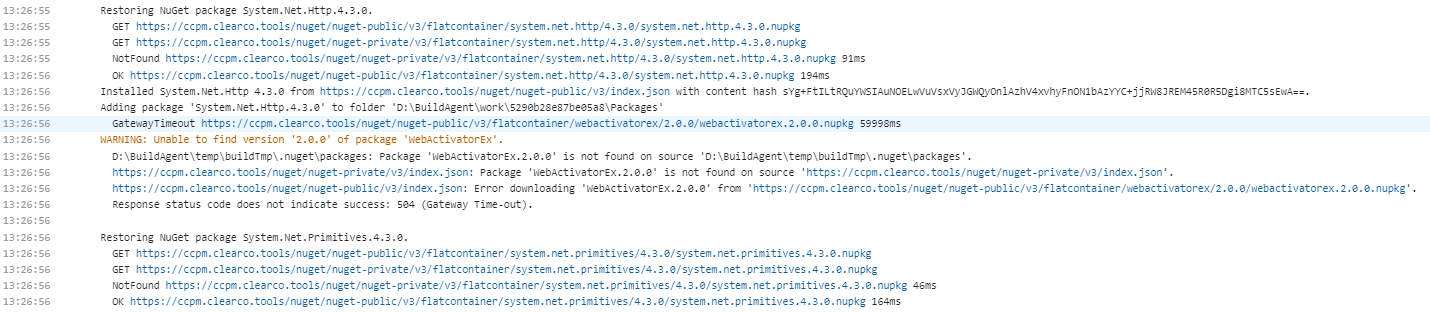
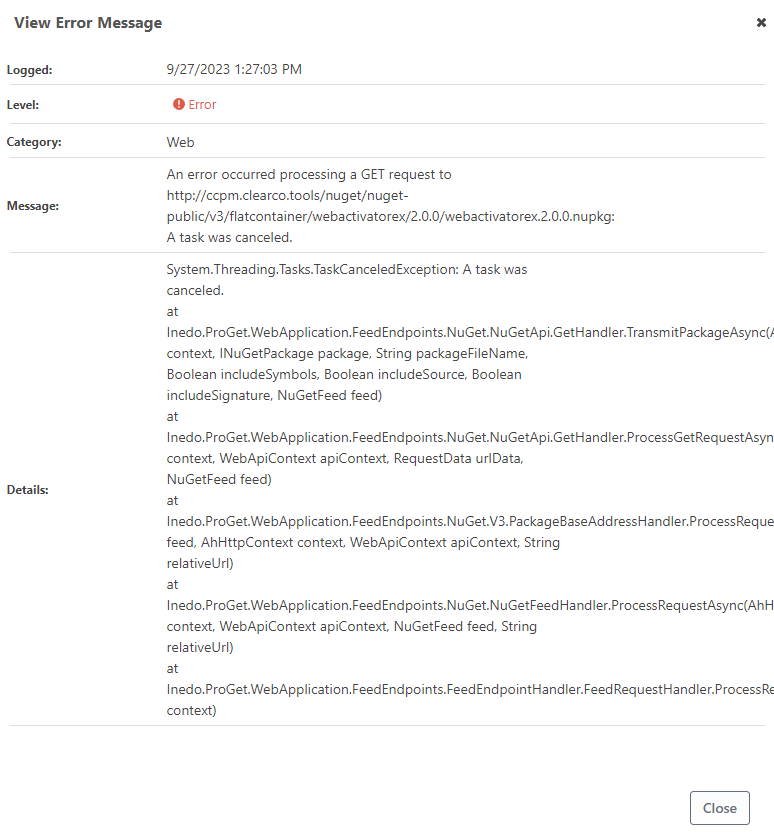
On a singleton instance of ProGet 2023.17 (build 4) we're running into some intermittent issues where retrieval of one or two NuGet packages will sometimes time out after 60 seconds with a 504 gateway timeout error, probably as a result of IIS timing out the request since this shows up in ProGet diagnostics as a canceled task. Other packages that don't fail to be retrieved during the same restore operation, though, typically take less than 1 second to retrieve, which makes me think that there's likely something getting stuck somewhere in the retrieval process on occasion.
We don't add new NuGet packages very often and run several builds each day, so I would expect all of the packages used by most builds to be cached by ProGet, and the package cited in this specific example is one that we've been referencing for a long time. We only started seeing this near the end of July, but unfortunately I'm not sure exactly what build we were on when it first started happening or what build we were on prior to that. Our builds reference a public feed backed by NuGet and a private feed containing a small number of internal packages.
Do you have any ideas around what might be causing this? If not, is there any additional diagnostic information that might be worth taking a look at to try to determine next steps to take? The stack trace from the diagnostic center reads to me like it could either be trying to add the package to the response or maybe trying to retrieve it from/verify it against nuget.org; could you clarify what ProGet is doing when the request is canceled?
Thanks for any assistance you may be able to offer!
-
Hi @mness_8576,
A 504 would be coming from some kind of intermittent network equipment (gateway), most typically a proxy server or SSL Offloading, etc. It's not issued by ProGet or IIS.
We've see this quite a bit - and usually the gateway has a timeout configured. Once reached, it terminates the connection, giving a 504 to the client and a "disconnect" to the server. The only way to fix this is to find that intermediate device and disable the timeout.
Best,
Alana -
Thanks for the quick reply @atripp! Regarding the condition potentially triggering the timeout where it seems like a request is getting hung up for more than a minute, does it seem from the corresponding ProGet log showing task cancelation like the hangup might be happening in ProGet, or do you feel that the intermediate network equipment is likely to be preventing ProGet from successfully providing a speedy response or not correctly relaying ProGet's response? If the hangup might be happening in ProGet, is there a revised, reasonable timeout (hopefully less than, say, 2.5 minutes) that you'd recommend instead of the curret 60-second timeout that would make it more likely that ProGet would eventually provide the desired response?
I could see a world where some results may take a while because NuGet package restore sends a large number of requests all at once and something somewhere (e.g. the C# thread pool or something similar in an intermediate network device) temporarily runs low on available resources and has to queue some requests to compensate, but in that case I feel like I'd see a pileup of varying longer response times. While some builds do have more than one package that times out, it's usually less than 10 out of around 300, and I don't see any middle ground between responses that come back in less than a second and responses that time out after sixty seconds.
I ask because I'd rather not go hunting down what seems like a potentially reasonable 60-second timeout enforced by intermediate network equipment if the only result is likely to be that it takes longer for builds to fail. -
Hi @mness_8576,
Unfortunately it's not going to be possible/practical to troubleshoot issues inside of ProGet when there are possibly problematic gateway appliances in the way. In general I can't imagine how there would be issues if there was only ProGet.
We know there's at least one HTTP gateway server between the build server and ProGet (which explains the 504 error), but there may also be a gateway between ProGet and nuget.org.
So I would first find out where these gateways are, and bypass them. If that's not possible, then you'll have to see what's happening on the gateway side. There are typically logs issued, etc.
We've seen everything from content filters to cache servers to DDoS protectors cause problems here. It's really difficult to guess.
Hope that helps,
Alana -
Just FYI, we found a solution that seemed to work - the packages that were failing all had a "quirky version number" warning in ProGet, and taking the ProGet-provided action of repackaging them with non-quirky version numbers seemed to resolve the issue.
-
Thanks for the update @mness_8576; based on this, it sounds like there's definitely a Gateway problem, and that the Gateway is misconfigured / misreporting some error condition from ProGet due to a quirky package request. That's a pretty common thing we've seen as well.

Hello! It looks like you're interested in this conversation, but you don't have an account yet.
Getting fed up of having to scroll through the same posts each visit? When you register for an account, you'll always come back to exactly where you were before, and choose to be notified of new replies (either via email, or push notification). You'll also be able to save bookmarks and upvote posts to show your appreciation to other community members.
With your input, this post could be even better 💗
Register Login