Welcome to the Inedo Forums! Check out the Forums Guide for help getting started.
If you are experiencing any issues with the forum software, please visit the Contact Form on our website and let us know!
Nginx reverse proxy header X-Forwarded-Proto doesn't work
-
Hi
I have recently deployed a ProGet server using Docker on an Ubuntu 20.04 LTS server for hosting Chocolatey packages & PowerShell modules for Windows servers. I requested port 443 firewall access from the network department, but were unable to download packages. After some troubleshooting I discovered the ProGet web service was returning http://.. addresses instead of https://...
I had to use the ProGet SSL configuration and my Nginx instance is now forwarding requests using https and ProGet is returning https://... addresses.
I do have the X-Forwarded-Proto header set and I even tried to set it to "https" without any luck.
location
{
   proxy_pass https://proget:443;           # local server
   proxy_ssl_verify off;
   proxy_http_version 1.1;
   proxy_cache_bypass  $http_upgrade;

   proxy_set_header Upgrade $http_upgrade;
   proxy_set_header Connection "upgrade";
   proxy_set_header Host $http_host;
   proxy_set_header X-Real-IP $remote_addr;
   proxy_set_header X-Forwarded-For $proxy_add_x_forwarded_for;
   proxy_set_header X-Forwarded-Proto $scheme;
   proxy_set_header X-Forwarded-Host $http_host;
   proxy_set_header X-Forwarded-Port $server_port;
}
I'm running ProGet version 23.0.6 and Nginx version 1.23.1.
Regards,
Espen Blikstad -
Hi @espen-blikstad_6547,
Please check the
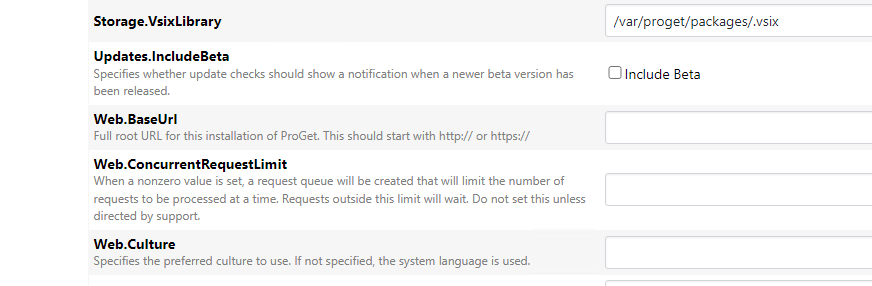
Web.BaseUrlproperty under advanced settings; when that is set, the X-Forwarded headers will not be used.Thanks,
Steve -
Thanks for the response!
The 'Web.BaseUrl' setting is not set. I'll try to use this setting to be able to do SSL offloading on my Nginx container.
-
The Web-BaseUrl setting did work! I have removed the proxy_set_header directives in my Nginx configuration.
PS:\>install-module mranagios -Repository powershell-internal -Verbose
VERBOSE: Suppressed Verbose Repository details, Name = 'powershell-internal', Location =
'https://proget.domain.com/nuget/powershell-internal'; IsTrusted = 'True'; IsRegistered = 'True'.
VERBOSE: Repository details, Name = 'powershell-internal', Location =
'https://proget.domain.com/nuget/powershell-internal'; IsTrusted = 'True'; IsRegistered = 'True'.
VERBOSE: Using the provider 'PowerShellGet' for searching packages.
VERBOSE: Using the specified source names : 'powershell-internal'.
VERBOSE: Getting the provider object for the PackageManagement Provider 'NuGet'.
VERBOSE: The specified Location is 'https://proget.domain.com/nuget/powershell-internal' and PackageManagementProvider
is 'NuGet'.
VERBOSE: Searching repository 'https://proget.domain.com/nuget/powershell-internal/FindPackagesById()?id='mranagios''
for ''.
VERBOSE: Total package yield:'1' for the specified package 'mranagios'.
VERBOSE: Performing the operation "Install-Module" on target "Version '1.3.2' of module 'MrANagios'".
VERBOSE: The installation scope is specified to be 'AllUsers'.
VERBOSE: The specified module will be installed in 'C:\Program Files\WindowsPowerShell\Modules'.
VERBOSE: The specified Location is 'NuGet' and PackageManagementProvider is 'NuGet'.
VERBOSE: Downloading module 'MrANagios' with version '1.3.2' from the repository
'https://proget.domain.com/nuget/powershell-internal'.
VERBOSE: Searching repository 'https://proget.domain.com/nuget/powershell-internal/FindPackagesById()?id='MrANagios''
for ''.
VERBOSE: InstallPackage' - name='MrANagios',
version='1.3.2',destination='C:\Users\admin123\AppData\Local\Temp\2\889763007'
VERBOSE: DownloadPackage' - name='MrANagios',
version='1.3.2',destination='C:\Users\admin123\AppData\Local\Temp\2\889763007\MrANagios.1.3.2\MrANagios.1.3.2.nupkg',
uri='https://proget.domain.com/nuget/powershell-internal/package/MrANagios/1.3.2'
VERBOSE: Downloading 'https://proget.domain.com/nuget/powershell-internal/package/MrANagios/1.3.2'.
VERBOSE: Completed downloading 'https://proget.domain.com/nuget/powershell-internal/package/MrANagios/1.3.2'.
VERBOSE: Completed downloading 'MrANagios'.
VERBOSE: Hash for package 'MrANagios' does not match hash provided from the server.
VERBOSE: InstallPackageLocal' - name='MrANagios',
version='1.3.2',destination='C:\Users\admin123\AppData\Local\Temp\2\889763007'
VERBOSE: Validating the 'MrANagios' module contents under
'C:\Users\admin123\AppData\Local\Temp\2\889763007\MrANagios.1.3.2' path.
VERBOSE: Test-ModuleManifest successfully validated the module manifest file
'C:\Users\admin123\AppData\Local\Temp\2\889763007\MrANagios.1.3.2'.
VERBOSE: Validating the authenticode signature and publisher of the catalog file or module manifest file of the module
'MrANagios'.
VERBOSE: Catalog file 'MrANagios.cat' is not found in the contents of the module 'MrANagios' being installed.
VERBOSE: Checking for possible command collisions for the module 'MrANagios' commands.
VERBOSE: Module 'MrANagios' was installed successfully to path 'C:\Program
Files\WindowsPowerShell\Modules\MrANagios\1.3.2'.
Thanks again,
Espen Blikstad

Hello! It looks like you're interested in this conversation, but you don't have an account yet.
Getting fed up of having to scroll through the same posts each visit? When you register for an account, you'll always come back to exactly where you were before, and choose to be notified of new replies (either via email, or push notification). You'll also be able to save bookmarks and upvote posts to show your appreciation to other community members.
With your input, this post could be even better 💗
Register Login