Welcome to the Inedo Forums! Check out the Forums Guide for help getting started.
If you are experiencing any issues with the forum software, please visit the Contact Form on our website and let us know!
Sync BM from OT
-
Hello,
I testing the last version of BM and OT (both on docker).
I configured sync between OT and BM and I have this error message:Response body from "https://otter-2023.ocapiat.fr/api/infrastructure/all/list" could not be loaded as JSON.while direct request :
https://otter-2023.ocapiat.fr/api/infrastructure/servers/list?key=*****return this json
[{"Active":true,"Environments":[],"Roles":[],"ServerType":"local","HostName":null,"Port":null,"EncryptionType":null,"EncryptionKey":null,"RequireSSL":null,"UniqueId":null,"AllowedIPAddresses":null,"CredentialsType":null,"CredentialsName":null,"Drift":"none","TempPath":null,"WSManUrl":null,"Id":1,"Name":"LOCALHOST","Variables":{}},{"Active":true,"Environments":["deploiement"],"Roles":["l-000-base","dc-dcs"],"ServerType":"ssh","HostName":"TEST","Port":22,"EncryptionType":null,"EncryptionKey":null,"RequireSSL":null,"UniqueId":null,"AllowedIPAddresses":null,"CredentialsType":null,"CredentialsName":"ubuntu_test_20.04","Drift":"none","TempPath":"/tmp/otter2023","WSManUrl":null,"Id":1002,"Name":"VM004001","Variables":{}}]Any idea ?
OT Version 2022.10 (Build 1)
BM Version 2022.9 (Build 5)Best regards
PhilippeC. -
Hi @philippe-camelio_3885 ,
I would expect the "could not be loaded as JSON" message if the endpoint was giving some kind of error.
What happens when you query:
https://otter-2023.ocapiat.fr/api/infrastructure/all/list?key=*****Is there a kind of error there?
Thanks,
Alana -
no errors
{ "Servers": [ { "Active": true, "Environments": [], "Roles": [], "ServerType": "local", "HostName": null, "Port": null, "EncryptionType": null, "EncryptionKey": null, "RequireSSL": null, "UniqueId": null, "AllowedIPAddresses": null, "CredentialsType": null, "CredentialsName": null, "Drift": "none", "TempPath": null, "WSManUrl": null, "Id": 1, "Name": "LOCALHOST", "Variables": {}, }, { "Active": true, "Environments": ["deploiement"], "Roles": ["l-000-base", "dc-dcs"], "ServerType": "ssh", "HostName": "VM004001", "Port": 22, "EncryptionType": null, "EncryptionKey": null, "RequireSSL": null, "UniqueId": null, "AllowedIPAddresses": null, "CredentialsType": null, "CredentialsName": "ubuntu_test_20.04", "Drift": "none", "TempPath": "/tmp/otter2023", "WSManUrl": null, "Id": 1002, "Name": "VM004001", "Variables": {}, }, { "Active": true, "Environments": ["deploiement"], "Roles": ["w-000-base"], "ServerType": "windows", "HostName": "VM000127", "Port": 46336, "EncryptionType": "aes", "EncryptionKey": "********************************************************", "RequireSSL": null, "UniqueId": null, "AllowedIPAddresses": null, "CredentialsType": null, "CredentialsName": null, "Drift": "manuallyRemediate", "TempPath": null, "WSManUrl": null, "Id": 1003, "Name": "VM000127", "Variables": {}, }, ], "Environments": [ { "ParentEnvironmentName": null, "ParentEnvironmentSet": true, "Id": 1, "Name": "integration", "Variables": {}, }, { "ParentEnvironmentName": null, "ParentEnvironmentSet": true, "Id": 2, "Name": "developpement", "Variables": {}, }, { "ParentEnvironmentName": null, "ParentEnvironmentSet": true, "Id": 3, "Name": "production", "Variables": {}, }, { "ParentEnvironmentName": "developpement", "ParentEnvironmentSet": true, "Id": 4, "Name": "recette", "Variables": {}, }, { "ParentEnvironmentName": null, "ParentEnvironmentSet": true, "Id": 5, "Name": "deploiement", "Variables": {}, }, ], "Roles": [ { "Dependencies": [], "Id": 2, "Name": "l-000-base", "Variables": {} }, { "Dependencies": [], "Id": 3, "Name": "dc-p16", "Variables": { "DC": { "Value": "P16", "TypeCode": "S", "Sensitive": false } }, }, { "Dependencies": [], "Id": 4, "Name": "dc-dcs", "Variables": { "DC": { "Value": "DCS", "TypeCode": "S", "Sensitive": false } }, }, { "Dependencies": [], "Id": 6, "Name": "w-000-base", "Variables": {} }, ], } -
json is not valid there are too many commas

-
... hmm that's really weird. Those commas aren't showing up on my instance.
Can you go to Admin > Infrastructure > Export; what do you see showing up there?
That uses the same JSON-serialization code as the API.
You can also copy/paste that JSON into Admin > Infrastructure > Import, and do a kind of manual sync.
-
Import of the Otter / Administration / Export, => OK
Import of url result => (commas are gone ????) but KO
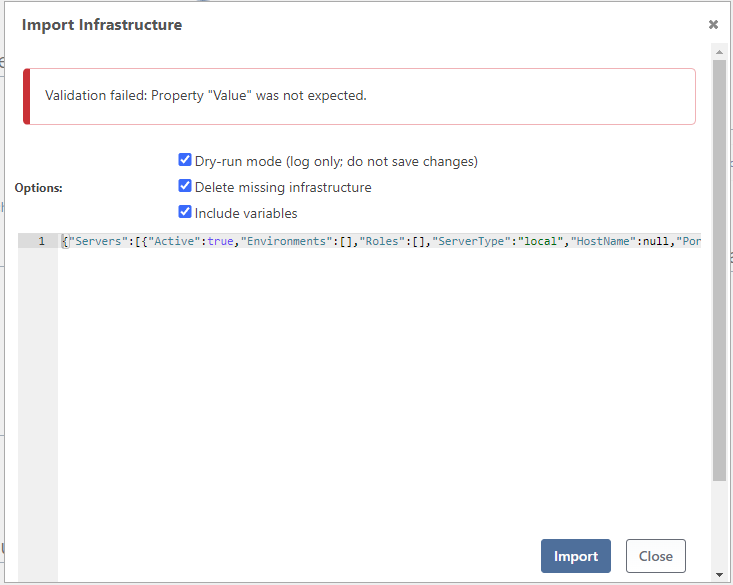
=================================
OTTER / Administration / Export{ "servers": [ { "active": true, "environments": [], "roles": [], "serverType": "local", "drift": "none", "name": "LOCALHOST", "variables": {} }, { "active": true, "environments": [ "deploiement" ], "roles": [ "l-000-base", "dc-dcs" ], "serverType": "ssh", "hostName": "VM004001", "port": 22, "credentialsName": "ubuntu_test_20.04", "drift": "none", "tempPath": "/tmp/otter2023", "name": "VM004001", "variables": {} }, { "active": true, "environments": [ "deploiement" ], "roles": [ "w-100-baseline", "w-010-modules-dbatools" ], "serverType": "windows", "hostName": "VM000127", "port": 46336, "encryptionType": "aes", "encryptionKey": "******************************************************************", "drift": "manuallyRemediate", "name": "VM000127", "variables": {} } ], "environments": [ { "name": "integration", "variables": {} }, { "name": "developpement", "variables": {} }, { "name": "production", "variables": {} }, { "parentName": "developpement", "name": "recette", "variables": {} }, { "name": "deploiement", "variables": {} } ], "roles": [ { "dependencies": [], "name": "l-000-base", "variables": {} }, { "dependencies": [], "name": "dc-p16", "variables": { "DC": "P16" } }, { "dependencies": [], "name": "dc-dcs", "variables": { "DC": "DCS" } }, { "dependencies": [], "name": "w-000-base", "variables": {} }, { "dependencies": [ "w-000-base" ], "name": "w-010-modules-base", "variables": { "PSModules": "[\n{\u0022Nom\u0022: \u0022Carbon\u0022,\u0022Version\u0022: \u00222.13.0\u0022},\n{\u0022Nom\u0022: \u0022ActiveDirectoryDsc\u0022,\u0022Version\u0022: \u00226.2.0\u0022}\n]" } }, { "dependencies": [ "w-010-modules-base" ], "name": "w-100-baseline", "variables": {} }, { "dependencies": [], "name": "w-010-modules-dbatools", "variables": { "PSModules": "[\n{\n\t\t\u0022Nom\u0022: \u0022dbatools\u0022,\n\t\t\u0022Version\u0022: \u00222.0.3\u0022\n\t},\n{\n\t\t\u0022Nom\u0022: \u0022dbachecks\u0022,\n\t\t\u0022Version\u0022: \u00222.0.18\u0022\n\t}\n]" } } ] }URL result
{"Servers":[{"Active":true,"Environments":[],"Roles":[],"ServerType":"local","HostName":null,"Port":null,"EncryptionType":null,"EncryptionKey":null,"RequireSSL":null,"UniqueId":null,"AllowedIPAddresses":null,"CredentialsType":null,"CredentialsName":null,"Drift":"none","TempPath":null,"WSManUrl":null,"Id":1,"Name":"LOCALHOST","Variables":{}},{"Active":true,"Environments":["deploiement"],"Roles":["l-000-base","dc-dcs"],"ServerType":"ssh","HostName":"VM004001","Port":22,"EncryptionType":null,"EncryptionKey":null,"RequireSSL":null,"UniqueId":null,"AllowedIPAddresses":null,"CredentialsType":null,"CredentialsName":"ubuntu_test_20.04","Drift":"none","TempPath":"/tmp/otter2023","WSManUrl":null,"Id":1002,"Name":"VM004001","Variables":{}},{"Active":true,"Environments":["deploiement"],"Roles":["w-100-baseline","w-010-modules-dbatools"],"ServerType":"windows","HostName":"VM000127","Port":46336,"EncryptionType":"aes","EncryptionKey":"********************************************************","RequireSSL":null,"UniqueId":null,"AllowedIPAddresses":null,"CredentialsType":null,"CredentialsName":null,"Drift":"manuallyRemediate","TempPath":null,"WSManUrl":null,"Id":1003,"Name":"VM000127","Variables":{}}],"Environments":[{"ParentEnvironmentName":null,"ParentEnvironmentSet":true,"Id":1,"Name":"integration","Variables":{}},{"ParentEnvironmentName":null,"ParentEnvironmentSet":true,"Id":2,"Name":"developpement","Variables":{}},{"ParentEnvironmentName":null,"ParentEnvironmentSet":true,"Id":3,"Name":"production","Variables":{}},{"ParentEnvironmentName":"developpement","ParentEnvironmentSet":true,"Id":4,"Name":"recette","Variables":{}},{"ParentEnvironmentName":null,"ParentEnvironmentSet":true,"Id":5,"Name":"deploiement","Variables":{}}],"Roles":[{"Dependencies":[],"Id":2,"Name":"l-000-base","Variables":{}},{"Dependencies":[],"Id":3,"Name":"dc-p16","Variables":{"DC":{"Value":"P16","TypeCode":"S","Sensitive":false}}},{"Dependencies":[],"Id":4,"Name":"dc-dcs","Variables":{"DC":{"Value":"DCS","TypeCode":"S","Sensitive":false}}},{"Dependencies":[],"Id":6,"Name":"w-000-base","Variables":{}},{"Dependencies":["w-000-base"],"Id":7,"Name":"w-010-modules-base","Variables":{"PSModules":{"Value":"[\n{\"Nom\": \"Carbon\",\"Version\": \"2.13.0\"},\n{\"Nom\": \"ActiveDirectoryDsc\",\"Version\": \"6.2.0\"}\n]","TypeCode":"S","Sensitive":false}}},{"Dependencies":["w-010-modules-base"],"Id":8,"Name":"w-100-baseline","Variables":{}},{"Dependencies":[],"Id":9,"Name":"w-010-modules-dbatools","Variables":{"PSModules":{"Value":"[\n{\n\t\t\"Nom\": \"dbatools\",\n\t\t\"Version\": \"2.0.3\"\n\t},\n{\n\t\t\"Nom\": \"dbachecks\",\n\t\t\"Version\": \"2.0.18\"\n\t}\n]","TypeCode":"S","Sensitive":false}}}]} -
Hi @philippe-camelio_3885,
I don't know where the "extra commas" came from, but Otter/BuildMaster wouldn't have generated them that I can tell? It's not like there's a flag we can pass to our JSON library to say "make invalid format"

But in any case, the API response looks valid to me, and it seems to be importing okay?
The
Property "Value" was not erxpectedmessage is what you would get if you tried to import the "bad" (extra commas) JSON document.Maybe try syncing again? The sync is really just an automated version of the manual process, and uses the same code base.
Cheers,
Alana -
@atripp said in Sync BM from OT:
aybe try syncing again? The sync is really just an automated version of the manual process, and uses the same code base.
Cheers,+1
After almost a year, I try again to sync BM with OtterStarting from a fresh Buildmaster (docker 2023.13) with an existing Otter instance (docker 2023.4)
I still have this damned error message
Response body from "https://**************/api/infrastructure/all/list" could not be loaded as JSON.
Newtonsoft.Json.JsonSerializationException: Property "Value" was not expected.
at Inedo.BuildMaster.Infrastructure.VariableValueJsonModel.Converter.ReadJson(JsonReader reader, Type objectType, Object existingValue, JsonSerializer
blablabla
The results of the api https://**************/api/infrastructure/all/list is looking.
-
Hi @philippe-camelio_3885 ,
We haven't investigated or changed this code in very many years (especially within the last year), so I wouldn't expect a changed result.
Can you try the same troubleshooting steps as above? To find out where the invalid JSON is? Maybe it's comma again?
FYI - we use
Newtonsoft.Jsonfor both serializing and deserializing (as you can see from error). It's really odd to be generating invalid JSON, but that's what the message is It could be related to an obscure bug, etc. We just have no idea and haven't investigated in past year.Thanks,
Alana

Hello! It looks like you're interested in this conversation, but you don't have an account yet.
Getting fed up of having to scroll through the same posts each visit? When you register for an account, you'll always come back to exactly where you were before, and choose to be notified of new replies (either via email, or push notification). You'll also be able to save bookmarks and upvote posts to show your appreciation to other community members.
With your input, this post could be even better 💗
Register Login