Welcome to the Inedo Forums! Check out the Forums Guide for help getting started.
If you are experiencing any issues with the forum software, please visit the Contact Form on our website and let us know!
Files not copied during deployment
-
Hello,
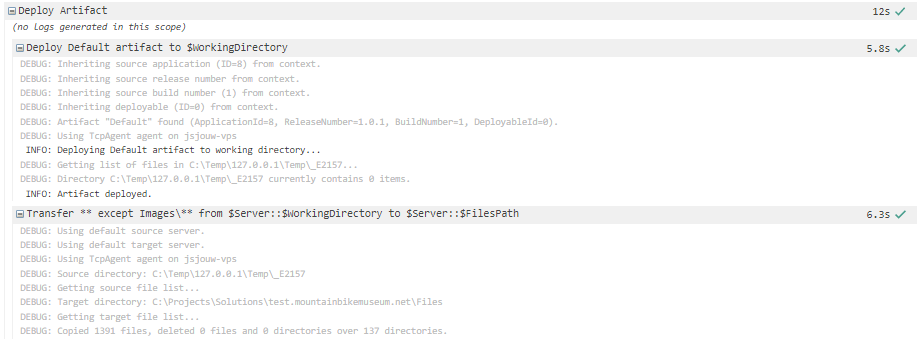
My deployment says it has run succesfully, but I still find that files are not copied over. I use the transfer command to copy files from the working directory to the application folder. According to the log all is well:
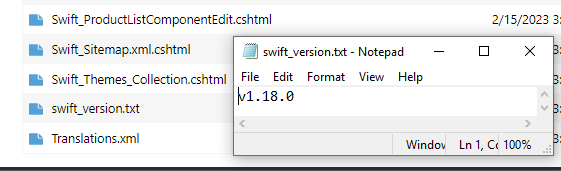
But I can see a version marker file is not copied, here is the file in the artifact:
And the file in the application folder is still showing the old file:
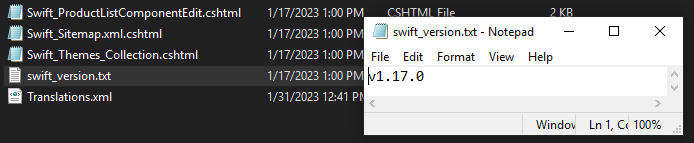
Also the Modified date of all other files in the folder are not changed, so it looks like nothing is actually copied over.
Any help figuring out why this is would be much appreciated...
Thanks,
Justin
-
Hi @Justinvolved ,
The first thing I would try is enabling verbose logging; this is on the advanced tab of the operation, or you can set with
Verbose: trueparameter.That will give a file-by-file comparison, and show you what's being copied and not. You will see texts like:
Copying C:\apxltd\artifact\Inedo.DependencyScan.dll to C:\apxltd\artifact2\Inedo.DependencyScan.dll...
Inedo.DependencyScan.dll already exists in C:\apxltd\artifact2.
Source timestamp: 11/12/2022 8:26:38 AM, Target timestamp: 11/12/2022 8:26:38 AM
Source size: 54272, Target size: 54272
Size and timestamp are the same; skipping Inedo.DependencyScan.dll...
Hopefully that will help trace this a little bit better.
Cheers,
Alana -
Hi @atripp,
Thanks that helped me solve it pretty quickly, just a typo somewhere in the script variables.
Very happy to have learned about the verbose setting :-)Justin

Hello! It looks like you're interested in this conversation, but you don't have an account yet.
Getting fed up of having to scroll through the same posts each visit? When you register for an account, you'll always come back to exactly where you were before, and choose to be notified of new replies (either via email, or push notification). You'll also be able to save bookmarks and upvote posts to show your appreciation to other community members.
With your input, this post could be even better 💗
Register Login