Welcome to the Inedo Forums! Check out the Forums Guide for help getting started.
If you are experiencing any issues with the forum software, please visit the Contact Form on our website and let us know!
How to set up connector to npm repo with access token
-
Hi!
We've been trying to set up a connector for our ProGet private npm feed to an external npm feed which can be accessed with an auth token:Here's what our local .npmrc looks like:
email=me@example.com
always-auth=true
registry=http://gitlab.com/api/v4/projects/12345/packages/npm/
//gitlab.com/api/v4/packages/npm/:_authToken=$TOKEN
//gitlab.com/api/v4/projects/12345/packages/npm/:_authToken=$TOKEN
It works locally, however we couln't figure it out how to make access tokens work in the NPM connector.
Could you please help in how to set this up?
Thanks. -
Hi @torgabor_4445 ,
I believe that, when creating the npm connector, you can select "Authentication: Bearer", and then enter email and your token for the username.
Let us know if that works!
Cheers,
Alana -
Hi!
Thanks for the advice!
However I had no luck with this.
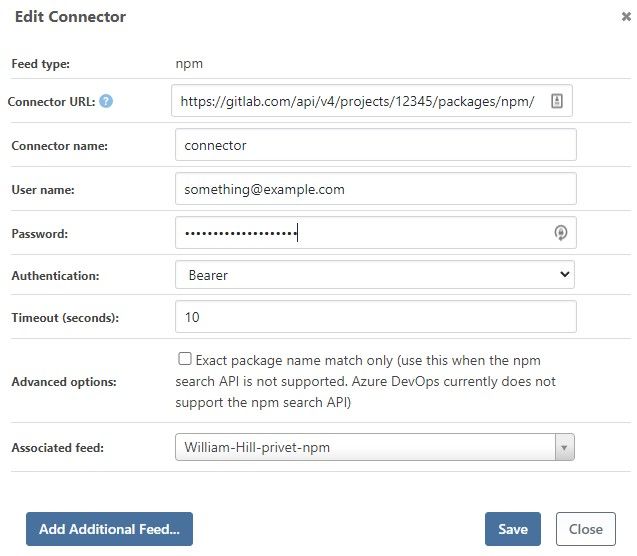
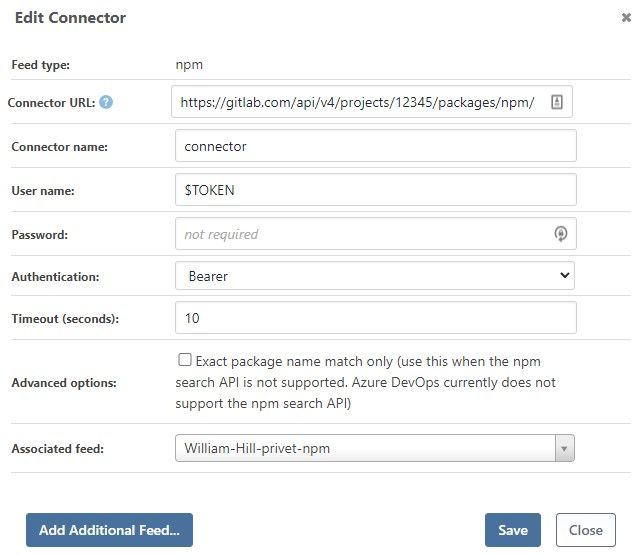
I tried setting the token as both the username or password on separate tries, and had no luck.
Both cases result in 403: Forbidden.Here's how I set it up:
-
@torgabor_4445 one other thing to try -- how about just putting your token as the password, and then having no username? But still selecting Bearer auth?
-
@atripp
I just tried what you suggested - passing the auth token as password, and leaving the user name as blank.
Same result - 403 forbidden -
At least for NPM feeds in Azure DevOps Artifacts it works with:
Using 'Basic Auth' and set the Token as Password.Have you tried that already?
-
@sdohle_3924 Tried setting the token as password, and the mode to 'Basic Auth'. Still getting 403
-
Hi @torgabor_4445,
Can you please try something for me?
- Leave the username blank
- Put your token in for the password
- Use Bearer authentication
- Change your URL to
https://gitlab.com/api/v4/projects/12345/packages/npm/:_authToken
If that does not fix it, I have another idea, but I will need to check a few more things offline.
Thanks,
Rich -
@rhessinger Thanks for getting back to me.
I tried what you suggested, unfortunately doesn't work. Same 403 issue. -
Hi @torgabor_4445 and @sdohle_3924,
I dug deeper into GitLab connectors and it looks like there are two ProGet issues here and a configuration issue.
- PG-2210: GitLab does not return the "time" property when it returns package metadata. This causes ProGet to fail to return any packages.
- PG-2211: There is a display issue when entering only a password with bearer authentication. The UI will show anonymous, even though it will use the token.
- Configuration Issue: here is what you will need to configure a GitLab connector.
- Connector URL: https://gitlab.com/api/v4/projects/12345/packages/npm/
- User Name: leave blank
- Password: Generate a personal access token with API access and set that value there.
- Authentication: Bearer
- Advanced Options: Check exact package match only. GitLab does not support partial searching and/or listing
I have added fixes for PG-2210 and PG-2211 and they will release tomorrow in ProGet 2022.9. Once you upgrade to 2022.9 and make the configuration updates, you should be able to pull GitLab packages via a connector.
Thanks,
Rich


Hello! It looks like you're interested in this conversation, but you don't have an account yet.
Getting fed up of having to scroll through the same posts each visit? When you register for an account, you'll always come back to exactly where you were before, and choose to be notified of new replies (either via email, or push notification). You'll also be able to save bookmarks and upvote posts to show your appreciation to other community members.
With your input, this post could be even better 💗
Register Login