Welcome to the Inedo Forums! Check out the Forums Guide for help getting started.
If you are experiencing any issues with the forum software, please visit the Contact Form on our website and let us know!
ProGet: login not working anymore after upgrading to 22.0.2
-
I just upgraded our local ProGet installation to version 22.0.2 (from 6.0.10) and I noticed that we are not able to login anymore. After trying out a few things I found the reason for this.
The URL where ProGet is running is
http://proget.intranet:8624/, we are using a reverse proxy server to access it, however, its URL ishttps://proget.example.com/. Logging in via the former URL works, via the latter does not anymore (it used to work in version 6.0.10).The reason for this is that the response to the login request to URL
https://proget.example.com/log-in?ReturnUrl=%2Fprojectsincludes the following response header:set-cookie: .AHWEBAUTH=6ab8eee0a01c3e187646085cb470d8b53bf4c27aff6a00440f70fd38f777cba956a24acd42066c4064121171d7617ecd1ef595239c8ee089f729b8f88ebbf98b; domain=proget.intranet; path=/; httponlyThis sets a cookie in the browser for the wrong domain, therefore the login does not work when using a reverse proxy server.
The setting
Web.BaseUrlunder Administration → Advanced Settings is set tohttps://proget.example.com/, by the way.So the question is: is this a bug or do we have to configure additional settings with ProGet version 2022?
-
Thanks for the detailed investigation!
You're right, the cookie domain seems to be the problem.
We are now using .NET6 on Windows, and I'm guessing that's how you're hosting this? This would have behaved the same on Linux (which was using .NET5 for a long time).
The cookie domain comes form the hosting framework, and doesn't use
Web.BaseUrl. In general, we don't recommend using that anymore, and instead prefer theX-Forwarded-*headers.In this case, can you try setting a header value on your reverse proxy to use
X-Forwarded-Host: proget.example.com? Then it should work.I haven't tested it, but since this is what's generally done on the NGINX proxies, I suspect it's not a problem

-
Thanks for you answer, @atripp.
ProGet is using the Integrated web server:
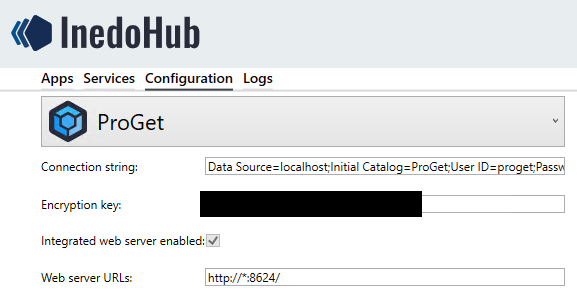
As reverse proxy we are using IIS on the same server. It is already configured to set the following headers for every request:
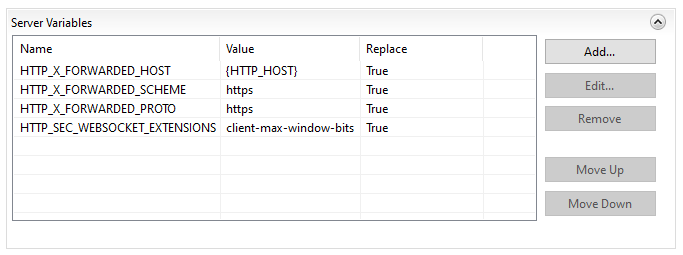
This server also acts as a reverse proxy for other URLs, the configurations for each site are basically identical. I can confirm that the other applications receive the added headers, including
X-Forwarded-Host. But just to make sure it is really working I enabled Request Tracing forproget.example.com, here is an excerpt from the relevant file (let me know should you need the whole content):<?xml version="1.0" encoding="UTF-8" ?> <?xml-stylesheet type='text/xsl' href='freb.xsl'?> <!-- saved from url=(0014)about:internet --> <failedRequest url="https://proget.example.com:443/log-in?ReturnUrl=%2F" siteId="2" appPoolId="proget.example.com" processId="13148" verb="POST" remoteUserName="" userName="" tokenUserName="NT AUTHORITY\IUSR" authenticationType="anonymous" activityId="{4000004C-0004-E300-B63F-84710C7967BB}" failureReason="STATUS_CODE" statusCode="302" triggerStatusCode="302" timeTaken="0" xmlns:freb="http://schemas.microsoft.com/win/2006/06/iis/freb" > <Event xmlns="http://schemas.microsoft.com/win/2004/08/events/event"> <System> <Provider Name="WWW Server" Guid="{3A2A4E84-4C21-4981-AE10-3FDA0D9B0F83}"/> <EventID>0</EventID> <Version>1</Version> <Level>0</Level> <Opcode>1</Opcode> <Keywords>0x0</Keywords> <TimeCreated SystemTime="2022-07-21T12:18:25.919Z"/> <Correlation ActivityID="{4000004C-0004-E300-B63F-84710C7967BB}"/> <Execution ProcessID="13148" ThreadID="3668"/> <Computer>SERVER_NAME</Computer> </System> <EventData> <Data Name="ContextId">{4000004C-0004-E300-B63F-84710C7967BB}</Data> <Data Name="SiteId">2</Data> <Data Name="AppPoolId">proget.example.com</Data> <Data Name="ConnId">805306443</Data> <Data Name="RawConnId">1610612839</Data> <Data Name="RequestURL">https://proget.example.com:443/log-in?ReturnUrl=%2F</Data> <Data Name="RequestVerb">POST</Data> </EventData> <RenderingInfo Culture="en-US"> <Opcode>GENERAL_REQUEST_START</Opcode> </RenderingInfo> <ExtendedTracingInfo xmlns="http://schemas.microsoft.com/win/2004/08/events/trace"> <EventGuid>{D42CF7EF-DE92-473E-8B6C-621EA663113A}</EventGuid> </ExtendedTracingInfo> </Event> <Event xmlns="http://schemas.microsoft.com/win/2004/08/events/event"> <System> <Provider Name="WWW Server" Guid="{3A2A4E84-4C21-4981-AE10-3FDA0D9B0F83}"/> <EventID>0</EventID> <Version>1</Version> <Level>4</Level> <Opcode>55</Opcode> <Keywords>0x0</Keywords> <TimeCreated SystemTime="2022-07-21T12:18:25.919Z"/> <Correlation ActivityID="{4000004C-0004-E300-B63F-84710C7967BB}"/> <Execution ProcessID="13148" ThreadID="3668"/> <Computer>SERVER_NAME</Computer> </System> <EventData> <Data Name="ContextId">{4000004C-0004-E300-B63F-84710C7967BB}</Data> <Data Name="RemoteAddress">172.16.202.130</Data> <Data Name="RemotePort">54193</Data> <Data Name="LocalAddress">172.16.205.27</Data> <Data Name="LocalPort">443</Data> </EventData> <RenderingInfo Culture="en-US"> <Opcode>GENERAL_ENDPOINT_INFORMATION</Opcode> </RenderingInfo> <ExtendedTracingInfo xmlns="http://schemas.microsoft.com/win/2004/08/events/trace"> <EventGuid>{D42CF7EF-DE92-473E-8B6C-621EA663113A}</EventGuid> </ExtendedTracingInfo> </Event> <Event xmlns="http://schemas.microsoft.com/win/2004/08/events/event"> <System> <Provider Name="WWW Server" Guid="{3A2A4E84-4C21-4981-AE10-3FDA0D9B0F83}"/> <EventID>0</EventID> <Version>1</Version> <Level>4</Level> <Opcode>50</Opcode> <Keywords>0x0</Keywords> <TimeCreated SystemTime="2022-07-21T12:18:25.919Z"/> <Correlation ActivityID="{4000004C-0004-E300-B63F-84710C7967BB}"/> <Execution ProcessID="13148" ThreadID="3668"/> <Computer>SERVER_NAME</Computer> </System> <EventData> <Data Name="ContextId">{4000004C-0004-E300-B63F-84710C7967BB}</Data> <Data Name="Headers">Cache-Control: max-age=0 Connection: close Content-Length: 403 Content-Type: application/x-www-form-urlencoded Accept: text/html,application/xhtml+xml,application/xml;q=0.9,image/avif,image/webp,image/apng,*/*;q=0.8,application/signed-exchange;v=b3;q=0.9 Accept-Encoding: gzip, deflate, br Accept-Language: en-US,en;q=0.9,de;q=0.8 Host: proget.example.com Referer: https://proget.example.com/log-in?ReturnUrl=%2F User-Agent: Mozilla/5.0 (Windows NT 10.0; Win64; x64) AppleWebKit/537.36 (KHTML, like Gecko) Chrome/103.0.0.0 Safari/537.36 sec-ch-ua: ".Not/A)Brand";v="99", "Google Chrome";v="103", "Chromium";v="103" sec-ch-ua-mobile: ?0 sec-ch-ua-platform: "Windows" origin: https://proget.example.com upgrade-insecure-requests: 1 dnt: 1 sec-fetch-site: same-origin sec-fetch-mode: navigate sec-fetch-user: ?1 sec-fetch-dest: document </Data> </EventData> <RenderingInfo Culture="en-US"> <Opcode>GENERAL_REQUEST_HEADERS</Opcode> </RenderingInfo> <ExtendedTracingInfo xmlns="http://schemas.microsoft.com/win/2004/08/events/trace"> <EventGuid>{D42CF7EF-DE92-473E-8B6C-621EA663113A}</EventGuid> </ExtendedTracingInfo> </Event> <!-- ... --> <Event xmlns="http://schemas.microsoft.com/win/2004/08/events/event"> <System> <Provider Name="WWW Server" Guid="{3A2A4E84-4C21-4981-AE10-3FDA0D9B0F83}"/> <EventID>0</EventID> <Version>1</Version> <Level>5</Level> <Opcode>53</Opcode> <Keywords>0x0</Keywords> <TimeCreated SystemTime="2022-07-21T12:18:25.919Z"/> <Correlation ActivityID="{4000004C-0004-E300-B63F-84710C7967BB}"/> <Execution ProcessID="13148" ThreadID="3668"/> <Computer>SERVER_NAME</Computer> </System> <EventData> <Data Name="ContextId">{4000004C-0004-E300-B63F-84710C7967BB}</Data> <Data Name="HeaderName">X-FORWARDED-HOST</Data> <Data Name="HeaderValue">proget.example.com</Data> <Data Name="Replace">true</Data> </EventData> <RenderingInfo Culture="en-US"> <Opcode>GENERAL_SET_REQUEST_HEADER</Opcode> </RenderingInfo> <ExtendedTracingInfo xmlns="http://schemas.microsoft.com/win/2004/08/events/trace"> <EventGuid>{D42CF7EF-DE92-473E-8B6C-621EA663113A}</EventGuid> </ExtendedTracingInfo> </Event> <!-- ... --> <Event xmlns="http://schemas.microsoft.com/win/2004/08/events/event"> <System> <Provider Name="WWW Server" Guid="{3A2A4E84-4C21-4981-AE10-3FDA0D9B0F83}"/> <EventID>0</EventID> <Version>1</Version> <Level>4</Level> <Opcode>47</Opcode> <Keywords>0x0</Keywords> <TimeCreated SystemTime="2022-07-21T12:18:25.919Z"/> <Correlation ActivityID="{4000004C-0004-E300-B63F-84710C7967BB}"/> <Execution ProcessID="13148" ThreadID="3668"/> <Computer>SERVER_NAME</Computer> </System> <EventData> <Data Name="ContextId">{4000004C-0004-E300-B63F-84710C7967BB}</Data> <Data Name="Headers">Cache-Control: private Location: / Server: Microsoft-IIS/10.0 Set-Cookie: .AHWEBAUTH=5ebe0ec8b0b1114732489a5ee92cba1b0f8469875d3c2a22f7a67df9628044640eac7504de83839446a570f1d1fb5da061c9ff2d5eff34d40803642dc18ec0d0; domain=proget.intranet; path=/; httponly X-ProGet-Version: 22.0.2.12 X-Powered-By: ARR/3.0 </Data> </EventData> <RenderingInfo Culture="en-US"> <Opcode>GENERAL_RESPONSE_HEADERS</Opcode> </RenderingInfo> <ExtendedTracingInfo xmlns="http://schemas.microsoft.com/win/2004/08/events/trace"> <EventGuid>{D42CF7EF-DE92-473E-8B6C-621EA663113A}</EventGuid> </ExtendedTracingInfo> </Event> <!-- ... --> </failedRequest>As you can see, the header
X-FORWARDED-HOSTis indeed getting set toproget.example.com.How would you recommend to troubleshoot this further? Are there options to enable logging inside ProGet to get any insights?
-
Hi @a-diessl,
Looking at your request/response, it looks like the cookie domain is still using the IWS URL. I believe what you will need to add is rules in IIS to replace the cookie domain also.
<rewrite>
<outboundRules>
<rule name="Add Domain" preCondition="Domain">
     <match serverVariable="RESPONSE_Set_Cookie" pattern=".*" negate="false" />
     <action type="Rewrite" value="{R:0}; domain=proget.example.com" />
     <conditions>
     </conditions>
    </rule>
    <preConditions>
     <preCondition name="Domain">
      <add input="{RESPONSE_Set_Cookie}" pattern="." />
      <add input="{RESPONSE_Set_Cookie}" pattern="; domain=.*"  negate="false"/>
     </preCondition>
    </preConditions>
  </outboundRules>

<inboundRules>
<rule name="Add Domain" preCondition="InDomain">
     <match serverVariable="RESPONSE_Set_Cookie" pattern=".*" negate="false" />
     <action type="Rewrite" value="{R:0}; domain=proget.intranet" />
     <conditions>
     </conditions>
    </rule>
    <preConditions>
     <preCondition name="InDomain">
      <add input="{RESPONSE_Set_Cookie}" pattern="." />
      <add input="{RESPONSE_Set_Cookie}" pattern="; domain=.*" negate="false" />
     </preCondition>
    </preConditions>
  </inboundRules>
 </rewrite>
You may have to tweak this a bit to fit your site exactly, but this should be a good start.
Thanks,
Dan -
Thanks for you reply, @Dan_Woolf. We have already tried a similar solution to the one you proposed after my last post while waiting for a reply and could indeed get it working by changing the cookie domain in an outbound rewrite rule. It feels a bit hacky, however ...

Out of interest we were wondering why ProGet is setting a domain in the first place, as our own .NET 6 application using cookie authentication does not do so. As far as we understood it, setting a domain is only necessary if a cookie set by a subdomain should be available to its siblings. Is this necessary for ProGet's Replication feature?
-
Hi @a-diessl ,
To simplify things, I'd recommend just hosting ProGet in IIS and using ACME/LetsEncrypt... if you don't already have HTTPS.
I can't answer why the domain is being set, that's just something the hosting framework seems to do, and it hasn't been an issue (for Linux users) until now.
We'll definitely consider changing if it becomes more of an issue...
Cheers,
Alana -
Thanks for your suggestion, @atripp, that's definitely something we'll look into when we find time to do so. In the meantime we have implemented the workaround described above, so thanks again for your help.


Hello! It looks like you're interested in this conversation, but you don't have an account yet.
Getting fed up of having to scroll through the same posts each visit? When you register for an account, you'll always come back to exactly where you were before, and choose to be notified of new replies (either via email, or push notification). You'll also be able to save bookmarks and upvote posts to show your appreciation to other community members.
With your input, this post could be even better 💗
Register Login