Welcome to the Inedo Forums! Check out the Forums Guide for help getting started.
If you are experiencing any issues with the forum software, please visit the Contact Form on our website and let us know!
Package not found restoring from ProGet but works from nuget.org
-
We recently started having an issue restoring/installing Selenium.WebDriver.ChromeDriver versions 96.X or newer from ProGet using Visual Studio and dotnet CLI. If we flip over to nuget.org the problem is resolved. We also had a developer "get it working" when he changed his Visual Studio settings to prefer PackageReference over packages.config:
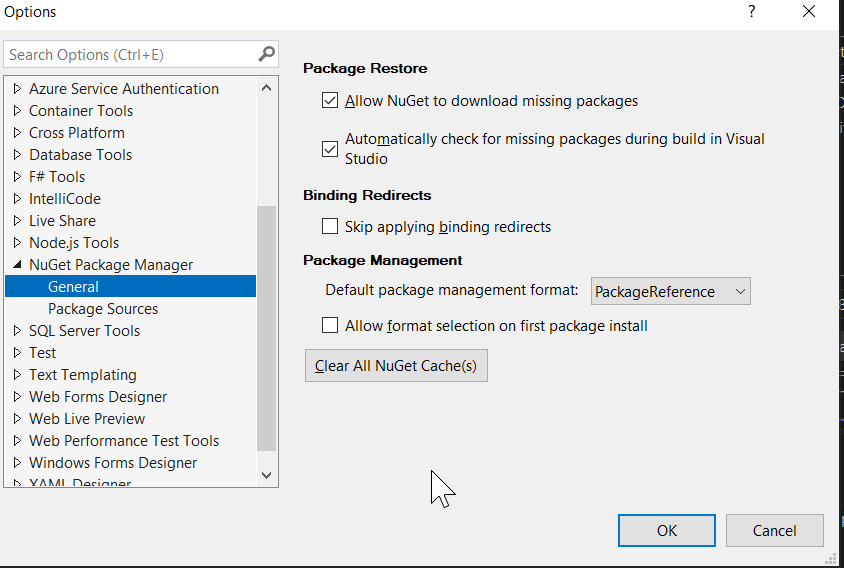
I made that change in my environment and am still having the problem. I don't see any errors in ProGet and on the package Usage/Statistics page I do not see any attempts from the day I tried to download the package from Visual Studio.
The user I am running Visual Studio as is able to log into the Web UI and manually download the package, but not from Visual Studio or nuget CLI.
-
Hi @kichikawa_2913,
Can you please try clearing the NuGet cache on your computer and see if the problem persisists? You should be able to click the "Clear All NuGet Cache(s)" button in the screen shot you sent to do this.
Thanks,
Rich -
@rhessinger I have done that multiple times and no difference.
-
Hi @kichikawa_2913,
Unfortunately I'm not able to reproduce this, and that packages are downloading just fine through ProGet, so it's a bit of guesswork as to where the issue could be.
Can you find errors on the ProGet-side around the time this is happening?
Can you isolate which specific requests are failing in ProGet? The easiest way to do this is with Fiddler (visual Studio should automatically connect to it) - and you can even share the failed requests as a
.sazfile so we can review as well...Thanks,
Alana -
@atripp I wasn't seeing anything in the logs before but this is what I get now. There's an initial query that looks to return a 401 then a second query after the LDAP lookup that returns a 200. I took away the Anonymous permissions in hopes to not use that where I can.
info: Microsoft.AspNetCore.Hosting.Diagnostics[1] Request starting HTTP/1.1 GET http://server01.internal.network/health - 0 info: Microsoft.AspNetCore.Hosting.Diagnostics[2] Request finished HTTP/1.1 GET http://server01.internal.network/health - 0 - 200 492 application/json 0.2094ms info: Microsoft.AspNetCore.Hosting.Diagnostics[1] Request starting HTTP/1.1 GET http://server01.internal.network/health - 0 info: Microsoft.AspNetCore.Hosting.Diagnostics[2] Request finished HTTP/1.1 GET http://server01.internal.network/health - 0 - 200 492 application/json 0.1055ms info: Microsoft.AspNetCore.Hosting.Diagnostics[1] Request starting HTTP/1.1 GET http://repo.dev.internal.network/nuget/approved-nuget/v3/registrations-gz/selenium.webdriver.chromedriver/index.json - - info: Microsoft.AspNetCore.Hosting.Diagnostics[2] Request finished HTTP/1.1 GET http://repo.dev.internal.network/nuget/approved-nuget/v3/registrations-gz/selenium.webdriver.chromedriver/index.json - - - 401 84 - 36.7864ms info: Microsoft.AspNetCore.Hosting.Diagnostics[1] Request starting HTTP/1.1 GET http://repo.dev.internal.network/nuget/approved-nuget/v3/registrations-gz/selenium.webdriver.chromedriver/index.json - - Begin LDAP Get Search Results LdapReferralException LdapReferralException LdapReferralException End LDAP Get Search Results Begin ActiveDirectoryUser IsMemberOfGroup End ActiveDirectoryUser IsMemberOfGroup Begin ActiveDirectoryUser IsMemberOfGroup End ActiveDirectoryUser IsMemberOfGroup Begin ActiveDirectoryUser IsMemberOfGroup End ActiveDirectoryUser IsMemberOfGroup Begin ActiveDirectoryUser IsMemberOfGroup End ActiveDirectoryUser IsMemberOfGroup Begin ActiveDirectoryUser IsMemberOfGroup End ActiveDirectoryUser IsMemberOfGroup info: Microsoft.AspNetCore.Hosting.Diagnostics[1] Request starting HTTP/1.1 GET http://server01.internal.network/health - 0 info: Microsoft.AspNetCore.Hosting.Diagnostics[2] Request finished HTTP/1.1 GET http://server01.internal.network/health - 0 - 200 492 application/json 0.2086ms info: Microsoft.AspNetCore.Hosting.Diagnostics[1] Request starting HTTP/1.1 GET http://server01.internal.network/health - 0 info: Microsoft.AspNetCore.Hosting.Diagnostics[2] Request finished HTTP/1.1 GET http://server01.internal.network/health - 0 - 200 492 application/json 0.0710ms info: Microsoft.AspNetCore.Hosting.Diagnostics[2] Request finished HTTP/1.1 GET http://repo.dev.internal.network/nuget/approved-nuget/v3/registrations-gz/selenium.webdriver.chromedriver/index.json - - - 200 11843 application/json 425.9930ms info: Microsoft.AspNetCore.Hosting.Diagnostics[1] Request starting HTTP/1.1 GET http://server01.internal.network/health - 0 info: Microsoft.AspNetCore.Hosting.Diagnostics[1] Request starting HTTP/1.1 GET http://server01.internal.network/health - 0 -
I think I remember in one of my posts, or another, someone saying that NuGet CLI will not send authentication on the initial query for a NuGet package and there might be a way to force it to?
-
@stevedennis said in Permissions only work when set for specific user, not a group (LDAP):
Hi @kichikawa_2913 ,
The NuGet client's behavior is based on NuGet.org, where no authentication is ever required to view/download packages. As such, it doesn't pass the API key when doing those queries; instead, you can use a username of
apiand the password of your api key.Based on the issue though, it sounds like ProGet is unable resolve the groups; I would use the "test privileges" function on the Tasks page to verify this. Thatw ill show you if the username can download packages or not.
The most common reason that groups aren't resolving is that the member is not directly in the group (i.e. they're in a group which is a member of the group), and you don't have recursive groups enabled; do note that this is really slow on some domains.
Cheers,
SteveI tried removing my credentials for VS and re-added them as "api" username and personal API key as the password, same results; get a 401, LDAP query, then 200 and getting same error in VS.
Seems like we need to keep the Anonymous permissions on all repos?
-
@kichikawa_2913 said in Package not found restoring from ProGet but works from nuget.org:
I wasn't seeing anything in the logs before but this is what I get now. There's an initial query that looks to return a 401 then a second query after the LDAP lookup that returns a 200.
That's considered an "authentication challenge"; in the first request, Visual Studio doesn't send any credentials (and the 401 is returned), so then he retries again with credentials (hence the 200). So that isn't so unusual of a pattern, and seems to be operating fine.
What we're lookign for is which requests in Visual Studio are giving results with no packages, etc. It should be obvious from the URL, which package is being requested from proget.
-
@atripp those are the only things in the container logs when I click "Install" in VS for the package in question. The name of the package is in the URLs below and I don't see any other URLs related to that package in the log.
I also made sure to clear the NuGet cache before attempting to install and I get the same results; request to http://repo.dev.internal.network/nuget/approved-nuget/v3/registrations-gz/selenium.webdriver.chromedriver/index.json results in a 401, LDAP search, some health checks, then a request to http://repo.dev.internal.network/nuget/approved-nuget/v3/registrations-gz/selenium.webdriver.chromedriver/index.json resulting in a 200.
I'm double checking with our security team to make sure we aren't blocking anything.
-
@kichikawa_2913 the best way to troubleshoot this would be with using a tool like Fiddler to compare/contrast the request/responses from NuGet and ProGet. At this point, we're not sure why your ProGet is behaving different than our ProGet, or NuGet.org. If you can share a
.sazarchive, we can try to look as well.The
registrations-gz/selenium.webdriver.chromedriver/index.jsonis basically just asking for a list of versions. It's dynamically generated, That may not have the version NuGet wants/expects? It's really hard to guess... -
@atripp our security team does not have anything that could be blocking. I'll work to get a fiddler
.sazfile for you as soon as I can. Thank you all again! -
I was able to duplicate this same issue with the nuget.exe directly. That is the direct suggested command when I open the package in the feed. However, when I don't specify a version, I was able to pull it down locally.
nuget install Selenium.WebDriver.ChromeDriver -Version 96.0.4664.1800-beta.2 -Source https://--redacted--/nuget/approved-nuget/v3/index.json
Package 'Selenium.WebDriver.ChromeDriver 103.0.5060.5300' is not found in the following primary source(s): --redacted--/nuget/approved-nuget/v3/index.json'. Please verify all your online package sources are available (OR) package id, version are specified correctly.
-
Hi @dward_2542 ,
Thanks for finding the specific package.
The issue is that ProGet does not consider
96.0.4664.1800-beta.2to be a valid NuGet package version, and gives an error message when trying to access it. See the NuGet Package Versioning documentation to see what's supported.Most NuGet tools and versions of the NuGet client will not support that version number either.
The easiest way to resolve the issue is to use a newer version of that package.
Cheers,
Alana -
dward_2542's message should have been
nuget install Selenium.WebDriver.ChromeDriver -Version 103.0.5060.5300 -Source https://--redacted--/nuget/approved-nuget/v3/index.json
Package 'Selenium.WebDriver.ChromeDriver 103.0.5060.5300' is not found in the following primary source(s): --redacted--/nuget/approved-nuget/v3/index.json'. Please verify all your online package sources are available (OR) package id, version are specified correctly.
He asked me to update this thread.
-
Hi @bbrown2_8761 ,
That package should be fine; are you sure it's in your
approved-nugetfeed?If you navigate to
/feeds/approved-nuget/Selenium.WebDriver.ChromeDriver/103.0.5060.5300in the Web UI, then you should be able to see and download the package.When you try to download from the UI, what happens?
Thanks,
Alana -
Works from the web UI without issue.
We tested installing the package in a .NET Core console app and a .NET Framework console app
(core being PackageReference style and Framework being packages.config style) and found that
the Core project installed just fine, but the Framework project was only able to install the
package if we omit the -Version argument using the Package Manager Console in VS.I ran the below in the package manager window of both.
install-package Selenium.WebDriver.ChromeDriver -Version 103.0.5060.5300 -Source https://(redacted)/nuget/approved-nuget/v3/index.jsonTest console app 1 - .Net Core 3.1 LTS
- This worked
Test console app 2 - .Net Framework 4.7.2
- This did not work
- I also attempted to download via NuGet Package manager > "Manage packages for this project", selecting 103.0.5060.5300
-
Hi @bbrown2_8761 ,
I was able to reproduce this issue, though it's not happening 100% of the time.
- a feed with a connector to nuget.org will fail
- a feed with just that version of the package will work
So far as I can tell, it's a bug in the NuGet client that .NET Framework uses. Maybe it's a result of the "bad version" in the feed?
We can see that Visual Studio is requesting the registration index, and then complains the package isn't found. However, it's clearly in the index.
The registration index lists all versions of the package, and you can find it on this URL:
https://(redacted)/nuget/approved-nuget/v3/registrations/selenium.webdriver.chromedriver/index.jsonYou will see 103.0.5060.5300 in that list, and there's no reason NuGet should say he's not found.
There is one key difference between ProGet's registration index, and NuGet.org's index is paging. Here's NuGet's index:
https://api.nuget.org/v3/registration5-semver1/selenium.webdriver.chromedriver/index.jsonWhen the registration index is paged, then the client will look for the appropriate page. I'm guessing he will crash if there's a bad version in there, or something?
Anyways... I don't think we can do much to work-around this issue, and I guess you have a suitable work-around: don't use the Install-Package command. That seems to be the only thing broken.
Cheers,
Alana -
Thank you for the reply.
When using VS with a .NET framework project if we install the package WITHOUT the version flag, it works. We've noticed that the -beta.2 version does not indicate "prerelease" if that matters.
This is a constant issue when we update Selenium.
When we don't use ProGet it works so that's what lead us to believe it was a ProGet related issue.
-
Hi @bbrown2_8761 ,
It's a bug in Visual Studio's NuGet client I'm afraid and it's not something we can realistically work-around

You could post it in the NuGet issues, and they may fix it in a future version; https://github.com/NuGet/Home/issues
It's really easy to reproduce, and they've definitely fixed issues like this in the past.
Cheers,
Alana


Hello! It looks like you're interested in this conversation, but you don't have an account yet.
Getting fed up of having to scroll through the same posts each visit? When you register for an account, you'll always come back to exactly where you were before, and choose to be notified of new replies (either via email, or push notification). You'll also be able to save bookmarks and upvote posts to show your appreciation to other community members.
With your input, this post could be even better 💗
Register Login