Welcome to the Inedo Forums! Check out the Forums Guide for help getting started.
If you are experiencing any issues with the forum software, please visit the Contact Form on our website and let us know!
BuildMaster Release Status
-
Hi Support,
Could you give me some guidance on using Releases and Builds please?I think I have a request to be able to be able to manually set the Release Status to anything, like I can with a Build Status, however I'm not sure if I have confused myself into a corner here !
Sorry for the ramble and wall of text..
I'm learning BuildMaster to deploy software releases and I have a software release for example that has a version of 1.1 and a build of 1234.
- What I have been doing so far is to create the release with the 3 digit release number i.e. 1.1.1234 and then just accepting a build number of #1 simply as a placeholder.
This gives a result that looks something like this:
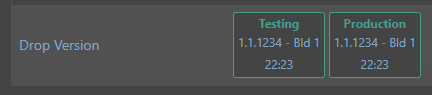
- I think I would rather create the release with a 2 digit release number i.e. 1.1 and a build of 1234 as I think this better matches our versioning.
This gives a result that looks something like this:

Where am tying myself in a knots; if I then have a subsequent release of 1.1 and build 5678, with option (1) this is easy, I simply create this as release 1.1.5678 and Bld 1.
However with option (2) as Release 1.1 was marked as Deployed I cannot add another build as there is no active release.There is an option to Restore the Release to Active Status
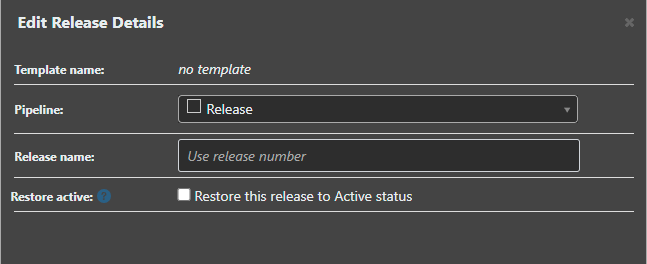
But if I want to cancel this action, and not proceed with a build, I cannot then mark the Release back to Deployed..
It looks as though I can set the last Build to Active, and then back to Deployed to get the Release back into a deployed state, but this feels like I am 'cheating' the system however !
Could the Release status be set to any status like the Build status ?I have another scenario with different spin, we sometimes produce 'dev' builds that break the numbering, they have a release of 0.0 and a build of 9998 for example.
Option (1) is again easy as the release is 0.0.9998 but I end up with the spurious Bld 1
Option (2) means I have a release of 0.0 that will end up with various builds in..Is my approach reasonable overall ?
Thanks,
Paul -
Hi @paul_6112 ,
The general philosophy that BuildMaster was designed around is this:
- A "Release" is an intended set of changes to production
- A "Build" is an attempt at implementing those changes
- When a "Build" makes it to production (i.e. the final stage in the pipeline), then the changes were applied to production, thus the "Release" has occurred
- If you want to change production again, then you create a new "Release"
This means that, after build of 1.1 is successfully deployed to production (and no rollbacks are needed, etc.), it cannot be released again. You'd need to do 1.2, or so on.
However, in practice users want to deploy 1.1 build 1234 to production, and then 1.1 build 5678 to production.
So with this, we have a few options:
- Create the releases 1.1.1234 and 1.1.5678, and then have build 1 (sounds like you're doing this)
- Create Release 1.1.0 Build 1234, Release 1.1.1 Build 5678, and use a Release Name of 1.1 (this overrides the display in nearly all places)
- Edit the pipeline, and uncheck "Mark the release and build as deployed once it reaches the final stage."; this will give you more control over changing release status
- Don't use releases at all (set Release Usage to None on advanced settings), and have the build number be 1.1.1234, 1.1.5678
Definitely open to some other ideas as well. A few users have had to "workaround" this design philsophy, and we'd rather just support it!

Hello! It looks like you're interested in this conversation, but you don't have an account yet.
Getting fed up of having to scroll through the same posts each visit? When you register for an account, you'll always come back to exactly where you were before, and choose to be notified of new replies (either via email, or push notification). You'll also be able to save bookmarks and upvote posts to show your appreciation to other community members.
With your input, this post could be even better 💗
Register Login