Welcome to the Inedo Forums! Check out the Forums Guide for help getting started.
If you are experiencing any issues with the forum software, please visit the Contact Form on our website and let us know!
Npm packages not visible when running onder IIS
-
We changed from http to https using this documentation
https://docs.inedo.com/docs/various-iis-switching-to-iis
But now when we publish an npm package with npm publish we don't see the new version with pnpm view only after an IIS reset is the new package visible.
The package also don't show up in Latest Local Packages list, but do after an IIS reset
-
Hi @v-makkenze_6348,
Can you please share your IIS configuration settings that you have used? Can you specifically include any caching settings you have as well?
Thanks,
Dan -
As far as I know I did not do anything other then what the documentation said.
Which IIS settings would you like to see?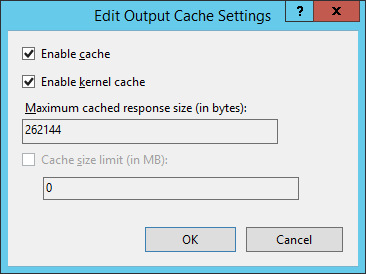
-
@v-makkenze_6348 it looks like you've enabled caching, which means that ProGet's responses won't be newly generated. Please disable this :)
-
I disabled the cache, but when I publish a new package its still not visible.
Version 1 is published
$ pnpm view @vicrea-neuron/progettest versions
[ '1.0.0' ]Publish version 2
$ npm publish
npm notice
npm notice package: @vicrea-neuron/progettest@2.0.0
npm notice === Tarball Contents ===
npm notice 64B package.json
npm notice === Tarball Details ===
npm notice name: @vicrea-neuron/progettest
npm notice version: 2.0.0
npm notice package size: 162 B
npm notice unpacked size: 64 B
npm notice shasum: 7187dcb1f33b4025539a79b0728b0b33dd44af9a
npm notice integrity: sha512-G+8QbHgghLq4g/Cn6P+qby28eQ==
npm notice total files: 1
npm notice- @vicrea-neuron/progettest@2.0.0
It does not show up
$ pnpm view @vicrea-neuron/progettest versions
[ '1.0.0' ]Only after an IIS reset version 2 is visible
$ pnpm view @vicrea-neuron/progettest versions
[ '1.0.0', '2.0.0' ] -
When I use an api key, there seem to be no caching problems.
So I have this in my .npmrc
_auth=<base encoded string api:key> -
@v-makkenze_6348 thanks for the additional information
ProGet does not cache npm package lists/indexes. It's always generated from the information in the database, so if you pushed it - then it's in the database. You should be able to see it in the ProGet UI right after publishing.
It's very possible that the npm client is doing some sort of caching as well, but isn't doing that cache with authenticated requests. I'm not familiar enough, but that's my guess.
You could use a tool like Fiddler to verify / see what requests npm is actually making.
-
We have the same problem after we updated to ProGet 6. We can publish npm packages and view/download them in ProGet Browser UI totaly fine. But when working with npm console it is not showing up. The only thing that works is explicitly an IIS reset. After that it works till a new version is uploaded. The mentioned IIS cache setting is off. Restarting the ProGet service (not IIS) has no effect. So far Nuget and other feed types that we are using seem not be affected.
-
Here the log from the npm attempt (sensitive data removed):
0 info it worked if it ends with ok
1 verbose cli [
1 verbose cli   'C:\\Program Files\\nodejs\\node.exe',
1 verbose cli   'C:\\Program Files\\nodejs\\node_modules\\npm\\bin\\npm-cli.js',
1 verbose cli   'install',
1 verbose cli   '@*********/baseui@1.0.10'
1 verbose cli ]
2 info using npm@6.14.13
3 info using node@v14.17.0
4 verbose npm-session f37403ddb21d77d5
5 silly install loadCurrentTree
6 silly install readLocalPackageData
7 http fetch GET 200 https://proget:9443/npm/*********/@*********%2fbaseui 17ms (from cache)
8 silly registry:manifest no matching version for @*********/baseui@1.0.10 in the cache. Forcing revalidation.
9 http fetch GET 200 https://proget:9443/npm/*********/@*********%2fbaseui 277ms
10 silly fetchPackageMetaData error for @*********/baseui@1.0.10 No matching version found for @*********/baseui@1.0.10.
11 timing stage:rollbackFailedOptional Completed in 1ms
12 timing stage:runTopLevelLifecycles Completed in 1252ms
13 verbose type version
14 verbose stack @*********/baseui: No matching version found for @*********/baseui@1.0.10.
14 verbose stack     at pickManifest (C:\Program Files\nodejs\node_modules\npm\node_modules\npm-pick-manifest\index.js:122:13)
14 verbose stack     at C:\Program Files\nodejs\node_modules\npm\node_modules\pacote\lib\fetchers\registry\manifest.js:43:18
14 verbose stack     at tryCatcher (C:\Program Files\nodejs\node_modules\npm\node_modules\bluebird\js\release\util.js:16:23)
14 verbose stack     at Promise._settlePromiseFromHandler (C:\Program Files\nodejs\node_modules\npm\node_modules\bluebird\js\release\promise.js:517:31)
14 verbose stack     at Promise._settlePromise (C:\Program Files\nodejs\node_modules\npm\node_modules\bluebird\js\release\promise.js:574:18)
14 verbose stack     at Promise._settlePromise0 (C:\Program Files\nodejs\node_modules\npm\node_modules\bluebird\js\release\promise.js:619:10)
14 verbose stack     at Promise._settlePromises (C:\Program Files\nodejs\node_modules\npm\node_modules\bluebird\js\release\promise.js:699:18)
14 verbose stack     at _drainQueueStep (C:\Program Files\nodejs\node_modules\npm\node_modules\bluebird\js\release\async.js:138:12)
14 verbose stack     at _drainQueue (C:\Program Files\nodejs\node_modules\npm\node_modules\bluebird\js\release\async.js:131:9)
14 verbose stack     at Async._drainQueues (C:\Program Files\nodejs\node_modules\npm\node_modules\bluebird\js\release\async.js:147:5)
14 verbose stack     at Immediate.Async.drainQueues [as _onImmediate] (C:\Program Files\nodejs\node_modules\npm\node_modules\bluebird\js\release\async.js:17:14)
14 verbose stack     at processImmediate (internal/timers.js:462:21)
15 verbose cwd C:\ApacheTomcat\webapps\ROOT\SCP\Sphere-Invoice-Interface\ui\InvoiceInterfaceMonitor
16 verbose Windows_NT 10.0.19044
17 verbose argv "C:\\Program Files\\nodejs\\node.exe" "C:\\Program Files\\nodejs\\node_modules\\npm\\bin\\npm-cli.js" "install" "@*********/baseui@1.0.10"
18 verbose node v14.17.0
19 verbose npm  v6.14.13
20 error code ETARGET
21 error notarget No matching version found for @*********/baseui@1.0.10.
22 error notarget In most cases you or one of your dependencies are requesting
22 error notarget a package version that doesn't exist.
23 verbose exit [ 1, true ]
Npm does not find it in its cache and a retry occurs which fails with: "No matching version found"
-
Hi @lockhead,
I think I see what the issue might be. Would you be able to capture the requests made from NPM to ProGet using a tool like fiddler and send them over to us? You can send the requests to support@inedo.com using the subject prefixed with
[QA-706]. This would help greatly to confirm my thoughts.Thanks,
Dan -
Hi Dan,
i will try. But it will take some time. Log4j fallout comes first;)
Greetings
-
I have sent a Fiddler dump to the mentioned email, hopefully confirming the thoughts of @Dan_Woolf.
Can you confirm that this is indeed the case? Will save @lockhead some time :)
-
Hi @p-boeren_9744,
I did receive the email, thank you for that. This mostly confirms my thought. There is still one issue, but I think it has to do with this package being downloaded anonymously first prior to adding login information to the NPM client. This fix is being tracked in ticket, PG-2059, and is scheduled to release on Friday in ProGet 6.0.5.
Thanks,
Dan -
I can confirm that its working for us now. Thanks!



Hello! It looks like you're interested in this conversation, but you don't have an account yet.
Getting fed up of having to scroll through the same posts each visit? When you register for an account, you'll always come back to exactly where you were before, and choose to be notified of new replies (either via email, or push notification). You'll also be able to save bookmarks and upvote posts to show your appreciation to other community members.
With your input, this post could be even better 💗
Register Login