Welcome to the Inedo Forums! Check out the Forums Guide for help getting started.
If you are experiencing any issues with the forum software, please visit the Contact Form on our website and let us know!
BuildMaster Automated BuildTriggers
-
Hi
Trying to explore creating a new build at a specific interval on a weekly basis. The field Run At Time always changing back to "00.00" even if I set it something like "05:00". Wondering what is the syntax that goes in here.
Using BuildMaster v7.0.4 on local environment.
-Sri
-
Setting custom format with 12:35PM, see the screenshot below...
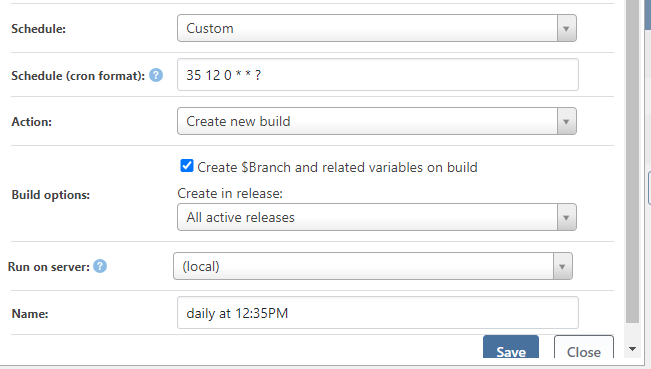
Gets saved as below:

What gives?
-
The documentation to the format is at https://www.quartz-scheduler.net/documentation/quartz-3.x/tutorial/crontrigger.html#format.... got it...
-
I am noticing that all scheduled builds only starts from tomorrow... I can't check if my schedule works by setting the build to happen next hour 13:00 or 13:15... it always seem to change the date to tomorrow and beyond...
-
Hi @sbolisetty_3792 ,
Cron format is a bit tricky, but it "can do anything"... so it seemed like an "decent" compromise to use that for advanced/custom intervals.
But to be honest, even after reading the docs, I can never figure it out, and always use a generator like this:
https://freeformatter.com/cron-expression-generator-quartz.html
What cron expression do you use, and what time of day did you check the "next run time".
Cheers,
Alana -
@atripp The links are very helpful... BM always showing the time in UTC...though I updated the server time to be localtimezone. So, the scheduling automatically changes the next run to be in the UTC format... once this is understood, I see that the cron based scheduling is working as expected...
Thanks for your help.

Hello! It looks like you're interested in this conversation, but you don't have an account yet.
Getting fed up of having to scroll through the same posts each visit? When you register for an account, you'll always come back to exactly where you were before, and choose to be notified of new replies (either via email, or push notification). You'll also be able to save bookmarks and upvote posts to show your appreciation to other community members.
With your input, this post could be even better 💗
Register Login