Welcome to the Inedo Forums! Check out the Forums Guide for help getting started.
If you are experiencing any issues with the forum software, please visit the Contact Form on our website and let us know!
EPERM unlink error with NPM packages
-
Hi all,
when installing npm packages from proget we regularly receive following error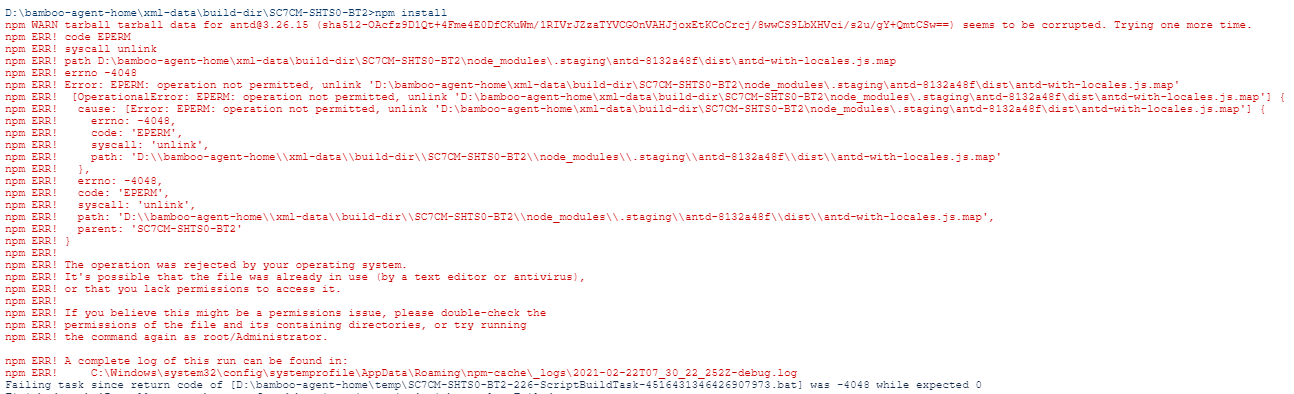
Any ideas where this could come from and how to solve it?
- It appears in different environments (different servers, different build plans, different packages etc.).
- While investigating we changed the source to use the official npm registry instead of proget and it did not appear in 10 of 10 tries. When pulling the packages from proget it appeared in 7 of 12 tries. We already tried to disable antivirus programs, running as administrator etc.
- We are using Proget v5.3.31, Node v12 and npm v6.
-
Hi @Jana-Rebmann_7461,
Typically when you see an EPERM error that is caused by the OS. You can find quite a bit about it on Google and Stack Overflow. Typically users experience that issue on windows that have their drives indexed. Although, I want to believe that the npm client is your issue, I have a feeling that something is happening first and then the EPERM error is happening on the cleanup of the file. Especially since you are saying that npmjs.org does not have the problem. I noticed at the end of the error, it says "A complete log of the run exists at", would you be able to send that over to us?
If you don't feel comfortable attaching that to this post, you can send it to support@inedo.com and put
[Support QA-609]in the subject. Just please let me know that you emailed it so I can keep an eye out for the email.Thanks,
Rich -
Hi Rich,
thanks for the fast reply. I have send the log file to the support mail address with the ticket number you provided.Thank you!
Jana -
Hi @Jana-Rebmann_7461,
Thanks! I received the log and took a look. The only errors I see before EPERM error is an error saying warn tar ENOENT: no such file or directory, open for the
core-jsmodule. What I think I happening is thenode_modulesdirectory is becoming corrupted, which is a pretty common occurrence. Typically you just runrm -rf node_modules && npm installand that fixes it.As for the EPERM error, this really looks like something is locking the files. Do you have any sort of anti-virus or anything watching that directory? Can you try ignoring that directory and testing again to see if you get the error still? Does this happen every time or just sporadically?
I know you mentioned that this didn't happen when switching to npmjs.org, but this could also be an issue with the npm cache and how it links to the installed files. When switching repositories, npm will create a different cache folder and link from a different location. I think it happens to just be a coincidence and you will most likely hit a similar issue after using npmjs.org for a bit.
Thanks,
Rich -
Hi Rich,
thanks for your feedback! We have no anti-virus or something running on these servers. I saw that suggestion (to disable it) also when researching in the past. We are using Atlassian Bamboo as build server and we have activated that it cleans up the directory after every build so there is no node_modules folder in the working directory.
Regarding your question the error appears sporadically. There are weeks where it doesn't appear in a single build and other weeks where it appears in every second build. We are tracking this issue now for a year and it disappears sometimes and appears again later. Unfortunately we didn't find any relation there.
Good point, I understand we could also experience that issue with npmjs.org when we use it for a while. I already tried running
npm cache clean --forcebefore starting to install the npm packages and also tried deleting the npm cache directoryC:\Windows\System32\config\systemprofile\AppData\Roaming\npm-cache. It did not help... Do you have experience how I could make sure to delete the cache before installing npm packages or how to use a dedicated directory for the cache to make sure there is no link/access issue?Thanks in advance.
Jana
-
Hi @Jana-Rebmann_7461,
Unfortunately, NPM does not include any parameters you can pass to uncache the install results. You can try delete
%appdata%\npm-cachebefore each run and see if that helps. I have also seen that this can be caused by the NPM verifying the hash with the one stored in the package-lock.json as well. But that would only break if an anti-virus or something deleted a file out of the zip.Have you tried upgrading your NPM client recently? How long has this issue existed?
Thanks,
Rich -
Hi Rich,
I'll try what you suggested, thank you. We tried to upgrade NPM client, unfortunately this will use also a newer version of Node.js which has a different error handling that caused all our unit tests to break. So we skipped that option until all tests are fixed.
The issue appears since one year now. It disappeared for 2 or 3 months but always came back.Thanks,
Jana

Hello! It looks like you're interested in this conversation, but you don't have an account yet.
Getting fed up of having to scroll through the same posts each visit? When you register for an account, you'll always come back to exactly where you were before, and choose to be notified of new replies (either via email, or push notification). You'll also be able to save bookmarks and upvote posts to show your appreciation to other community members.
With your input, this post could be even better 💗
Register Login