Welcome to the Inedo Forums! Check out the Forums Guide for help getting started.
If you are experiencing any issues with the forum software, please visit the Contact Form on our website and let us know!
ProGet in docker with Nginx for https reverse proxy
-
Thanks for your response.
Yes, it does.
The only problem is with VS publishing to ProGet.
During the docker compilation, NuGet packages are updated, that's when the endpoint returns with zero bytes. So it seems the https connection is not failing but the result returned is zero length.I suspect the issues to be in the Nginx server definition, something might be missing so that the result is not returned. (Pulling NuGet packages during normal compilation works fine, one would expect the same when publishing)
-
Hi @Fred,
It definitely can be settings in your Nginx settings, but nothing is jumping out at me. I am by no means an Nginx expert, but everything looks normal. I know we have quite a few users using Nginx with ProGet, so we know this is a working combination.
Just to get the easy Docker nuances out of the way first, I just want to verify that your certificate is not a self-signed certificate or generated by an internal certificate authority (there are things you need to set in the Docker client to get that to work). Also are you able to push images to ProGet using the command line? If not, are you able to send over the output of the CLI?
One other thing to try is to set the
Web.BaseUrlin Administration -> Advanced Settings to your HTTPS URL (ex: https://proget.xxx.com).Thanks,
Rich -
Hi @Fred,
I think I may have found the issue. Can you include
proxy_set_header Host $http_host;in your location node and see if that fixes your issue?Thanks,
Rich -
Thanks for looking into this.
- I am using a Commodo SSL certificate
- Web.BaseUrl is set to https://ProGet.xxx.com
- The image below is the error from VS2019 when I publish
- The text below is from the diagnostic log file referenced in the error.
- As a reminder, this all works fine when using ProGet on Windows.
(I don't think this is a ProGet issue, rather getting Nginx to work with ProGet) - I tried "proxy_set_header Host $http_host;", didn't work;
Thank you for your time, I appreciate it.
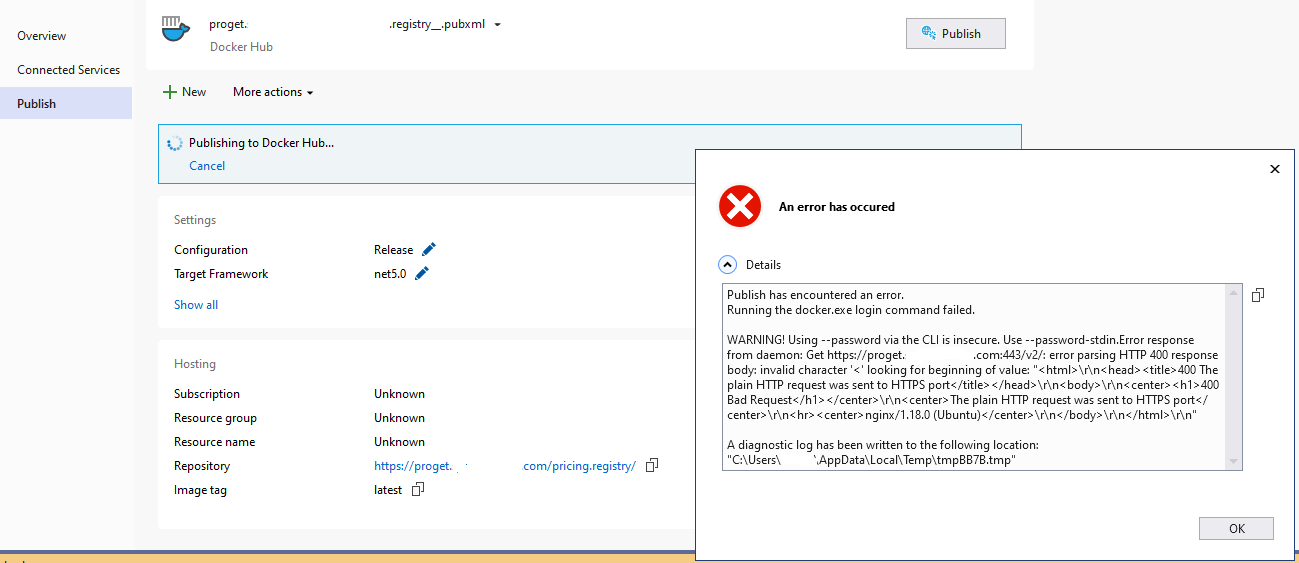
This is from the VS2019 diagnostic log :
6/15/2021 10:25:32 AM
Microsoft.WebTools.Azure.Publish.Docker.DockerCommandException: Running the docker.exe login command failed.WARNING! Using --password via the CLI is insecure. Use --password-stdin.Error response from daemon:
Get https://proget.xxx.com:443/v2/: error parsing HTTP 400 response body: invalid character '<' looking for beginning of value:
"<html>\r\n<head><title>400 The plain HTTP request was sent to HTTPS port</title></head>\r\n<body>\r\n<center><h1>400 Bad Request</h1>
</center>\r\n<center>The plain HTTP request was sent to HTTPS port</center>\r\n<hr><center>nginx/1.18.0 (Ubuntu)</center>\r\n</body>\r\n</html>\r\n"
at Microsoft.WebTools.Azure.Publish.Docker.DockerOperations.ThrowDockerCommandError(String dockerCommand)
at Microsoft.WebTools.Azure.Publish.Docker.DockerOperations.<DockerLoginAsync>d__5.MoveNext()
--- End of stack trace from previous location where exception was thrown ---
at System.Runtime.CompilerServices.TaskAwaiter.ThrowForNonSuccess(Task task)
at System.Runtime.CompilerServices.TaskAwaiter.HandleNonSuccessAndDebuggerNotification(Task task)
at Microsoft.WebTools.Azure.Publish.Docker.DockerPublish.<DockerPublishAsync>d__2.MoveNext()
--- End of stack trace from previous location where exception was thrown ---
at System.Runtime.CompilerServices.TaskAwaiter.ThrowForNonSuccess(Task task)
at System.Runtime.CompilerServices.TaskAwaiter.HandleNonSuccessAndDebuggerNotification(Task task)
at Microsoft.WebTools.Azure.Publish.ContainerRegistry.ManageContainerRegistry.<PushImageAsync>d__11.MoveNext()
--- End of stack trace from previous location where exception was thrown ---
at System.Runtime.CompilerServices.TaskAwaiter.ThrowForNonSuccess(Task task)
at System.Runtime.CompilerServices.TaskAwaiter.HandleNonSuccessAndDebuggerNotification(Task task)
at Microsoft.WebTools.Azure.Publish.PublishProviders.ContainerRegistryProfileVisual.<PostPublishAsync>d__38.MoveNext()
--- End of stack trace from previous location where exception was thrown ---
at System.Runtime.CompilerServices.TaskAwaiter.ThrowForNonSuccess(Task task)
at System.Runtime.CompilerServices.TaskAwaiter.HandleNonSuccessAndDebuggerNotification(Task task)
at Microsoft.Publish.Framework.Nexus.PublishProfilesServiceImpl.ServerProjectProfilesManager.<RunPublishTaskAsync>d__53.MoveNext()===================
-
Hi @Fred,
The message I'm pulling out of this error is
The plain HTTP request was sent to HTTPS port. This indicates either the docker client is trying to push a non-SSL request to an SSL port (like HTTP://proget.com:443 where 443 is bound to SSL) or you have a bad forward of the host and port in your NGINX file. I recently did some testing on this and this was the NGINX file that I tested and worked: https://docs.inedo.com/docs/https-support-on-linuxThanks,
Rich -
Thanks.
I tried it but got the same error.
As you said, it works for you, now I will have to look elsewhere in Nginx for the problem. -
@Fred I've got the following configuration on my system, and it's working just fine. I'm also on Ubuntu, specifically 20.04.
proxy_set_header Host $host;
proxy_set_header X-Real-IP $remote_addr;
proxy_set_header X-Forwarded-Proto "https";
The only other proxy settings I have are
proxy_passandclient_max_body_size, but those shouldn't be related.I couldn't tell from the original post, but make sure your not connecting over
httpwhen connecting from Docker. Unless you manually specify HTTP, I'm pretty sure Docker will automatically use HTTPS though. -
Good morning,
You are right, not only does Docker use https but VS2019 does not give any option to change it, hence the requirement to proxy ProGet with https using Nginx.
The reason why I don't think Docker is the issue; I have both Windows and Linux (Ubuntu 20.10) of ProGet installed and switch between the two by changing the IP address in the DNS.
If I use the Windows version all works fine, the goal is to use the Linux version and do away with the Windows version.I also use Portainer and even thought Portainer does have https I also use the Nginx as a proxy to it so I can have a url without a port number.
It uses the same SSL certificates (*.xxx.com) and that works fine, so the SSL certificates I use for ProGet are good.Therefore, logically the issue has to be around Nginix.
-
Hi @Fred and @hwittenborn,
You can actually configure docker to use insecure HTTP registries. As it states in our documentation, you can register a host and port as an insecure registry which will then tell your docker client to use HTTP instead of HTTPS. A good way to rule out the ProGet container would be to configure your Docker daemon to use insecure registries pointing to the HTTP port of your ProGet container and try to push it that way. For example:
If you have your ProGet container running HTTP on port
80and hostproget.domain.local, add this to your Docker daemon (or settings in Docker Desktop on Windows and Mac):{ "registry-mirrors": [], "insecure-registries": [ "proget.domain.local:80" ], "debug": false, "experimental": false }Then if your repository name would be:
proget.domain.local:80/my/imagenameand your push command would look like:docker push proget.domain.local:80/my/imagename:tagnameThat will then push the image over HTTP vs HTTPS.
Is this only an issue in Visual Studio? Have you tried to push your image using the command line?
Thanks,
Rich -
Definitely try out @rhessinger's method - just make sure to remove the
insecure-registriesconfig after. -
Created repo including working docker-compose file + some guide.
https://github.com/Relers/proget-nginx


Hello! It looks like you're interested in this conversation, but you don't have an account yet.
Getting fed up of having to scroll through the same posts each visit? When you register for an account, you'll always come back to exactly where you were before, and choose to be notified of new replies (either via email, or push notification). You'll also be able to save bookmarks and upvote posts to show your appreciation to other community members.
With your input, this post could be even better 💗
Register Login