Welcome to the Inedo Forums! Check out the Forums Guide for help getting started.
If you are experiencing any issues with the forum software, please visit the Contact Form on our website and let us know!
OTTER 3 - $CredentialProperty not working after migration from Otter 2.X
-
Hi,
I trying to migrate to Otter 3, it is a very long journey :(
$CredentialProperty function is not working in Otter 3.0.
Create a Secure Credentials as "UserName & Password"
Check  Allow encrypter properties ...
Use in otter script:
set $CredentialUser = $CredentialProperty(UsernamePassword::myaccount, Username);
set $CredentialPwd = $CredentialProperty(UsernamePassword::myaccount, Password);
I got the following error msg:
The specified credential "UsernamePassword::svc-inedo" was not found.Same script on Otter 2.X is working.
Best regards
-
@philippe-camelio_3885 sorry this has been frustrating

There is a compatibility shim for this that should have picked this up... but after the migration from
ResourceCredentialstoSecureResourcesandSecureCredentials, we no longer use the type name to qualify credentials.Long story short, this should fix it...
set $CredentialUser = $CredentialProperty(myaccount, Username); set $CredentialPwd = $CredentialProperty(myaccount, Password); -
Hi @atripp
I made the change, and I got this new error:The specified credential "myaccount" could not be deserialized correctly: Persisted object is not a ResourceCredentials.The Credential is defined in Secure Credential like this
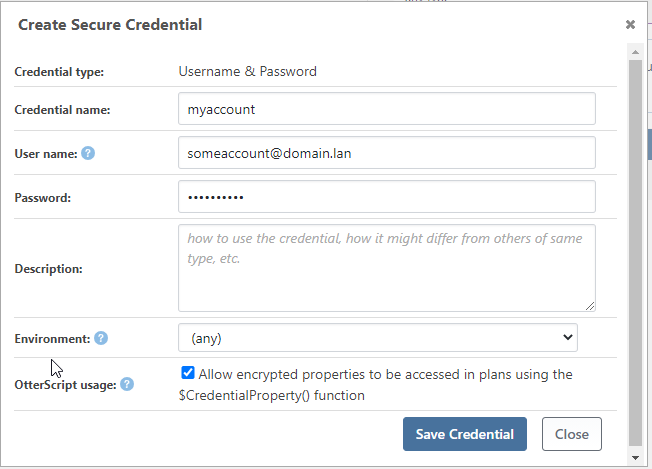
what am I doing wrong ?
-
Ah ok, I was able to reproduce this behavior; it was unfortunately a 3.0 regression as part of migrating the Legacy ResourceCredentials changes... but it's relatively easy to fix as OT-413 -- it's already scheduled for Otter 3.0.5 (next Friday), but we could make it available as a patch/pre-release version if you'd prefer?
-
@atripp said in OTTER 3 - $CredentialProperty not working after migration from Otter 2.X:
it's already scheduled for Otter 3.0.5 (next Friday), but w
I would like to test it as soon as possible if possible .
Thank you -
Hi @philippe-camelio_3885,
I have just built a pre-release version (3.0.5-ci.3) of Otter you can install to test out this feature. Please let me know if you have any issues.
Thanks,
Rich -
Thank
I am sorry, I am using Inedo Hub, and this version is not available.
Do you have any link for this prerelease version ? -
Hi @philippe-camelio_3885,
You can update the config of the Inedo Hub to point to our pre-release feed and install using the InedoHub. To do this, please see our Prerelease Products portion of the Inedo Hub documentation. Hope this helps!
Thanks,
Rich -
thank you @rhessinger
It is working fine.I have now to mix this version with the Scripting v1.10.2-CI.1 (bug for PSEnsure)

Thank you guys for the fast correction


Hello! It looks like you're interested in this conversation, but you don't have an account yet.
Getting fed up of having to scroll through the same posts each visit? When you register for an account, you'll always come back to exactly where you were before, and choose to be notified of new replies (either via email, or push notification). You'll also be able to save bookmarks and upvote posts to show your appreciation to other community members.
With your input, this post could be even better 💗
Register Login