Welcome to the Inedo Forums! Check out the Forums Guide for help getting started.
If you are experiencing any issues with the forum software, please visit the Contact Form on our website and let us know!
Connector to Azure DevOps NPM package feed not working
-
We are trying to connect our ProGet instance to a DevOps NPM Artifacts feed.
We are unable to connect to it using ProGet connector, but the token used is valid and has access to the Azure DevOps feed.
Step used to create the connector:
-
Login to the Azure DevOps Project and generate a token with the needed rights (Packaging Read, write, manage)

-
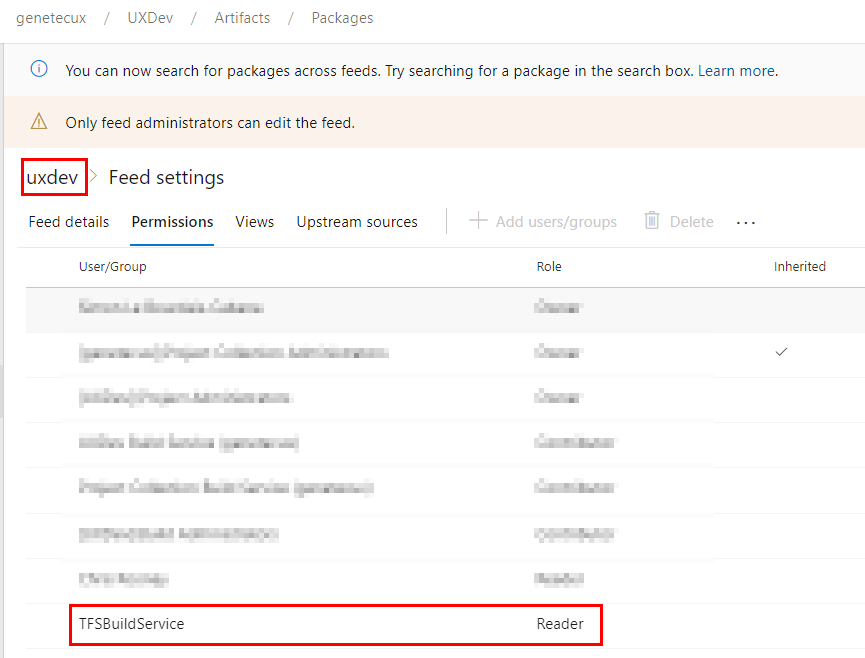
Go on the Azure DevOps project needed feed and give Read access to the user for which we created the token
-
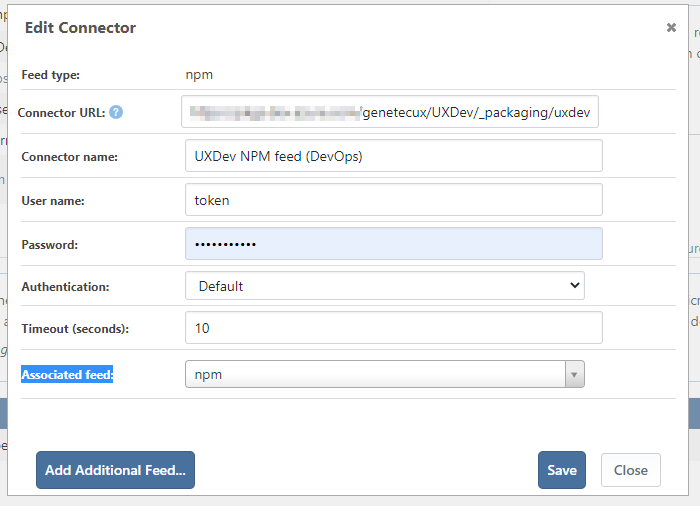
Login to ProGet and create a new Connector
Feed type : NPM
Connector URL : Azure DevOps feed URL
Connector name: The name we want
User name: token (also tried genetecux which is the name of the project)
Password: AzureDevops Generated token value (tried encoded in BASE64 as well)
Authentication: default (tried basic and bearer)
Timeout (seconds):10
Associated feed:npm
-
Run the service Connector Health Check
Get the error :- Debug: Invalid JSON response querying https://pkgs.dev.azure.com/genetecux/UXDev/_packaging/uxdev/npm/registry/

- Debug: Invalid JSON response querying https://pkgs.dev.azure.com/genetecux/UXDev/_packaging/uxdev/npm/registry/
Do you have any idea why we can't make it work and if it's a known issue?
-
-
I'm not super-familiar with ADO's npm feeds, but I don't think you're the only one who's had this issue, based on this old post.
Since that post was made, we added the "Authentication" drop down, and you should select Bearer for that. Then, keep Username empty.
If you do that, the Password field will be used as the Bearer token.
Can you try taht, and let us know if it works?
-
@stevedennis Hey Steve,
We tried that without success as well:

Microsoft is giving us a hard time to make it work with your product as usual.
If you have any idea or have anyone that's familiar with creating connector to an Azure DevOps feed I would be more than grateful!
-
@nicolas-morissette_6285 ah, that's too bad, but not surprising. Microsoft doesn't like non-Microsoft products (or even products from other departments) using their products

Unfortunately we can't "see" the response or back/forth communication and have no idea what's going on.
You could attach ProGet to a proxy server (like Fiddler) by going to Admin > Proxy, and see what's the back/forth communication is.
Or , easiest thing, just send us an access key to test with. We can just attach a debugger and see the responses, and maybe even fix the code or work-around whatever nonsense they're doing.
If you email it to support at inedo dot com with the [QA-529] in the subject, we can then attach it to the internal issue, and an engineer can investigate.
-
This post is deleted! -
@stevedennis
I created a dummy collection with a dummy project and a dummy feed on Azure DevOps that contains 1 NPM package.
I sent the information (feed address and PAT) in an email with "[QA-529] issue with ADO NPM feed connector" as subject.Thanks,
Nicolas -
Thanks @nicolas-morissette_6285 -- we've received it, and I've attached to our internal dashboard. I can also see which domain/company you're with, based on the Email -- and it looks like your company purchased a license, thanks!
I'll escalate the priority internally, and from here we'll just try to reproduce/research this (might take a day or two)... but we'll update as soon as we learn more!
-
@dean-houston Hey Dean,
Thanks a lot!
Yes we do have a license and use it to full potential. Microsoft is giving us/you a hard time with their DevOps feed.Will stay tuned for the update and let me know if you need anymore information.
-
Hi @nicolas-morissette_6285,
I took a look into this and what I have found is that Azure DevOps does not support the NPM search API which is why this errors. I created a connector to the Azure DevOps npm feed and then used a username of
token, set the password to the PAT (not Base64Encoded), and then selected Basic authentication. The list of all packages will not work, but if you navigate directly to the package or pull through npm, it will access the package. In my case, I was able to navigate tohttp://PROGET_SERVER/feeds/NPM_FEED_NAME/PACKAGE_NAME/versionsand it would load the package's page.I'm currently working with the products team on a solution. I'll let you know when I have more information for you.
Thanks,
Rich -
Hey @rhessinger,
Thanks a lot for the feedback it's really appreciated. Hopefully I won't be on your blacklist since I'm always coming in with Microsoft issues haha.I'll stay tuned for the solution.
Best Regards,
Nicolas -
@rhessinger said in Connector to Azure DevOps NPM package feed not working:
http://PROGET_SERVER/feeds/NPM_FEED_NAME/PACKAGE_NAME/versions
Hey Rich,
I just figured out that if I add this broken connector to this DevOps NPM feeds in my ProGet NPM feed it will break the ProGet NPM packages page.
As we know with this issue the connector isn't working and it gives us this error:

I did not expect that having this broken connector setup would crash my whole NPM feed page:

We would be fine if the connector would be skipped regarding listing the packages on the feed webpage but would still let us download the package directly with the NPM command as you mentioned (I tried it and was able to reach specific version pages on ProGet)
If it can make your life easier by just fixing the NPM page we would be fine with it.
-
Hi @nicolas-morissette_6285,
I'm still waiting for feedback from the products team, but my idea is to basically add a setting that allows you to disable listing/searching the packages on that connector and only allow exact name matches in the UI. We do a similar thing for Docker connectors because not all registries support listing or searching. The product change ticket tracking this fix is PG-1916. I will reply as soon as we have confirmed the fix and scheduled it for release. I'm hoping we can get it in for ProGet 5.3.26.
Thanks,
Rich -
Hi @nicolas-morissette_6285,
We have released this change in ProGet 5.3.26. I apologize for not replying sooner. If you upgrade your ProGet instance, then you can update your NPM connecter and select the
Exact Match Onlyoption on the connector configuration. That will then allow you to see all your local packages and still allow you to search by the exact name of your NPM packages on Azure DevOps Connector.Thanks,
Rich -
@rhessinger Hey Rich,
No worry I followed up closely and I knew the release including the fix was coming!I updated ProGet yesterday morning, updated my connector and our NPM feed page is back alive. Off course the connector can't tell me how much packages there's upstream but that's no big deal.
I asked our team using this NPM feed connector to let me know if they encounter any issue.
Thanks again for the amazing support it's highly appreciated.
-
Hi @nicolas-morissette_6285,
Always glad to help! Thanks for giving us an update and letting us know that this fixed your issue. Unfortunately, the package count is a side effect of ADO not implementing the search API. It does not give us the ability to get a package count.
Thanks,
Rich



Hello! It looks like you're interested in this conversation, but you don't have an account yet.
Getting fed up of having to scroll through the same posts each visit? When you register for an account, you'll always come back to exactly where you were before, and choose to be notified of new replies (either via email, or push notification). You'll also be able to save bookmarks and upvote posts to show your appreciation to other community members.
With your input, this post could be even better 💗
Register Login