Welcome to the Inedo Forums! Check out the Forums Guide for help getting started.
If you are experiencing any issues with the forum software, please visit the Contact Form on our website and let us know!
Otter 3.0.2. PSEnsure operations broken
-
I have installed Otter on several brand new Windows 10 and Server 2019 with nothing else installed. I am testing a deployment framework. I cannot get anything PowerShell related to work at all. I have even gone back several versions, and it is still broken. I used some known good working ones that I have developed over time that are in use today, but cannot get them to work:
DEBUG: 2021-03-02 21:10:57Z - Building OtterScript configuration for server "LOCALHOST" to target 2 roles...
DEBUG: 2021-03-02 21:10:57Z - Beginning collection run...
ERROR: 2021-03-02 21:10:57Z - Could not resolve variable $ErrorActionPreference.
ERROR: 2021-03-02 21:10:57Z - No Collect or Ensure operations were executed during the collection phase.
DEBUG: 2021-03-02 21:10:57Z - Cleaning up temporary files on Local Server...Don't even get me started with trying with PowerShell Agentless. Help! :)
PS Love the new look of Otter 3 :D
-
Thanks @JonathanEngstrom!
Could not resolve variable $ErrorActionPreference.
There could be a regression with Variable resolution? Can you let us know how/where this is configured, so we can try a repro?
PSEnsure that I test with and has always worked
This was a big change. We really liked the name
PSEnsurebut hated how it worked, and we don't want people to use it anymore. So we decided to rename it toPSEnsureScriptsand redefine the behavior.Quick Fix - Rename the Operation
PSEnsureScripts
(
    Key: Simple Test,
    Value: True,
    Collect: >>
if (Test-Path C:\Temp2){$true}else {$false}

    >>,
    Configure: >>
    New-Item -Path C:\ -Name Temp2 -ItemType Directory -Verbose
    Write-Output "Make C:\Temp directory"
    >>
);
Recommended Fix - Rewrite your Verify / Ensure Scripts
<#
.DESCRIPTION
Verifies that the specified HotFix is installed

.AHCONFIGKEY
Simple Test

.AHEXECMODE
$ExecMode

#>

if $ExecMode -eq "Configure" {
    New-Item -Path C:\ -Name Temp2 -ItemType Directory -Verbose
    Write-Output "Make C:\Temp directory"
} else {
if (Test-Path C:\Temp2) { return $true} else { return $false }
}
PS Love the new look of Otter 3 :D
Thanks! And it's too bad you didn't try out Otter 3.0.3 (shipping this week, Friday); we now have cute character/artwork in the onboarding steps

For reference, here are the descriptions of the Additional Help values
.AHDESIREDVALUE
This is what you wish the configuration value to be. When not specified, $true is used.AHCURRENTVALUE
This is the actual value of the configuration. When not specified, the script's return (output) is used..AHCONFIGKEY
This is the "configuration key" used by the script, which is a string that uniquely identifies configuration on a server. It's like a file on disk (a file is uniquely identified by its name), or the name of an IIS Application pool (an application pool is unqiuely identified by its name). Optional. When not specified, the name of the script is used..AHVALUEDRIFTED
This is an indicator as to whether the value is considered drifted. When not specified, it's a basic comparison of the desired and current values..AHEXECMODE
This is either "Collect" or "Configure", and is only used on PSEnsure operations; it will be ignored (or set to Collect, depending on what's easier to code) on PSVerify. Using a PSEnsure without a .AHEXECMODE will cause an error.The Additional Help items can be specified as a value or a variable; variables will simply start with a $.
-
Hi @JonathanEngstrom
Since 3.0.2 PSEnsure has changed a lot but Inedo team has not yet updated the doc about that.
PSEnsure will work more like PSVerify ie one single powershell. I think they will updated soon the doc and I think the new PSEnsure is in the demo. -
Here is an Inedo example of the Otter 3 PSEnsure.
Create a Powerscript like test-psensure.ps1
<#
.PARAMETER HotFixID
ID of the HotFix to check, such as "KB4562830"
.AHCONFIGKEY
$HotFixID
.AHCONFIGTYPE
HotFix
.AHEXECMODE
$ExecutionMode
#>
param ([string]$HotFixID)
if ($ExecutionMode -eq "Collect") {
  return !!((Get-HotFix -Id  $HotFixID) 2> $null)
} else if ($ExecutionMode -eq "Configure") {
  # install Hot Fix ... Which is complex
}
Create an Otter script:
##AH:UseTextMode
PSEnsure Test-PSEnsure
(
    HotFixID: KB4532938
);
In visual mode, you will have :
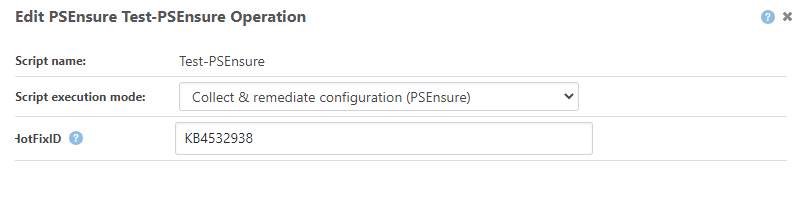
-
This post is deleted! -
Thanks @JonathanEngstrom!
Could not resolve variable $ErrorActionPreference.
There could be a regression with Variable resolution? Can you let us know how/where this is configured, so we can try a repro?
PSEnsure that I test with and has always worked
This was a big change. We really liked the name
PSEnsurebut hated how it worked, and we don't want people to use it anymore. So we decided to rename it toPSEnsureScriptsand redefine the behavior.Quick Fix - Rename the Operation
PSEnsureScripts
(
    Key: Simple Test,
    Value: True,
    Collect: >>
if (Test-Path C:\Temp2){$true}else {$false}

    >>,
    Configure: >>
    New-Item -Path C:\ -Name Temp2 -ItemType Directory -Verbose
    Write-Output "Make C:\Temp directory"
    >>
);
Recommended Fix - Rewrite your Verify / Ensure Scripts
<#
.DESCRIPTION
Verifies that the specified HotFix is installed

.AHCONFIGKEY
Simple Test

.AHEXECMODE
$ExecMode

#>

if $ExecMode -eq "Configure" {
    New-Item -Path C:\ -Name Temp2 -ItemType Directory -Verbose
    Write-Output "Make C:\Temp directory"
} else {
if (Test-Path C:\Temp2) { return $true} else { return $false }
}
PS Love the new look of Otter 3 :D
Thanks! And it's too bad you didn't try out Otter 3.0.3 (shipping this week, Friday); we now have cute character/artwork in the onboarding steps
And for reference, here are the descriptions of the Added Help values you can use.
.AHDESIREDVALUE
This is what you wish the configuration value to be. When not specified, $true is used.AHCURRENTVALUE
This is the actual value of the configuration. When not specified, the script's return (output) is used..AHCONFIGKEY
This is the "configuration key" used by the script, which is a string that uniquely identifies configuration on a server. It's like a file on disk (a file is uniquely identified by its name), or the name of an IIS Application pool (an application pool is unqiuely identified by its name). Optional. When not specified, the name of the script is used..AHVALUEDRIFTED
This is an indicator as to whether the value is considered drifted. When not specified, it's a basic comparison of the desired and current values..AHEXECMODE
This is either "Collect" or "Configure", and is only used on PSEnsure operations; it will be ignored (or set to Collect, depending on what's easier to code) on PSVerify. Using a PSEnsure without a .AHEXECMODE will cause an error.The Additional Help items can be specified as a value or a variable; variables will simply start with a $.
-
@atripp Is 3.0.3 out? It wasn't as of yesterday? Is it a beta? You know I am always happy to try a new version.
I didn't know you guys were unhappy with PSEnsure; I was pleased with it. If I was still at my previous position, I would not have been happy that my 80 some odd configurations broke because someone didn't like the way it worked. This someone was happy enough, but I will give the new way a go. Since PSEnsureScripts has a new name, why not just leave the PSEnsure there and operational? You could of also added a warning and said "Hey, we see you are using the old PSEnsure, why not check out the new shiny PSEnsureScripts? See? OOOooohhhh, shiny!! :) Just a thought.
-
@JonathanEngstrom Otter 3.0.3 scheduled for Friday, so please check it out then :)
So first, we do take breaking/deprecating pretty seriously; we put a ton of effort in documenting and helping migrate from BuildMaster Legacy Features for example, and even built-in tools, etc. to do it.
Why did we break it in Otter? Well, we normally wouldn't break something like
PSEnsure-- but this feature saw almost no usage. I think only like 3-4 customers made use of it, and then some community folks like yourself. We already talked to the customers, and figured... early adopters in community might ask ;)One reason it saw so little usage is that the old
PSEnsurerequired two scripts (Collect and Configure), and lots of messy parameters. So it was always on our list to do it with a single script.Our original plan was to make it backwards compatible, but that proved to be technically unfeasible. From a training/documentation standpoint, we wanted to make
PSCall,PSVerify, andPSEnsure, all work very consistently, and we just went withPSEnsureScripts...If there were more users of the features, we would have been a lot more careful and either automated or carefully documented a migration plan. But in this case, we figured it was a major version change (so breaking things are expected), and we can act reactively (like this) and help migrate as needed.
A couple customers will have a lot of OtterScript Configurations to migrate, but it's just a search/replace of
PSEnsuretoPSEnsureScriptsfor them... -
@atripp After spending hours trying to create a folder, I gave up, uninstalled, and installed 2.2.12 and my PSEnsure seems to be working fine. I can't get anything to work in 3.0.2, anything powershell agentless. I have had problems getting an Ensure Server $servername to work on localhost, so not sure what to do there.
@atripp said in Otter 3.0.2. PSEnsure operations broken:
A couple customers will have a lot of OtterScript Configurations to migrate, but it's just a search/replace of PSEnsure to PSEnsureScripts for them...
Oh my! Shots fired!!!
@atripp said in Otter 3.0.2. PSEnsure operations broken:
Otter 3.0.3 scheduled for Friday, so please check it out then :)
I have a demo to a customer that I need stuff to just work right now, but I will try to understand what you guys are trying to do. It has taken a lot of my time already, and I haven't gotten anywhere, so I will have to table this for now. It was hard enough to get people on my previous team to use the old PSEnsure, and the new version does not seem very user friendly and is not straightforward at all. My target customers are not developers, and these new concepts will definitely help kill my sales. I may have to stay in 2.2 for the foreseeable future.
-
@JonathanEngstrom Otter v3 is still really early in the release cycle (closer to what folks used to call "beta" than "stable"), and we're getting the bugs worked out. We also fixed a bunch of bugs (unintended behavior) while testing v3, so it could be an unexpected change.
Please let us know specifically what you find so we can look to get things working. I'm not really sure what you mean by "Ensure Server $servername".
The only thing you should need to do is change
PSEnsure->PSEnsureScriptsto get those scripts working, but the single-script will be a lot better once you get a hang of it. We plan to put a lot of work in documenting this new integration, and coming up with tons of examples to help folks verify the configuration and configure their servers.The main real advantage to the new
PSVerify/PSEnsuremechanics is that you can write a single PowerShell script to both verify and configure servers, and more easily create/modify/test/share those scripts outside of Otter.



Hello! It looks like you're interested in this conversation, but you don't have an account yet.
Getting fed up of having to scroll through the same posts each visit? When you register for an account, you'll always come back to exactly where you were before, and choose to be notified of new replies (either via email, or push notification). You'll also be able to save bookmarks and upvote posts to show your appreciation to other community members.
With your input, this post could be even better 💗
Register Login