Welcome to the Inedo Forums! Check out the Forums Guide for help getting started.
If you are experiencing any issues with the forum software, please visit the Contact Form on our website and let us know!
Clair -> Proget Integration
-
Hey Guys,
I'm trying to configure Clair to scan my proget docker registry. My Clair container is up and running and it looks like step 1 in the "Vulnerability Scanning" section here is working OK:
https://docs.inedo.com/docs/proget/compliance/clair#configureproget
However I'm getting these errors in the Clair error log when executing "Step 2":
quay.io/coreos/clair:v2.1.6@sha256:ac7ea2811ac7f21a140b048c9b02bd9854b881b62dca0a4f7bfc7220db399710/Proget_clairApp.1.wj83pt57ty9puvx18bng4in48/159eccc6e7c8 {"Event":"failed to extract data from path","Level":"error","Location":"worker.go:122","Time":"2021-02-08 20:04:53.195393","error":"could not find layer","layer":"sha256:bb9fc6048a9dd25ab6a26f64809be519e91cca2cf15d4e0cdddd0a8f99a3cd94","path":"https://proget.xxxxxxxxxx.com/api/docker-blobs/download/sha256%3Abb9fc6048a9dd25ab6a26f64809be519e91cca2cf15d4e0cdddd0a8f99a3cd94"}
Event Actions
My assumption is that Clair is struggling downloading the image from ProGet as I require authentication on ProGet to connect to the docker registry.
How do I pass (proget) credentials to Clair so that it can use them to download the image layers?
The strange thing is that I do see this "API" credential created when the "VulernablityDownloader" task is running, but it doesn't seam to have access:

I'm running ProGet v5.3.22 and Clair v2.1.6
I see errors like this in the "VulnerablityDownloader" log:
WARN : 2021-02-08 20:05:35Z - Clair returned error BadRequest for layer sha256:c9817fc410f6223217d62f147379cbdfc3ed993cd307adccc05eebdcfc818f69.
WARN : 2021-02-08 20:05:35Z - Clair returned error BadRequest for layer sha256:c9817fc410f6223217d62f147379cbdfc3ed993cd307adccc05eebdcfc818f69.
WARN : 2021-02-08 20:05:35Z - Clair returned error BadRequest for layer sha256:9f30fc0b74dd5bc842d09b2b2d8afcac1ed37b7d28c4d85beb3b96bb5726e770.
ERROR: 2021-02-08 20:05:35Z - Unhandled exception: System.NullReferenceException: Object reference not set to an instance of an object.
   at Inedo.Extension.Clair.VulnerabilitySources.ClairVulnerabilitySource.PushLayerToClair(JsonSerializer serializer, WebRequest request, IVulnerabilityDockerBlob blob) in C:\InedoAgent\BuildMasterTemp\192.168.44.60\Temp\_E82939\Src\Clair\InedoExtension\VulnerabilitySources\ClairVulnerabilitySource.cs:line 190
   at Inedo.Extension.Clair.VulnerabilitySources.ClairVulnerabilitySource.GetVulnerabilitiesAsync(IVulnerabilitySourceContext context) in C:\InedoAgent\BuildMasterTemp\192.168.44.60\Temp\_E82939\Src\Clair\InedoExtension\VulnerabilitySources\ClairVulnerabilitySource.cs:line 43
   at Inedo.ProGet.ScheduledTasks.General.VulnerabilityDownloaderScheduledTask.ExecuteAsync(ScheduledTaskContext context) in C:\InedoAgent\BuildMasterTemp\192.168.44.60\Temp\_E106466\Src\ProGetCoreEx\ScheduledTasks\General\VulnerabilityDownloaderScheduledTask.cs:line 35
   at Inedo.ProGet.Service.Executions.ActiveScheduledTaskExecution.ExecuteAsync() in C:\InedoAgent\BuildMasterTemp\192.168.44.60\Temp\_E106466\Src\ProGet.Service\Executions\ActiveScheduledTaskExecution.cs:line 61
Also getting errors like this in the error log:
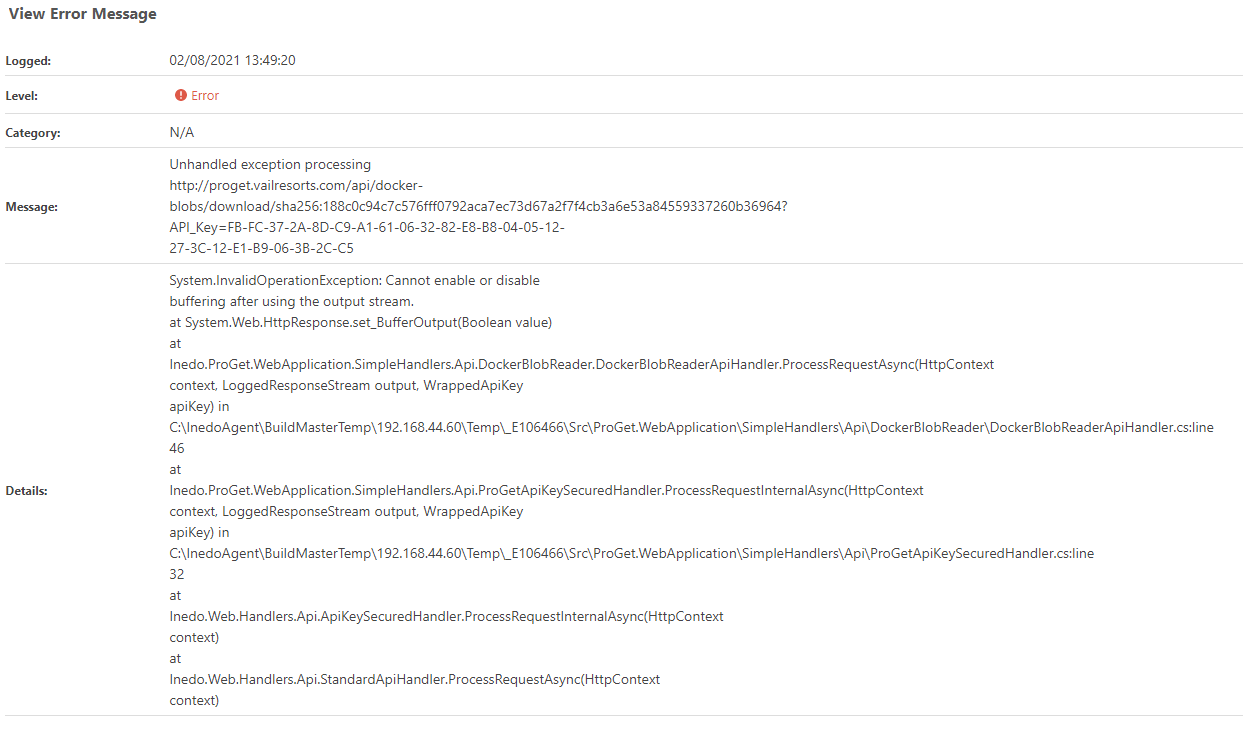
Thanks
Simon
-
Hi @scroak_6473,
ProGet automatically handles creating a temporary API key for use with clair. When ProGet integrates with clair, it generates a temporary key to use to check layers for vulnerabilities then deletes it when the process completes. So there is nothing you have to do to authenticate clair to ProGet. If the key is still there after running the scan, my guess is an error occurred while trying to clean it up.
As for the other error you are seeing, are you able to pull an image with that layer attached to it? I can probably create a SQL query for you to link a layer to the image if needed.
Thanks,
Rich

Hello! It looks like you're interested in this conversation, but you don't have an account yet.
Getting fed up of having to scroll through the same posts each visit? When you register for an account, you'll always come back to exactly where you were before, and choose to be notified of new replies (either via email, or push notification). You'll also be able to save bookmarks and upvote posts to show your appreciation to other community members.
With your input, this post could be even better 💗
Register Login