Welcome to the Inedo Forums! Check out the Forums Guide for help getting started.
If you are experiencing any issues with the forum software, please visit the Contact Form on our website and let us know!
Max pool size was reached - many times
-
Hello together,
I have the issue, that I am getting a huge number of timeouts in ProGet when a special (big) build was triggered. Then I get the message "Timeout expired. The timeout period elapsed prior to obtaining a connection from the pool. This may have occurred because all pooled connections were in use and max pool size was reached."
I already set the max pool size limit to 300 within the connection string.
Every time this happens ProGet is completely unavailable for about 10 minutes. In this time many builds are failing. Then ProGet heals itself. Version is 5.3.20.There was also a setting "Close Database Connections Early" in a earlier version, but this is gone.
How can I avoid the problem?
Full Exception:
Event code: 3005
Event message: An unhandled exception has occurred.
Event time: 1/22/2021 5:01:30 AM
Event time (UTC): 1/22/2021 4:01:30 AM
Event ID: 767f6e78c0d145f7b95c83fc8adaaa82
Event sequence: 10562
Event occurrence: 1
Event detail code: 0Application information:
Application domain: /LM/W3SVC/2/ROOT-1-132557607186126238
Trust level: Full
Application Virtual Path: /
Application Path: C:\ProGet\WebApp
Machine name: FEED01Process information:
Process ID: 7268
Process name: w3wp.exe
Account name: INT\UserException information:
Exception type: InvalidOperationException
Exception message: Timeout expired. The timeout period elapsed prior to obtaining a connection from the pool. This may have occurred because all pooled connections were in use and max pool size was reached.
at System.Data.Common.ADP.ExceptionWithStackTrace(Exception e)
--- End of stack trace from previous location where exception was thrown ---
at System.Runtime.ExceptionServices.ExceptionDispatchInfo.Throw()
at System.Runtime.CompilerServices.TaskAwaiter.HandleNonSuccessAndDebuggerNotification(Task task)
at Inedo.Data.SqlServerDatabaseContext.d__4.MoveNext()
--- End of stack trace from previous location where exception was thrown ---
at System.Runtime.ExceptionServices.ExceptionDispatchInfo.Throw()
at System.Runtime.CompilerServices.TaskAwaiter.HandleNonSuccessAndDebuggerNotification(Task task)
at Inedo.Data.DatabaseContext.d__37.MoveNext()
--- End of stack trace from previous location where exception was thrown ---
at System.Runtime.ExceptionServices.ExceptionDispatchInfo.Throw()
at System.Runtime.CompilerServices.TaskAwaiter.HandleNonSuccessAndDebuggerNotification(Task task)
at Inedo.Data.SqlServerDatabaseContext.d__7.MoveNext()
--- End of stack trace from previous location where exception was thrown ---
at System.Runtime.ExceptionServices.ExceptionDispatchInfo.Throw()
at System.Runtime.CompilerServices.TaskAwaiter.HandleNonSuccessAndDebuggerNotification(Task task)
at Inedo.Data.DatabaseContext.d__35.MoveNext()
--- End of stack trace from previous location where exception was thrown ---
at System.Runtime.ExceptionServices.ExceptionDispatchInfo.Throw()
at System.Runtime.CompilerServices.TaskAwaiter.HandleNonSuccessAndDebuggerNotification(Task task)
at Inedo.ProGet.WebApplication.ProGetHttpModule.d__7.MoveNext()
--- End of stack trace from previous location where exception was thrown ---
at System.Runtime.ExceptionServices.ExceptionDispatchInfo.Throw()
at Inedo.Web.InedoHttpModule.ProcessEnd(IAsyncResult ar)
at System.Web.HttpApplication.AsyncEventExecutionStep.InvokeEndHandler(IAsyncResult ar)
at System.Web.HttpApplication.AsyncEventExecutionStep.OnAsyncEventCompletion(IAsyncResult ar)Request information:
Request URL: http://feeds.es.cid-online.net/nuget/escid_deploy/FindPackagesById()?id='System.ComponentModel'&semVerLevel=2.0.0
Request path: /nuget/escid_deploy/FindPackagesById()
User host address: 10.x.x.x
User:
Is authenticated: False
Authentication Type:
Thread account name: INT\User
Thread information:
Thread ID: 99
Thread account name: INT\User
Is impersonating: False
Stack trace: at System.Data.Common.ADP.ExceptionWithStackTrace(Exception e)
--- End of stack trace from previous location where exception was thrown ---
at System.Runtime.ExceptionServices.ExceptionDispatchInfo.Throw()
at System.Runtime.CompilerServices.TaskAwaiter.HandleNonSuccessAndDebuggerNotification(Task task)
at Inedo.Data.SqlServerDatabaseContext.d__4.MoveNext()
--- End of stack trace from previous location where exception was thrown ---
at System.Runtime.ExceptionServices.ExceptionDispatchInfo.Throw()
at System.Runtime.CompilerServices.TaskAwaiter.HandleNonSuccessAndDebuggerNotification(Task task)
at Inedo.Data.DatabaseContext.d__37.MoveNext()
--- End of stack trace from previous location where exception was thrown ---
at System.Runtime.ExceptionServices.ExceptionDispatchInfo.Throw()
at System.Runtime.CompilerServices.TaskAwaiter.HandleNonSuccessAndDebuggerNotification(Task task)
at Inedo.Data.SqlServerDatabaseContext.d__7.MoveNext()
--- End of stack trace from previous location where exception was thrown ---
at System.Runtime.ExceptionServices.ExceptionDispatchInfo.Throw()
at System.Runtime.CompilerServices.TaskAwaiter.HandleNonSuccessAndDebuggerNotification(Task task)
at Inedo.Data.DatabaseContext.d__35.MoveNext()
--- End of stack trace from previous location where exception was thrown ---
at System.Runtime.ExceptionServices.ExceptionDispatchInfo.Throw()
at System.Runtime.CompilerServices.TaskAwaiter.HandleNonSuccessAndDebuggerNotification(Task task)
at Inedo.ProGet.WebApplication.ProGetHttpModule.d__7.MoveNext()
--- End of stack trace from previous location where exception was thrown ---
at System.Runtime.ExceptionServices.ExceptionDispatchInfo.Throw()
at Inedo.Web.InedoHttpModule.ProcessEnd(IAsyncResult ar)
at System.Web.HttpApplication.AsyncEventExecutionStep.InvokeEndHandler(IAsyncResult ar)
at System.Web.HttpApplication.AsyncEventExecutionStep.OnAsyncEventCompletion(IAsyncResult ar) -
Hi @markus4830,
I think the first thing to check is if you are actually running out of connections or not. Can you please run the following SQL next time you see ProGet experiencing this problem? Can you also run it under normal load when everything is running normally?
SELECT DB_NAME(dbid) as DBName, COUNT(dbid) as NumberOfConnections --, loginame as LoginName
FROM sys.sysprocesses
WHERE dbid > 0 AND DB_NAME(dbid) = 'ProGet'
GROUP BY dbid --, loginame
I commented out the
loginName, but you can uncomment that if you want to verify the connections are coming from ProGet versus other users connected to SQL server.What is the number of connections you are seeing when you run that?
Thanks,
Rich -
Hi @rhessinger,
I added a complete PRTG sensor to see what is happening, with the SQL statement.
What you can see in the screenshot is that ProGet reach multiple times the pool size of 550 set as maximum. (tested also with 1000 - didn't change anything)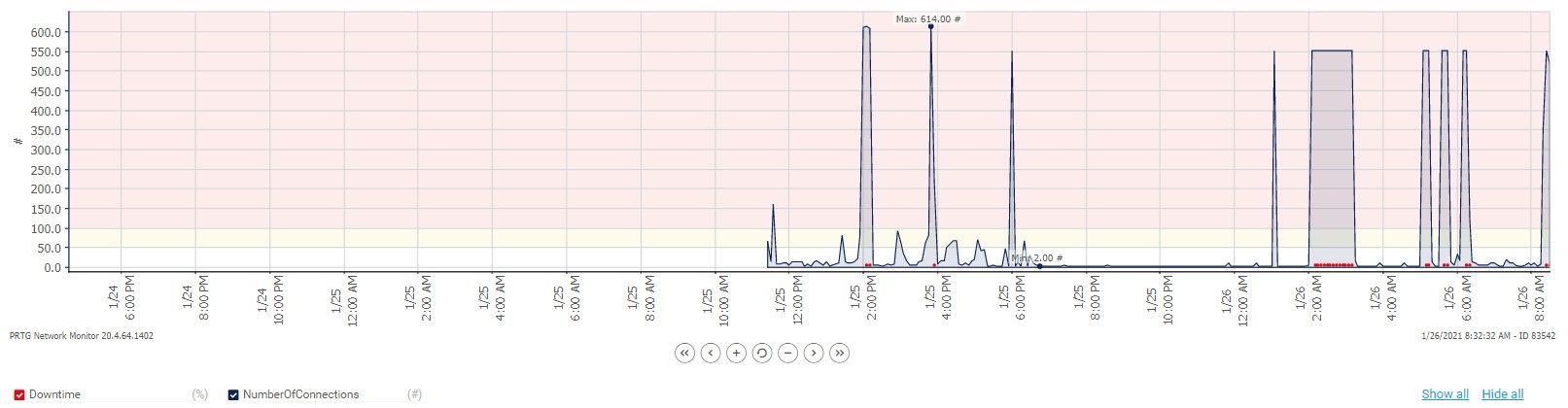
-
Hi @markus4830,
Thanks for sending that over. The
Close Database Connections Earlyvalue was removed because we enabled that for everyone which helped this issue initially. Can you remind me, are you using the Docker version of ProGet or do you have it installed on Windows?For the (big) build, is it multiple builds triggering at the same time, or is it just a single massive build with a lot of packages associated with it? I'm also noticing that you are using the NuGet v2 endpoint. Is it possible to switch your build to use the NuGet v3 version of your endpoint?
Thanks,
Rich -
Hi @rhessinger,
actually we run ProGet on a Windows Server 2019 Datacenter with a MSSQL Database.
The "big" build triggers multiple smaller (still big) builds (~50). Every day this is triggered at 5AM. Every day within the last 2 weeks ProGet is then down. After re triggering it later when ProGet is back the build is working again.
I will change the connector to nuget.org to v3 on a smaller feed for test purpose.
Could using API v2 cause this issue? -
Hi @markus4830,
I definitely recommend changing your NuGet.org connector to the V3 endpoint simply for the fact that NuGet.org is deprecating portions of their V2 API. The V3 endpoint on NuGet.org is also much faster than the V2 endpoint and the V2 endpoint on NuGet.org currently throttles package connections.
On the same note, I recommend the same thing for connecting to ProGet as well. Your error message above shows that your build server is connecting to the V2 endpoint for your ProGet NuGet feed. The V3 API is much more efficient in both database connections and overall SQL execution.
If your NuGet feed in ProGet is still showing a V2 endpoint address, you will need to go to your feed's
Manage Feedpage by clicking theManage Feedbutton and change the supported API to includeJSON-LD (v3). Your feed will still support V2 connections, but you should migrate all your builds to access it over the V3 endpoint.I feel the combination of those two pieces should help bring down the number of concurrent connections to SQL server.
Thanks,
Rich -
Hello @rhessinger,
I did the changes to use API v3 in the future. I still get exceptions that max pool size was reached. But here v2 API is still in use. I have to change this also. After that I will monitor again and come back here.
Thanks

Hello! It looks like you're interested in this conversation, but you don't have an account yet.
Getting fed up of having to scroll through the same posts each visit? When you register for an account, you'll always come back to exactly where you were before, and choose to be notified of new replies (either via email, or push notification). You'll also be able to save bookmarks and upvote posts to show your appreciation to other community members.
With your input, this post could be even better 💗
Register Login