Welcome to the Inedo Forums! Check out the Forums Guide for help getting started.
If you are experiencing any issues with the forum software, please visit the Contact Form on our website and let us know!
Docker: 5.3.12 (dotnet core) hung
-
Hi, I'm trying to migrate to the new dotnet core based docker image
proget.inedo.com/productimages/inedo/proget:5.3.12which hungs after printing version number.docker run -e SQL_CONNECTION_STRING='Data Source=db02; Initial Catalog=ProGet; User ID=proget; Password=XXXXXX' --rm -p 8085:80 -it proget.inedo.com/productimages/inedo/proget:5.3.12 Unable to find image 'proget.inedo.com/productimages/inedo/proget:5.3.12' locally 5.3.12: Pulling from productimages/inedo/proget d121f8d1c412: Already exists 7b2d5a029506: Already exists 778ad5bbc2d1: Already exists 6de7a0eb2598: Already exists 6d9bf7184ec4: Already exists efa13847425c: Already exists Digest: sha256:398060e737b34d2afe85c837c395e056ba37938896140bf1d7ecfc61e029caf1 Status: Downloaded newer image for proget.inedo.com/productimages/inedo/proget:5.3.12 ProGet version is 5.3.12.21.Switching to the mono image
proget.inedo.com/productimages/inedo/progetmono:5.3.12works fine. -
Hi @viceice,
Can you tell me how many feeds you have and what types those feeds are? Also, does your ProGet database user have db_owner on the ProGet database or just the ProGetUser_Role?
Thaks,
Rich -
Currently we have 9 feeds (nuget, powershell, docker, npm)
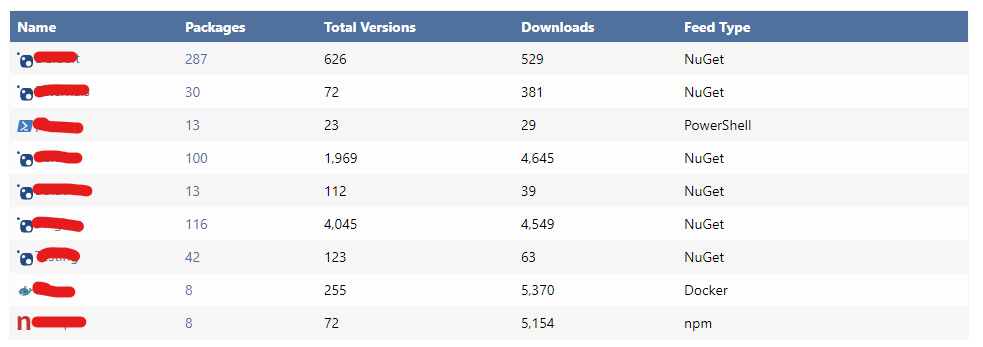
Our proget sql user has
db_ownerrights. As said above, the mono version runs fine, but the dotnet core version seems to hung on sql connection. -
Hi @viceice,
I'm having trouble recreating this issue. Could you try using the IP address as the SQL Server data source instead of db02? There isn't any difference in the startup between the dotnet core version and the mono (outside of the image base that is). If you let it run, do you get any timeout or cannot find server error?
Thanks,
Rich -
I can try the ip.
I don't get any output after the
ProGet version is 5.3.12.21.line. It simply hungs.btw: our sql server it at version: 12.0.6372.1
-
Using ip doesn't change anything.
I additionally see, that it will use 100% of one cpu core. So it doesn't hung, but seems to be in an endless loop.
Is there any env variable or somethings else i can set to get some more debug output?
-
Hi @viceice,
There shouldn't be any issue with your SQL Server version, but I will do some testing on that version to see if I can recreate the issue. SQL Server 2014 is technically deprecated by Microsoft, but we are not using any functionality that wouldn't work with it. I'll let you know if I find anything on that front.
As for the 100% CPU usage, I'm going to reach out to my colleague internally to see if there are any extra debug settings that can be enabled, but I do not think there is. Do you have the docker host throttling what hardware can be used with that container? If so, what are the restrictions for it? Also, are you able to share what hardware specs are for your Docker host?
Thanks,
Rich -
The host is a hyper-v virtual machine running on a dual socket amd opteron 6300 server with 256GB RAM. ~50% physical memory used.
Our prod proget server is running in k3s kubernetes v1.18.9+k3s1 (630bebf9). But i tested the simple docker command posted above, which fails too.
VM stats:
- 8 cores
- 16GB ram (no swapfile)
- ubuntu 18.04.5 with linux-azure kernel 5.4.0-1025-azure
- k3s v1.18.9+k3s1 (630bebf9)
- docker-ce 19.03.13 (btrfs)
let me know if you need more specs.
-
We are also deprecating / migrating the sql server in near future.
So i can move the database to a linux docker sql server to check, if there are any changes.
Another thing is the proget database is pretty old. it was migrated since
2014-08-27 12:19:06.093. -
Hi @viceice,
Nothing is sticking out to me that there is an issue. Your hardware looks fine (without knowing everything else running on the server/kube pods).
It looks like it is hanging when trying to load the current database schema version. The code for both mono and .net core does not differ for this component. Is there anything that is different from your progetmono and progetcore start scripts in kubernetes? I would put some enphasis around the networking piece in kubernetes.
Thanks,
Rich -
No, I don't change anything. We are using the official docker image.
I can reproduce it even on a plain docker container, so kubernetes isn't the cause.
I can also reproduce it on a similar vm, where nothing else is running. -
Hi @viceice,
I'm having trouble recreating this issue. I tested this by setting up a SQL Server 2014 instance with updates installed to bring it to version 12.0.6372.1. I have tried both the
progetand theprogetmonoimages at version 5.3.12. Both of them boot up and run all the scripts completely fine. I have even tested using your exact docker command and only changing out the SQL connection string. So far I cannot get it to hang. Is there anything else unique about your network configuration? Do you have just a standard install of SQL Server? Is there any proxy or VPN that requests are routed through to connect to your SQL Server?Thanks,
Rich -
SQL Server is installed on a Windows Server 2012 R2 Core vm. That is directly accessable via IPv4 and IPv6. Nothing special here.
I'll more a copy of the db to a single docker host and try running sql server and proget on same docker host.
I'll also testConnection Timeout=30to my connection string, so i should get a timeout while trying to connect. -
test on local docker host now and it works as expected, so it must be something with the old sql server
docker run --name proget-sql \ -e 'ACCEPT_EULA=Y' -e 'MSSQL_SA_PASSWORD=ProGetTest!1234' \ -e 'MSSQL_PID=Express' -p 1433:1433 \ -d mcr.microsoft.com/mssql/server:2019-latest # restore db docker run \ -e SQL_CONNECTION_STRING='Data Source=docker-m01; Initial Catalog=Proget; User ID=sa; Password=ProGetTest!1234;Connection Timeout=10' \ -e Logging__LogLevel__Default='Trace' --rm -p 8085:80 -t --name proget \ proget.inedo.com/productimages/inedo/proget:5.3.12 -
Hi @viceice,
Thanks for confirming that for me. I ran into a few issues on my test server with SQL 2014 and TLS1.2 support. You may want to make sure that TLS 1.2 is enabled on that VM. SQL Server 2014 and Windows Server 2012 R2 both had some unique issues with teh TLS 1.2 conversion (both needing updates to be able to enable them) . Although this did not cause an issue with hanging, it did cause my authentication to fail. You may want to check that.
Thanks,
Rich -
Now moved to docker based sql server 2019 and it works. but now i get a new error in logs:
Product activation error: machine UID mismatch. Expected: 5.3; Actual: G2fKz***redacted***tHtI= -
Hi @viceice,
That error is safe to ignore. It is currently a known bug and we are looking to fix that in an upcoming version of ProGet. The ticket tracking the fix for the log message is PG-1841.
Long story short, the ProGet service correctly detected that the product wasn't activated, and then logged that message. But it was doing it every time it accessed license information, which is on every connector health check, replication run, etc.
Activation happens automatically as soon as someone visits the Web application, and re-activation is required after upgrading certain versions.Thanks,
Rich

Hello! It looks like you're interested in this conversation, but you don't have an account yet.
Getting fed up of having to scroll through the same posts each visit? When you register for an account, you'll always come back to exactly where you were before, and choose to be notified of new replies (either via email, or push notification). You'll also be able to save bookmarks and upvote posts to show your appreciation to other community members.
With your input, this post could be even better 💗
Register Login