Welcome to the Inedo Forums! Check out the Forums Guide for help getting started.
If you are experiencing any issues with the forum software, please visit the Contact Form on our website and let us know!
Nuget package not found in proget, but searchable in UI
-
It is multiple packages, not just MethodTimer.Fody. Our code/dependencies does use multiple versions of MethodTimer.Fody, and we have multiple versions cached locally on Proget.
-
Hello @jyip_5228,
I'm having trouble recreating this locally. If my memory servers me right, you are currently running ProGet in Docker, is that correct? I will attempt to spin-up the Docker-based version of ProGet locally to attempt to recreate this issue. I do wonder if this is related to your database connection pool errors. Do you see any errors in the Diagnostics Center under Administration?
Thanks,
Rich -
Correct, this is on docker.
This may be related to the database error; I can further test this when the database error is resolved. This particular issue was not something I can produce consistently. -
Took awhile clicking through each diagnostics message to find the timeout error below. Is there an easier way to search through these messages?
Prior to the timeout message there were error messages regarding database out of max pool size reached. So they may be correlated.
error NU1101: Unable to find package System.IO.FileSystem.Watcher. No packages exist with this id in source(s): https://xxx/nuget/ks-nuget/v3/index.jsonMessage: Connector error: The operation has timed out.
Request URL: https://www.nuget.org/api/v2/FindPackagesById()?id=%27system.io.filesystem.watcher%27&semVerLevel=2.0.0 System.Net.WebException: The operation has timed out. at System.Net.HttpWebRequest.RunWithTimeoutWorker[T] (System.Threading.Tasks.Task`1[TResult] workerTask, System.Int32 timeout, System.Action abort, System.Func`1[TResult] aborted, System.Threading.CancellationTokenSource cts) [0x000f8] in <4d8f95b7df544b3fa1a27dda924b4424>:0 at System.Net.HttpWebRequest.EndGetResponse (System.IAsyncResult asyncResult) [0x00020] in <4d8f95b7df544b3fa1a27dda924b4424>:0 at System.Threading.Tasks.TaskFactory`1[TResult].FromAsyncCoreLogic (System.IAsyncResult iar, System.Func`2[T,TResult] endFunction, System.Action`1[T] endAction, System.Threading.Tasks.Task`1[TResult] promise, System.Boolean requiresSynchronization) [0x0000f] in <c453bf849bb84e719dbec0475e99db95>:0 --- End of stack trace from previous location where exception was thrown --- at Inedo.ProGet.Feeds.Connector.GetDirectResponseAsync (System.String url) [0x000eb] in <5675ed1ff2ff49938725a260ae4389ad>:0 at Inedo.ProGet.Feeds.Connector.GetCachedResponseAsync (System.String url) [0x000a8] in <5675ed1ff2ff49938725a260ae4389ad>:0 at Inedo.ProGet.Feeds.Connector.GetCachedTextReaderAsync (System.String url) [0x00075] in <5675ed1ff2ff49938725a260ae4389ad>:0 at Inedo.ProGet.Feeds.NuGet.V2.NuGetFeedClient.PerformRequestWithAbsoluteUrlAsync (System.String fullUrl) [0x000d9] in <5675ed1ff2ff49938725a260ae4389ad>:0 -
This issue appears to still exist occasionally, is there a way to increase logging to try and troubleshoot this?
error NU1101: Unable to find package Microsoft.Office.Interop.Word. No packages exist with this id in source(s): https://xxx/nuget/ks-nuget/v3/index.jsonClearly searching via UI
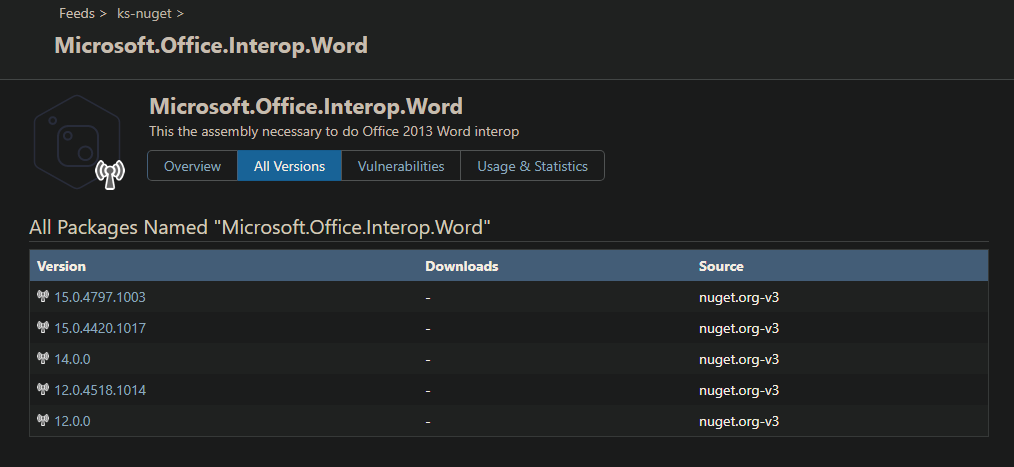
I sometimes when it feels like it would work after running the build job a few times, this happened to the package 'automapper' eventually it worked.
Please assist.
-
Hi @jyip_5228,
Does this only happen with remote packages? Or do you see this with packages in ProGet as well? When this happens, if you run
nuget locals all -clearon the same account that your build agent is running under, will it work then? I have seen some similar issues like this in the past, but typically they are caused by an issue with local caching in NuGet.Thanks,
Rich -
I have only seen issues with remote packages. The clear command didn't do anything. Is there a way to find logs on why it failed and today it worked? Need this to work reliably.
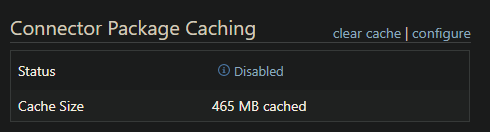
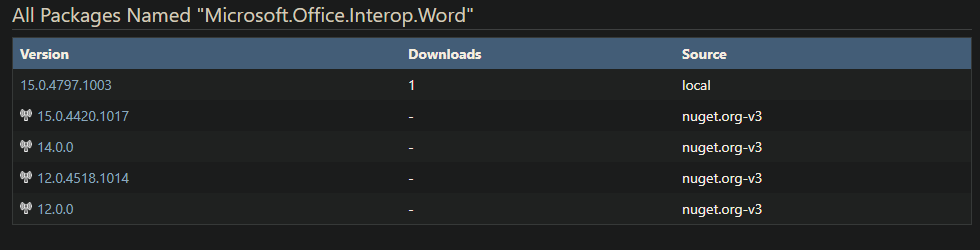
Also seems like the setting for no cache does not work.
-
Hi @jyip_5228,
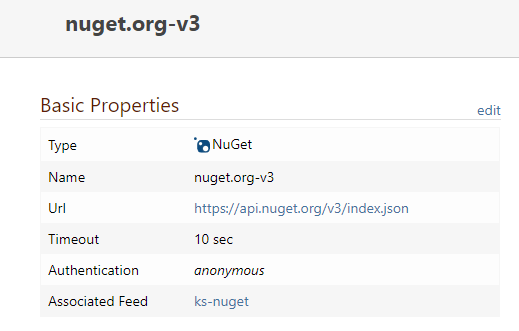
Looking at your last connector error stack trace, it looks like your connector is using the NuGet v2 URL. Would you be able to send a screenshot of your NuGet connector configuration? NuGet has added limiting to their V2 API and I'm wondering if that is causing your issue.
Thanks,
Rich -
i completely agree that it shouldnt be using v2 api.. and i dont know why cause it is pointed to the v3 url.
-
@jyip_5228 said in Nuget package not found in proget, but searchable in UI:
This issue appears to still exist occasionally, is there a way to increase logging to try and troubleshoot this?
Errors on the ProGet side are logged under Admin > Diagnostics. However, the error message is coming from the
nuget.exeside, so we have no idea why it can't find the package. Clearly, it's available on ProGet... and if you can see the package in the UI, then will should show up in the API as well. No one else is reporting this either, which leads me to think it's outside of the ProGet software.We don't have a mechanism in side of ProGet to capture all incoming/outgoing traffic, but could you run the cli tool through a proxy, and capture the results?
Regarding the caching, we were able to reproduce that -- it as PG-1804, which will cause remote packages to sometimes cache, even if you have the caching disabled
-
@atripp
So there is no trace from Proget side where it receives the request and see how it responds?Also for the stacktrace @rhessinger mentioned should it be v2, when I'm using v3 ?
-
Hi @jyip_5228,
For the v2/v3 thing. If the connector is using v3, there is potential to fall back to v2 if you have issues connecting over teh v3 API. That may be why we are seeing the v2 error.
To follow up on Alana's comment. You may need to use a tool like Wireshark, Fiddler, or Burp to catch the request and response traffic between nuget.exe and ProGet. That would be the only way to see the full response from ProGet and determine if it does attempt v3 before the v2 request.
One last question, what version of the nuget.exe are you using? Is it the latest version?
Thanks,
Rich -
nuget version 4.7.1.5393
-
Hi @jyip_5228,
That may be your issue. NuGet is currently on version 5.7. Could you please try upgrading your NuGet.exe and see if that fixes the issue?
Thanks,
Rich


Hello! It looks like you're interested in this conversation, but you don't have an account yet.
Getting fed up of having to scroll through the same posts each visit? When you register for an account, you'll always come back to exactly where you were before, and choose to be notified of new replies (either via email, or push notification). You'll also be able to save bookmarks and upvote posts to show your appreciation to other community members.
With your input, this post could be even better 💗
Register Login