Welcome to the Inedo Forums! Check out the Forums Guide for help getting started.
If you are experiencing any issues with the forum software, please visit the Contact Form on our website and let us know!
ProGetSetup5.3.6.exe - Kaspersky malware finding
-
Kaspersky Security for Windows Server 10.1.2.996 blocked the installation of ProGet5.3.6.exe because of malware (blocked file was LoupeViewer.exe, see screenshot at the end).
This happended when I tried to update ProGet to version 5.3.6 via ProGetSetup5.3.6.exe downloaded from https://my.inedo.com/downloads using „Traditional Installer“ link (https://my.inedo.com/services/legacy/downloads/proget/sql/5.3.6)
VirusTotal check result: 23 engines detected this file
https://www.virustotal.com/gui/file/51323ca85048c062d0336258d2f879f8e2eb9005ecff6feb6a5e87e9e1273727/detectionWe also contacted Kaspersy directly to clarify wether this is a false positive or not, sadly it is no false-positive.
Answer from Kaspersky:
Dear Sir or Madam,I would highly recommend to trust Kaspersky Enpoint Security, Security for Windows Server and Opentip.
It´s not an false positive.It´s an already known Malware / Trojaner, as UDS:Trojan.MSIL.Dnoper.agl.
You can read more about it here: https://threats.kaspersky.com/en/threat/Trojan.MSIL.Miner/Kaspersky Threat Intellligence portal report: https://opentip.kaspersky.com/845F0E5E391D7DA49CA546BEEAD97BFC0952E162F14AB32B7E8756B601B21D4E
Could you please check this and provide a cleaned installer?
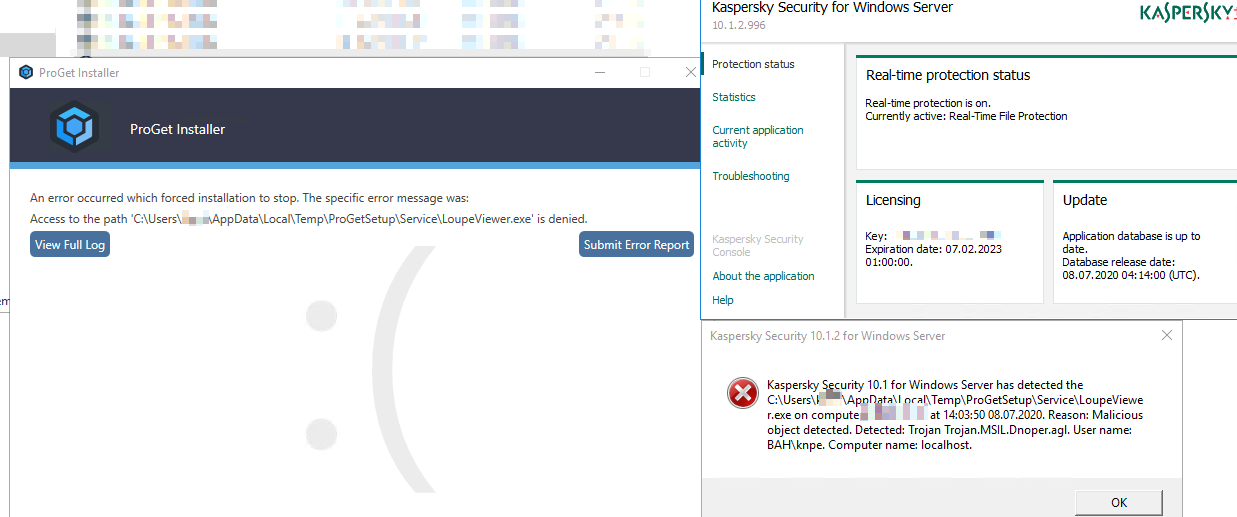
-
Hello;
Kaspersky is totally wrong. This is a 100% false positive. Can you share this thread with them?
LoupeViewer.exe is a tool that, among other things, inspects MSIL of live processes for debugging purposes, and it's embedded in our installer. It seems their (or whatever provider they use) heuristics algorithm saw an ".exe that embeds an .exe that uses MSIL inspection hooks like this", and flagged it as this signature.
It shouldn't take more than a few seconds to verify that LoupeViewer.exe is not a trojan, and it'd be easy to inspect the disassembly.
Microsoft and several other providers have already removed whitelisted this in response to other customers submitting this.
Our installer is safe. Rest assured that if the package is signed by Inedo, you can be absolutely certain that no "viruses," malware, Trojans, or other malicious code were injected into our installers.
Please see this article for more information: https://inedo.com/support/kb/1113/false-positive
-
Thank you for your anwer.
We will contact kaspersky and keep you updated. -
Good news, they analyzed the installer again and confirmed a false-positive, they will update the detection database
Kasperskys answer:
Hello,Sorry, it was a false detection. It will be fixed.
Thank you for your help.Best regards,
Igor Loshchakov, Malware Analyst, Kaspersky -
A last question:
Is it somehow possible to repair a ProGet installation?
My installation is broken (at least it is nowhere shown as installed anymore, but services are still running and working).
So when running ProGetSetup5.3.6.exe, it shows initial setup screens instead of the upgrade screens.I would be grateful for tips on this, thank you very much!
-
In this case, you can just install on top of the old installation -- the database or package store won't be overwritten.
But do note it might impact the IIS/application pool customizations you made.
-
thanks a lot for the support,
upgrade did work out great in the end,
just had to update the IIS bindings and certificates back to the customized ones


Hello! It looks like you're interested in this conversation, but you don't have an account yet.
Getting fed up of having to scroll through the same posts each visit? When you register for an account, you'll always come back to exactly where you were before, and choose to be notified of new replies (either via email, or push notification). You'll also be able to save bookmarks and upvote posts to show your appreciation to other community members.
With your input, this post could be even better 💗
Register Login