Welcome to the Inedo Forums! Check out the Forums Guide for help getting started.
If you are experiencing any issues with the forum software, please visit the Contact Form on our website and let us know!
ProGet Issues using api/package-deployment/ to record chocolatey deployments
-
Hey Guys,
I'm using ProGet to host a Chocolatey package feed.
Everything is working great except I'm trying to use the package-deployment api to record when a package has been deployed to a particular machine.
I'm using the following code in my chocolatey package install powershell script as described here (https://docs.inedo.com/docs/proget/reference/api/package-deployment-api)
$data = @{
    FeedName="Software-Test"
    Application="Chocolatey"
    Description="Installed by Chocolatey"
    Target="$env:COMPUTERNAME"
    PackageName="$env:ChocolateyPackageName"
    Version="$env:ChocolateyPackageVersion"
}

$headers = @{
    'content-type' = 'application/json'
    'X-ApiKey' = '{hidden key}'
}
Invoke-RestMethod -Method Post -Uri 'https://{proget url}/api/package-deployment/' -Body ($data | ConvertTo-JSON) -Headers $headers
But the API is returning the message below which is making the package install script fail:
ERROR: Cannot access a disposed object.
Object name: 'Stream has been closed'.
This also happens using a stand alone SOAP client (boomerang).
I'm getting the following message in the proget admin diagnostic center:
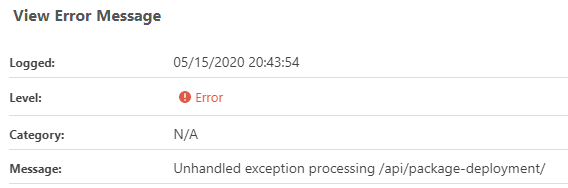
With the following stack trace:System.ObjectDisposedException: Cannot access a disposed object. Object name: 'Stream has been closed'. at System.Web.IntPtrStream.Read (System.Byte[] buffer, System.Int32 offset, System.Int32 count) [0x00043] in <b4f0b153c02f4f0588d3f7549d75281b>:0 at System.IO.Stream+<>c.<BeginReadInternal>b__40_0 (System.Object <p0>) [0x0000b] in <c453bf849bb84e719dbec0475e99db95>:0 at System.Threading.Tasks.Task`1[TResult].InnerInvoke () [0x0002b] in <c453bf849bb84e719dbec0475e99db95>:0 at System.Threading.Tasks.Task.Execute () [0x00000] in <c453bf849bb84e719dbec0475e99db95>:0 --- End of stack trace from previous location where exception was thrown --- at System.IO.Stream.EndRead (System.IAsyncResult asyncResult) [0x0004d] in <c453bf849bb84e719dbec0475e99db95>:0 at System.IO.Stream+<>c.<BeginEndReadAsync>b__45_1 (System.IO.Stream stream, System.IAsyncResult asyncResult) [0x00000] in <c453bf849bb84e719dbec0475e99db95>:0 at System.Threading.Tasks.TaskFactory`1+FromAsyncTrimPromise`1[TResult,TInstance].Complete (TInstance thisRef, System.Func`3[T1,T2,TResult] endMethod, System.IAsyncResult asyncResult, System.Boolean requiresSynchronization) [0x00000] in <c453bf849bb84e719dbec0475e99db95>:0 --- End of stack trace from previous location where exception was thrown --- at System.IO.Stream.CopyToAsyncInternal (System.IO.Stream destination, System.Int32 bufferSize, System.Threading.CancellationToken cancellationToken) [0x000a6] in <c453bf849bb84e719dbec0475e99db95>:0 at Inedo.Web.Handlers.Api.ApiKeySecuredHandler.LogApiAccess (System.Web.HttpRequest request, System.Byte[] responseBody, Inedo.Web.Handlers.Api.ApiKeySecuredHandler+WrappedApiKey apiKey, System.Int32 responseCode) [0x00154] in <552cf13df3c1427b87b305d8f051c033>:0 at Inedo.Web.Handlers.Api.ApiKeySecuredHandler.ProcessRequestInternalAsync (System.Web.HttpContext context) [0x004d7] in <552cf13df3c1427b87b305d8f051c033>:0 at Inedo.Web.Handlers.Api.StandardApiHandler.ProcessRequestAsync (System.Web.HttpContext context) [0x0006e] in <552cf13df3c1427b87b305d8f051c033>:0Any ideas on how to fix this? I'm running ProGet 5.2.30
Thanks
Simon -
HI Simon;
The error appears to be occurring while logging the API body; can you try disabling that as see if it helps?
Admin > Api Keys > Edit > Uncheck Log request body , Uncheck Log response body
Is this ProGet for Linux, by chance? There was a related error in an earlier version of ProGet regarding this.
-
Hi Thanks for the response,
I now get this:
User not authorized to download packages for feed Software-Test.My API access looks like this:
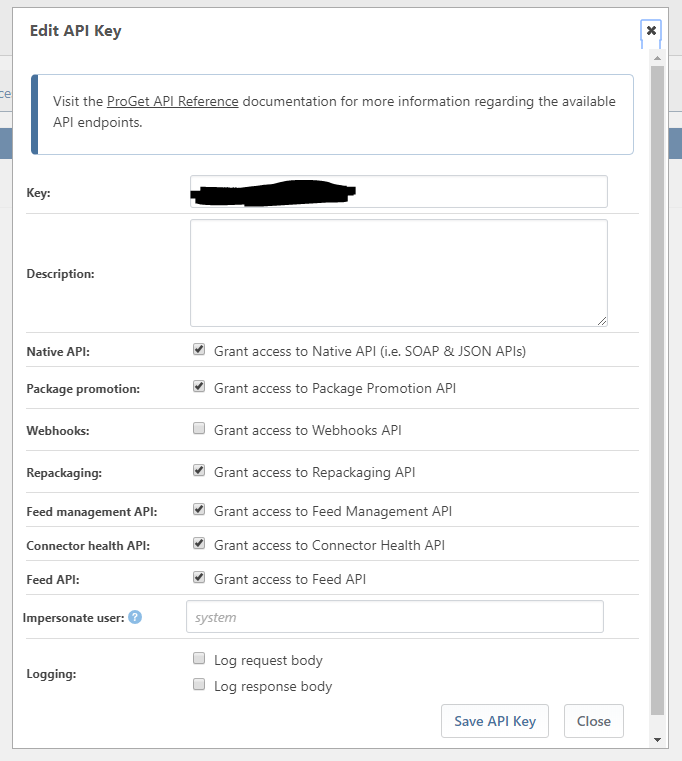
Yes this is ProGet for Linux, I'm actually running the docker image available here:
https://hub.docker.com/r/inedo/proget/buildsCould you send me a link to the related error? Is there a fix?
Thanks
Simon
-
Hi Simon;
The Linux-based error is an error-logging-an-error sort of problem, so we can just get rid of the underlying error and be OK.
The underlying error in this case is a bug, and it's that Impersonate User is required (even though it shouldn't be). Just put in a user that has ViewPackage privilege to the target feed.
Actually you don't even need an API Key for this endpoint, just view package is enough.
Best,
Alana
-
Adding an "Impersonate user" fixed this issue.
Thanks for all your help!
Simon
-
Hi @scroak_6473,
That's great to hear that the impersonation has fixed the issue. We have fixed this issue to not require impersonation in ProGet 5.3.2. I will let you know if anything changes!
Thanks,
Rich


Hello! It looks like you're interested in this conversation, but you don't have an account yet.
Getting fed up of having to scroll through the same posts each visit? When you register for an account, you'll always come back to exactly where you were before, and choose to be notified of new replies (either via email, or push notification). You'll also be able to save bookmarks and upvote posts to show your appreciation to other community members.
With your input, this post could be even better 💗
Register Login